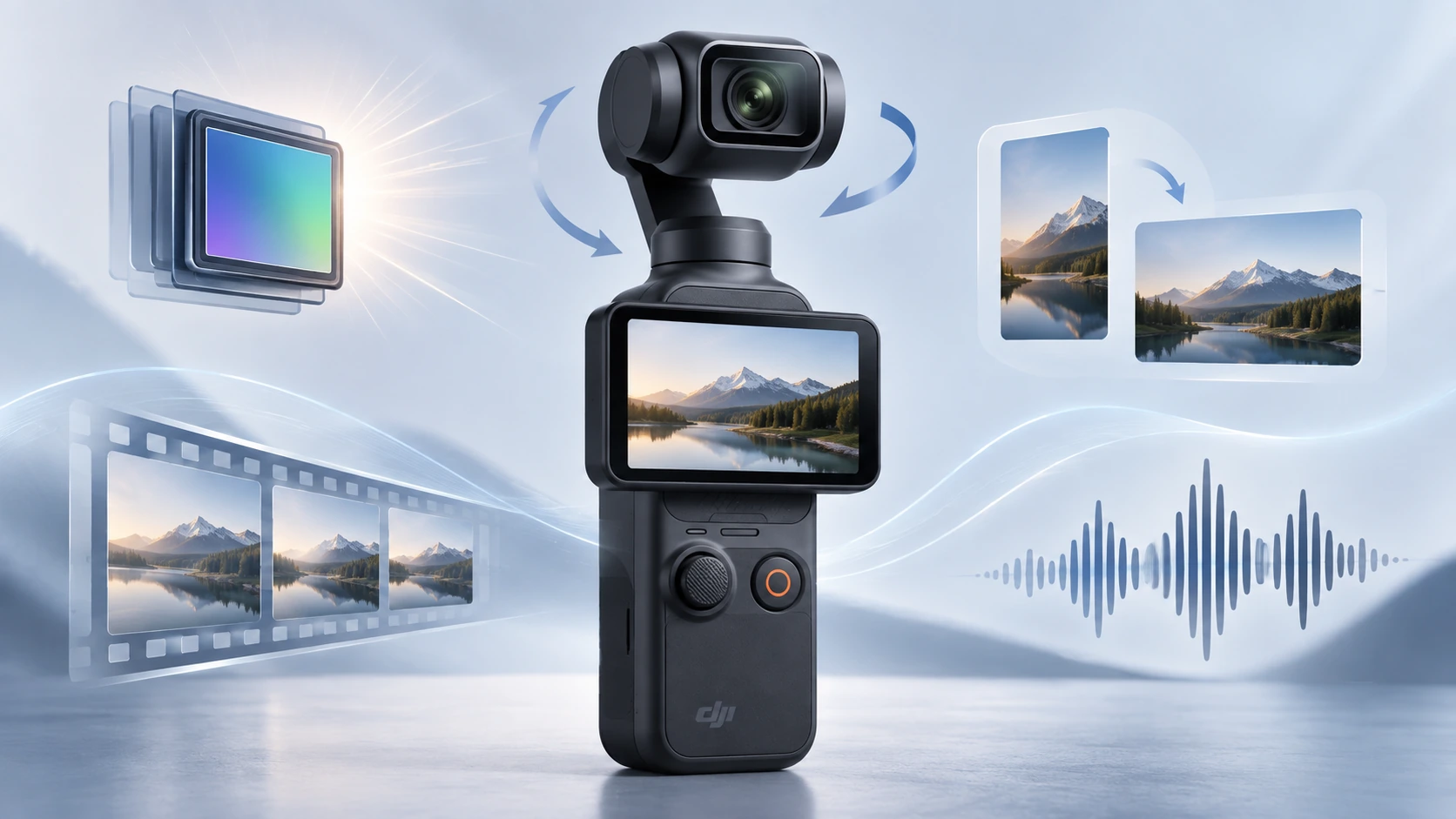
DJI Osmo Pocket 3 को सिर्फ “एक छोटा 4K camera” समझना इसकी capabilities को बहुत कम करके देखना होगा। असल में यह एक 1-inch sensor वाला pocket-size camera + 3-axis motorized gimbal + subject tracking system + wireless microphone platform + webcam/live-stream camera है।
और यहीं confusion शुरू होता है।
इसके product page पर आपको “1-inch sensor”, “4K/120fps”, “ActiveTrack 6.0”, “D-Log M”, “3-axis stabilization” जैसे शब्द दिखेंगे। Tech जानने वाले reader के लिए ये familiar हो सकते हैं, लेकिन अगर आप पहली बार camera खरीद या use कर रहे हैं तो सवाल यह है: इन features का असल फायदा क्या है? कौन-सा feature कब काम आता है? कहाँ नहीं आता? और specification बड़ी दिखने के बावजूद उसकी limitation क्या है?
इस guide में हम Pocket 3 को review या rating नहीं दे रहे। इसका काम अलग है: Pocket 3 के current 2026 feature-set को लगभग feature-by-feature खोलकर आसान भाषा में समझना।
एक और important बात: Pocket 3 के कुछ useful features launch के बाद firmware updates से आए हैं। इसलिए केवल 2023 का original feature list देखना अब incomplete है। DJI ने बाद के updates में 40mm-equivalent Med-Tele mode, breathing compensation, 4K UVC output, D-Log M webcam support और newer DJI microphone compatibility जैसी capabilities add की हैं।
DJI Osmo Pocket 3 का basic hardware पहले समझिए
Pocket 3 के अंदर main camera एक 1-inch CMOS sensor use करता है। उसके सामने fixed 20mm-equivalent f/2.0 lens है और पूरा camera module motorized 3-axis gimbal पर बैठा है।
Camera body लगभग 139.7 × 42.2 × 33.5 mm है और weight करीब 179 g है। इसमें 2-inch rotating touchscreen, तीन built-in microphones, microSD slot और USB-C connection मिलता है। DJI की current official specification microSD cards को 1TB तक support करती है।
| Spec | Official figure | आसान मतलब |
|---|---|---|
| Sensor | 1-inch CMOS | Phone/action-camera से बड़ा imaging sensor |
| Lens | 20mm equivalent, f/2.0 | काफी wide view और relatively bright fixed lens |
| Minimum focus | 0.2 m / 20 cm | बहुत पास की चीज़ को focus करने की सीमा |
| Weight | 179 g | Pocket/travel use के लिए हल्का |
| Display | 2.0-inch, 556×314 | Framing और settings के लिए rotating touch display |
| Display brightness | 700 nits | Outdoor visibility ठीक, लेकिन flagship-phone level brightness नहीं |
| Built-in microphones | 3 | Camera अकेले भी stereo/directional audio record कर सकता है |
| Storage | microSD up to 1TB | Internal recording storage नहीं है |
| Maximum bitrate | 130 Mbps | Highest modes काफी data लिख सकते हैं |
| Battery | 1300mAh / 10.01Wh | Built-in rechargeable battery |
| Operating temperature | 0°C–40°C | Extreme cold/heat इसका intended environment नहीं है |
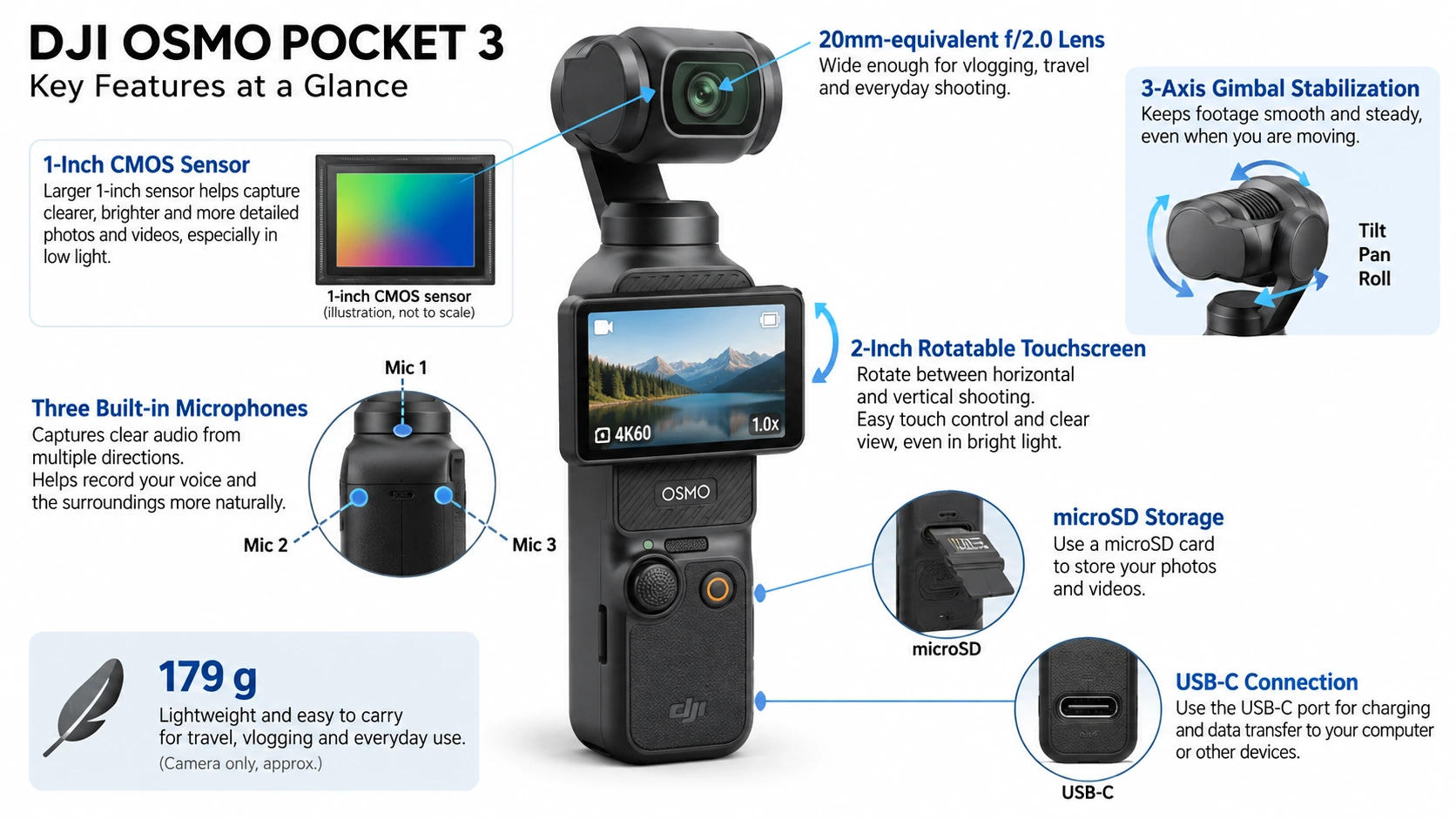
अब इन numbers को एक-एक करके practical language में समझते हैं।
1-inch sensor: इसका असल फायदा क्या है?
सबसे पहले “1-inch” नाम से confuse मत हों। इसका मतलब यह नहीं कि sensor literally एक inch चौड़ा है। यह camera industry का पुराना sensor-format naming convention है।
आपके लिए important बात यह है कि Pocket 3 का sensor typical छोटे action-camera या कई compact-camera sensors की तुलना में बड़ा है।
बड़े sensor को आसान example से समझिए। मान लीजिए दो बाल्टियाँ बारिश का पानी पकड़ रही हैं। अगर एक बाल्टी का opening बड़ा है, तो उतने ही समय में वह ज्यादा पानी इकट्ठा कर सकती है। Camera sensor में पानी की जगह light है।
ज्यादा usable light मिलने से camera को खास तौर पर तीन जगह फायदा मिल सकता है: कम रोशनी, highlight और shadow को संभालने में, और subject-background separation में।
लेकिन “1-inch sensor है, इसलिए रात में बिल्कुल noise नहीं होगा” गलत conclusion होगा। Low light में Pocket 3 भी noise पैदा कर सकता है, खासकर जब रोशनी बहुत कम हो या camera को ISO काफी बढ़ाना पड़े। DJI इसे low-light capability का major selling point बनाता है; independent reviews ने भी Pocket 3 की low-light performance को previous small-sensor pocket cameras से बेहतर पाया है, लेकिन completely clean night footage की guarantee नहीं है।
किस user को सबसे ज्यादा फायदा?
Indoor vlog, restaurant/café shooting, family functions, evening walk, indoor product videos और night-city footage बनाने वालों को बड़ा sensor ज्यादा meaningful है। Bright daylight में इसका फायदा मौजूद रहता है, लेकिन difference low-light जितना obvious हमेशा नहीं दिखेगा।
20mm-equivalent lens: कितना wide है?
Pocket 3 का main lens 20mm-equivalent है। Simple language में: यह काफी wide lens है।
अगर आप camera हाथ में पकड़कर खुद को shoot कर रहे हैं, तो lens सिर्फ आपका चेहरा नहीं बल्कि आसपास का environment भी अच्छी मात्रा में frame में ले सकता है। Travel vlog में इसका मतलब है कि पीछे monument भी दिख सकता है। Kitchen video में cooking area ज्यादा दिख सकता है। Real-estate walkthrough में room का ज्यादा हिस्सा frame में आ सकता है।
लेकिन wide lens का trade-off भी है। अगर camera चेहरे के बहुत पास रखा जाए, तो perspective exaggerated लग सकता है—नाक comparatively बड़ी और चेहरे के किनारे थोड़ा stretched महसूस हो सकते हैं। यह lens defect नहीं बल्कि wide-angle perspective का सामान्य effect है।
और Pocket 3 का lens interchangeable नहीं है। आप DSLR/mirrorless camera की तरह lens निकालकर 50mm, 85mm या telephoto lens नहीं लगा सकते।
f/2.0 aperture क्या करता है?
Lens का aperture f/2.0 है। Aperture को camera की “light window” मान सकते हैं। छोटा f-number आम तौर पर ज्यादा light अंदर आने देता है।
f/2.0 Pocket 3 जैसे compact camera के लिए reasonably bright aperture है। इसका फायदा indoor और evening shooting में मिलता है क्योंकि camera को हर situation में बहुत ऊँचा ISO लगाने की जरूरत कम हो सकती है।
लेकिन aperture fixed है। आप mirrorless camera की तरह f/2 से f/5.6, f/8 या f/11 पर physical aperture बंद नहीं कर सकते। Bright sunlight में अगर आप cinematic shutter speed रखना चाहते हैं, तो यहीं ND filter useful हो सकता है।
Minimum focusing distance: 20 cm का मतलब
Pocket 3 official तौर पर लगभग 20 cm से infinity तक focus करता है। इसका मतलब: अगर आप किसी छोटी चीज़ को lens से सिर्फ 5–10 cm दूर रख दें, तो camera उसे sharp focus नहीं कर पाएगा।
Product showcase करते समय यह important है। कोई watch, cosmetic bottle, mobile accessory या food item सीधे lens पर चिपका देने की बजाय थोड़ा पीछे रखना होगा। Independent testing में भी बहुत पास आने पर focus failure उसी expected 20 cm सीमा के आसपास देखा गया।
9.4MP photos: क्या Pocket 3 photography camera भी है?
Pocket 3 still photos ले सकता है, लेकिन इसका core design video-first है। Official photo mode लगभग 9.4MP output देता है। Maximum listed image dimensions हैं 16:9 — 3840 × 2160 और 1:1 — 3072 × 3072।
Photo formats में JPEG और JPEG + DNG उपलब्ध हैं। DNG का फायदा यह है कि यह RAW-type file देता है, जिससे Lightroom जैसे software में exposure, white balance और colour पर JPEG से ज्यादा editing freedom मिल सकती है।
लेकिन अगर आपका मुख्य काम high-resolution photography, aggressive cropping या large prints है, तो Pocket 3 का roughly 9.4MP still output dedicated high-resolution photo camera जैसा नहीं है। Independent reviewers ने भी still photography को इसकी stronger use case नहीं माना।
Photo modes: सिर्फ normal photo ही नहीं
Pocket 3 में normal single photo के अलावा countdown timer और panorama भी हैं। Countdown options में off, 3 sec, 5 sec और 7 sec शामिल हैं। यानी tripod पर रखकर family/group photo लेते समय shutter दबाने के बाद खुद frame में आने का समय मिल सकता है।
180° Panorama
Camera automatically अलग-अलग directions में घूमकर चार photos capture करता है और उन्हें wide panorama में stitch करता है। Landscape, viewpoint या बड़ा room capture करने में useful है।
3×3 Panorama
Camera नौ images capture करके ज्यादा बड़ा stitched view बनाता है। Limitations वही हैं जो panorama में सामान्यतः होती हैं: moving people, moving vehicles, leaves या waves frame-to-frame बदलें तो stitching artifacts आ सकते हैं।
ISO: 50 से 16,000 तक numbers का अर्थ
Official ranges mode के हिसाब से अलग हैं:
| Mode | ISO range |
|---|---|
| Photo | 50–6400 |
| Normal Video | 50–6400 |
| Low-Light Video | 50–16000 |
| Slow Motion | 50–6400 |
ISO को camera की light sensitivity control समझ सकते हैं। Low ISO, जैसे 50 या 100, आम तौर पर cleaner image देता है लेकिन ज्यादा रोशनी चाहिए। High ISO अंधेरे scene को brighter बनाने में मदद करता है, लेकिन उसके साथ image noise, colour deterioration और fine-detail loss बढ़ सकते हैं।
इसलिए ISO 16000 उपलब्ध होना और ISO 16000 footage बहुत clean होना दो अलग बातें हैं। Low-Light mode को larger ISO range इसलिए मिलता है क्योंकि उसका काम ही darker scenes में usable exposure बनाना है।
Shutter speed: 1/8000 sec से 1 sec तक
Photo mode में official shutter range 1/8000 second से 1 second है। Video में upper/lower limit frame rate के हिसाब से बदलती है। Fast shutter moving subject को freeze कर सकता है। Slow shutter ज्यादा light capture करता है लेकिन motion blur भी बढ़ाता है।
Video में cinematic look के लिए लोग अक्सर frame rate के करीब double denominator वाला shutter use करते हैं—जैसे 25fps में लगभग 1/50 sec—लेकिन यह creative convention है, कोई compulsory rule नहीं। Bright sunlight में f/2 fixed aperture के कारण desired slow shutter बनाए रखने के लिए ND filter काम आता है।
Full-Pixel Fast Focusing और PDAF क्या है?
DJI Pocket 3 में full-pixel fast focusing advertise करता है और support documentation इसे phase-detection autofocus system से जोड़ती है। Simple language में इसका काम है: camera को जल्दी समझना कि focus subject के आगे है या पीछे, और lens focus को सही direction में move करना।
यह खासकर useful है जब आप camera की तरफ product लाते हैं, खुद camera की तरफ आते-जाते हैं, चलते हुए vlog करते हैं, या foreground और background subjects के बीच focus बदलते हैं।
Pocket 3 के focus system में अलग modes भी हैं।
Single Focus
एक बार focus set करता है। Static subject या controlled shot में useful।
Continuous Focus
Camera continuously subject distance बदलने पर focus adjust करता रहता है। Walking vlog और moving subjects में useful।
Product Showcase Mode
यह खास तौर पर foreground product दिखाने के लिए बनाया गया है। मान लीजिए आप अपने चेहरे पर focus हैं और camera के सामने earphones का box लाते हैं। Product Showcase का उद्देश्य product को जल्दी priority देना है।
Creators के लिए बहुत practical feature है, लेकिन इसकी सीमा minimum focusing distance फिर भी लागू रहती है। 5 cm दूर product दिखाने पर software physics को bypass नहीं कर सकता।
Focus Breathing Compensation: firmware से आया useful feature
February 2025 firmware में DJI ने Pocket 3 में Breathing Compensation जोड़ा। Focus breathing क्या है? कुछ lenses में focus distance बदलते समय ऐसा लगता है जैसे frame थोड़ा zoom in या zoom out हो गया।
उदाहरण: पहले focus आपके चेहरे पर है। फिर focus हाथ में पकड़े product पर जाता है। अगर frame edges भी थोड़ा shift हो जाएँ, वही focus breathing है। Breathing compensation इस visible framing change को कम करने की कोशिश करता है।
यह interview, product video और deliberate focus transitions में ज्यादा useful है। लेकिन correction digital processing से होती है, इसलिए इसे lens की optical breathing completely गायब करने वाला magic feature नहीं समझना चाहिए।
40mm Med-Tele 2× mode: normal digital zoom से अलग क्यों है?
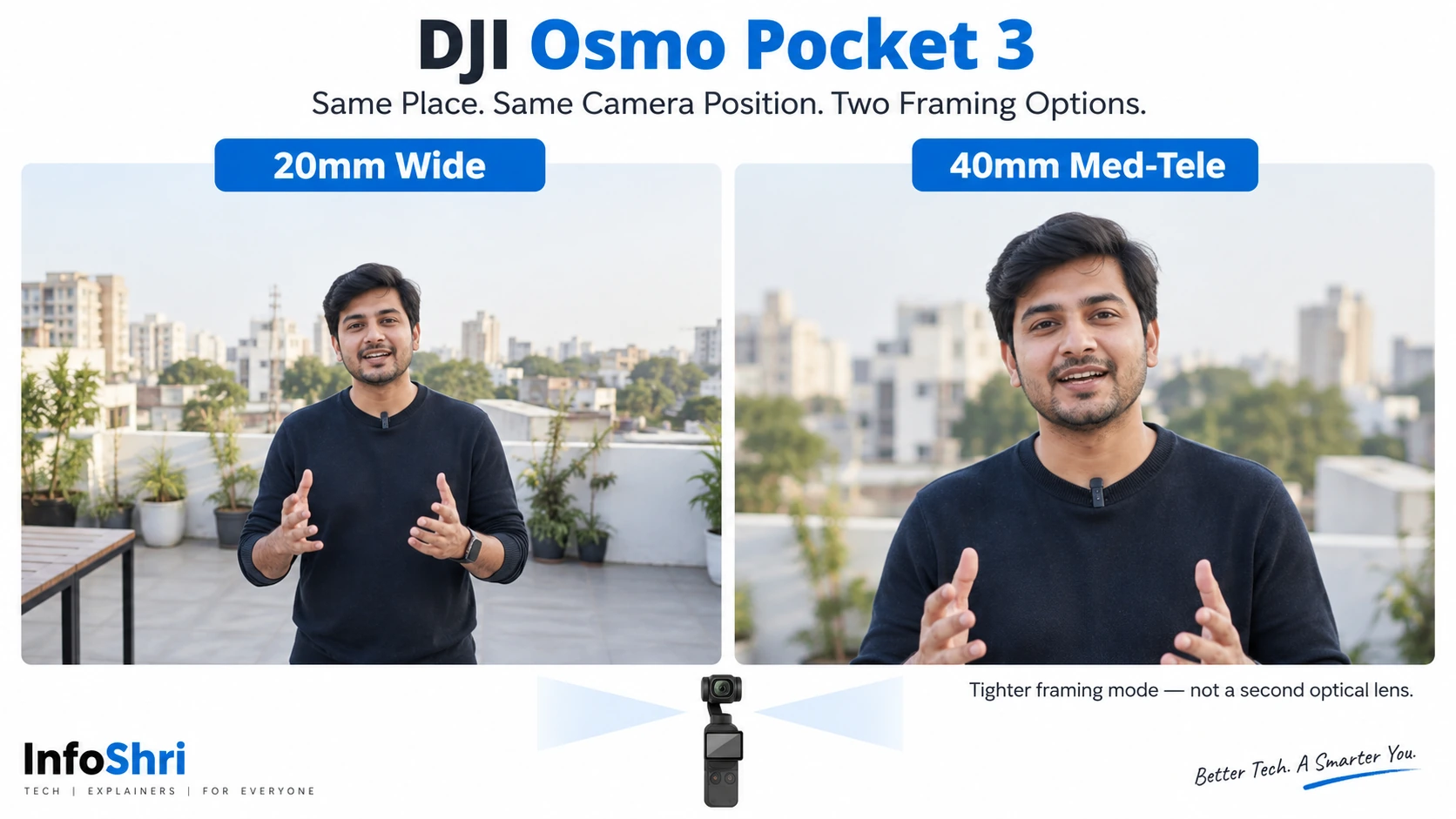
Pocket 3 launch होने के समय इसका main field of view 20mm-equivalent था। February 2025 firmware ने Med-Tele 2× mode add किया, जो लगभग 40mm-equivalent framing देता है।
यह बहुत useful update है। 20mm framing environment-heavy है। 40mm comparatively tighter और natural-looking portrait/interview framing दे सकती है। उदाहरण: 20mm पर café में व्यक्ति के आसपास काफी background आएगा। 40mm mode में उसी जगह person ज्यादा prominent दिखाई देगा।
DJI का कहना है कि Med-Tele mode normal digital zoom की तुलना में image resolution significantly improve करता है। लेकिन limitations महत्वपूर्ण हैं: Maximum resolution 4K है। Maximum ISO 1600 है। और ActiveTrack इस mode में supported नहीं है।
इसलिए यह “free optical 2× lens” नहीं है। Pocket 3 में दूसरा physical telephoto lens नहीं जोड़ा गया है; यह computational/digital mode है।
Normal digital zoom कितना मिलता है?
Official zoom limits recording resolution पर depend करते हैं। Photo में लगभग 2×। Normal video में 1080p — 4×, 2.7K — 3×, 4K — 2×।
यह pattern logical है: lower output resolution में sensor image crop करने के लिए ज्यादा pixel headroom मिलता है। लेकिन digital zoom में जितना ज्यादा crop करेंगे, उतना image detail और quality compromise हो सकती है। Slow Motion और Timelapse में normal digital zoom उपलब्ध नहीं है।
Video resolutions: Pocket 3 वास्तव में क्या-क्या record करता है?
Headline “4K camera” पूरी कहानी नहीं बताता। Normal video mode में official options काफी broad हैं।
Standard horizontal 16:9
4K: 3840 × 2160
2.7K: 2688 × 1512
1080p: 1920 × 1080
इनमें 24, 25, 30, 48, 50 और 60fps options मिलते हैं।
Square 1:1 recording
Pocket 3 3K square तक record कर सकता है: 3072 × 3072। इसके अलावा 2160×2160 और 1080×1080 options भी हैं।
Vertical 9:16 recording
Vertical content के लिए 3K — 1728 × 3072, 2.7K — 1512 × 2688, 1080p — 1080 × 1920 उपलब्ध हैं और supported normal frame rates 24 से 60fps तक जाते हैं। यह Instagram Reels, YouTube Shorts और vertical social video के लिए useful है क्योंकि आपको हमेशा horizontal 4K crop करके vertical बनाने की जरूरत नहीं पड़ती।
ध्यान दें: native vertical mode की maximum listed resolution 3K है, 4K vertical नहीं।
Rotating screen horizontal और vertical shooting को कैसे बदलता है?
Pocket 3 की सबसे visible design features में से एक 2-inch rotating touchscreen है। Screen को horizontal orientation में rotate करने पर camera landscape recording के लिए configure हो सकता है; vertical करने पर portrait orientation activate हो सकती है। Settings में Landscape, Portrait और Auto-Rotation behaviour control किया जा सकता है।
एक limitation: Recording शुरू हो जाने के बाद orientation locked रहती है। यानी बीच recording में screen rotate करके landscape clip को seamless portrait recording में नहीं बदला जाता। नया orientation लेने के लिए recording stop/restart करनी होगी।
Screen Rotate & Capture: screen घुमाओ और recording शुरू
Firmware के बाद Pocket 3 में Screen Rotate & Capture option आया। इसे ऐसे configure किया जा सकता है कि screen rotate करके camera start करते ही predetermined shooting mode खुल जाए—जैसे Last Settings, Video, Hyperlapse, Low-Light, या Custom mode।
यह “moment miss न हो” type feature है। Travel में camera pocket से निकाला, screen rotate की और जल्दी recording शुरू की जा सकती है।
2-inch touchscreen: बड़ा है, लेकिन phone screen नहीं
Display resolution 556 × 314 pixels और official brightness 700 nits है। इसका primary काम cinematic footage देखने के लिए mini-TV बनना नहीं है। इसका काम है framing, focus point, tracking, shooting settings, playback और quick controls।
Swipe gestures भी central हैं: top से swipe — control menu; bottom/up side से shooting parameters; right swipe — playback; left side — image/audio related settings। Small 2-inch size का trade-off है कि detailed menu operation बड़े smartphone जितना आरामदायक नहीं होगा। Independent reviewers ने touchscreen operation को कभी-कभी fiddly पाया।
4K/120fps: headline feature को सही तरीके से समझिए
Pocket 3 4K 120fps capture कर सकता है। लेकिन यह normal 4K120 continuous recording mode समझना गलत होगा। Officially 4K/120 Slow Motion mode में उपलब्ध है।
120fps का मतलब camera हर second 120 frames capture करता है। अगर 120fps footage को 30fps timeline पर play करें, तो यह लगभग 4× slow motion बन सकता है। इसलिए इसका उपयोग water splash, sports action, hair movement, food pour, running child/pet और product B-roll जैसी चीज़ों में है।
1080p/240fps
Pocket 3 1080p में 240fps तक जा सकता है। यह 30fps playback पर लगभग 8× slow motion देता है। Trade-off: 240fps में resolution 1080p तक गिरता है। और high-frame-rate shooting ज्यादा light मांगती है। Dark room में 120/240fps हमेशा ideal नहीं होगा।
Slow Motion की एक unusual audio limitation
Slow-motion video file itself में normal synced audio नहीं मिलता। DJI manual के अनुसार camera separate audio file बना सकता है जिसे बाद में computer पर use किया जा सकता है। इसलिए अगर आप slow-motion clip shoot करके expect कर रहे हैं कि उसी MP4 में normal realtime sound होगा, workflow अलग हो सकता है।
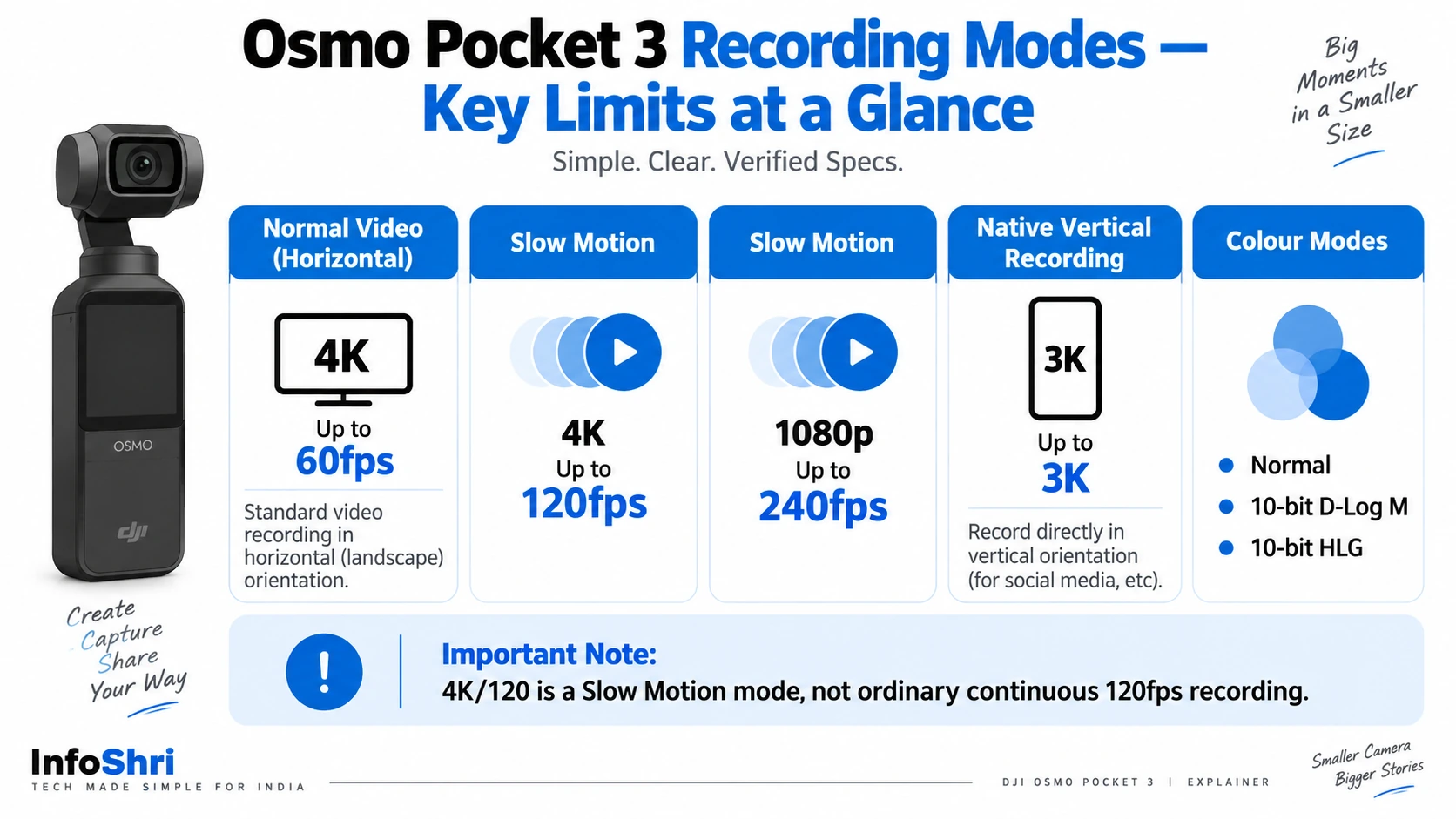
Normal, HLG और D-Log M: तीन colour approaches
Pocket 3 सिर्फ standard video colour तक सीमित नहीं है।
Normal
यह सबसे आसान mode है। Camera footage को largely ready-to-watch look में record करता है। Beginner user, family video या fast social upload के लिए यही सबसे simple option है।
HLG
HLG एक HDR-oriented format है। Compatible HDR workflow और display में brighter highlights और wider tonal presentation का फायदा लिया जा सकता है। लेकिन अगर आपका editing software, export settings या viewing device HDR workflow ठीक से handle नहीं करता, तो colours गलत या washed-out दिख सकते हैं।
10-bit D-Log M
D-Log M deliberately flatter-looking footage record करता है ताकि editing में colour और tonal adjustment की ज्यादा room मिले। “10-bit” का practical मतलब यह है कि colour information के बहुत ज्यादा tonal steps record किए जा सकते हैं compared with 8-bit workflow। इससे aggressive colour adjustment में banding कम होने की संभावना रहती है।
लेकिन D-Log M का drawback भी obvious है: raw camera preview dull और low-contrast लग सकता है। अगर आप colour grading नहीं करने वाले, तो Normal mode ज्यादा convenient है।
D-Log M और “RAW video” एक चीज नहीं हैं
यह common misconception है। D-Log M = log gamma/profile। यह RAW video नहीं है। Pocket 3 normal compressed video files बनाता है; official formats H.264 या HEVC/H.265 MP4 हैं। Log profile editing flexibility बढ़ाता है, लेकिन sensor का unprocessed RAW stream नहीं देता।
HEVC बनाम H.264
Camera दोनों codecs support करता है।
H.264
बहुत broadly compatible है। Older computers, phones और editors पर generally आसान।
HEVC / H.265
Same visual quality के आसपास comparatively smaller files या better compression दे सकता है। लेकिन decoding ज्यादा demanding हो सकती है और कुछ old software/devices में compatibility weaker हो सकती है।
Maximum bitrate 130 Mbps का मतलब
Pocket 3 का listed maximum video bitrate 130 Mbps है। Mbps यहाँ megabits per second है, megabytes नहीं। 130 Mbps को roughly 8 से divide करें तो theoretical data rate लगभग 16.25 MB/s बनता है।
Real file size mode, codec और actual encoding behaviour पर depend करेगा, लेकिन practical lesson है: cheap/slow memory card risky है। इसी वजह से DJI high-resolution recording के लिए suitable high-speed microSD cards recommend करता है।
Low-Light Video mode अलग क्यों है?
Pocket 3 में dedicated Low-Light Video mode है। Official resolution options 4K 24/25/30fps और 1080p 24/25/30fps हैं। इस mode में ISO range 16,000 तक जा सकती है और camera exposure/noise processing low-light situation के लिए optimize करता है।
लेकिन इसकी limitations देखिए। यह 4K60 या 4K120 low-light mode नहीं है। और high ISO बढ़ने पर physical noise problem खत्म नहीं होती। Independent testing में dedicated Low-Light mode useful पाया गया, जबकि ordinary night 4K60 footage में visible noise रहा।
इसलिए “Low-Light mode = रात को daylight quality” नहीं। सही expectation: difficult light में camera को ज्यादा usable result निकालने में मदद करना।
Glamour Effects 2.0 और skin/complexion processing
DJI Pocket 3 में Glamour Effects 2.0 और complexion-related processing advertise करता है। इसका उद्देश्य face appearance को processed/retouched look देना है। Vlog, beauty, lifestyle या quick social video में किसी user को यह useful लग सकता है।
लेकिन दो cautions हैं। Beauty processing aesthetic preference है—हर creator natural skin texture से processing को बेहतर नहीं मानेगा। और कुछ glamour controls DJI Mimo workflow पर ज्यादा convenient होते हैं।
Sharpness और Noise Reduction manual control
Firmware/software evolution के बाद Pocket 3 Video, Slow Motion और Hyperlapse जैसे applicable modes में sharpness और noise reduction adjustment देता है। यह advanced users के लिए important है।
अगर camera ज्यादा sharpening लगा रहा है और edges artificial/crunchy दिख रही हैं, sharpness कम की जा सकती है। अगर noise reduction fine texture smear कर रही है, उसका level adjust किया जा सकता है। लेकिन beginner user को सिर्फ इसलिए इन controls को बदलने की जरूरत नहीं कि option मौजूद है। गलत settings default processing से खराब result दे सकती हैं।
3-axis mechanical gimbal stabilization: electronic stabilization से कैसे अलग?
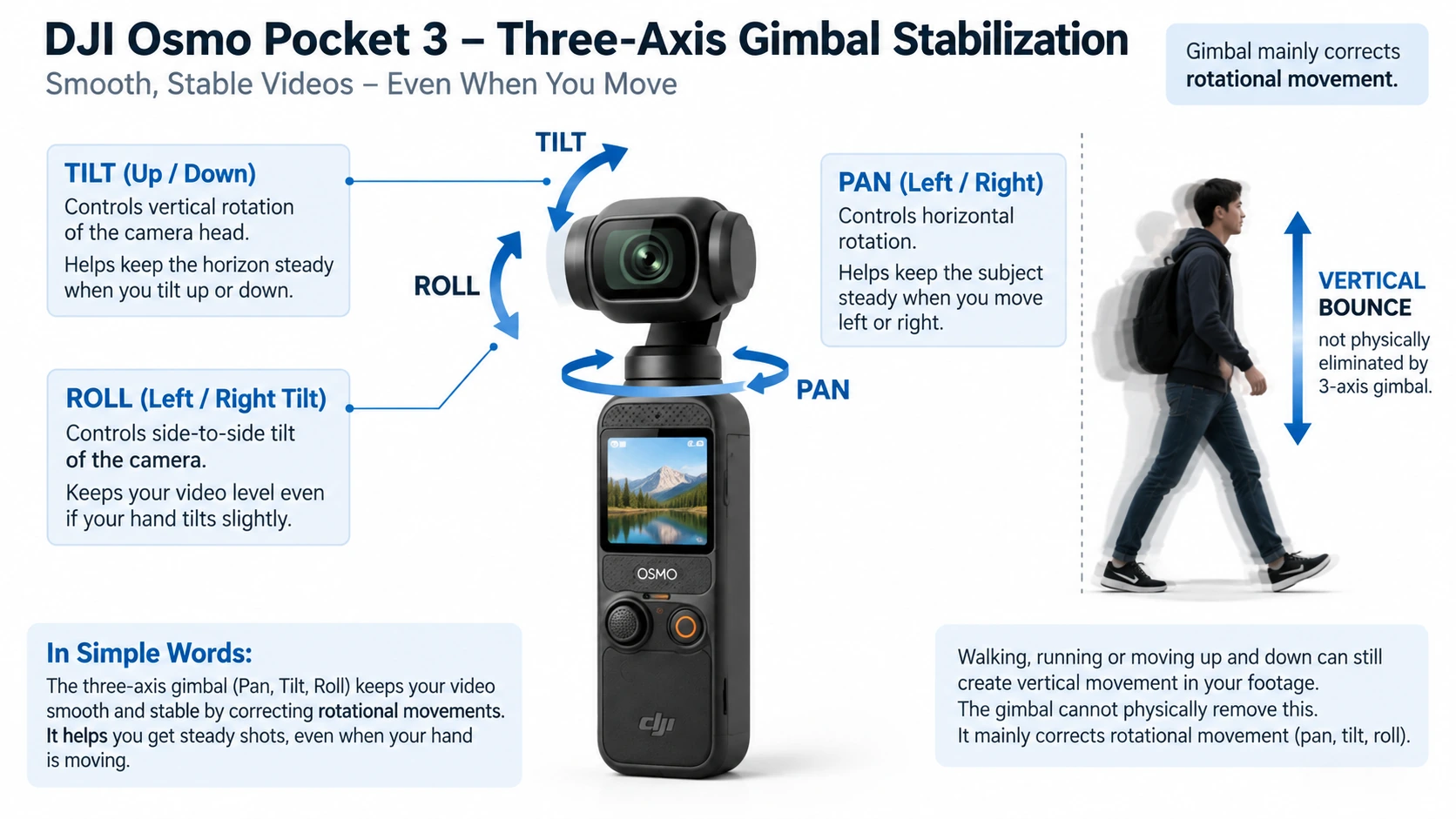
Pocket 3 का camera physical motors पर mounted है। Gimbal तीन rotational axes को actively stabilize करता है: Pan — left/right rotation, Tilt — up/down, Roll — horizon tilt।
DJI का official controllable range लगभग Pan: −235° से +58°, Tilt: −120° से +70°, Roll: −45° से +45° है। Maximum controllable speed 180°/sec और listed angular vibration range ±0.005° है। ये numbers useful engineering limits हैं, लेकिन इन्हें “footage exactly ±0.005° shake-free रहेगा” जैसी real-world guarantee नहीं समझना चाहिए।
असल फायदा यह है कि camera को software crop करके shake हटाने की बजाय lens/sensor assembly physical movement से stable रखी जाती है। Walking vlog, panning shot और handheld B-roll में यही Pocket series की core पहचान है।
क्या gimbal हर प्रकार का shake खत्म कर देता है?
नहीं। 3-axis gimbal rotational motion को बहुत अच्छी तरह compensate कर सकता है, लेकिन walking के दौरान body का ऊपर-नीचे vertical bounce एक अलग translational movement है। इसे अक्सर “fourth-axis” movement कहा जाता है।
Independent practical testing में इसी limitation को note किया गया है और fully floating walk के लिए shock-absorbing/4th-axis solution की usefulness बताई गई। इसलिए walking technique अभी भी matter करती है। Gimbal होने का मतलब यह नहीं कि आप दौड़ते हुए camera को जोर-जोर से ऊपर-नीचे करें और footage हमेशा drone जैसी लगेगी।
Gimbal Follow Mode
Follow mode में pan और tilt आपके handle movement को follow करते हैं जबकि roll horizon को level रखने की कोशिश करता है। यह सामान्य vlog और everyday shooting का most natural mode है। आप camera दाएँ मोड़ेंगे तो camera smooth तरीके से दाएँ follow करेगा।
Tilt Locked Mode
इस mode में tilt locked रहता है जबकि pan movement follow कर सकता है। उदाहरण: आप camera को chest height से नीचे ले जा रहे हैं लेकिन चाहते हैं कि camera का up/down viewing angle बदलता न रहे। Product walk-through, horizontal sweep या specific composed movements में useful हो सकता है।
FPV Mode
FPV में gimbal movement ज्यादा freely handle orientation को follow करता है। इससे horizon हमेशा rigidly level रखने की बजाय shot में roll/dynamic movement आ सकती है। Action-style creative shot में useful है। लेकिन maximum stability चाहने वाले normal vlog के लिए यह default choice नहीं होगी।
FPV-⊥ mode
May 2024 firmware में DJI ने FPV-⊥ gimbal mode add किया। इसमें camera power-on या recenter के बाद touchscreen के relative perpendicular orientation maintain करने की कोशिश करता है। यह specialized creative/control behaviour है; casual beginner को रोज इसकी जरूरत नहीं पड़ेगी, लेकिन current Pocket 3 capability list में इसे ignore करना incomplete होगा।
5D joystick क्या-क्या करता है?
Pocket 3 का छोटा joystick सिर्फ menu navigation button नहीं है। Official manual behaviour के अनुसार: एक press — back/return; दो press — gimbal recenter; तीन press — forward और selfie direction के बीच camera flip; left/right — pan; up/down — configuration के अनुसार tilt या zoom; press-hold — gimbal lock।
इसका benefit यह है कि basic camera movement के लिए touchscreen पर बार-बार finger रखने की जरूरत कम होती है।
Gimbal Lock किस काम आता है?
जब joystick hold करके gimbal lock किया जाता है, camera orientation को temporary fixed रखने में मदद मिलती है। मान लीजिए आप चलते हुए सामने की दिशा lock रखना चाहते हैं और accidental handle movement से composition बदलना नहीं चाहते—यह useful हो सकता है।
Gimbal calibration क्यों है?
Motorized gimbal समय के साथ या unusual physical condition के बाद slightly misaligned महसूस हो सकता है। Settings में gimbal calibration option है। लेकिन calibration routine को mechanical damage repair समझना गलत होगा। अगर camera गिर गया और gimbal arm physical रूप से bent है, software calibration hardware damage ठीक नहीं कर सकती।
ActiveTrack 6.0: यह सिर्फ face tracking नहीं है
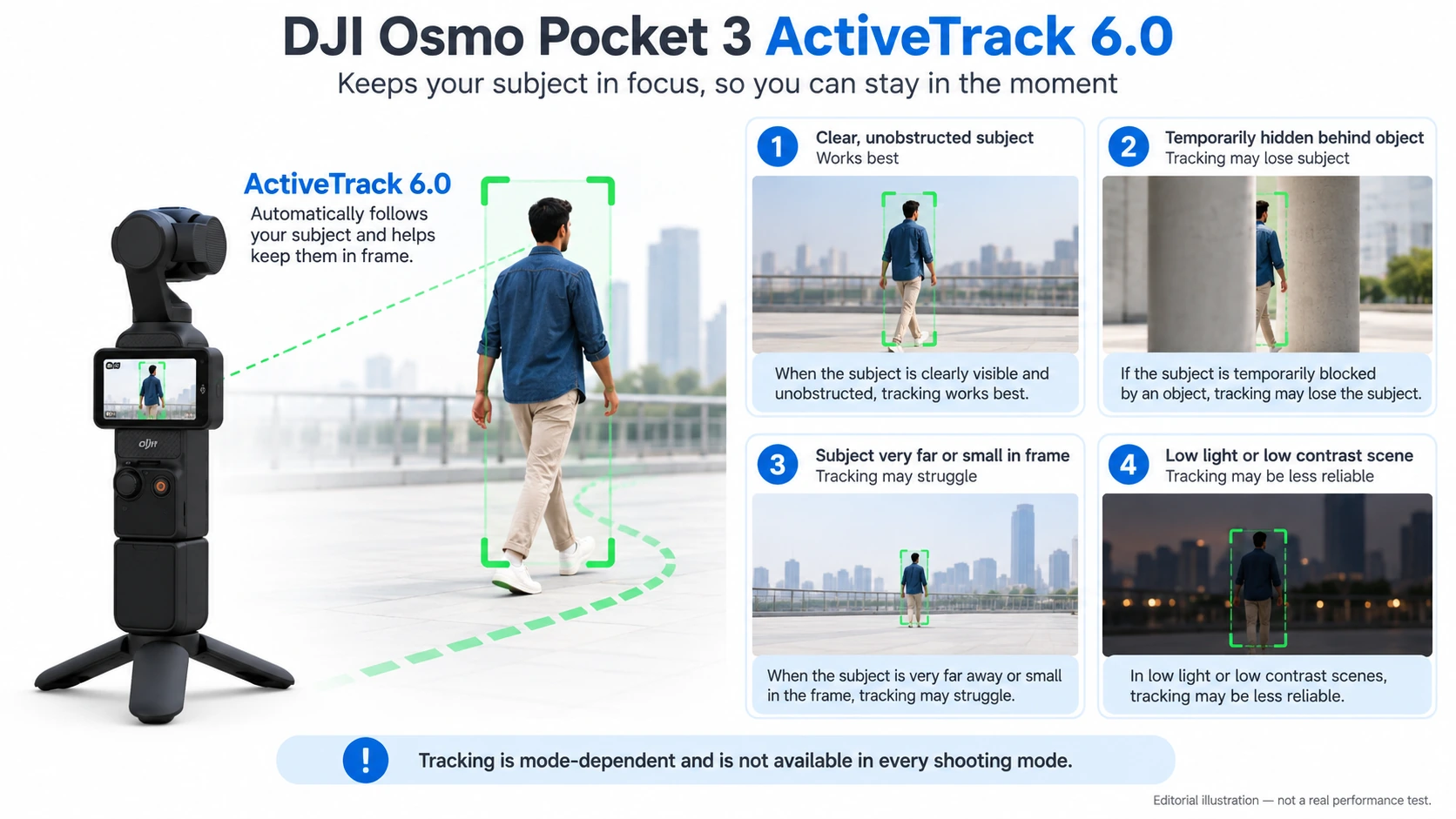
ActiveTrack का basic concept: आप subject select करते हैं और motorized gimbal उसे frame में रखने की कोशिश करता है। Pocket 3 में touchscreen पर subject को double-tap करके tracking शुरू की जा सकती है और DJI Mimo से भी tracking control उपलब्ध है।
Solo creator के लिए इसका फायदा बहुत बड़ा हो सकता है। Camera tripod पर रख दिया। आप room में left-right move कर रहे हैं। Camera operator नहीं है। ActiveTrack gimbal को automatically pan/tilt करके आपको follow करने की कोशिश करता है। Cooking demo, fitness instruction, classroom/explainer, dance rehearsal और solo vlog जैसे scenarios में यह काम आता है।
ActiveTrack की real limitations
Tracking को “AI है, इसलिए कभी subject नहीं खोएगा” मत समझिए। DJI की own troubleshooting guidance कहती है कि tracking मुश्किल हो सकती है जब subject बहुत तेज move करे, बहुत दूर हो, lighting कम हो, या subject और background में contrast कम हो। DJI Pocket 3 के लिए face-tracking distance लगभग 2 m और head-and-shoulders tracking लगभग 5 m तक बताता है।
Obstruction भी problem है। अगर कोई pillar, आदमी या object subject को temporarily cover कर दे, tracking हमेशा perfect नहीं रहेगी। Independent testing में भी tracking generally strong होने के बावजूद brief lag/obstruction issues देखे गए।
ActiveTrack हर mode में उपलब्ध नहीं है
यह बहुत important limitation है। Pocket 3 manual के अनुसार ActiveTrack कुछ modes में available नहीं है, जिनमें Panorama, Low-Light, certain high slow-motion modes, Timelapse, Motionlapse और SpinShot शामिल हैं। और firmware-added Med-Tele 2× mode में भी ActiveTrack unsupported है।
इसका मतलब feature list को अलग-अलग पढ़कर “Med-Tele + ActiveTrack + Low-Light सब एक साथ” assume नहीं करना चाहिए। Camera modes के बीच compatibility restrictions हैं।
Face Auto-Detect
Face Auto-Detect selected conditions में frame के relevant face को recognize करके tracking आसान बनाता है। Manual के अनुसार system frame centre के करीब face को priority दे सकता है। Solo talking-head video में manually box draw करने की जरूरत कम होती है।
Group situation में limitation obvious है: camera को decide करना पड़ेगा किस face को priority देनी है। इसलिए multi-person scene में framing intent हमेशा automatic system नहीं समझ सकता।
FT Selfie
FT Selfie का मतलब roughly selfie orientation में automatic face tracking behaviour है। Camera selfie direction में flip होने पर face पहचानकर उसे frame में रखने की कोशिश कर सकता है। Walk-and-talk vlog में useful है क्योंकि बार-बार tracking target select करने की जरूरत कम हो सकती है।
Dynamic Framing
Dynamic Framing सिर्फ “subject center में रखो” नहीं करता। आप joystick के जरिए desired composition position चुन सकते हैं और camera subject को frame के उस area में बनाए रखने की कोशिश करता है—DJI इसे rule-of-thirds/golden-ratio style composition से जोड़ता है।
उदाहरण: आप चाहते हैं कि person frame के left third में रहे और right side पर monument दिखे। Normal face tracking उसे center में खींच सकता है। Dynamic Framing composition को अधिक intentional बनाने में मदद करता है। लेकिन automatic composition हर creative scene में human camera operator का substitute नहीं है।
SpinShot
SpinShot camera को automatically 90° या 180° roll rotation वाला stylized shot बनाने देता है। Music video transition, reveal या short-form creative B-roll में fun हो सकता है। Normal interview या family recording में इसका practical value कम है। यानी feature मौजूद है, लेकिन हर feature equally important नहीं होता।
Hyperlapse, Timelapse और Motionlapse में फर्क
इन तीनों को अक्सर एक ही चीज समझ लिया जाता है।
Timelapse
Camera fixed position से long duration को बहुत छोटे video में compress करता है। उदाहरण: एक घंटे के sunset को 20-second clip बनाना। Pocket 3 official intervals देता है: 0.5, 1, 2, 3, 4, 5, 6, 8, 10, 15, 20, 25, 30, 40 और 60 seconds। Timelapse output 4K, 2.7K या 1080p में 25/30fps हो सकता है।
Motionlapse
Timelapse + programmed gimbal movement। आप 2–4 positions set कर सकते हैं और camera timelapse के दौरान धीरे-धीरे एक framing से दूसरी framing तक move करता है। Sunset, traffic, cloud movement और room activity में cinematic motion add कर सकता है।
Hyperlapse
Camera खुद भी moving हो सकता है और time-compressed result बनता है। Official speed options में Auto, 2×, 5×, 10×, 15× और 30× शामिल हैं। Travel walk या long route को जल्दी दिखाने के लिए useful है।
Custom Modes: अपनी favourite settings save कर सकते हैं
Pocket 3 में up to five custom modes/settings combinations save किए जा सकते हैं। उदाहरण: C1 — 4K25 Normal, C2 — 4K60, C3 — D-Log M manual exposure, C4 — Product Showcase, C5 — vertical social setup। हर बार सारे parameters दोबारा बदलने की जरूरत कम हो सकती है।
2.35:1 guide और Grid Lines
Firmware updates में 2.35:1 composition guide भी जोड़ा गया। ध्यान रहे: guide दिखाई देना automatically video को true anamorphic/cinema format में record नहीं करता। यह framing reference है। Grid lines rule-of-thirds composition, straight horizon और alignment में मदद करती हैं।
Anti-Flicker
Indoor LED/tube lights mains frequency के कारण video में flicker या horizontal bands पैदा कर सकती हैं। Pocket 3 anti-flicker setting देता है। India 50Hz electricity environment में appropriate setting artificial-light flicker reduce करने में मदद कर सकती है। लेकिन हर LED light का PWM behaviour अलग हो सकता है; anti-flicker universal cure नहीं है।
Timecode support
Pocket 3 timecode settings भी देता है, जिसमें reset और synchronization-related options शामिल हैं। Casual family user शायद इसे कभी touch न करे। लेकिन multi-camera editor के लिए timecode clips synchronize करने में useful हो सकता है।
उदाहरण: Pocket 3 एक angle पर, दूसरा camera दूसरे angle पर और separate audio recorder चल रहा है। Common time reference post-production organization आसान करता है।
तीन built-in microphones: audio system कैसे काम करता है?
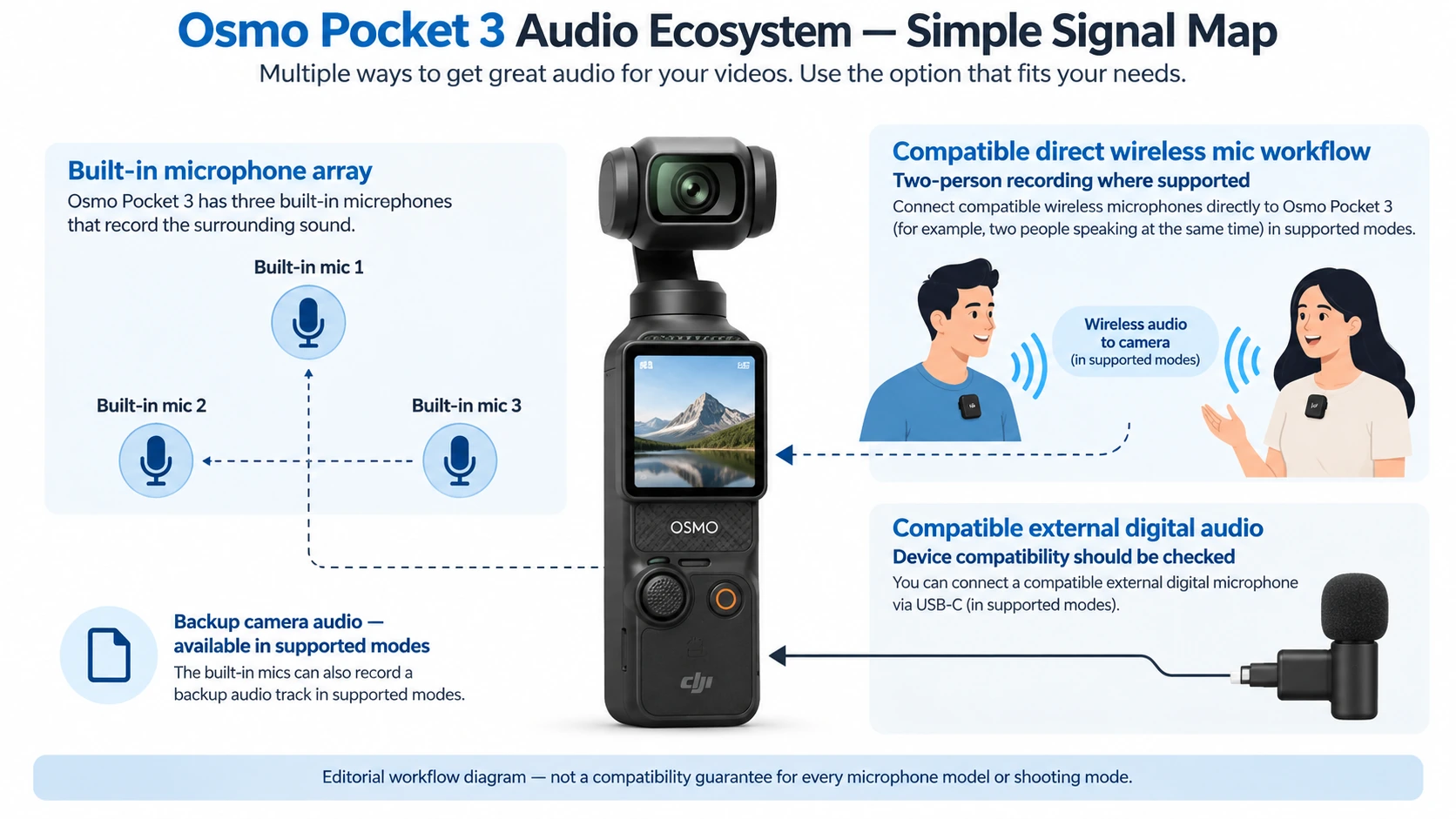
Pocket 3 में तीन built-in microphones हैं। Camera standalone होने पर भी usable onboard audio capture कर सकता है। Audio settings में stereo/mono और directional pickup options मिलते हैं। Manual में built-in directional choices जैसे Front, Front & Back और All documented हैं।
इसका फायदा है कि recording situation के हिसाब से camera को sound direction की priority दी जा सकती है। लेकिन directional software processing shotgun microphone जैसा perfect acoustic isolation नहीं बनाता।
Wind Noise Reduction
Outdoor recording में हवा microphone capsule पर hit करके “भभभ” जैसी low-frequency noise बना सकती है। Pocket 3 built-in microphones के लिए wind noise reduction देता है। यह light/moderate wind में useful हो सकता है।
Strong wind में physical wind protection—जैसे proper furry windscreen वाला external mic—फिर भी ज्यादा effective हो सकता है। और DJI manual के अनुसार built-in wind-noise control external microphone पर उसी तरीके से apply नहीं होता।
Audio Zoom
Pocket 3 में Audio Zoom feature भी है, जो zoom change के साथ audio pickup processing को adjust कर सकता है। Concept यह है कि tighter visual framing के साथ sound focus भी subject direction की ओर feel हो। लेकिन इसे optical zoom microphone समझना गलत होगा। तीन tiny microphones physically telephoto mic में नहीं बदलते।
Internal microphone gain manually बदल सकते हैं?
DJI FAQ के अनुसार internal microphone gain automatic adjustment use करता है; internal gain को उसी तरह manually tune नहीं किया जाता जैसे supported external microphone gain को किया जा सकता है। External mic workflow में gain control ज्यादा important हो जाता है क्योंकि voice level और clipping manage करनी होती है।
DJI Mic 2, Mic Mini, Mic 3 और newer microphone support
Pocket 3 का audio ecosystem launch के बाद काफी expand हुआ। Current DJI support के अनुसार compatible transmitters में DJI Mic 2, Mic Mini और newer Mic-family transmitters including Mic 3 generation direct wireless connection के जरिए Pocket 3 से pair किए जा सकते हैं; newer documentation दो compatible transmitters simultaneously use करने की capability भी describe करती है।
यह solo interview और two-person dialogue में बहुत useful है। दो transmitters का मतलब: एक mic host पर, दूसरा guest पर। Receiver-less direct connection setup को छोटा रख सकता है।
लेकिन original first-generation DJI Mic को current direct-Bluetooth support के साथ confuse नहीं करना चाहिए; पुराने system में receiver requirement अलग हो सकती है।
Built-in Mic Audio Backup
Pocket 3 selected external-mic situations में built-in microphones से separate backup WAV audio file save करने का option देता है। यह safety net हो सकता है। मान लीजिए wireless mic बहुत low gain पर record हो गया या transmitter audio में problem आ गई। Backup camera audio rescue option दे सकता है।
लेकिन backup feature हर recording mode/colour-mode combination में available नहीं है। DJI documentation कुछ Low-Light और high-frame-rate D-Log M/HLG combinations में restrictions बताती है। इसलिए important shoot से पहले actual selected mode में backup symbol/setting verify करना चाहिए।
Third-party external microphones
USB-C के जरिए compatible digital microphones और suitable adapter के माध्यम से external audio connection possible है। Manual 48kHz/16-bit compatible digital audio workflow document करता है। इससे Pocket 3 सिर्फ DJI wireless mic ecosystem तक बंद नहीं है। लेकिन हर random USB microphone guaranteed compatible नहीं है; specific device compatibility test करना sensible है।
Recorded audio specification
Official video audio output 48kHz, 16-bit AAC listed है। 48kHz video production में standard sample rate है। 16-bit casual/content-production use के लिए conventional specification है, लेकिन dedicated professional field recorder के 24-bit/32-bit-float workflow के बराबर flexibility assume नहीं करनी चाहिए।
Webcam mode: Pocket 3 computer camera भी बन सकता है
USB-C से computer connect करने पर Pocket 3 UVC webcam की तरह काम कर सकता है। DJI firmware ने May 2024 में 4K UVC output — 3840×2160 at 25/30fps add किया। बाद में webcam workflow में D-Log M 10-bit support भी जोड़ा गया।
यह video calls, OBS streaming, teaching या desktop creator setup के लिए interesting है। DJI Windows/macOS webcam use document करता है, लेकिन actual app compatibility computer और software पर depend कर सकती है।
Webcam में ActiveTrack का फायदा
Supported workflow में gimbal/tracking desk पर बैठे creator को automatically frame में रख सकता है। यानी fixed ordinary webcam के विपरीत आप थोड़ा left/right move करें तो Pocket 3 physically turn कर सकता है।
4K UVC और 4K livestream एक चीज नहीं हैं
यह distinction बहुत जरूरी है। 4K UVC = USB के जरिए compatible computer को webcam video output। DJI Mimo livestreaming = phone/app based streaming system। Current DJI livestream guide Pocket 3 के लिए 480p, 720p और 1080p, 30fps livestream options document करता है—not 4K Mimo livestreaming।
Livestreaming: Facebook, YouTube और RTMP
Current 2026 DJI guide Pocket 3 livestreaming के लिए Facebook, YouTube और RTMP support list करता है। Maximum listed Mimo livestream resolution 1080p30 है। Bitrate options resolution के साथ बदलते हैं; 1080p के लिए current guide 3 Mbps और 6 Mbps choices document करता है।
RTMP का फायदा यह है कि compatible custom streaming platform/server पर stream भेजी जा सकती है। लेकिन livestream workflow DJI Mimo app पर depend करता है।
HDMI output है?
USB-C port होने का मतलब HDMI output automatically नहीं होता। DJI FAQ स्पष्ट करता है कि Pocket 3 के USB-C port से ordinary USB-C-to-HDMI cable लगाकर real-time HDMI footage output supported नहीं है। अगर professional switcher workflow HDMI input मांगता है, तो इसे पहले से जानना important है।
DJI Mimo app क्या करती है?
DJI Mimo Pocket 3 का companion mobile app है। इसके जरिए phone पर live camera view, remote control, settings, transfer, editing-related functions और firmware management उपलब्ध हो सकते हैं। Current DJI download information के अनुसार September 2026 में Mimo v2.11.9 listings iOS 15+ और Android 9+ requirements दिखाती हैं। यह version-sensitive information है; future में बदल सकती है।
Activation के लिए app क्यों चाहिए?
DJI manual Pocket 3 activation को DJI Mimo workflow से जोड़ता है। इसलिए नया camera खरीदकर सिर्फ battery charge करके app को हमेशा ignore करने वाला fully offline expectation practical नहीं है। Firmware update भी Mimo के जरिए किया जा सकता है। DJI update के समय पर्याप्त battery रखने की recommendation देता है; manual में 15% से ज्यादा battery requirement/precaution documented है।
Background firmware/download improvements
Later firmware/Mimo updates ने background download behaviour improve किया, जिससे user दूसरे tasks करते हुए media transfer/download process चला सकता है। यह headline camera feature नहीं है, लेकिन high-volume creator के workflow में useful convenience है।
LightCut app
DJI LightCut को quick mobile editing workflow के लिए promote करता है। Current DJI download page AI-assisted one-tap editing, templates और fast mobile workflow जैसी capabilities list करती है। Beginner user के लिए फायदा है कि हर clip desktop editor में manually arrange करना जरूरी नहीं। Advanced creator के लिए limitation यह है कि automated template edit Final Cut/Premiere/DaVinci जैसी granular editing control replace नहीं करता।
Files phone या computer में कैसे जाते हैं?
Pocket 3 में footage microSD card पर record होती है। Transfer के कुछ रास्ते हैं: DJI Mimo wireless/mobile transfer, USB-C computer transfer, और supported Android devices पर OTG-related workflow। एक practical limitation: file transfer करते समय simultaneous normal shooting available नहीं रहती।
Internal storage: बिल्कुल नहीं
Pocket 3 में recording के लिए built-in storage नहीं है। यह बहुत important spec है। Camera खरीदकर memory card भूल गए तो normal footage record करने के लिए internal 32GB/64GB emergency storage नहीं है। इसलिए microSD card effectively essential accessory है।
microSD up to 1TB
Current specification 1TB तक microSD support list करती है। लेकिन capacity अकेली बात नहीं है। High-bitrate 4K recording के लिए card speed भी matter करती है। DJI high-resolution recording के लिए UHS-I U3-class compatible cards और specific tested models recommend करता है। Random cheap “1TB” card लेना इसलिए smart नहीं है—fake-capacity cards और insufficient sustained write speed recording errors पैदा कर सकते हैं।
File system: exFAT
Official storage file system exFAT है। exFAT large video files के लिए suitable है और पुराने FAT32 की 4GB-per-file limitation जैसी constraint से बचाता है। Formatting ideally camera के supported format function से करनी चाहिए, खासकर नए card पर।
Wi-Fi और Bluetooth
Pocket 3 official wireless specification में 2.4GHz Wi-Fi, 5.1/5.8GHz Wi-Fi bands, 802.11 a/b/g/n/ac, Bluetooth BLE 5.2 और BR/EDR listed हैं। इनका practical काम Mimo connectivity, device communication और supported wireless accessories/workflows है। हर region में usable Wi-Fi frequency/band regulatory rules के हिसाब से अलग हो सकती है।
Battery: 1300mAh number अकेले useful नहीं
Battery specification: 1300mAh, 10.01Wh, 7.70V Li-ion। mAh अकेले अलग voltage वाले devices की battery compare करने का ideal तरीका नहीं है। Wh ज्यादा directly stored energy indicate करता है।
DJI official maximum operating-time claim लगभग 166 minutes देता है—but conditions बहुत specific हैं: 25°C environment, 1080p/24fps, Wi-Fi off, screen off। इसलिए इसे “4K60 में हमेशा 2 घंटे 46 मिनट मिलेगा” नहीं पढ़ना चाहिए। Higher resolution, high frame rate, screen usage, tracking, Wi-Fi और temperature battery life बदल सकते हैं।
Fast charging: 16 मिनट में 80%?
DJI official lab figure: compatible DJI 65W PD charger के साथ करीब 16 minutes में 80% और 32 minutes में 100% charge। यह practical travel feature है। लेकिन charger, cable, temperature और battery condition actual timing बदल सकते हैं। और 65W charger का मतलब camera लगातार 65W battery में भरता है—ऐसा assume नहीं करना चाहिए। Charger सिर्फ compatible power source है; device अपनी negotiated requirement लेता है।
Recording करते हुए charging
Pocket 3 charging source से connected रहते हुए use किया जा सकता है। DJI FAQ के अनुसार recording के दौरान camera incoming power use कर सकता है; battery charging normal रूप से recording stop होने के बाद continue होती है। Long desk recording या webcam use में useful है। लेकिन battery-powered camera को indefinitely mains-powered studio camera समझना फिर भी सही नहीं होगा—heat और operating conditions matter करते हैं।
Pocket 3 phone को charge कर सकता है?
नहीं। DJI FAQ के अनुसार Pocket 3 को phone power bank की तरह use करने का intended support नहीं है। USB-C port देखकर reverse charging assume न करें।
Battery Handle क्या करता है?
Optional Osmo Pocket 3 Battery Handle में लगभग 950mAh अतिरिक्त battery है। DJI lab figure के अनुसार यह operating time को लगभग 62%, या specific 1080p24 test में करीब 103 additional minutes, बढ़ा सकता है।
इसके साथ grip लंबा होता है, USB-C connection पीछे relocate/access मिलता है, bottom 1/4-inch mounting option मिलता है, और external audio connection workflow आसान हो सकता है। यह long events, travel day और extended recording में useful है। लेकिन extra handle camera को लंबा और थोड़ा less-pocketable बनाता है।
Heat: क्या Pocket 3 overheat होता है?
इस point पर black-and-white claim करना सही नहीं होगा। DJI के official manual में warning है कि long high-specification recording के बाद upper camera section hot हो सकता है। Independent observations mixed हैं। कुछ reviews ने heat/overheating को practical concern के रूप में note किया, जबकि CineD ने hot outdoor conditions में long 4K/120 testing के दौरान thermal shutdown experience नहीं किया।
इसलिए evidence-based practical conclusion यह है: Demanding recording में body noticeably warm/hot हो सकती है; लेकिन हर unit और हर environment में thermal shutdown होगा, ऐसा evidence नहीं कहता। Ambient temperature, recording mode, airflow, screen, charging और session length outcome बदल सकते हैं।
Operating temperature
Official operating range 0°C से 40°C है। Charging temperature 5°C से 45°C listed है। India में इसका practical relevance extreme summer conditions में है। 40°C ambient के आसपास direct sun में खड़ा black electronic device internally environment से काफी ज्यादा गर्म हो सकता है। इसलिए extreme heat में shade और reasonable session management sensible है।
Wearable Mode
Pocket 3 में Wearable Mode भी है, जिसे body-mounted/POV-style use के लिए optimize किया गया है। DJI Expansion Adapter जैसे accessory के साथ action-camera-style mounting easier हो सकती है। Later firmware में Wearable Mode behaviour और screen-off timing भी optimize किया गया।
लेकिन यहाँ सबसे बड़ी limitation याद रखिए: Pocket 3 action camera की तरह waterproof नहीं है।
Waterproofing: नहीं है
DJI Pocket 3 को waterproof camera के रूप में specify नहीं करता। यह rain, swimming, snorkeling या underwater shooting के लिए naked GoPro/Osmo Action जैसा device नहीं है। हल्की बूंद पड़ जाने को “waterproof” proof नहीं मानना चाहिए। Motorized gimbal joints और exposed camera structure के कारण पानी के आसपास extra care चाहिए।
Pocket camera होने के बावजूद gimbal physically delicate है
Electronic stabilization-only action camera में camera block fixed रहता है। Pocket 3 में small moving motors और gimbal arms हैं। Protective cover इसी वजह से important है।
DJI guidance के अनुसार axis lock/storage design loose pocket या small bag use में मदद करता है, लेकिन heavy pressure से protect करना चाहिए और larger bag में protective cover recommended है। इसे jeans pocket में डालकर उसके ऊपर बैठ जाना obviously safe use case नहीं है।
Wide-Angle Lens accessory: 20mm से 15mm
Optional magnetic Wide-Angle Lens field of view को लगभग 108° और focal length को लगभग 15mm-equivalent तक widen करता है। यह useful है: selfie vlog में arm छोटा हो, tight room हो, architecture/interior capture करना हो, या बहुत ज्यादा surroundings दिखानी हों।
Drawback: ज्यादा wide view perspective distortion बढ़ा सकता है और subject frame में comparatively छोटा हो सकता है।
ND16, ND64 और ND256 filters
DJI magnetic ND Filter Set में ND16, ND64 और ND256 शामिल हैं। ND filter sunglasses की तरह lens में आने वाली light कम करता है। Bright sun में f/2 fixed aperture और cinematic shutter maintain करने में useful है।
लेकिन low-light में ND लगाकर भूल गए तो unnecessary dark footage/ऊँचा ISO मिल सकता है। ND filter image “automatically cinematic” नहीं बनाता; यह exposure control tool है।
Black Mist Filter
Optional Black Mist filter highlights को softer/bloom-like बना सकता है और skin texture को less clinical look दे सकता है। Portrait, wedding, café या dreamy night-light aesthetic में useful हो सकता है। लेकिन fine contrast deliberately reduce होता है। अगर आपका goal maximum crisp, technical product shot है, तो mist effect शायद unwanted हो।
Mini Tripod
Pocket 3 Mini Tripod 1/4-inch mounting connection के जरिए camera को table/ground पर stable रखने देता है। ActiveTrack के साथ इसका combination खास useful है: camera रखिए, खुद frame में जाइए और gimbal आपको follow करे। लेकिन छोटा tripod uneven surface या strong wind में full-size tripod जितना stable नहीं होगा।
Handle With 1/4-inch Thread
Standard package में market/bundle के अनुसार Handle With 1/4-inch Thread मिल सकता है; user-provided India listing इसे standard box contents में दिखाती है। यह grip लंबा करता है और standard tripod/accessory mounting आसान बनाता है। Rear USB-C access भी ergonomically useful हो सकता है।
Expansion Adapter
DJI Expansion Adapter Pocket 3 को broader action-camera accessory ecosystem से जोड़ता है और mounting/cold-shoe flexibility देता है। POV setup, extra light, receiver या rigging में useful हो सकता है। लेकिन जितने accessories जोड़ेंगे, Pocket 3 का original “small pocket camera” advantage उतना कम होगा।
Protective Cover में accessory storage
DJI protective cover सिर्फ camera shell नहीं है; official accessory guidance wide-angle lens और Black Mist Filter storage तथा microphone-related attachment/storage conveniences भी describe करती है। छोटे magnetic accessories खोने से बचाने के लिए यह practical detail है।
Pocket 2 accessories compatible हैं?
Generally नहीं। DJI specifically Pocket 2 के exclusive accessories को Pocket 3 के साथ compatible नहीं मानता। इसलिए पुराने Pocket 2 ecosystem को देखकर physical resemblance के आधार पर compatibility assume न करें।
Startup Direction
Pocket 3 settings में startup direction configure की जा सकती है—camera forward, backward/selfie या previous orientation behaviour के करीब start करे। Frequent selfie creator के लिए छोटी लेकिन useful convenience है।
Auto Power Off और “Never”
Firmware update के बाद Auto Power Off में Never option add हुआ। Desk/webcam/long setup में useful है जहाँ camera को idle होते ही बंद नहीं करना चाहते। Battery-only use में obvious trade-off ज्यादा battery consumption है।
Screen-off while recording
Camera recording के दौरान display को predetermined time के बाद off कर सकता है। यह battery और distraction दोनों कम कर सकता है। DJI का maximum-runtime test भी screen-off condition use करता है—इसलिए runtime claims पढ़ते समय यह detail important है।
Status LED, naming rules और device management
Pocket 3 settings में status LEDs, file/folder naming behaviour, language, format, factory reset, device info और log export जैसे system-level controls भी हैं। ये exciting marketing features नहीं हैं, लेकिन troubleshooting और professional file organization में useful हैं। Log export खास तौर पर support issue diagnose करने में काम आ सकता है।
Latest firmware ने Pocket 3 को launch version से कितना बदला?
यह section बहुत important है क्योंकि 2023 की review/video देखकर current Pocket 3 feature set judge करना misleading हो सकता है।
| Firmware-era addition | Practical meaning |
|---|---|
| Screen Rotate & Capture | Screen घुमाकर faster shooting startup |
| Dedicated Low-Light mode | Dark scenes के लिए specialized recording mode |
| Sharpness / NR controls | Image processing पर ज्यादा control |
| Built-in mic backup audio | External audio failure के खिलाफ extra safety |
| 2.35:1 composition guides | Cinematic framing reference |
| 4K UVC output | Pocket 3 को high-resolution USB webcam की तरह use करना |
| ActiveTrack in livestream workflow | Stream के दौरान automatic framing |
| FPV-⊥ gimbal mode | Additional specialized gimbal behaviour |
| Wearable Mode improvements | POV/body-mount workflow refinement |
| DJI Mic Mini support | Smaller wireless mic ecosystem |
| Two-transmitter improvements | Two-person audio flexibility |
| 40mm Med-Tele 2× | Tighter framing option |
| Breathing Compensation | Focus shift पर framing change reduce करना |
| D-Log M webcam | Advanced colour workflow for UVC use |
| Background download improvements | Mobile transfer workflow आसान |
DJI firmware release history इन additions को अलग-अलग updates में document करती है। Latest official release note available in DJI’s current history is dated 26 August 2025, firmware v01.06.10.04, जिसमें minor bug fixes listed हैं। इसका मतलब यह नहीं कि Pocket 3 को 2026 में कोई नया hardware मिला; लेकिन software-defined capability launch के मुकाबले materially बड़ी हो गई।
Current microphone support भी पुराने reviews से आगे बढ़ चुका है
अगर कोई 2023 या early-2024 article कहता है कि Pocket 3 “सिर्फ Mic 2 direct connect करता है”, तो वह current picture नहीं है। DJI ने बाद में Mic Mini support add किया और current support documentation newer Mic-family transmitters के साथ direct OsmoAudio/Bluetooth workflows describe करती है। इसलिए accessory compatibility check हमेशा current support page से करनी चाहिए, launch review से नहीं।
Current 2026 product-family context
September 2026 में Pocket 3 DJI Pocket family का newest model नहीं है। DJI की current lineup में Osmo Pocket 4 और Pocket 4P भी मौजूद हैं; current DJI pages Pocket 3 को older/classic option के रूप में retain करती हैं।
यह article comparison नहीं है, इसलिए हम Pocket 4 बनाम Pocket 3 winner decide नहीं कर रहे। लेकिन feature research में यह context जरूरी है, क्योंकि “Pocket 3 के current features” और “DJI Pocket series की absolute latest technology” अब एक ही चीज नहीं हैं।
Software updates: December 2026 वाली line को गलत मत पढ़िए
DJI current specification Pocket 3 के लिए “Guaranteed software updates until 2026/12/31” list करती है। इसका सही अर्थ: DJI ने कम-से-कम उस date तक software-update commitment list किया है।
इसका गलत अर्थ: “1 January 2027 से camera बंद हो जाएगा” या “उस दिन के बाद कोई update कभी नहीं आएगा।” Official wording बाद की support policy को establish नहीं करती। इसलिए उससे ज्यादा claim करना speculation होगा।
Pocket 3 की main limitations एक जगह
अब तक detail में limitations अलग-अलग sections में आईं। उन्हें एक compact map में देखें:
| Feature | फायदा | मुख्य limitation |
|---|---|---|
| 1-inch sensor | Better light gathering और low-light potential | Darkness में noise completely खत्म नहीं |
| 20mm f/2 lens | Wide, bright, vlog-friendly | Fixed lens और fixed aperture |
| 40mm Med-Tele | Tighter framing | ISO max 1600, ActiveTrack नहीं |
| 4K120 | High-quality 4× slow motion | Normal 4K120 mode नहीं; ज्यादा light/data |
| 1080p240 | 8× slow motion | Resolution 1080p |
| Native vertical | Shorts/Reels workflow आसान | Max native vertical 3K |
| D-Log M | Grading flexibility | Editing/grading required |
| HLG | HDR workflow | Compatibility/manage करना जरूरी |
| 3-axis gimbal | Strong rotational stabilization | Vertical walking bounce पूरी तरह remove नहीं |
| ActiveTrack 6 | Solo automatic framing | Fast/distant/obscured/low-contrast subjects में fail हो सकता है |
| Product Showcase AF | Product creators के लिए useful | 20cm minimum focus physics रहती है |
| Low-Light mode | Dark-scene optimization | Max 4K30; high ISO noise still possible |
| Rotating display | Landscape/portrait quick switch | Recording के बीच orientation change नहीं |
| 3 built-in mics | Camera-only audio possible | Strong wind/pro audio में external mic better हो सकता है |
| Direct wireless mics | Compact creator setup | Exact transmitter generation compatibility verify करनी होगी |
| 4K UVC | High-res webcam use | Software/computer/cable compatibility matter करती है |
| Mimo livestream | YouTube/Facebook/RTMP | Max documented Mimo stream 1080p30 |
| microSD up to 1TB | Huge storage potential | Internal storage zero |
| 1300mAh battery | Compact internal power | 166-min figure low-demand lab conditions में |
| Battery Handle | Longer runtime | Size/weight बढ़ता है |
| Pocket body | Very portable | Waterproof नहीं और moving gimbal delicate है |
| Magnetic lenses/filters | Fast accessory change | Small accessories lose हो सकते हैं |
| USB-C | Charge/data/audio/UVC flexibility | Direct HDMI output नहीं |
अलग-अलग users के लिए कौन-से features सबसे relevant हैं?
इस section को खरीदने की recommendation न समझें। यह सिर्फ feature relevance map है।
Solo vlog creator
सबसे relevant: ActiveTrack 6, Face Auto-Detect, FT Selfie, 20mm wide lens, 3-axis gimbal, wireless microphone support और rotating screen।
Product-review / unboxing creator
Product Showcase AF, 20cm focus limit को समझना, D-Log M, Med-Tele framing, external mic और tripod setup ज्यादा important होंगे।
Travel creator
179g body, gimbal, wide-angle accessory, Hyperlapse, Motionlapse, quick Screen Rotate & Capture और Battery Handle useful हो सकते हैं।
Family user
Normal colour, autofocus, face tracking, panorama, simple 4K modes और built-in microphones advanced log/timecode controls से ज्यादा relevant होंगे।
Short-form / Reels creator
Native 9:16 3K, rotating screen, tracking, Glamour Effects, 4K120/1080p240 slow motion और quick mobile transfer meaningful हैं।
Interview/podcast-type creator
40mm Med-Tele framing, external wireless microphone, two-transmitter support, tripod और manual/pro controls ज्यादा useful हैं।
Live streamer / online teacher
UVC webcam, ActiveTrack, external microphone support और Mimo/RTMP capabilities सबसे relevant हिस्से हैं।
Serious photographer
DNG और panorama useful हैं, लेकिन roughly 9.4MP still resolution और fixed 20mm lens Pocket 3 को high-resolution interchangeable-lens photography system नहीं बनाते।
Rain, swimming या extreme-action creator
यहाँ सबसे important “feature” actually limitation है: Pocket 3 waterproof action camera नहीं है।
कुछ common misconceptions
“1-inch sensor है, तो mirrorless camera जैसी image हमेशा मिलेगी।” नहीं। Sensor size important है, लेकिन lens, processing, codec, lighting और physical camera system सब matter करते हैं।
“4K120 लिखा है, तो normal video में 120fps हमेशा मिलती है।” नहीं। 4K120 Slow Motion mode है।
“2× zoom मतलब दूसरा telephoto lens है।” नहीं। Pocket 3 single fixed 20mm-equivalent optical lens use करता है; firmware-added 40mm Med-Tele computational/tighter mode है।
“Gimbal है, इसलिए running footage में कोई bounce नहीं होगा।” नहीं। Gimbal rotational shake संभालता है; vertical translation पूरी तरह eliminate नहीं होती।
“ActiveTrack है, तो cameraman कभी चाहिए ही नहीं।” नहीं। Occlusion, speed, distance और low contrast tracking को challenge कर सकते हैं।
“USB-C है, तो HDMI adapter लगा देंगे।” DJI direct USB-C-to-HDMI real-time output support नहीं बताता।
“1TB support है, इसलिए कोई भी 1TB card चलेगा।” Capacity के साथ sustained card speed और genuine card होना भी जरूरी है।
“Low-Light mode है, इसलिए अंधेरे में noise नहीं होगा।” नहीं। Software और larger sensor मदद करते हैं; light की physics खत्म नहीं होती।
“Water resistance कहीं न कहीं होगी।” इसे waterproof camera assume नहीं करना चाहिए।
Bottom Line: Pocket 3 का feature-set असल में किस समस्या को solve करता है?
Osmo Pocket 3 का सबसे interesting हिस्सा किसी एक headline specification में नहीं है। इसकी असली architecture यह है कि DJI ने एक ही छोटे body में 1-inch sensor, 20mm f/2 camera, motorized 3-axis gimbal, fast autofocus, automatic subject tracking, native horizontal/vertical recording, 10-bit log/HDR workflows, high-frame-rate slow motion, three-mic audio, direct wireless microphone connectivity, mobile app control, UVC webcam, livestreaming, और modular accessories को combine किया है।
यही combination Pocket 3 को साधारण “tiny camera” से अलग बनाता है। लेकिन इसकी limitations उतनी ही clear हैं: fixed lens और aperture, roughly 9.4MP still photos, 20cm close-focus limit, no internal storage, no waterproofing, no direct HDMI output, native vertical 4K का अभाव, mode-specific ActiveTrack restrictions और motorized gimbal की physical delicacy।
और शायद सबसे important practical lesson यह है कि Pocket 3 के features को अलग-अलग marketing bullets की तरह नहीं पढ़ना चाहिए।
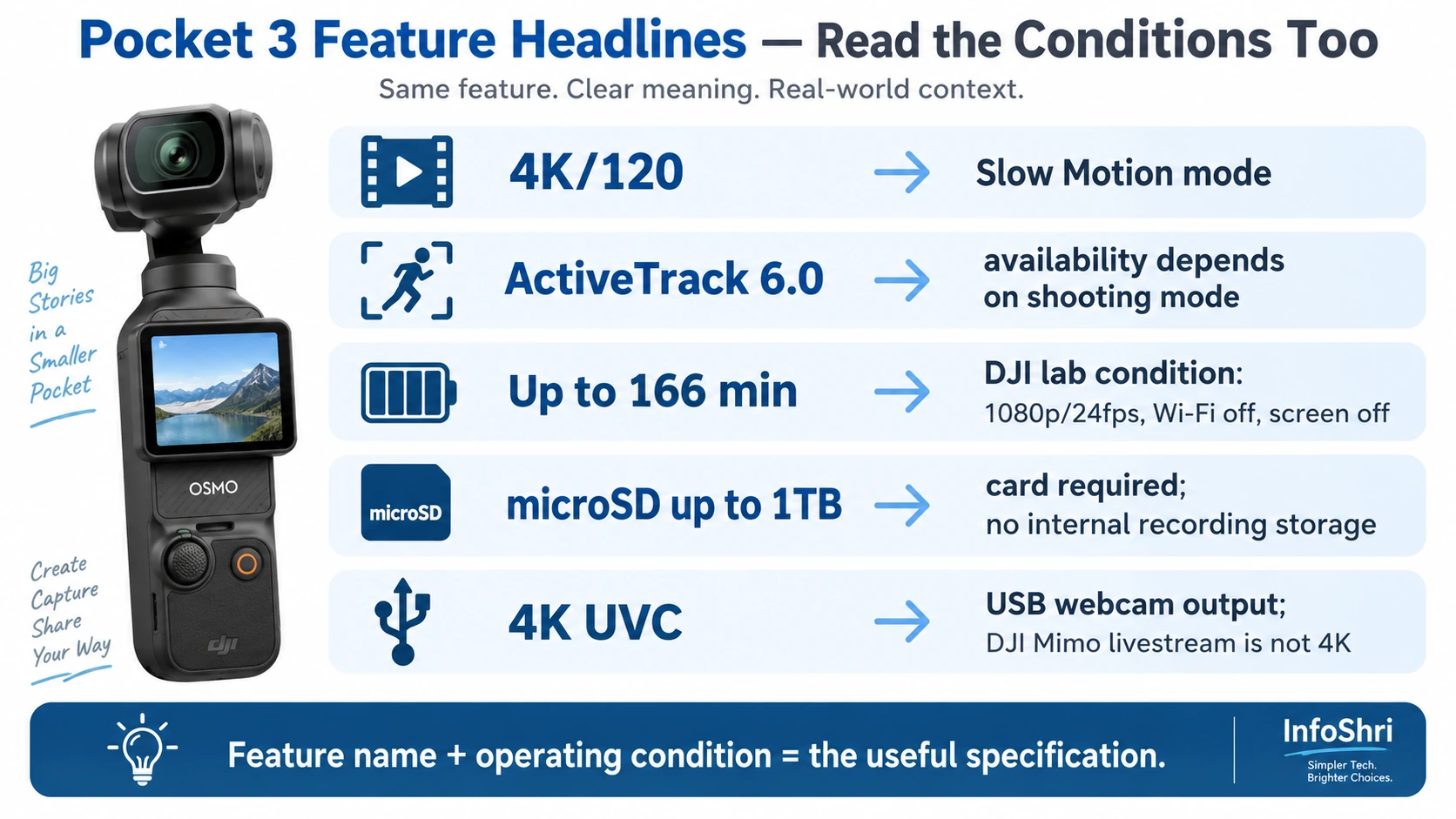
4K120 है—but Slow Motion में।
ActiveTrack है—but हर mode में नहीं।
40mm mode है—but ActiveTrack और very-high ISO के बिना।
166-minute battery figure है—but 1080p24, screen/Wi-Fi-off lab condition में।
1TB storage support है—but memory card खुद लगाना पड़ेगा।
Webcam 4K हो सकता है—but Mimo livestream 4K नहीं है।
जब ये conditions साथ समझ आती हैं, तभी specifications वास्तव में useful information बनती हैं। और यही Pocket 3 को समझने का सही तरीका है: feature का नाम नहीं, feature की condition और limitation भी पढ़िए।
Sources
- DJI — Osmo Pocket 3 Specifications
- DJI — Osmo Pocket 3 Product Page
- DJI — Osmo Pocket 3 FAQ
- DJI — Osmo Pocket 3 User Manual v1.0
- DJI — Osmo Pocket 3 Release Notes
- DJI Support — Osmo Pocket 3 Livestreaming Guide
- DJI Support — Osmo Pocket 3 Wireless Microphone Compatibility
- DJI Support — Osmo Pocket 3 Tracking Troubleshooting
- DJI Support — Osmo Pocket 3 Webcam Use
- DJI — Osmo Pocket 3 Downloads
- DJI — Osmo Pocket 3 Support
- DJI Newsroom — Osmo Pocket 3 Launch Information
- DJI Store — Handheld / Pocket Family Listing
- DJI India Shop — Osmo Pocket 3 Product Listing
- TechRadar — DJI Osmo Pocket 3 Review
- CineD — DJI Osmo Pocket 3 Review for Professional Documentary Work
- Digital Camera World — DJI Osmo Pocket 3 Review
- PetaPixel — DJI Osmo Pocket 3 Review
- Tom's Guide — DJI Osmo Pocket 3 Review

Keep exploring