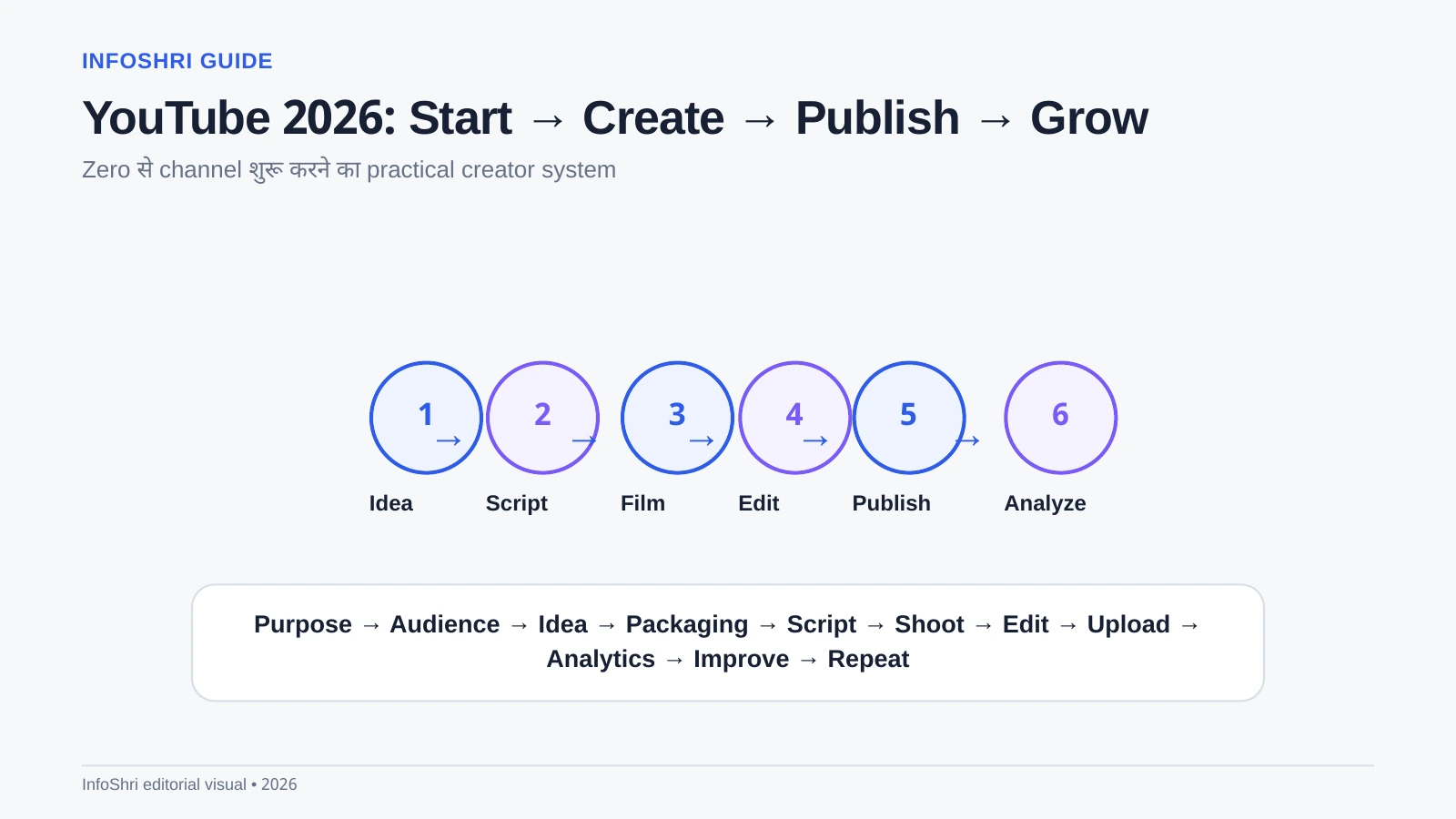
YouTube channel शुरू करना technically आसान है: Google account बनाइए, channel create कीजिए और video upload कर दीजिए। लेकिन 2026 में असली challenge channel बनाना नहीं, ऐसा repeatable system बनाना है जिसमें सही audience, useful ideas, clear packaging, अच्छा video, honest promotion और analytics-based improvement एक साथ काम करें। यही इस guide का focus है।
यह guide complete beginners के लिए है—ऐसे लोगों के लिए भी जिन्होंने कभी video upload नहीं किया, expensive camera नहीं है, full-time creator नहीं हैं, Hindi/Hinglish में काम करना चाहते हैं, या India से global audience target करना चाहते हैं। Technical terms जहाँ आएँगे, उनका simple meaning साथ में समझाया गया है।
Quick answer: अगर आज zero से YouTube शुरू करना हो तो क्या करें?
पहले तय करें कि channel किसके लिए है और viewer को क्या मिलेगा। फिर 3–5 content pillars चुनें, कम-से-कम 30 video ideas की bank बनाएं, हर video का title/thumbnail promise पहले सोचें, simple script लिखें, available phone/camera से साफ audio और light में shoot करें, unnecessary editing हटाएँ, truthful thumbnail बनाएं, upload के बाद impressions/CTR/retention/traffic source देखें और अगली video में एक specific improvement करें।
Growth का useful mental model यह है: Idea → Packaging → Content → Publish → Analytics → Improve → Repeat। कोई single hack इसका replacement नहीं है।
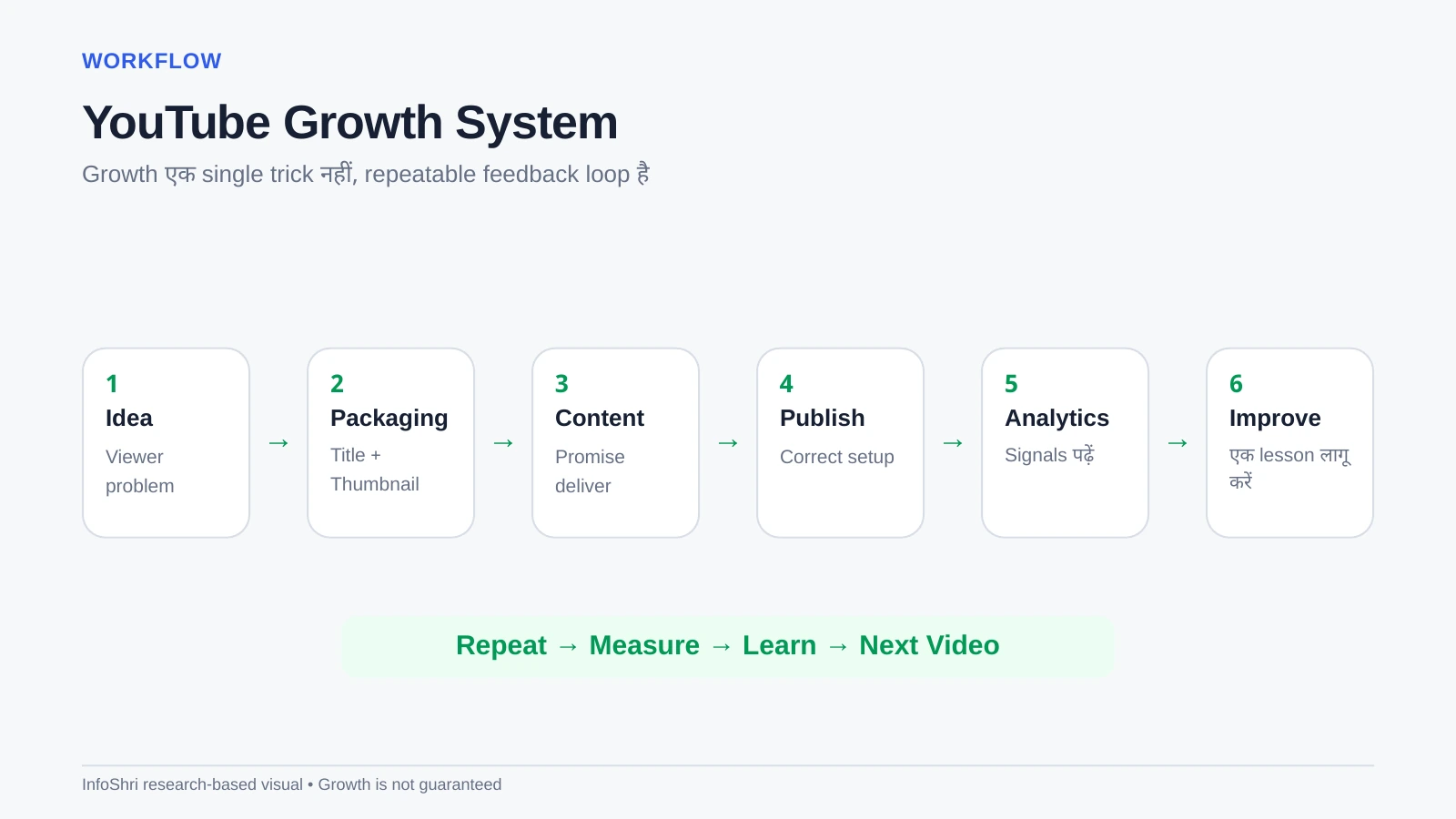
इस guide का research आधार क्या है?
इस article में Vanessa Lau की January 2026 training video “How to START & GROW on YouTube in 2026” को practical framework source की तरह use किया गया है। Platform-specific rules—जैसे monetization, analytics terminology, Shorts, upload features, tags, A/B testing और policy—को creator advice से अलग रखा गया है। जहाँ official YouTube rules बदल सकते हैं, खरीद/प्रकाशन/monetization decision से पहले current YouTube Help या YouTube Studio wording verify करना sensible है।
1. क्या 2026 में YouTube शुरू करना बहुत late है?
नहीं, लेकिन “late नहीं है” का मतलब “easy है” नहीं होता। YouTube पर competition बहुत है, फिर भी हर दिन नए viewers नए questions, products, creators, hobbies और problems लेकर आते हैं। किसी topic पर लाखों videos होना demand का signal भी हो सकता है; असली सवाल यह है कि आप किस audience के लिए किस angle से useful या entertaining content बना सकते हैं।
Long-form videos search, browse और recommendations से months या years तक traffic पा सकती हैं। Shorts fast discovery दे सकते हैं। Live streams, posts और community features अलग use cases देते हैं। लेकिन कोई format automatic growth guarantee नहीं करता। New channel को viewer trust, packaging skill, on-camera clarity, editing judgement और consistent feedback loops build करने पड़ते हैं।
2. सही mindset: पहले 10 videos को परीक्षा नहीं, training समझें
Beginners अक्सर पहली 2–3 videos पर बहुत जल्दी verdict दे देते हैं: “views नहीं आए, niche खराब है” या “algorithm नए channel को push नहीं करता।” बेहतर approach है कि शुरुआती videos को skill-building experiments माना जाए। पहली video publishing सिखा सकती है, दूसरी audio, तीसरी thumbnail, चौथी hook, पाँचवीं pacing।
Patience का मतलब बिना strategy के months तक upload करना नहीं है। इसका मतलब है enough repetitions देना ताकि meaningful data और skill दोनों develop हों। Consistency का मतलब भी daily upload नहीं; sustainable production rhythm ज्यादा important है।
3. Channel क्यों शुरू कर रहे हैं?
Goal strategy तय करता है। Hobby channel, local business, personal brand, teaching channel, entertainment channel और affiliate-led product channel एक जैसी content strategy नहीं follow करेंगे।
- Hobby: enjoyment और community priority हो सकती है।
- Personal brand: expertise, trust और long-term reputation important है।
- Business: सही viewers और qualified leads raw views से ज्यादा valuable हो सकते हैं।
- Education: clarity, structure और search intent critical हैं।
- Entertainment: concept, emotion, personality और repeat viewing ज्यादा important हो सकते हैं।
- Portfolio/career: work quality और niche credibility focus हो सकता है।
Channel Purpose Template
मैं [किस audience] की मदद [किस problem/result] में [किस type के videos] के जरिए करता/करती हूँ, ताकि वे [desired outcome] पा सकें।
उदाहरण: “मैं Hindi-speaking beginner creators को budget-friendly cameras, audio और editing workflows समझाता हूँ ताकि वे बिना unnecessary खर्च के बेहतर videos बना सकें।”
4. Niche से पहले audience define करें
“Technology” niche नहीं, broad category है। “Beginner creator cameras in Hindi” ज्यादा useful positioning है क्योंकि viewer और problem clearer हैं। लेकिन ultra-narrow होना भी जरूरी नहीं। एक practical niche वह है जिसमें audience overlap हो और आपके पास कम-से-कम dozens of meaningful ideas हों।
One Viewer Profile Template
| Field | क्या लिखें? |
|---|---|
| Experience level | Complete beginner / intermediate / advanced |
| Main problem | इस समय सबसे बड़ी confusion क्या है? |
| Goal | Viewer किस result तक पहुँचना चाहता है? |
| Already knows | कौन-सी basics repeat करने की जरूरत नहीं? |
| Searches | वे YouTube पर किस तरह के questions type करते हैं? |
| Fear / objection | पैसा, समय, complexity, confidence या trust? |
| Desired outcome | Video देखने के बाद कौन-सा decision/action आसान होना चाहिए? |
5. Hindi, English, Hinglish या regional language?
Language को सिर्फ CPM/RPM rumor के आधार पर मत चुनें। आपकी strongest communication language और target audience ज्यादा important हैं। Hindi बड़ा India audience खोल सकती है; English global discoverability और professional niches में useful हो सकती है; Hinglish कई Indian creator/tech audiences के लिए natural है; regional languages में competition कम और trust strong हो सकता है।
एक language automatically ज्यादा कमाई देगी—ऐसा universal rule नहीं है। Revenue geography, niche, advertiser demand, season, viewer intent, video length, ad inventory और कई factors पर depend करता है।
6. Personal name या brand channel?
Consultant, coach, educator, speaker या personality-led creator के लिए personal name flexible हो सकता है। Review site, media brand, company या multi-author project के लिए topic/business brand ज्यादा scalable हो सकता है। कोई option universally superior नहीं है।
नाम simple, pronounceable और याद रखने योग्य रखें। Perfect logo पर weeks खर्च करने से बेहतर है कि channel promise clear हो।
7. Channel setup: basics सही रखें
Current YouTube interface समय के साथ बदल सकती है, इसलिए menu labels को permanent मानने के बजाय core tasks समझें: channel create करना, display name/handle set करना, profile image/banner लगाना, description लिखना, relevant links add करना, phone/feature verification complete करना और Home/Profile customization करना। Advanced features की availability account history/verification पर depend कर सकती है।
Banner में keyword stuffing न करें। Viewer को जल्दी समझ आना चाहिए कि channel किस बारे में है और किसके लिए है।
8. Content pillars कैसे चुनें?
Content pillars repeated topic buckets होते हैं। Example: creator-tech channel में Cameras, Audio, Editing Tools, AI Workflow और YouTube Growth पाँच pillars हो सकते हैं। Pillars ideas organize करते हैं और audience expectation clear रखते हैं।
Content Pillar Template
- Pillar 1: Core beginner problems
- Pillar 2: Product/tool decisions
- Pillar 3: How-to workflows
- Pillar 4: Mistakes / troubleshooting
- Pillar 5: Experiments / trends / advanced topics
9. अच्छे YouTube video ideas कहाँ से आएँगे?
Idea discovery और idea validation अलग steps हैं। Discovery के लिए YouTube search suggestions, competitor channels, comments, Reddit/community discussions, Google searches, customer questions, support forums, your own analytics और YouTube Studio के current idea/Ask Studio tools useful हो सकते हैं। लेकिन किसी tool ने idea suggest कर दिया, इसका मतलब वह आपके audience के लिए automatically अच्छा नहीं है।
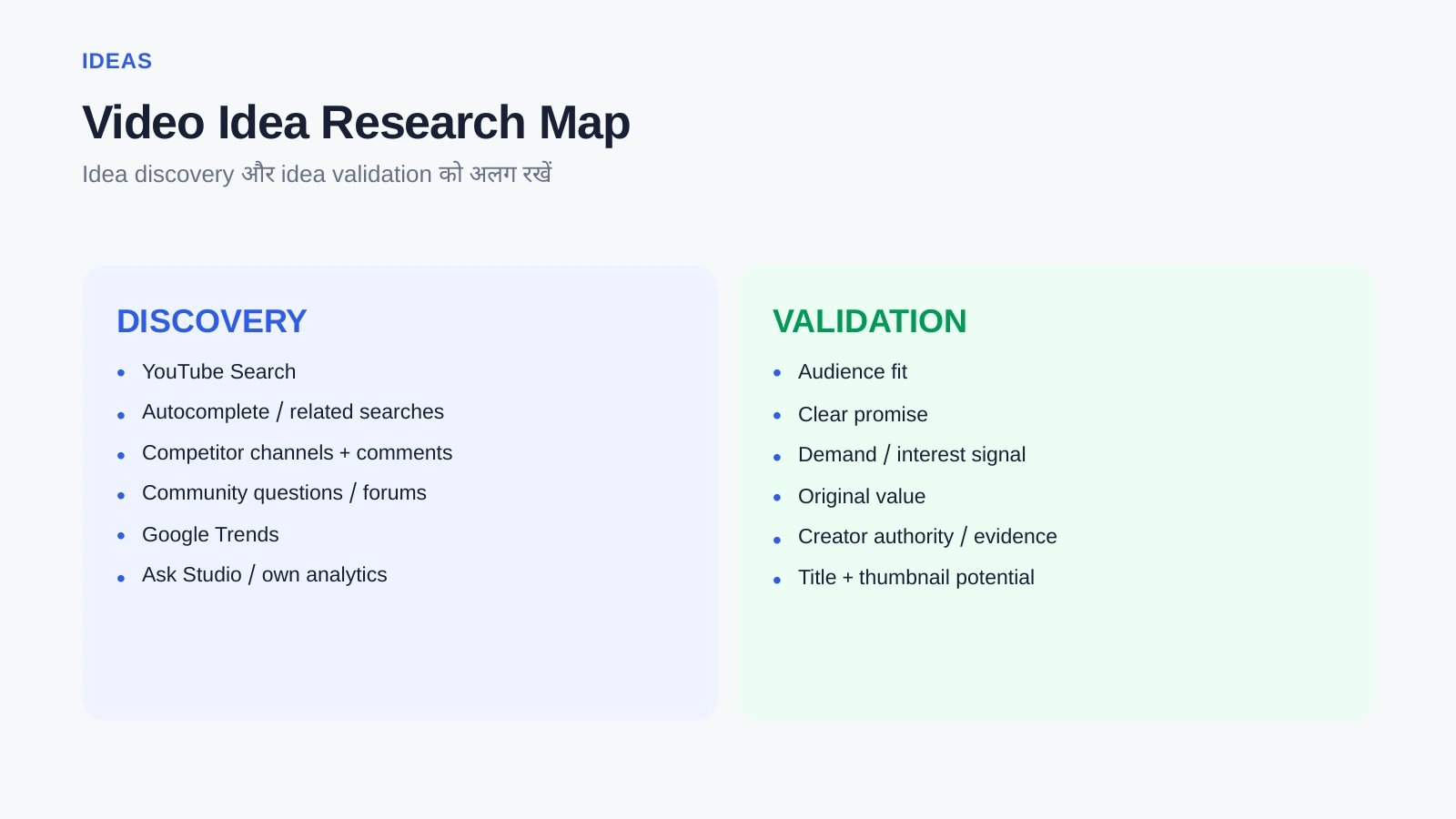
Video Idea Bank Template
| Idea | Viewer problem | Intent | Proof/demand | Your angle |
|---|---|---|---|---|
| Idea title | क्या problem solve? | Search / Browse / Comparison / Story | Comments, searches, competitor demand | क्या नया/clearer देंगे? |
10. Competitor research करें, copy नहीं
Competitors से topics, viewer questions, title patterns, thumbnail clarity, comments और outdated information सीखें। Script, thumbnail composition या title word-for-word copy न करें। अच्छा competitor research यह पूछता है: viewers को क्या चाहिए, existing videos कहाँ incomplete हैं, और मैं क्या useful नया दे सकता हूँ?
11. First 30 video ideas कैसे बनाएं?
एक practical mix बनाइए: beginner questions, proven demand topics, comparisons, problem-solving, experiments और personal/expert perspective। लक्ष्य सिर्फ 30 random titles नहीं; 30 ऐसे concepts जिनसे आपकी audience promise repeatedly मजबूत हो।
12. Idea validate कैसे करें?
Video Validation Checklist
- क्या viewer problem/desire clear है?
- क्या target audience तुरंत समझ आएगी?
- क्या title promise truthful है?
- क्या thumbnail उस promise को visually strengthen कर सकती है?
- क्या topic पर current demand या recurring interest का कोई signal है?
- क्या आप existing videos से clearer, fresher, deeper या more practical value दे सकते हैं?
- क्या आपके पास enough evidence/examples हैं?
- क्या video बनाने की effort expected value के proportion में है?
13. Packaging-first thinking: title और thumbnail पहले क्यों सोचना useful है?
Video बनाने से पहले यह clear होना चाहिए कि viewer को click क्यों करना चाहिए। इसका मतलब misleading clickbait नहीं। Packaging-first का मतलब है: पहले promise define करें, फिर उसी promise को fulfil करने वाली script बनाएं। इससे beautiful लेकिन unclear video बनाने का risk घटता है।
14. Title strategy
एक अच्छा title value communicate करता है, relevant curiosity पैदा करता है और video से match करता है। Search-friendly title explicit query को answer कर सकता है; browse-friendly title context और curiosity पर ज्यादा depend कर सकता है। हर video को keyword list बनाना जरूरी नहीं।
Tags आज title, thumbnail और description जितने important discovery lever नहीं हैं। Official YouTube guidance tags को mainly misspellings/extra context के लिए limited role देती है; description में excessive tags डालना spam policy issue बन सकता है।
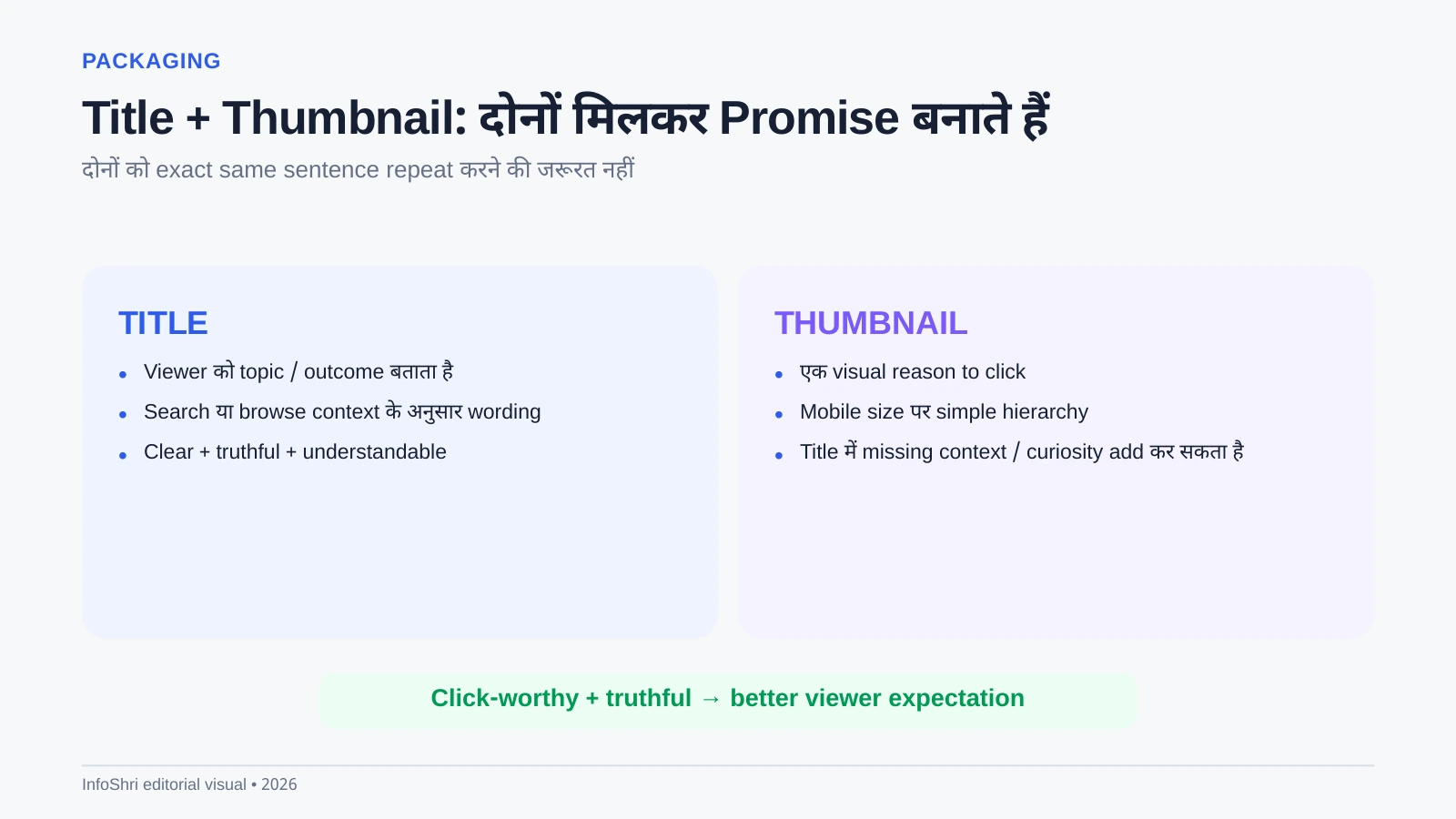
15. Title और Thumbnail एक ही बात repeat न करें
अगर title लिखता है “Best Camera Under ₹50,000?” तो thumbnail सिर्फ वही sentence giant text में repeat न करे। Thumbnail visual reason-to-click दे सकती है—दो cameras, clear winner/decision tension, meaningful visual contrast। Title promise और thumbnail visual context एक-दूसरे को complement करें।
16. YouTube A/B testing का सही use
YouTube Studio में title/thumbnail testing features eligible creators के लिए available हो सकते हैं। Test का purpose clickbait बढ़ाना नहीं, different packaging options के real viewer response को compare करना है। Feature availability account/region/interface के अनुसार बदल सकती है; current official documentation देखें।
17. Full script, bullet script या outline?
Beginner को अक्सर full script या detailed bullet outline helpful लगता है क्योंकि rambling कम होती है। Conversational expert bullet points से बेहतर बोल सकता है। Interview/podcast पूरी script से unnatural लग सकता है। Format content और presenter skill के अनुसार चुनें।
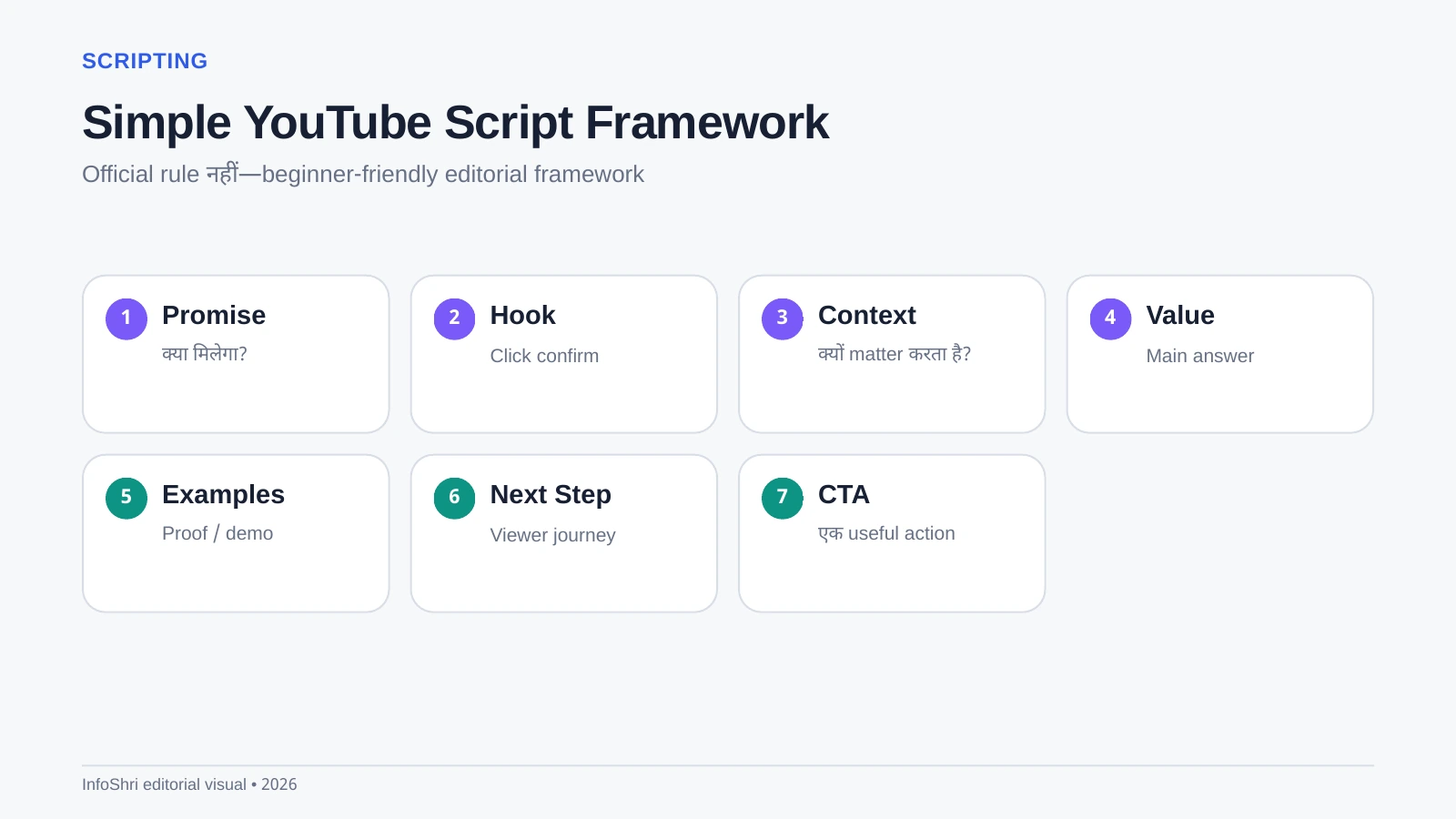
18. Complete YouTube Script Framework
- Promise: video किस result का वादा कर रही है?
- Hook: viewer को तुरंत relevance क्यों महसूस हो?
- Context: problem/decision को minimal background दें।
- Value: main steps, explanation, evidence.
- Examples/Proof: abstract advice को concrete बनाएं।
- Next step: viewer अब क्या करे?
- CTA: relevant subscribe/comment/next-video action.
Script Outline Template
Title promise: ___
Hook: ___
Problem/context: ___
Main point 1: ___
Main point 2: ___
Main point 3: ___
Example/proof: ___
Viewer action: ___
CTA: ___
19. First 30–60 seconds क्यों critical हैं?
Opening में viewer click के बाद verify करता है कि video सही है या नहीं। Long logo animation, unrelated life story या repeated intro drop-off बढ़ा सकती है। Hook का काम hype नहीं; promise confirm करना, relevance establish करना और viewer को आगे की structure समझाना है।
Hook Template
“अगर आप [specific viewer] हैं और [specific problem] से परेशान हैं, इस video में मैं [clear outcome] दिखाऊँगा—और पहले [important misconception] clear कर लेते हैं।”
20. Retention कैसे improve करें?
Retention tricks से ज्यादा clarity matter करती है। Repetition हटाएँ, examples जल्दी दें, visual changes natural रखें, progress दिखाएँ, B-roll वहाँ use करें जहाँ explanation आसान होती है, और unnecessary pauses/side stories trim करें। “Pattern interrupt” सिर्फ flashy zoom नहीं; meaningful chart, example, screen, prop या scene change भी हो सकता है।
21. CTA कहाँ रखें?
हर 30 seconds में subscribe मांगना जरूरी नहीं। CTA viewer journey serve करे। Tutorial के बीच relevant tool link, end पर next video, या genuinely useful question comment CTA हो सकता है।
22. Beginner equipment: वास्तव में क्या चाहिए?
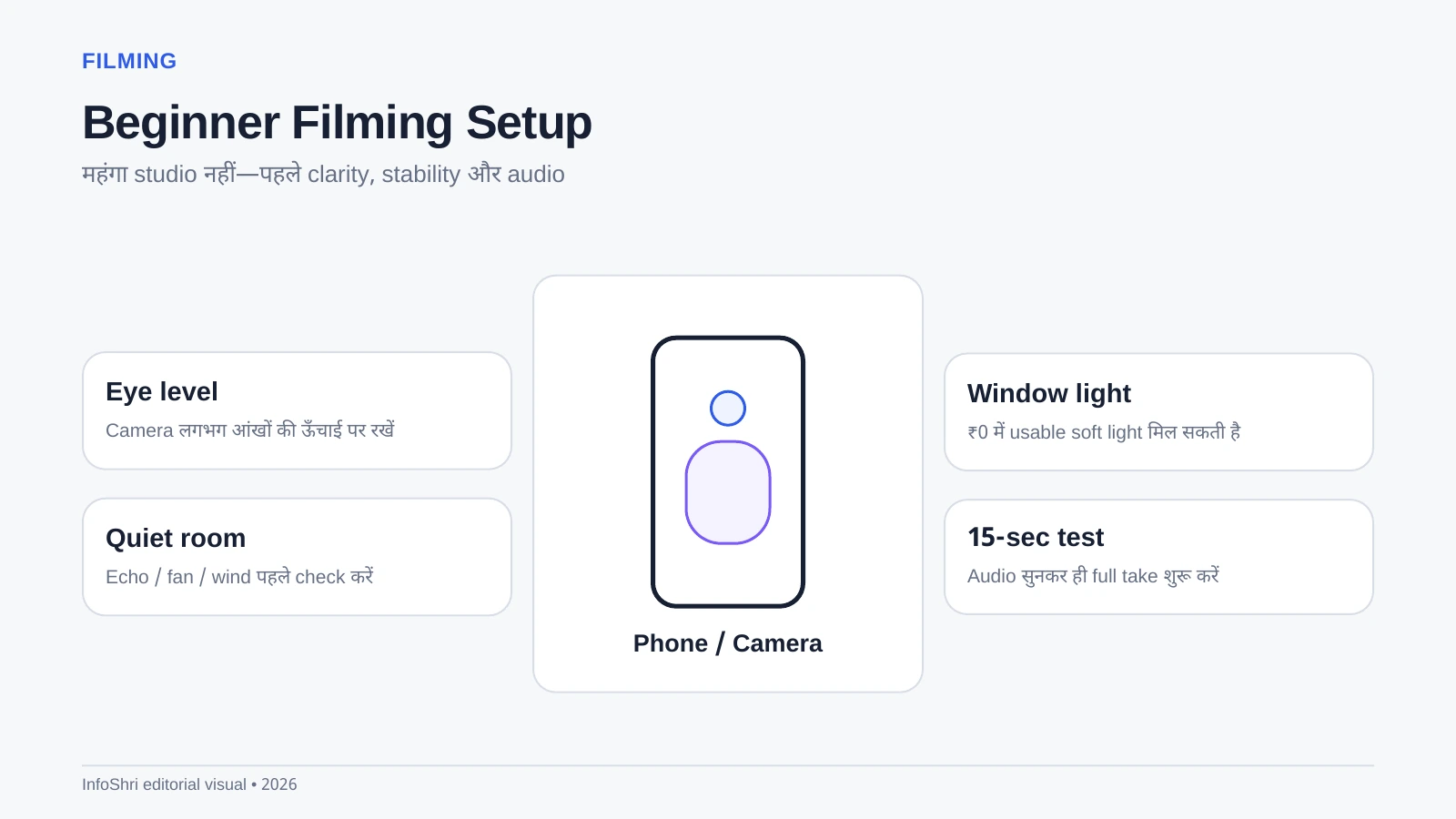
Minimum setup चार चीजें हैं: recording device, understandable audio, stable framing और enough light। Smartphone से excellent YouTube start किया जा सकता है। Camera खरीदना तब useful है जब phone की कोई specific limitation—low light, lens, autofocus, recording reliability, heat, storage, battery या workflow—आपको regularly रोकती है।
₹0 / Use What You Have Setup
- Existing phone
- Window light
- Quiet room
- Books/cheap stand for stability
- Free/low-cost editing software
Upgrade priority
कई beginners के लिए first paid upgrade camera नहीं बल्कि audio होता है। Viewer average video quality tolerate कर सकता है, लेकिन लगातार unclear audio जल्दी थका देती है। इसके बाद light/stability और फिर camera जरूरत के अनुसार।
23. Phone vs dedicated camera
Phone पर्याप्त है अगर अच्छी light, controlled framing और simple workflow है। Dedicated camera useful होता है जब better lens options, longer recording, low-light control, background separation, manual controls या professional connections matter करें। “Serious creator बनने के लिए camera जरूरी है” सही नहीं है।
24. Audio: expensive mic से पहले room ठीक करें
Mic जितना करीब speaker के पास होगा, usually voice उतनी clearer होगी। Echo वाले खाली room में expensive mic भी खराब सुन सकता है। Curtains, bed, soft furnishings और mic distance often bigger improvement देते हैं।
25. Lighting का simple rule
Face पर enough soft light रखें। Window एक excellent free source है। Window को पीछे रखने पर face dark हो सकता है; side/front angle ज्यादा flattering हो सकता है। Cheap ring light हर situation में best नहीं; larger soft source अक्सर natural दिखता है।
26. Filming: first-time creator checklist
- Lens साफ करें।
- Camera eye level के आसपास रखें।
- Background distracting न हो।
- Audio test रिकॉर्ड करें और headphones से सुनें।
- Exposure/focus check करें।
- Airplane/Do Not Disturb mode जहाँ practical हो enable करें।
- Main take से पहले 20–30 second test clip देखें।
- Important footage का backup plan रखें।
Shot List Template
A-roll intro → Main explanation sections → Product/screen close-ups → B-roll examples → Before/after → CTA/end screen setup.
27. B-roll क्या है?
A-roll आपकी main speaking footage है। B-roll supporting visual है—product close-up, screen recording, location shot, chart, hands-on action। B-roll viewer को चीज समझने में मदद करे; सिर्फ video busy दिखाने के लिए हर sentence पर random footage डालना जरूरी नहीं।
28. Editing: वास्तव में क्या जरूरी है?
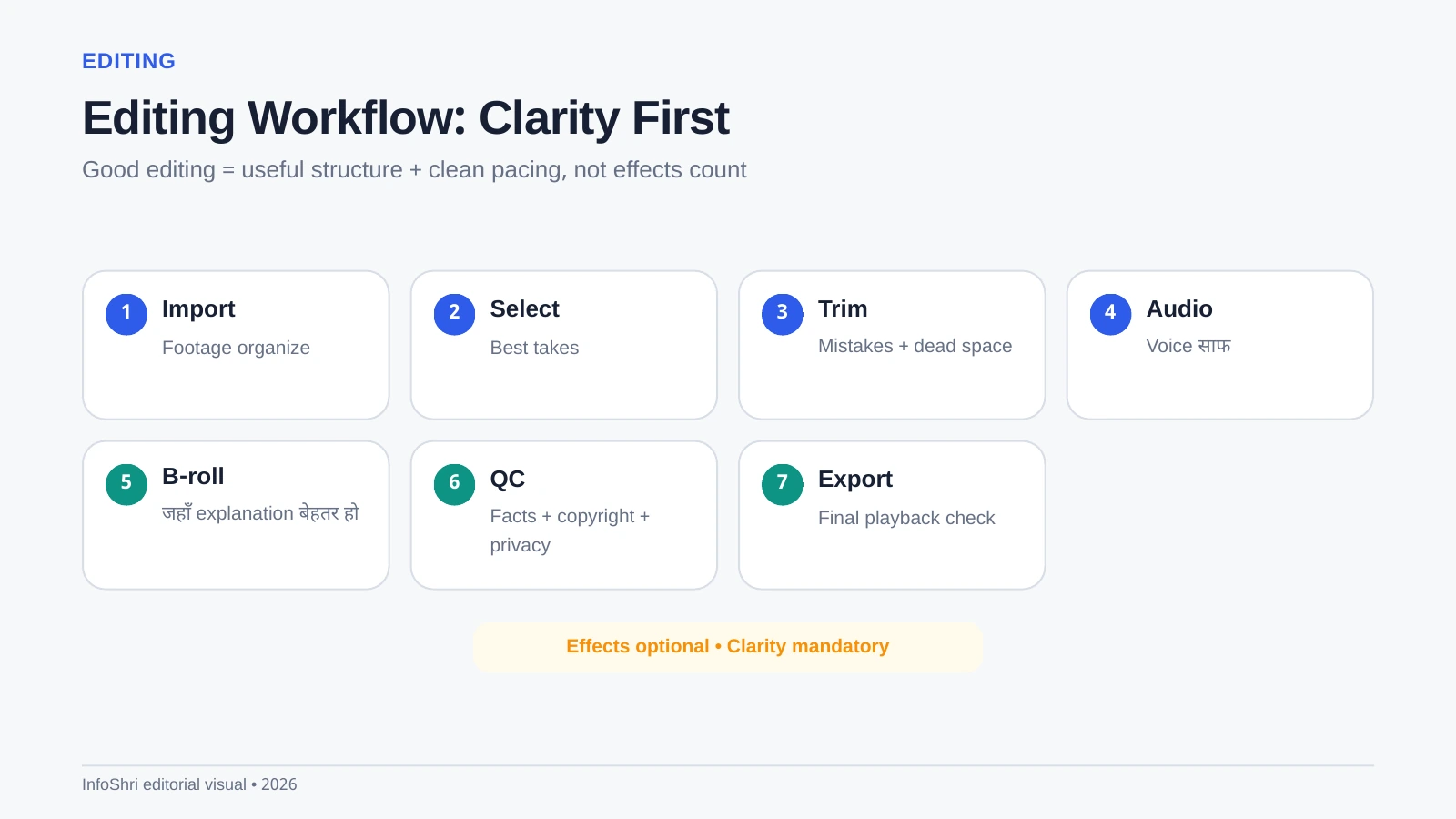
Beginner editing का goal Hollywood effects नहीं; confusion हटाना है। पहले गलत takes और dead space trim करें, फिर audio clean करें, आवश्यक B-roll/text add करें, pacing check करें, music बहुत low रखें और final export से पहले पूरा video देखें।
29. Editing software: कौन-सा चुनें?
Free/low-cost options में YouTube Create (जहाँ compatible), DaVinci Resolve और platform-native/mobile editors useful हो सकते हैं। Premiere Pro, Final Cut Pro और paid tools advanced workflows के लिए हैं। Software वही चुनें जिसे आपका device reliably चला सके और जिसकी सीखने की cost आपके production level के अनुरूप हो।
India में किसी app की regulatory/store availability बदल सकती है; इसलिए old recommendation को permanent न मानें।
30. AI को assistant की तरह use करें, autopilot factory की तरह नहीं
AI idea clustering, outline, transcript cleanup, title variations, research organization, captions और repetitive editing assistance में मदद कर सकता है। लेकिन mass-produced, repetitive, low-value content monetization risk बन सकता है। YouTube की monetization policy originality और authentic value पर focus करती है; “AI use किया = demonetized” भी सही नहीं और “AI से unlimited passive income” भी सही नहीं।
31. Thumbnail strategy
Mobile screen पर thumbnail बहुत छोटी दिखती है। एक clear subject, strong visual hierarchy, readable limited text और truthful promise रखें। पाँच अलग messages, tiny screenshots और long sentences thumbnail को कमजोर बना सकते हैं।
Thumbnail Brief Template
Viewer emotion: ___
Main visual: ___
Supporting visual: ___
Text (optional, short): ___
What title says: ___
What thumbnail adds: ___
32. Upload करते समय क्या matter करता है?
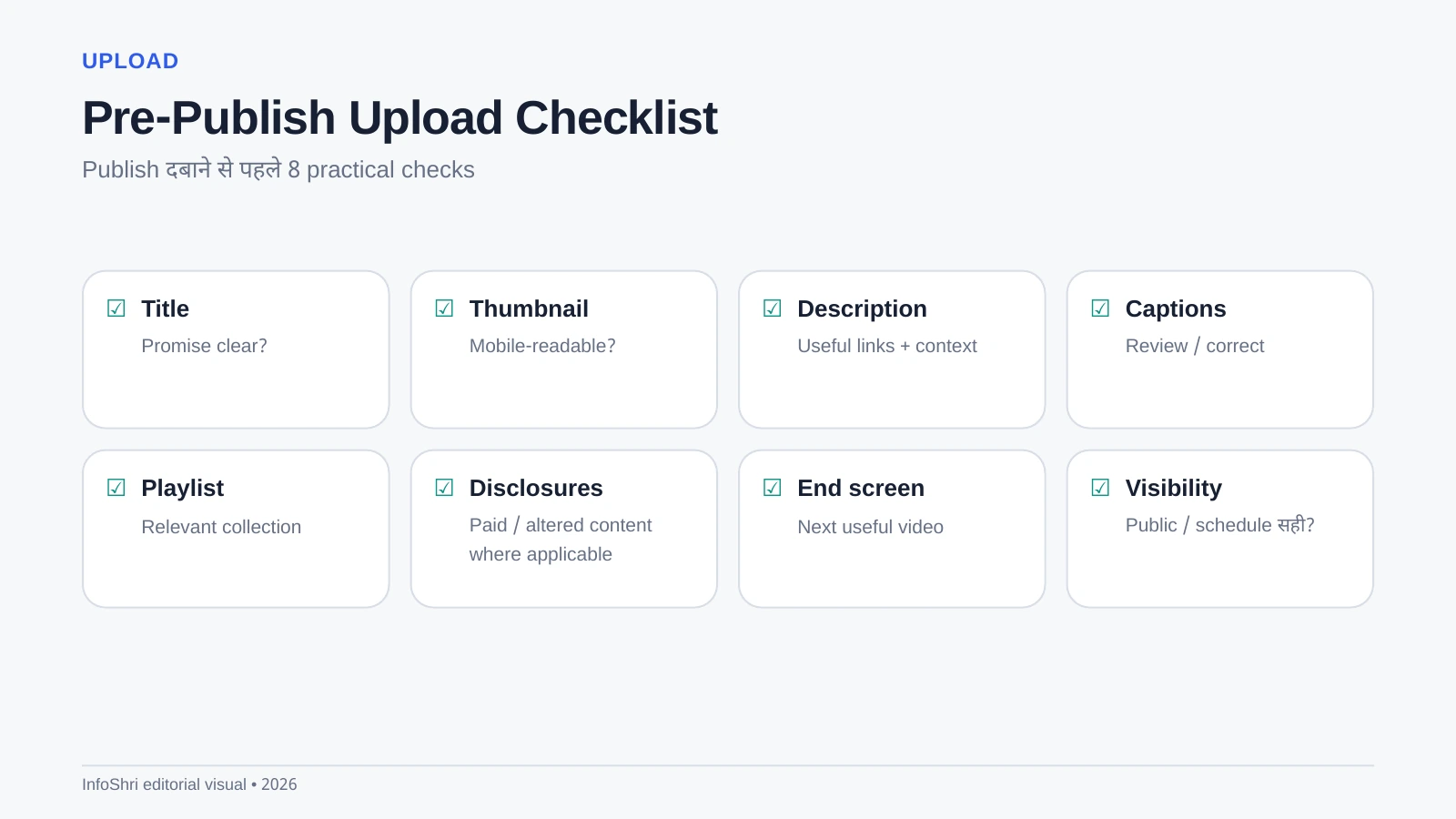
Title, thumbnail, description, audience setting, captions, playlist, disclosures, visibility/schedule, end screen और where relevant cards/related-video connections check करें। Exact Studio interface evolve होती रहती है, इसलिए किसी old screenshot को permanent map न मानें।
33. Description और SEO
Description के पहले lines में viewer के लिए useful context दें। Natural topic wording use करें; keyword stuffing न करें। Search के लिए title/content match, viewer satisfaction, topical relevance और actual content quality महत्वपूर्ण हैं। Tags को magic SEO lever न मानें।
34. Chapters कैसे बनाएं?
Manual chapters के लिए पहला timestamp 00:00 से शुरू होना चाहिए, कम-से-कम तीन timestamps हों और each segment sufficient length रखे। Chapters long tutorials/reviews में navigation बेहतर करते हैं। Current eligibility/feature requirements YouTube Help में verify करें।
35. Captions
Auto captions Hindi सहित कई languages में available हो सकती हैं, लेकिन names, technical terms और mixed Hinglish गलत transcribe हो सकते हैं। Important video में captions review करना accessibility और clarity दोनों के लिए useful है।
36. End screens और cards
End screen viewer को next logical video तक ले जाने का strong tool है। Random “subscribe” से ज्यादा useful next-video recommendation अक्सर session continue करा सकती है। Cards को interruption नहीं, contextual aid की तरह use करें। Made-for-Kids content पर कुछ features restricted हो सकते हैं।
37. Complete Upload Checklist
- Final video पूरा play करके देखा?
- Audio clipping/noise acceptable?
- Title promise accurate?
- Thumbnail mobile-size पर clear?
- Description useful?
- Required disclosures present?
- Copyright/music rights okay?
- Captions reviewed?
- Playlist selected?
- End screen set?
- Visibility/schedule correct?
- Important links working?
38. Upload frequency: कितनी videos जरूरी हैं?
कोई universal “दो videos per week” rule नहीं। Weekly, fortnightly या multiple uploads—जो quality और life के साथ sustainable हो वही बेहतर है। Beginners को enough repetitions चाहिए, लेकिन mass-producing weak videos growth strategy नहीं है।
39. YouTube recommendation system को simple भाषा में समझें
YouTube अलग viewers के लिए अलग videos predict करता है। Official explanations performance और personalization के multiple signals की बात करती हैं—appeal, engagement, satisfaction, viewing history, topic interest, competition और context जैसे factors matter कर सकते हैं। इसलिए “algorithm सिर्फ CTR और watch time देखता है” oversimplification है।
Goal algorithm को trick करना नहीं; सही viewer के लिए click-worthy और satisfying video बनाना है।
40. Impressions क्या हैं?
जब YouTube eligible surfaces पर आपका thumbnail दिखाता है, वह impression count हो सकता है। हर external view या हर screen exposure impression definition में नहीं आता। Impressions कम हैं तो topic demand, audience fit, competition, channel history या distribution context investigate करना पड़ सकता है।
41. CTR क्या है?
CTR यानी click-through rate—impression देखने वालों में कितने लोगों ने click किया। High या low CTR का कोई single universal “good” number नहीं; traffic source, audience, topic और sample size बदलते हैं। CTR को context में देखें।
42. Audience retention क्या है?
Retention बताती है viewers video के अलग moments तक कितनी देर टिके। Early drop hook/promise mismatch का signal हो सकता है; mid-video drop repetition या confusing section का संकेत हो सकता है। लेकिन graph को diagnosis clue की तरह देखें, guaranteed cause की तरह नहीं।
43. Average View Duration और Average Percentage Viewed
Average View Duration बताता है average viewer ने कितने minutes/seconds देखे। Average Percentage Viewed बताता है video का average कितना प्रतिशत देखा गया। दोनों useful हैं; 2-minute और 40-minute video को एक ही percentage expectation से compare करना गलत हो सकता है।
44. Traffic sources
Browse, Suggested, YouTube Search, Shorts feed, External, Channel pages और अन्य sources अलग viewer contexts बताते हैं। Search-heavy video और Home-heavy video की packaging/data को same way judge न करें।
45. New, casual और regular viewers
Audience segmentation यह समझने में मदद करती है कि लोग पहली बार आ रहे हैं या repeatedly लौट रहे हैं। लेकिन “regular viewers count” कोई direct ranking switch नहीं। इसे audience relationship signal की तरह use करें।
46. 24 hours, 7 days, 28 days review
24 hours: technical issues, early CTR/retention patterns, comments.
7 days: traffic sources, packaging, audience response.
28 days: long-tail search/suggested performance, subscriber impact, whether topic deserves follow-up.
Small sample पर panic न करें। 40 impressions और 4,000 impressions की certainty same नहीं होती।
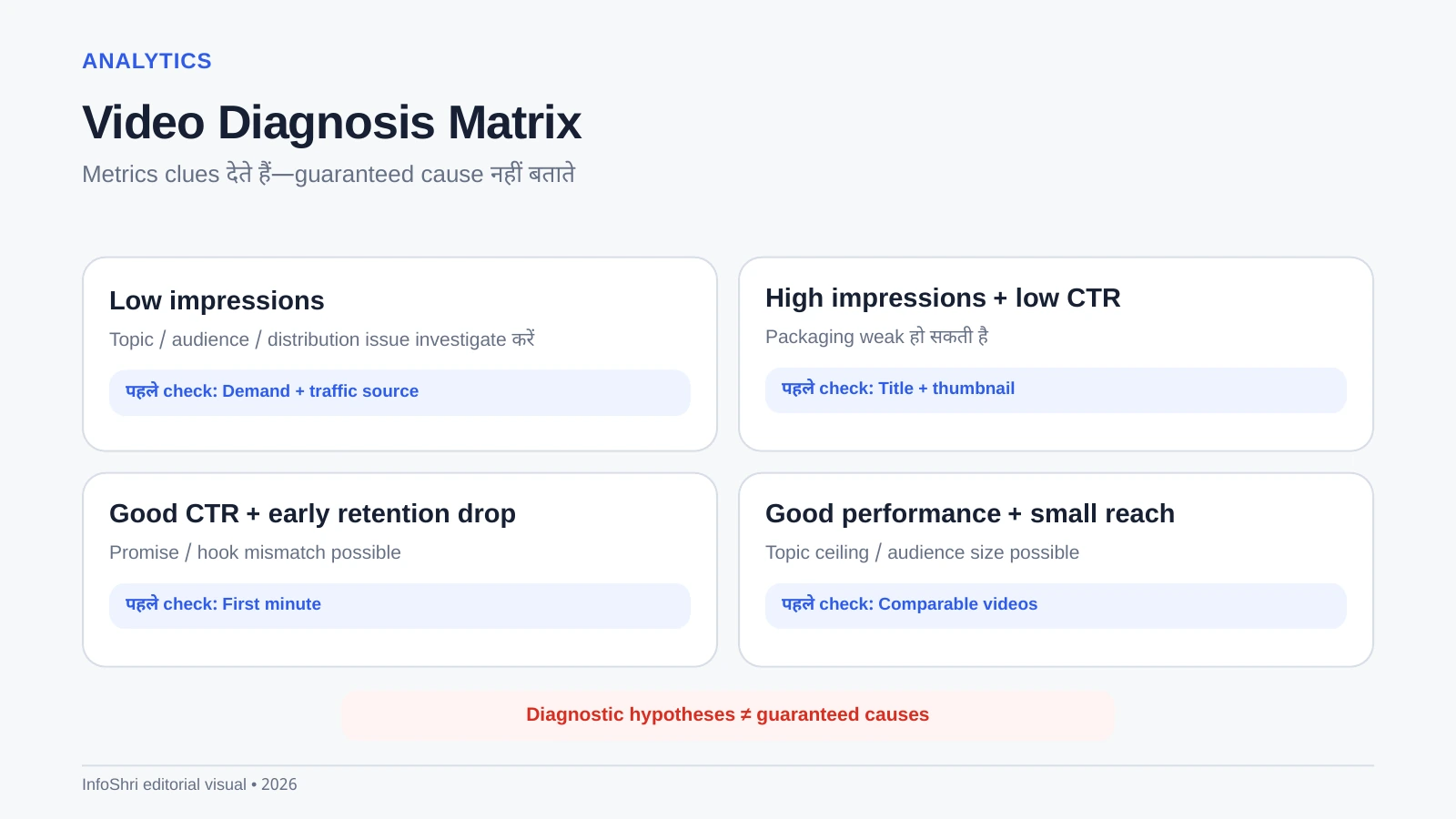
47. Video fail हुई? यह diagnosis table use करें
| Pattern | क्या investigate करें? |
|---|---|
| Low impressions | Topic size, audience fit, competition, distribution context |
| High impressions + low CTR | Title/thumbnail clarity, relevance, promise |
| Good CTR + early retention drop | Hook, misleading packaging, slow intro, content mismatch |
| Good retention + small reach | Topic ceiling, audience size, channel fit, time |
| Views but weak returning audience | Topic consistency, next-video pathway, channel promise |
48. Title/thumbnail कब बदलें?
Enough data के बिना हर few hours thumbnail बदलना learning खराब कर सकता है। YouTube का A/B testing feature available हो तो structured testing बेहतर है। Packaging clearly weak दिखे तो change करें, लेकिन arbitrary “24 hours बाद जरूर बदलो” rule न बनाएं।
49. Low-view video delete करना जरूरी है?
नहीं। Video inaccurate, harmful, brand-conflicting या rights issue वाली है तो remove/private करना sensible हो सकता है। सिर्फ कम views का मतलब automatic delete नहीं। Old evergreen videos future search/suggested traffic पा सकती हैं।
50. Shorts का role
Shorts discovery और fast experimentation के लिए useful हैं। Square/vertical Shorts length limits समय के साथ बढ़ी हैं और current platform rules check करने चाहिए। लेकिन Shorts viewers automatically long-form viewers नहीं बनते। Cross-format strategy तब strongest होती है जब audience intent overlap करे।
Shorts description/comments के plain URLs हमेशा clickable funnel नहीं देते; related-video feature जहाँ available हो, long-form connection के लिए ज्यादा useful हो सकता है।
51. Long-form और Shorts साथ डालने से algorithm confuse होता है?
Official YouTube guidance broadly यह नहीं कहती कि सिर्फ formats mix करने से channel punished होता है। Problem तब होती है जब audiences बिल्कुल अलग हों। Example: one channel में creator-camera reviews और unrelated comedy Shorts viewer expectations split कर सकते हैं। Format नहीं, audience mismatch ज्यादा important है।
52. Promotion बिना spam के
Relevant community, email list, Instagram, LinkedIn, WhatsApp group या forum पर video तभी share करें जब वह genuine question solve करती हो। “Please watch my video” spam low-quality traffic ला सकता है और trust hurt कर सकता है।
53. Repurposing
Long video से Shorts, Reel, article, newsletter या social post बनाना efficient है—लेकिन context adapt करें। हर platform पर same clip dump करना जरूरी नहीं।
54. Collaborations
Subscriber count से ज्यादा audience overlap देखें। दो छोटे creators जिनके viewers complementary हैं, large irrelevant creator से ज्यादा useful collaboration कर सकते हैं।
55. First 10 videos learning plan
- Video 1: publish process सीखें.
- Video 2: audio improve करें.
- Video 3: thumbnail clarity improve करें.
- Video 4: stronger hook.
- Video 5: tighter editing.
- Video 6: better B-roll/examples.
- Video 7: search/browse packaging experiment.
- Video 8: audience comments से topic.
- Video 9: analytics-based improvement.
- Video 10: best-performing pattern पर deliberate follow-up.
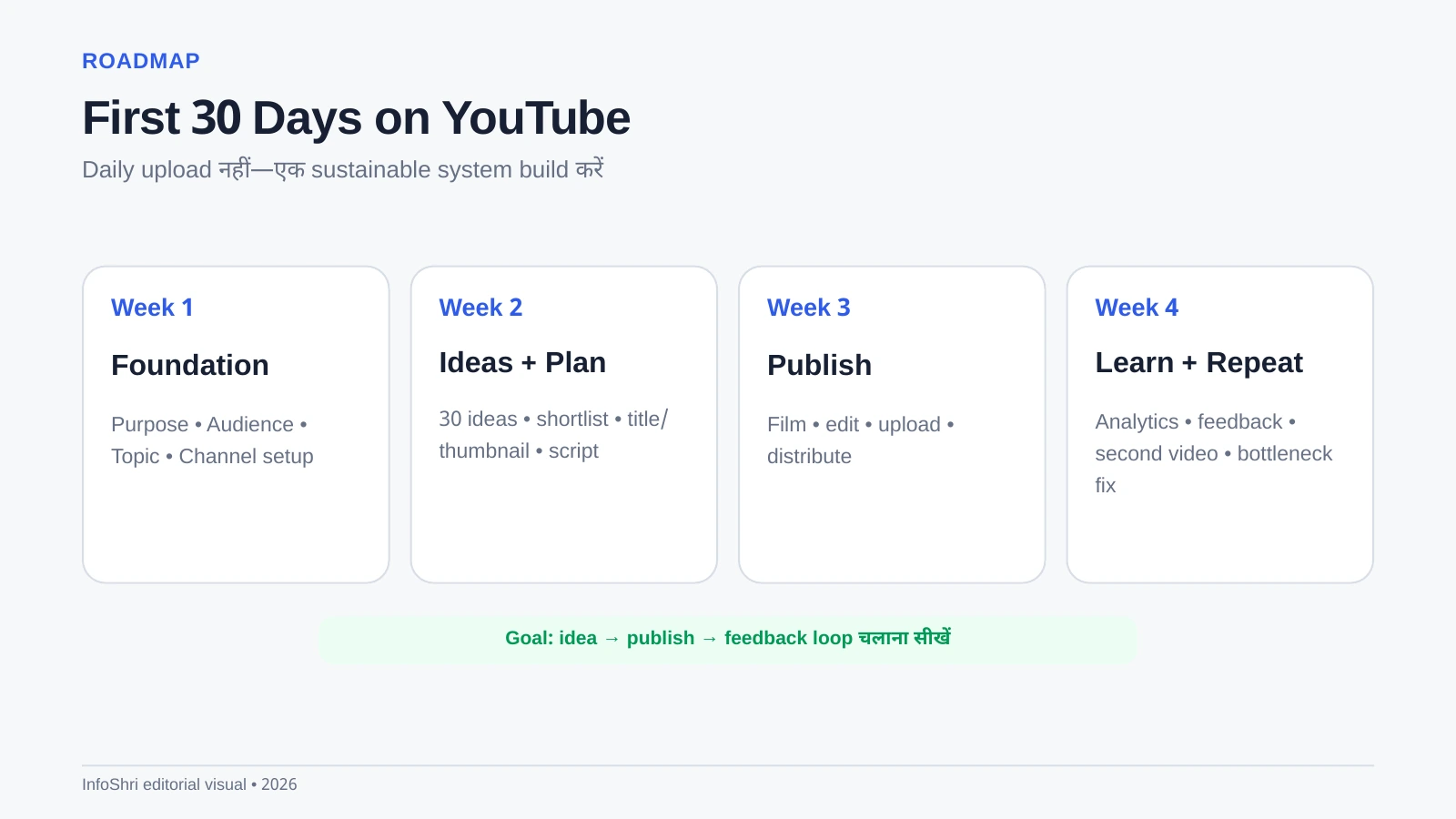
56. 30-Day Beginner Plan
Week 1: purpose, audience, niche, channel setup, 30 ideas.
Week 2: top ideas validate, titles/thumbnails, scripts, filming setup.
Week 3: first uploads, comments, basic analytics.
Week 4: repeat, compare, one workflow bottleneck fix करें.
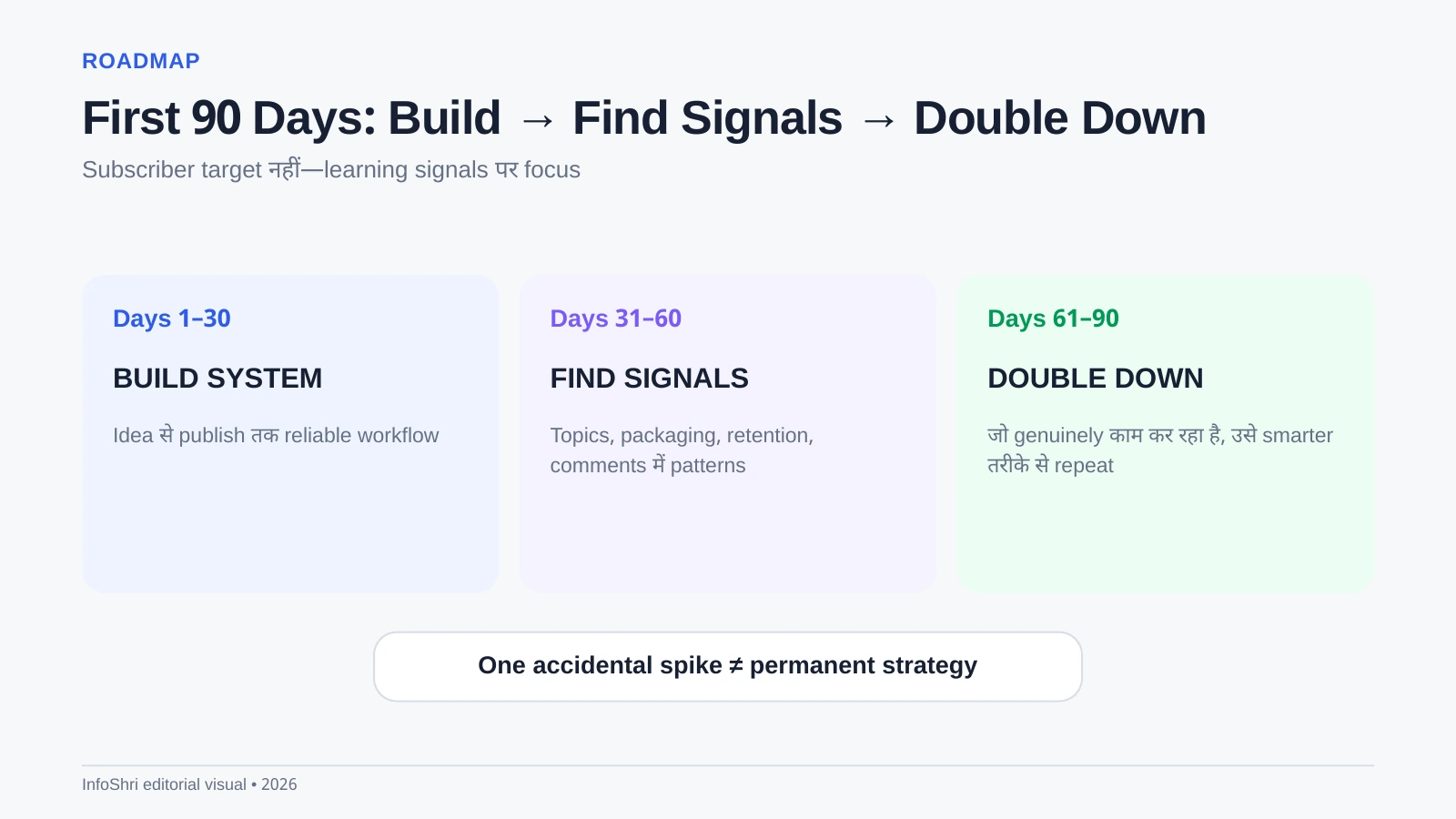
57. 90-Day Growth Plan
Days 1–30 — Build System: publishing habit, audio, packaging, editing basics.
Days 31–60 — Find Signals: कौन से topics, titles, traffic sources और hooks response दे रहे हैं?
Days 61–90 — Double Down: repeatable strengths पर focused follow-ups बनाएं, weak assumptions छोड़ें.
58. Job या studies के साथ sustainable workflow
Batching useful है: एक दिन research/ideas, एक दिन scripts, weekend filming, अलग editing block। Daily creator schedule copy न करें अगर आपके पास full-time job है। Sustainable cadence burnout से बचाती है।
59. Complete repeatable creator workflow
Idea → Research → Video Promise → Title Concept → Thumbnail Concept → Outline → Script → Shot List → Film → Backup → Edit → Quality Check → Thumbnail → Upload → Final Check → Publish → Promote → Analyze → Lessons → Next Video
60. YouTube Monetization 2026: Current rules
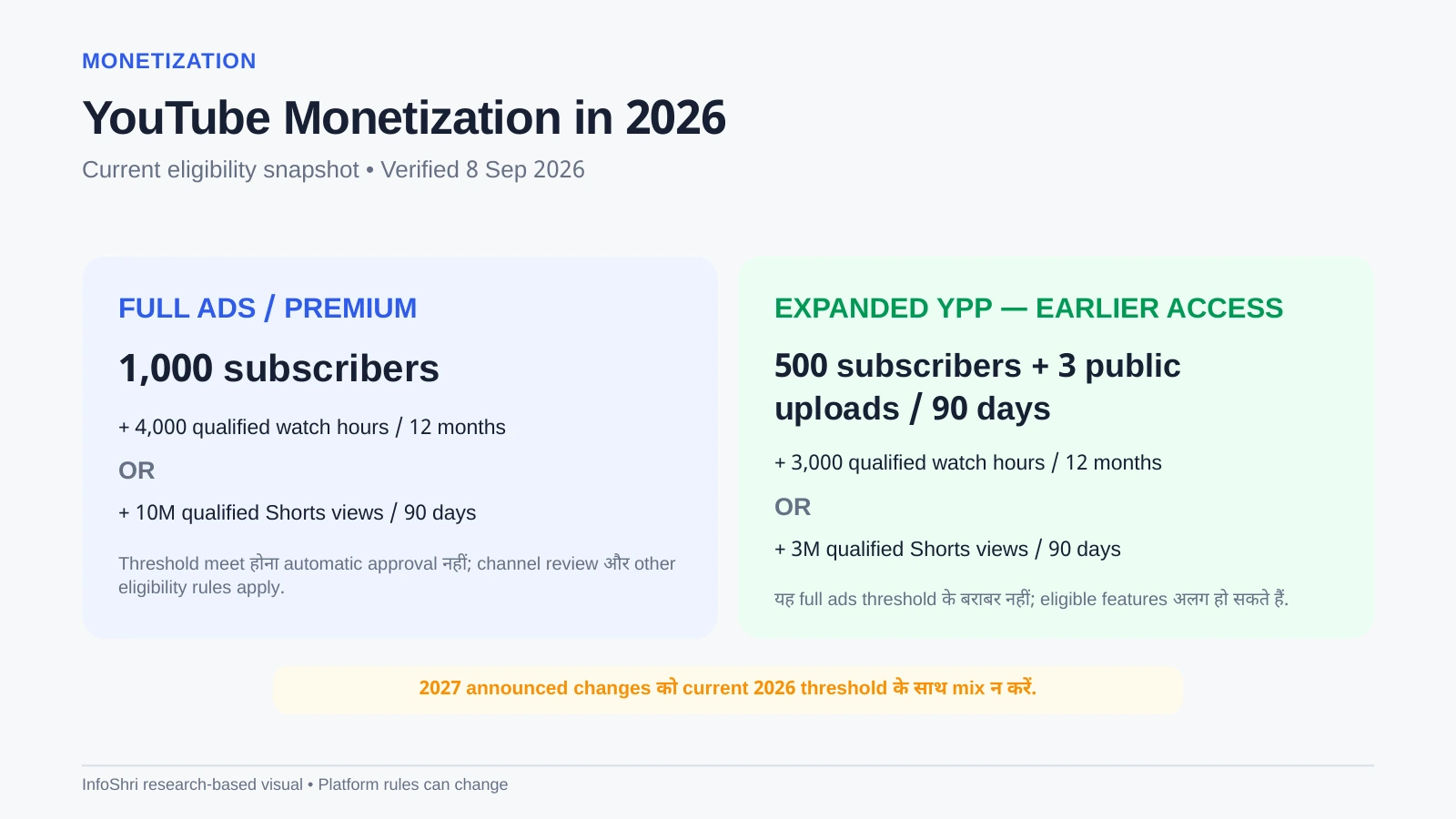
September 2026 में current official YPP framework broadly दो levels में समझना useful है। Expanded/earlier-access tier eligible markets में fan-funding/Shopping-type features के लिए lower threshold देता है; full ad/Premium revenue-sharing के लिए higher threshold लागू है। Eligibility threshold hit करना automatic approval नहीं—channel को policy review से गुजरना पड़ता है।
Current full-ad threshold: 1,000 subscribers + 4,000 qualified public watch hours in the previous 12 months या 10 million qualified public Shorts views in 90 days। Expanded YPP path: 500 subscribers + पिछले 90 दिनों में 3 valid public uploads + 3,000 qualified public watch hours in 12 months या 3 million qualified public Shorts views in 90 days, जहाँ feature/market eligible हो। India expanded YPP eligible markets में शामिल है।
YouTube ने 1 February 2027 से नए creators के full ad/Premium eligibility thresholds में announced increase भी publish किया है: 1,000 subscribers + 8,000 qualified watch hours / 365 days या 20 million qualified Shorts views / 90 days। Existing YPP members के लिए transition/terms details current official notice में verify करें क्योंकि policy effective date future-facing है।
61. Monetization सिर्फ ads नहीं
Eligible creators memberships, Super Chat/Super Stickers, Super Thanks, Shopping, affiliate revenue, sponsorships, products/services, courses, consulting और business leads से earn कर सकते हैं। लेकिन हर feature country, age, channel type और policy eligibility पर depend करता है। Income guarantee नहीं है।
62. Copyright basics
Credit देना copyright permission नहीं बनाता। Music, clips, photos या footage use करने के लिए license/permission/public-domain/appropriate exception का legal basis चाहिए। Fair use/fair dealing context-specific legal doctrine है, automatic disclaimer नहीं। Content ID claim और copyright strike भी same thing नहीं हैं।
63. Reused और inauthentic content
YouTube monetization policies original, meaningful value expect करती हैं। July 2025 policy wording ने repetitive/mass-produced material को “inauthentic content” language में clarify किया था; reused-content rules अलग remain करते हैं। Reaction, commentary, education या transformation तभी useful है जब real original contribution हो।
64. AI/synthetic content disclosure
Realistic altered/synthetic content पर YouTube disclosure rules apply हो सकते हैं। AI-assisted script, cleanup या generic workflow और realistic synthetic depiction को same category न मानें। Upload करते समय current altered-content disclosure field और policy wording check करें।
65. 2026 myths: reality क्या है?
| Myth | Reality |
|---|---|
| Daily upload जरूरी है | Sustainable quality cadence ज्यादा useful है। |
| Tags video viral करते हैं | Tags का role limited है; packaging/content ज्यादा important हैं। |
| Expensive camera जरूरी है | Phone + good audio/light पर्याप्त start हो सकता है। |
| Algorithm सिर्फ CTR देखता है | Multiple viewer/performance/personalization signals matter करते हैं। |
| Shorts डालते ही long videos grow होंगे | Audience overlap जरूरी है; funnel guaranteed नहीं। |
| AI channel = passive income | Low-value mass production monetization risk हो सकता है। |
| 1,000 subscribers = automatic monetization | Eligibility के बाद policy review होता है। |
66. Post-Publish Analysis Template
Video: ___
Primary traffic source: ___
Impressions: ___
CTR: ___
Average view duration / percentage: ___
Biggest retention drop: ___
Comments/questions: ___
What worked: ___
What to change next: ___
Follow-up idea: ___
67. क्या 2026 में नया channel grow कर सकता है?
हाँ, लेकिन growth guaranteed नहीं। New creator को सही topic selection, packaging, satisfying content और enough iterations चाहिए। “New channels suppressed होते हैं” जैसी blanket claim के लिए official evidence नहीं है। YouTube viewer response और personalization के आधार पर videos test/recommend करता है।
68. क्या subscribers सबसे important metric हैं?
Subscribers useful audience asset हैं, लेकिन हर subscriber हर video नहीं देखता। Active viewers, returning audience, topic fit और video-level performance ज्यादा actionable हो सकते हैं। Subscriber count को social proof समझें, algorithm guarantee नहीं।
69. क्या viral video target करना चाहिए?
Virality outcome है, reliable plan नहीं। Better target है: specific viewer के लिए strong idea + strong packaging + satisfying delivery। कभी broad topic breakout कर सकता है; कभी narrow search video slow evergreen traffic देता है। Channel portfolio दोनों प्रकार के content का mix हो सकता है।
70. कब niche बदलें?
एक-दो weak videos के बाद niche pivot न करें। Enough experiments के बाद देखें: क्या ideas खत्म हो रहे हैं? क्या audience intent mismatch है? क्या आप topic में genuinely interested/credible नहीं? क्या better adjacent topic repeatedly strong signals दे रहा है? Pivot audience overlap के साथ gradual हो सकता है।
71. कब gear upgrade करें?
Specific bottleneck लिख नहीं सकते तो शायद upgrade जरूरी नहीं। “Camera चाहिए क्योंकि views नहीं आ रहे” weak reason है। “Phone 45-minute recording में overheat करता है” या “client work में XLR/timecode चाहिए” specific reason है।
72. कब team/outsource करें?
पहले workflow समझें। अगर creator खुद कभी editing/thumbnail process नहीं समझा तो outsource quality judge करना मुश्किल होता है। Repetitive, well-defined bottleneck—captions, rough cuts, shorts clipping, research organization—पहले outsource करना आसान हो सकता है।
73. 30-Day Content Plan Template
| Week | Main Goal | Output |
|---|---|---|
| 1 | Foundation | Channel + 30 ideas + 3 validated concepts |
| 2 | Production | 2–3 scripts + first shoot |
| 3 | Publish | 1–2 videos + first analytics notes |
| 4 | Improve | Next videos based on feedback |
74. 90-Day Growth Review Template
- Top 5 videos by qualified watch/engagement signals
- Top 5 topics by consistent demand
- Best traffic sources
- Packaging patterns that repeatedly work
- Common retention problems
- Production bottleneck
- Audience questions appearing repeatedly
- Which content pillar to increase/decrease
- Next 10-video hypothesis
75. Beginner decision tree
Ideas नहीं मिल रहे? Audience questions/comments/search demand देखें.
Impressions नहीं? Topic/audience/distribution investigate करें.
Impressions हैं, clicks नहीं? Packaging investigate करें.
Clicks हैं, viewers जल्दी जा रहे? Hook/promise/content investigate करें.
Video अच्छा चल रहा? उसी viewer need पर useful follow-up बनाएं.
Workflow बहुत slow? Template/batching/automation improve करें.
76. “Do this now” — आज के 60 minutes
- Channel purpose एक sentence में लिखें.
- One-viewer profile भरें.
- 3 content pillars चुनें.
- 10 immediate ideas लिखें.
- एक idea select कर title promise लिखें.
- Thumbnail concept sketch करें.
- 5-part outline बनाएं.
- कल का filming slot calendar में block करें.
77. Complete pre-publish checklist
Content: Promise delivered? Factual claims checked?
Audio: Clear, no clipping, music low?
Video: Focus/exposure/framing okay?
Title: Accurate and understandable?
Thumbnail: Mobile-readable and truthful?
Description: Useful context/links?
Disclosure: Sponsorship/affiliate/altered content where required?
Copyright: Rights okay?
Captions: Reviewed?
Playlist: Correct?
End screen: Next step set?
Visibility: Public/scheduled correctly?
78. Post-publish checklist
- Published video playback verify करें.
- Thumbnail/title mobile पर देखें.
- Comments का genuine जवाब दें.
- Relevant places पर non-spam promotion करें.
- 24h/7d/28d notes रखें.
- Strong follow-up topic तुरंत capture करें.
- Next-video/end-screen pathway improve करें.
79. Creator system for students, employees और business owners
Full-time creator schedule copy करने की जरूरत नहीं। Student monthly 2 videos, employee weekly/fortnightly batch, business owner monthly high-intent tutorials—सभी valid हैं। Consistency viewer expectation और your capacity के balance से बनती है।
80. Final beginner roadmap
START HERE → PURPOSE → AUDIENCE → NICHE → 30 IDEAS → VALIDATE → TITLE/THUMBNAIL → SCRIPT → BASIC SETUP → FILM → EDIT → UPLOAD → PROMOTE → ANALYZE → FIRST 10 VIDEOS → FIRST 30 DAYS → FIRST 90 DAYS → MONETIZE WHEN ELIGIBLE → SCALE WHAT REPEATABLY WORKS
81. Niche चुनते समय तीन filters use करें: Skill, Demand, Sustainability
कई beginners niche चुनते समय सिर्फ passion देखते हैं या सिर्फ “high CPM niche” list देखते हैं। दोनों incomplete हैं। बेहतर filter तीन चीजों का overlap है। पहला, Skill/credibility: क्या आप topic को समझते हैं या सीखकर consistently useful content बना सकते हैं? दूसरा, Demand: क्या लोग इस subject पर questions पूछते, search करते, products खरीदते या content consume करते हैं? तीसरा, Sustainability: क्या आप 50–100 meaningful videos imagine कर सकते हैं?
अगर demand है लेकिन आपको topic से कोई interest नहीं, consistency मुश्किल हो सकती है। अगर passion है लेकिन audience बहुत tiny है, growth limited हो सकती है। अगर skill है लेकिन topic rapidly obsolete होता है और research workload बहुत high है, production sustainability issue बन सकती है।
Niche Scorecard
| Factor | 1–5 score | Question |
|---|---|---|
| Interest | __ | क्या 2 years बाद भी इस पर बात करना चाहेंगे? |
| Knowledge | __ | क्या useful depth दे सकते हैं? |
| Demand | __ | क्या recurring audience questions हैं? |
| Idea depth | __ | कम-से-कम 50 topics बन सकते हैं? |
| Monetization options | __ | Ads के अलावा products/services/affiliate/sponsor fit है? |
| Production feasibility | __ | आपके time/budget में बन सकता है? |
82. Search intent और browse intent में फर्क
Search intent में viewer active question लेकर आता है: “YouTube channel kaise start kare”, “best mic under 5000”, “DaVinci Resolve export settings”। ऐसे content में clarity, exact answer और query match महत्वपूर्ण हैं।
Browse intent में viewer Home feed पर casually scroll कर रहा है। वहाँ title/thumbnail को पहले interest create करना पड़ता है। Example: “मैंने 30 दिन सिर्फ phone से YouTube बनाया—क्या बदला?” Browse-oriented packaging हो सकती है।
एक channel दोनों कर सकता है। Search beginners को predictable traffic दे सकता है; browse breakout reach दे सकता है। लेकिन हर topic को browse drama या SEO keyword list में force न करें।
83. Topic-cluster strategy: random uploads से बेहतर क्यों?
अगर आपने “beginner YouTube audio” पर video बनाई और audience ने अच्छी response दी, अगले useful videos हो सकते हैं: lav mic vs shotgun mic, echo कैसे कम करें, phone audio settings, budget mic comparison, wireless mic setup। इससे viewer के अगले questions naturally cover होते हैं।
Cluster strategy का फायदा यह नहीं कि algorithm magical topic authority score देता है; practical फायदा यह है कि आपकी content library same audience के multiple needs solve करती है और internal viewer journey बनाती है।
84. 30 ideas को 5 buckets में organize करें
- Problem-solving: “Views क्यों नहीं आ रहे?”
- Decision: “Phone vs camera?”
- How-to: “Thumbnail कैसे बनाएं?”
- Myth/troubleshooting: “Tags से viral होता है?”
- Experiment/story: “10 videos के बाद क्या सीखा?”
इससे channel सिर्फ एक repetitive format पर dependent नहीं रहता, फिर भी audience intent coherent रहता है।
85. Idea selection matrix
| Question | Low score | High score |
|---|---|---|
| Audience relevance | General curiosity | Core viewer problem |
| Demand signal | No evidence | Search/comments/competitor demand |
| Unique value | Same as 50 videos | Clear new angle/depth |
| Timeliness | Outdated/irrelevant | Current or evergreen |
| Production effort | Huge cost for tiny value | Feasible |
| Follow-up potential | Dead end | Useful cluster |
86. Title formulas को template समझें, rule नहीं
Formulas idea generate करने में मदद कर सकती हैं, लेकिन हर title को formula जैसा बनाना robotic लगता है। Examples:
- How to ___ without ___
- ___ vs ___: किसके लिए कौन?
- Before you buy ___, यह जानें
- मैंने ___ test किया: क्या सीखा?
- ___ की 7 mistakes जो beginners करते हैं
- 2026 में ___ अभी भी worth it है?
Formula से ज्यादा important है specificity। “YouTube Tips” weak है; “New YouTube Channel की First 10 Videos कैसे Plan करें” clearer है।
87. Thumbnail में visual hierarchy कैसे बनाएं?
Viewer की नजर पहले कहाँ जाएगी? Main face/product? Big number? Comparison? Arrow? अगर पाँच चीजें equal importance से compete कर रही हैं तो thumbnail messy लगेगी। One primary visual + one supporting cue अक्सर enough है।
Text use करें तो 2–5 short words mobile पर ज्यादा readable होते हैं। Title में जो already clear है उसे repeat करने के बजाय missing context add करें।
88. Beginner thumbnail QA
- 10% zoom पर readable?
- Main subject instantly identifiable?
- Background subject को swallow तो नहीं कर रहा?
- Text बहुत लंबा तो नहीं?
- Title और thumbnail same sentence repeat तो नहीं?
- Misleading emotion/arrow/result तो नहीं?
- Branding इतना बड़ा तो नहीं कि hook गायब हो जाए?
89. Script को “spoken language” में कैसे लिखें?
Essay और spoken script अलग होते हैं। बोलते समय shorter sentences, direct questions और transitions useful हैं। लिखने के बाद script जोर से पढ़ें। जहाँ सांस टूटती है या sentence unnatural लगता है, simplify करें।
Hinglish audience के लिए technical term English में और explanation Hindi/Hinglish में देना natural हो सकता है: “CTR यानी thumbnail देखने वाले लोगों में कितने ने click किया।” इससे artificial translation से बचते हैं।
90. Script में proof और examples क्यों जरूरी हैं?
“Good audio important है” generic advice है। “Mic को 2 meter दूर रखने के बजाय 20–30 cm पास लाने से voice-to-room ratio बेहतर हो सकता है” practical example है। “Thumbnail simple रखें” के साथ before/after mock example explanation को concrete बनाता है।
Evidence-heavy topic में source link, screenshot, chart या cited official rule trust बढ़ाते हैं। Opinion-heavy topic में personal experience को opinion/experience की तरह label करें।
91. Talking-head video की simple structure
- Hook + outcome
- Why this matters
- 3–5 main points
- Examples / visuals
- Common mistakes
- Decision or next action
- Next-video CTA
Intro music, logo और biography तभी रखें जब viewer value add हो। Beginners अक्सर पहले 30 seconds में बहुत context देते हैं; इसे later move करना retention improve कर सकता है।
92. Tutorial video की structure
Tutorial में final result पहले दिखाना useful है। फिर prerequisites, exact steps, common errors और final verification। Screen recording में cursor movements slow/clear रखें; tiny UI text zoom करें; unnecessary waiting cut करें।
93. Review video की structure
Review में सिर्फ feature list नहीं: who should buy, who should skip, real limitations, alternatives और price context दें। Hands-on किया है तो exact test conditions बताएं; नहीं किया तो research-based label करें। Fake “हमने test किया” trust destroy करता है।
94. Comparison video की structure
Comparison को specification table से आगे ले जाएँ। Buyer personas define करें: beginner, travel, professional, budget, existing-owner। हर difference का practical meaning explain करें। “A में 20% ज्यादा battery” से ज्यादा useful है “क्या इससे full shooting day cover हो सकता है?”
95. Faceless channel के लिए क्या बदलता है?
Faceless का मतलब low-effort नहीं। Voiceover, screen recording, animation, stock footage, original graphics या hands-only demonstrations use किए जा सकते हैं। Original research, narration, structure और meaningful editing जरूरी हैं। Mass-produced template videos monetization/policy risk बढ़ा सकते हैं।
96. Camera settings: beginner को क्या जानना जरूरी है?
हर camera अलग है, लेकिन basic concepts common हैं। Resolution 1080p/4K image detail तय करती है; frame rate 24/25/30/50/60 motion look बदलता है; shutter speed motion blur control करती है; ISO sensor amplification है और ज्यादा ISO noise बढ़ा सकता है; white balance color temperature control करता है।
Beginners के लिए auto mode acceptable start है। Manual control तब सीखें जब auto repeatedly problem दे। Technical settings के कारण publishing delay न करें।
97. 24fps, 30fps या 60fps?
24/25fps cinematic/standard talking content के लिए common है; 30fps online/general use में common है; 50/60fps smoother motion और slow-down flexibility देते हैं लेकिन file size/light requirement बढ़ सकती है। India में 50Hz lighting के कारण artificial lights के नीचे flicker considerations हो सकते हैं। Exact shutter/flicker settings local lighting और camera पर depend करें।
98. 4K जरूरी है?
4K cropping/reframing और detail देता है, लेकिन storage, editing power और upload time बढ़ाता है। Low-end laptop पर 1080p workflow अधिक practical हो सकता है। Viewer value resolution से ज्यादा content clarity पर depend करती है।
99. Smartphone filming checklist
- Rear camera जहाँ practical हो use करें.
- Lens साफ करें.
- Digital zoom avoid करें.
- Exposure face पर lock/check करें.
- Enough storage रखें.
- Battery/power plan रखें.
- External mic test करें.
- Notifications बंद करें.
- Long recording से पहले heat test करें.
100. Audio troubleshooting
Echo: mic करीब करें, soft furnishings add करें.
Hiss: input gain/noisy preamp/cable investigate करें.
Clipping: level कम करें; clipped audio बाद में पूरी तरह fix नहीं होती.
Wind: windscreen/deadcat use करें.
Wireless drop: transmitter distance/interference/line-of-sight check करें.
101. Lighting troubleshooting
Face dark है तो light camera के पीछे/side-front लाएँ। Harsh shadow है तो source बड़ा/soft करें। Window background blown-out है तो subject को window-facing angle दें या exposure balance करें। Cheap RGB background light से पहले face light ठीक करें।
102. Editing workflow को templates से तेज करें
Project folder structure repeat रखें: Footage, Audio, Graphics, Music, Exports, Thumbnails। Editing software में reusable intro lower-third, subtitle style और export preset रखें। इससे creative decision fatigue घटती है।
103. Proxy editing क्या है?
High-resolution 4K footage slow laptop पर lag करे तो proxy—low-resolution temporary copy—से edit किया जा सकता है; final export original files से होता है। DaVinci/Premiere/Final Cut जैसे editors proxy workflows support करते हैं। यह low-end machine को usable बना सकता है।
104. Music use करते समय three checks
- License वास्तव में YouTube/commercial use cover करता है?
- Subscription खत्म होने के बाद old videos safe रहेंगे?
- Content ID whitelist/claim handling क्या है?
“Royalty-free” का मतलब हमेशा copyright-free नहीं। License terms पढ़ें।
105. Sound effects और transitions कम क्यों रखें?
हर cut पर whoosh और zoom beginners को dynamic लगता है, लेकिन viewer fatigue बढ़ सकता है। Effect तभी use करें जब information hierarchy, comedy, emphasis या continuity improve हो।
106. Upload के बाद first hour में क्या करें?
Technical playback verify करें, thumbnail/title सही दिख रहे हैं या नहीं check करें, pinned comment/links अगर planned हैं तो add करें, genuine comments का reply दें। Analytics refresh करके हर 5 minutes panic न करें।
107. Community posts कब useful हैं?
Poll, image, question, follow-up insight और video context audience relationship strengthen कर सकते हैं। Post सिर्फ “नई video देखो” billboard न हो; standalone value भी दे। Feature eligibility/account availability check करें।
108. Playlist strategy
Playlist viewer journey organize कर सकती है: “YouTube Beginner Course”, “Camera Buying Guides”, “Editing Basics”। Playlist titles human-readable रखें। Series playlist eligibility/behavior जहाँ relevant हो current YouTube documentation देखें।
109. End-screen strategy: next logical step चुनें
Video “camera कैसे चुनें” पर है तो next video “best beginner cameras” हो सकती है। Random newest upload भेजना हमेशा best नहीं। Script के ending में next video naturally tease करें, फिर end screen element उसी promise से match करे।
110. Analytics में sample size का discipline
10 views पर 80% retention amazing दिख सकती है लेकिन statistically unstable है। 100, 1,000, 10,000 viewers के graphs अलग confidence देते हैं। Exact universal thresholds की जगह trend और repeated patterns देखें।
111. CTR को traffic source से अलग क्यों नहीं देखना चाहिए?
Search viewer active solution चाहता है; Home viewer casual है; subscriber notification viewer already familiar है। इन sources की CTR natural ranges अलग हो सकती हैं। एक blended CTR number बिना source context misleading हो सकता है।
112. Retention graph कैसे पढ़ें?
Sharp dip देखें: क्या उस moment पर long intro, sponsor, confusing explanation, repeated point या audio problem है? Spike देखें: viewers rewind कर रहे हैं या chapter skip करके वहाँ पहुँचे? धीरे decline normal भी हो सकता है। एक graph से cause certainty नहीं, hypothesis बनती है।
113. Search video को कब update करें?
Software UI, laws, prices, product specs, monetization thresholds और “2026” guides time-sensitive हैं। Description pinned note, title/year update या new replacement video useful हो सकती है। Old inaccurate video को evergreen छोड़ना trust damage कर सकता है।
114. Evergreen vs news/trend content
Evergreen content months/years useful रहता है; trend content fast spike दे सकता है लेकिन जल्दी stale होता है। Beginner channel दोनों mix कर सकता है: core evergreen library + selective timely topics। News-heavy schedule research pressure बढ़ाता है।
115. Seasonal content planning
Festivals, exams, product launches, sales, tax season, travel periods या creator buying cycles predictable demand दे सकते हैं। Video demand peak से पहले publish करना useful हो सकता है ताकि indexing/recommendation time मिले।
116. India-specific creator workflow
India में budget, device performance, internet upload speeds, language mix, regional audiences और payment/monetization availability practical constraints हैं। Low-end Android + basic laptop वाला creator cloud-heavy workflow की जगह mobile editing और compressed proxies चुन सकता है। Tier-2/Tier-3 audience के लिए Hindi/regional explanation powerful हो सकती है।
117. Global audience target करते समय
English content, universally understandable examples, currency conversion/context, subtitles और globally searchable titles helpful हो सकते हैं। लेकिन सिर्फ English बोलने से US audience automatically नहीं मिलती। Topic demand, packaging, viewer satisfaction और distribution matter करते हैं।
118. Bilingual channel की challenge
अगर एक video pure Hindi और अगली pure English है, audience overlap कितनी है यह observe करें। Same audience दोनों consume करती है तो fine; नहीं तो channel expectation split हो सकती है। Hinglish stable identity एक solution हो सकता है। Separate channels तब consider करें जब audiences genuinely अलग हों।
119. Comments को research database बनाएं
Recurring questions spreadsheet में save करें। Column रखें: question, frequency, related video, urgency, possible title, answer depth। 100 comments से अक्सर अगले 20 videos के ideas निकल सकते हैं।
120. Negative comments से क्या सीखें?
हर criticism valid नहीं। Pattern देखें। Multiple viewers same confusion बताते हैं तो script clarity issue हो सकता है। Personal attack ignore/moderate करें। Constructive correction मिले तो source verify करके update करें।
121. Audience trust कैसे build होता है?
- Unknown को unknown कहना.
- Affiliate/sponsor disclosure clear रखना.
- Hands-on नहीं किया तो claim न करना.
- Source conflicts explain करना.
- Old video गलत हो जाए तो correction करना.
- Viewer के पैसे/time को priority देना.
122. Affiliate content की integrity
Affiliate link होने से recommendation automatically biased साबित नहीं होती, लेकिन disclosure और decision logic transparent होना चाहिए। Product सिर्फ commission के कारण “best” न बनाएं। Alternatives और “किसे नहीं खरीदना चाहिए” include करें।
123. Sponsorship accept करते समय questions
क्या sponsor editorial control चाहता है? क्या negative points बोल सकते हैं? क्या mandatory claims verifiable हैं? Payment terms? Usage rights? Exclusivity? Disclosure wording? Sponsor fit audience के लिए relevant है? Bad-fit sponsorship short-term money और long-term trust के बीच खराब trade-off हो सकती है।
124. Creator business funnel का simple model
YouTube video → trust → next useful content → email/community/product/service। हर channel को funnel नहीं चाहिए। Hobby creator के लिए viewer enjoyment enough है। Business creator के लिए CTA business goal से align होना चाहिए।
125. Monetization readiness checklist
- Original/authentic value?
- Copyright rights clear?
- Channel policy strikes/issues?
- Public watch/Shorts metrics qualified?
- AdSense/payment setup ready?
- Country/feature eligibility verified?
- Content repetitive/mass-produced तो नहीं?
126. Watch hours में क्या count नहीं हो सकता?
YPP metrics में qualified public watch hours की specific definitions हैं; private/unlisted/deleted content, Shorts feed watch time या ad-campaign watch time जैसी categories अलग treatment पा सकती हैं। Exact current qualification rules official YPP page पर verify करें क्योंकि policy details change हो सकती हैं।
127. Shorts monetization और long-form ads अलग क्यों हैं?
Shorts Feed revenue-sharing model और long-form watch-page ads अलग systems हैं। Thresholds और revenue mechanics भी अलग हो सकते हैं। “10M Shorts views = 4,000 hours के बराबर पैसे” जैसा comparison गलत है।
128. YouTube Shopping / affiliate features
India सहित selected markets में eligible creators के लिए Shopping/affiliate features available हो सकते हैं। Eligibility, supported retailers/brands और commission terms बदल सकते हैं। Product tagging को editorial trust से अलग न करें।
129. Memberships, Super Thanks, Super Chat
Fan-funding features loyal community के लिए useful हैं, लेकिन हर audience pay नहीं करेगी। Benefits sustainable रखें—ऐसे rewards promise न करें जिन्हें monthly deliver करना impossible हो। Live-heavy channel में Super Chat relevant हो सकता है; evergreen tutorial channel में Super Thanks अलग role निभा सकता है।
130. Brand deals के लिए subscriber count ही सब कुछ नहीं
Niche relevance, average views, audience geography, purchase intent, engagement quality और creator trust sponsor के लिए important हो सकते हैं। 20k highly targeted audience कभी 200k broad entertainment audience से product campaign के लिए ज्यादा valuable हो सकती है।
131. Channel security: growth से पहले account बचाएं
Strong unique password, two-step verification, phishing awareness और role-based permissions critical हैं। Sponsorship ZIP/EXE files खोलने से पहले verify करें। Brand Account/team access में login credentials share करने के बजाय official permissions use करें जहाँ available हो।
132. Backup strategy
Important footage का कम-से-कम two-copy rule useful है। Camera card + computer/SSD, और critical projects के लिए additional cloud/offsite backup। Edit project file अकेला raw footage backup नहीं है।
133. File naming system
2026-09-08_topic_cameraA_001.mp4 जैसी consistent naming search आसान करती है। Project folders में YYYY-MM-DD + short title pattern long-term archive व्यवस्थित रखता है।
134. Thumbnail source files archive करें
Final JPG के साथ editable source—Canva/PSD/Figma—रखें। बाद में title/thumbnail update या A/B variant बनाना आसान होगा।
135. Research/source ledger beginners के लिए
Fact-heavy video में simple document रखें: claim, source URL, date checked, conflicting source, final wording। इससे script corrections और future updates आसान होते हैं। Health, finance, legal, policy और expensive buying decisions में यह ज्यादा important है।
136. “हमने test किया” कब बोलें?
जब आपने वास्तव में product/process controlled or meaningful way में use/test किया हो और conditions बता सकें। Manufacturer specs पढ़कर “हमने पाया” नहीं लिखें। Independent reviewer result को “X ने अपने test में पाया” कहें।
137. AI research का safe workflow
AI से source खोज ideas मिल सकते हैं, लेकिन citations open करें, official pages पढ़ें, date verify करें और contradictory facts note करें। AI-generated summary को primary evidence न मानें। Platform policy, prices और current software features विशेष रूप से re-check करें।
138. Script में source attribution natural कैसे रखें?
हर sentence के बाद citation बोलना जरूरी नहीं। Material fact पर “YouTube की current Help documentation के अनुसार…” कहें। Creator framework पर “Vanessa Lau इस step को packaging-first सोच से जोड़ती हैं…” जैसी attribution useful हो सकती है। Opinion को official rule की तरह न बोलें।
139. Video description में sources
Fact-heavy tutorial/review में “Sources/References” section viewer trust और future update में मदद करता है। Affiliate links sources से अलग label करें। Sponsor disclosure सबसे ऊपर/clear position पर रखें जहाँ policy require करती है।
140. Chapters को retention hack नहीं, navigation समझें
कुछ creators डरते हैं कि chapters viewers को skip कराएँगे। Viewer अगर सिर्फ specific answer चाहता है, chapter उसे जल्दी value देती है। Forced watch से ज्यादा user experience important है।
141. Long video कब बनाएं?
Length topic demand से तय हो। Complete camera comparison 25 minutes justified हो सकती है; simple setting answer 3 minutes में complete हो सकती है। “10 minutes से कम video नहीं” rule unnecessary है। Monetization considerations content padding justify नहीं करते।
142. Short video कब बनाएं?
One-question answer, quick demonstration, myth correction या single feature explanation short format में better हो सकती है। Video को artificial intro/outro से लंबा न करें।
143. Storytelling educational content में कैसे मदद करती है?
Problem → attempt → mistake → insight → result structure technical topic को memorable बना सकती है। लेकिन fake personal story invent न करें। Real case, hypothetical clearly labeled example या documented user scenario use करें।
144. Pattern interrupts का ethical use
Graphic, question, example, camera angle, sound cue या short B-roll attention reset कर सकते हैं। हर 3 seconds forced zoom retention guarantee नहीं। Visual change information से linked हो तो ज्यादा natural है।
145. Presenter confidence कैसे improve करें?
Full paragraph memorization के बजाय short chunks record करें। Lens के पास bullet points रखें। First take perfect होने की expectation छोड़ें। Editing jump cuts normal हैं। 10–20 videos के बाद delivery naturally improve होती है।
146. On-camera नहीं आना चाहते?
Screen tutorials, voiceover explainers, animation, slides, product hands, whiteboard और documentary-style visuals options हैं। Viewer value और originality face visibility से ज्यादा important है।
147. Voice quality improve करने के free तरीके
Hydration, mic distance, quiet room, slower pace, clear articulation, breath pauses और noise source बंद करना। AI noise removal useful है लेकिन over-processing robotic artifacts दे सकती है।
148. Teleprompter use करें?
Useful है अगर long precise script है। लेकिन आंखें unnatural left-right move करें तो viewer disconnect हो सकता है। Text बड़े font में, short lines और natural pauses रखें।
149. Batch filming का फायदा और risk
Same setup में 3–4 videos film करने से time बचता है। Risk: first video की mistake बाकी सब में repeat हो सकती है। इसलिए batch से पहले एक test clip और first full video quick review करें।
150. Content calendar कितना rigid होना चाहिए?
Calendar direction देता है, prison नहीं। Timely opportunity आए तो schedule बदल सकता है। 70–80% planned evergreen + 20–30% flexible slots useful pattern हो सकता है, लेकिन exact ratio niche-dependent है।
151. 90-day goals views/subscribers के बजाय skills में रखें
- 10 publish cycles complete करना
- Audio consistency
- Thumbnail process 30 minutes faster
- Retention drop diagnose करना सीखना
- 30 validated ideas backlog
- One repeatable editing template
Outcome goals पूरी तरह control में नहीं; process goals ज्यादा controllable हैं।
152. कब “double down” करें?
एक video outlier हो सकती है। जब same topic/format multiple uploads में above-baseline response दे, तब cluster follow-up justified है। Exact copy नहीं; same audience need के adjacent questions cover करें।
153. कब experiment करें?
हर video experiment हो तो audience identity fuzzy हो सकती है; कभी experiment न करें तो learning slow। Core content के बीच controlled experiment रखें: नया thumbnail style, नया format, different length, collaboration, new pillar। एक time पर बहुत variables बदलने से सीखना मुश्किल होता है।
154. Channel audit हर 90 days
Home page, banner, About, playlists, old links, top videos, underperforming clusters, outdated information, thumbnails और content gaps review करें। Old branding current promise से mismatch हो तो update करें।
155. Old videos से new ideas निकालें
Top video के comments, retention spikes, search terms और unanswered subtopics देखें। “Part 2” तभी बनाएं जब real viewer need हो; सिर्फ successful title copy न करें।
156. Analytics में comparison baseline बनाएं
अपने पिछले 10 similar videos का median CTR/retention/watch time देखना generic internet benchmark से ज्यादा useful हो सकता है। Channel-specific baseline समय के साथ evolve होती है।
157. Viewer satisfaction को कैसे infer करें?
Likes/comments alone sufficient नहीं। Watch behavior, returning viewers, surveys जहाँ available हों, “not interested” type feedback, comments quality और next-video consumption broader picture देते हैं। Official systems कई signals use करते हैं।
158. Clickbait और curiosity में फर्क
Curiosity viewer को accurate but incomplete information देती है: “इस ₹40k camera में एक limitation सब बदल देती है।” Clickbait गलत expectation बनाती है: “यह camera DSLR को खत्म कर देगा!” जबकि video ऐसा prove नहीं करती। Long-term trust के लिए accurate curiosity बेहतर है।
159. Thumbnail face जरूरी है?
नहीं। Product, result, diagram, before/after, text-led concept—सब काम कर सकते हैं। Face emotion useful है जब creator identity या emotional story central हो। हर niche MrBeast-style reaction face नहीं चाहता।
160. SEO में keyword stuffing क्यों नुकसान कर सकती है?
Title unreadable हो जाता है, description spammy लगती है और viewer intent कमजोर होता है। Natural primary phrase + clear promise enough हो सकती है। Search engine/YouTube content को broader semantic context से समझते हैं; exact keyword repetition अकेला strategy नहीं।
161. Hashtags का role
Hashtags optional discovery/context tool हैं, core ranking hack नहीं। Relevant limited hashtags use करें। Irrelevant trending hashtags trust और policy risk पैदा कर सकते हैं। Current YouTube hashtag limits/behavior समय के साथ बदल सकती है।
162. Comments में links और spam risk
Repeated promotional links auto-moderation/spam signals trigger कर सकते हैं। Community promotion में helpful answer पहले दें, link तभी जब नियम allow करें और genuinely necessary हो।
163. External traffic अच्छा है या खराब?
Relevant external audience अच्छा हो सकता है। Random low-intent traffic retention distort कर सकता है। “External traffic algorithm को खराब करता है” blanket rule गलत है; source quality/context देखें।
164. Email list क्यों useful हो सकती है?
YouTube audience platform-controlled है; email opt-in direct communication देता है। Business/education creators के लिए useful हो सकता है। लेकिन beginners को पहले video system build करना चाहिए; हर channel को day one newsletter जरूरी नहीं।
165. Thumbnail/title test के बाद क्या सीखें?
Winning variant सिर्फ copy करने के लिए नहीं। पूछें किस hypothesis ने काम किया: clearer outcome? stronger product visibility? simpler wording? यह learning future packaging में apply करें।
166. Video idea fail होने पर three outcomes
- Idea weak था.
- Packaging weak थी.
- Execution weak थी.
कभी तीनों। Analytics से exact certainty नहीं मिलती, लेकिन structured diagnosis next test define करता है।
167. Production bottleneck audit
| Bottleneck | Possible fix |
|---|---|
| Ideas में 5 घंटे | Idea bank + weekly research block |
| Script बहुत लंबी | Outline template + word limit |
| Filming retakes | Teleprompter/bullet chunks + test |
| Edit 2 days | Preset, proxies, simpler style |
| Thumbnail last minute | Packaging before script |
168. Solo creator weekly workflow example
Monday: research + idea selection.
Tuesday: title/thumbnail + outline.
Wednesday: script + shot list.
Thursday: film.
Friday/Saturday: edit + thumbnail.
Sunday: publish/schedule + next research.
यह सिर्फ example है; आपके job/family schedule के अनुसार बदलें।
169. Monthly workflow example
अगर weekly video impossible है: Month start में 4 ideas validate करें, एक weekend में 2 videos batch करें, अगले weekend बाकी 2, editing evenings में। Sustainable 2–4 quality videos/month inconsistent burnout cycle से बेहतर हो सकती हैं।
170. First monetization के बाद क्या करें?
Income आने पर तुरंत expensive studio upgrade जरूरी नहीं। Revenue का हिस्सा tax reserve, better audio, storage/backup, reliable lighting, freelancer support या research tools में reinvest किया जा सकता है। Business accounting local rules के अनुसार रखें।
171. Revenue screenshots देखकर expectations क्यों न बनाएं?
RPM niche, country, season, length, ad suitability और viewer type से dramatically बदलता है। एक US finance creator और Hindi entertainment channel की revenue economics compare करना meaningless हो सकता है।
172. Subscriber milestone celebration vs strategy
Milestones motivational हैं, लेकिन 1k/10k/100k के पीछे viewer value भूलना नहीं। Channel की health सिर्फ subscriber number से नहीं, active viewership और repeatable content demand से आती है।
173. Burnout prevention
Overcomplicated editing style, unrealistic upload quota और constant analytics checking burnout बढ़ाते हैं। Minimum viable quality define करें। Rest days और batch systems रखें। Channel long game है; health/sleep ignore करके consistency टिकती नहीं।
174. कब break लें?
Quality collapse, health issues, family crisis या severe burnout में break practical है। Return पर audience को simple update दें; “algorithm reset हो जाएगा” fear के कारण unhealthy schedule maintain करना जरूरी नहीं।
175. Final 20-point action checklist
- Purpose लिखें.
- One viewer define करें.
- Language choose करें.
- 3–5 pillars बनाएं.
- 30 ideas collect करें.
- Top 5 validate करें.
- First title promise लिखें.
- Thumbnail concept बनाएं.
- Script outline करें.
- Audio test करें.
- Window/basic light set करें.
- Film test clip देखें.
- Main video shoot करें.
- Clarity-first edit करें.
- Thumbnail final करें.
- Upload checklist run करें.
- Publish/schedule करें.
- Relevant promotion करें.
- 24h/7d/28d analytics notes लें.
- Next video में एक measurable improvement करें.
176. Frequently Asked Questions
क्या 2026 में YouTube पर grow करने के लिए Shorts जरूरी हैं?
नहीं। Shorts useful discovery format हैं, mandatory नहीं। अगर आपका audience long-form tutorials पसंद करता है, long-form alone viable हो सकता है। Shorts use करें जब same audience intent serve हो।
क्या नए channel को पहले 100 videos upload करनी चाहिए?
कोई official exact requirement नहीं। Enough repetitions जरूरी हैं, लेकिन arbitrary 100 weak videos target नहीं। हर batch से deliberate improvement करें।
क्या पहला video perfect होना चाहिए?
नहीं। Publishable quality और factual accuracy जरूरी है; perfection नहीं। पहली videos learning assets हैं।
क्या phone से monetized channel बन सकता है?
हाँ, device type monetization threshold नहीं है। Content policies, audience value और eligibility matter करते हैं। Phone production quality पर्याप्त हो सकती है।
क्या expensive mic जरूरी है?
नहीं। Quiet room, close mic placement और correct gain अक्सर ज्यादा important हैं। Budget mic meaningful improvement दे सकता है।
क्या 4K upload करने से ज्यादा views मिलते हैं?
4K alone ranking guarantee नहीं। Viewer satisfaction और content relevance ज्यादा important हैं। 4K quality benefit हो सकती है।
क्या upload time algorithm को decide करता है?
Audience online timing early views में मदद कर सकती है, लेकिन universal magic hour नहीं। Analytics में audience timing data available हो तो use करें। Evergreen videos long-term में initial hour से आगे जा सकती हैं।
क्या scheduled video कम reach लेती है?
Scheduling standard publishing workflow है; schedule करने से inherently punishment का official rule नहीं।
क्या premiere हर video के लिए करना चाहिए?
नहीं। Premiere event/community interaction के लिए useful है; normal evergreen tutorial के लिए regular publish simpler हो सकता है।
क्या comments बंद होने से reach कम होती है?
Comments engagement/context देते हैं, लेकिन comment availability content/audience settings पर depend कर सकती है। Reach को एक single switch से explain न करें।
क्या हर video में subscribe CTA चाहिए?
Mandatory नहीं। Relevant moment पर natural CTA पर्याप्त है। Next-video CTA कई बार ज्यादा useful हो सकता है।
क्या niche बदलने से channel खत्म हो जाता है?
नहीं, लेकिन audience mismatch temporary performance issues ला सकता है। Adjacent gradual pivot आसान होता है।
क्या old subscribers inactive हों तो नया channel बनाएं?
Automatically नहीं। Current topic, channel history, audience overlap और brand value देखें। Small inactive channel को repurpose करना कभी fine है।
क्या views खरीदना safe है?
नहीं। Artificial engagement policy risk और useless data दोनों पैदा करता है। Subscribers/views कभी खरीदें नहीं।
क्या competitor का thumbnail copy करके थोड़ा change कर सकते हैं?
Exact/close copying ethical और copyright/trade-dress issues ला सकती है। Conceptual pattern learn करें, original expression बनाएं।
क्या AI voice allowed है?
AI voice automatically banned नहीं, लेकिन content originality, value, disclosure और synthetic-content policy context matter करते हैं। Mass-produced low-value videos risk हैं।
क्या YouTube SEO खत्म हो गया?
नहीं। Search intent अभी भी relevant है, लेकिन SEO को keyword stuffing समझना गलत है। Topic relevance, clear metadata और satisfying content core हैं।
क्या thumbnail A/B test हर creator को मिलता है?
Feature rollout/eligibility/account interface vary कर सकते हैं। YouTube Studio में current availability check करें।
क्या 500 subscribers पर ads शुरू हो जाते हैं?
नहीं। Expanded YPP lower tier fan-funding/Shopping-type access दे सकता है; full ads/Premium revenue share higher threshold पर है।
2027 threshold change अभी लागू है?
September 2026 में announced change future effective date 1 February 2027 से जुड़ा है। Current 2026 eligibility और future 2027 requirements को अलग रखें।
Final takeaway
2026 में YouTube growth का सबसे useful principle है: हर upload को isolated lottery ticket नहीं, feedback loop समझिए। Strong channel वह है जो viewer की problem/desire को समझता है, clear promise बनाता है, उसे honestly deliver करता है, data से सीखता है और अगले upload में specific improvement करता है।
Expensive gear, secret tags, daily uploading, one viral Short या AI automation इनमें से कोई भी उस system का replacement नहीं है। Phone से शुरू करें या camera से, Hindi में बोलें या English में—clarity, relevance, trust और iteration long-term foundation हैं।
Research & methodology note
यह article research-based editorial guide है; InfoShri किसी controlled channel-growth experiment या guaranteed subscriber/income outcome का claim नहीं करता। Vanessa Lau की January 2026 training video को practical framework source की तरह use किया गया है। Platform-sensitive facts को current YouTube/Google documentation के research state से अलग verify किया गया था। User-authorized export override के कारण यह package unavailable prior exact article snapshot को preserve नहीं करता; article body को current project research से rebuild किया गया है। Full source-video transcript independently recover नहीं हुआ था, इसलिए creator-specific details को chapter/description/excerpt-level evidence से आगे verbatim या exhaustive transcript representation की तरह present नहीं किया गया है।
Sources

Keep exploring