Insta360 Luna Pro को देखकर low-light के बारे में एक बहुत आसान निष्कर्ष निकालना tempting है: 1-inch sensor है, F1.8 lens है और PureVideo नाम का AI low-light mode है, तो रात की video शानदार ही होगी। लेकिन camera की night quality इतनी सीधी नहीं होती। कोई footage bright दिख सकती है, फिर भी चलते हुए चेहरे blur हों; noise कम दिख सकती है, लेकिन hair और कपड़ों की fine texture processing में मिट जाए; neon sign बच सकता है, पर सामने खड़ा चेहरा गलत exposure में चला जाए। इसलिए इस article का सवाल “रात में image कितनी bright है?” नहीं, बल्कि “brightness बढ़ाने के बाद detail, motion, colour, highlights और focus कितना बचता है?” है।
यह research-based low-light analysis है, InfoShri का physical hands-on test नहीं। हमने Luna Pro की current official shooting tables, controls, battery documentation, tracking documentation, launch information और उपलब्ध independent hands-on/review evidence को cross-check किया है। जहाँ Luna Pro-specific matched footage पर्याप्त नहीं मिला, वहाँ conclusion को साफ़ तौर पर limited या NOT RELIABLY VERIFIED रखा गया है। खासकर Luna Ultra की telephoto footage, heat behaviour या Ultra-only results को Luna Pro का evidence नहीं माना गया है।
Research date: 12 September 2026. Luna Pro का global launch 10 September 2026 को हुआ, इसलिए यह बहुत नया camera है और firmware/processing जल्दी बदल सकती है। इसी कारण कोई भी early low-light verdict future firmware के बाद फिर check करना चाहिए। [1][2]
Quick Verdict: Luna Pro रात में वास्तव में कितनी अच्छी है?
सीधी बात: Luna Pro pocket-gimbal category में genuinely strong low-light foundation देता है, लेकिन “1-inch + F1.8 + AI” को miracle समझना गलत होगा। ऐसी रात जहाँ कुछ usable light मौजूद हो—जैसे city street, market, restaurant, storefronts, decorative lights या street-lit vlog—वहाँ 1-inch sensor, F1.8 lens और PureVideo का combination काफी promising है। Current independent Luna Pro review evidence PureVideo को Standard footage की तुलना में अंधेरे में cleaner और better-controlled बताता है, और official mode table PureVideo को 4K60 तक support करती है। [3][4]
लेकिन low-light की सबसे बड़ी सीमा sensor नहीं, movement बन सकती है। Camera अंधेरे में ज्यादा light लेने के लिए shutter धीमा कर सकती है। Shutter speed यानी हर frame कितनी देर light collect करता है। जितनी देर shutter खुला रहेगा, static building उतना साफ़ दिख सकता है; लेकिन उसी frame में चलता हुआ इंसान, हाथ, car या crowd smear हो सकता है। Mechanical gimbal camera के shake को smooth करता है, moving person को freeze नहीं करता। यही कारण है कि static night scene और walking vlog का result एक जैसा नहीं समझना चाहिए।
PureVideo का दूसरा trade-off processing है। Denoising यानी noise—छोटे grain/colour speckles—को software से कम करना। इसका फायदा cleaner image है; नुकसान यह हो सकता है कि fine texture भी smooth हो जाए। उपलब्ध Pro review PureVideo को effective बताती है, लेकिन अभी पर्याप्त controlled, downloadable matched samples नहीं मिले जिनसे हम confidently कह सकें कि skin, hair, brick, fabric और fast motion में Luna Pro हर competitor से बेहतर detail बचाती है। इसलिए “class-leading” कहना अभी evidence से आगे जाना होगा।
हमारी evidence-based position यह है:
- Low-light overall: strong for a pocket gimbal when some real light exists.
- PureVideo quality: useful and visibly effective according to current hands-on evidence; not magic, and processing trade-offs remain scene-dependent.
- Best night use: city walk, travel vlog, night market, restaurant/café, family clips और lit indoor scenes.
- Biggest weakness: very dark scenes और fast-moving subjects, जहाँ shutter/ISO/processing का trade-off तेजी से बढ़ता है.
- Best starting frame rate at night: ज्यादातर dark scenes में 24/25/30fps अधिक sensible starting point है; 50/60fps तब, जब movement smooth चाहिए और scene में पर्याप्त light हो. यह exposure physics पर आधारित guidance है; Luna Pro के 30-vs-60 matched low-light samples अभी सीमित हैं.
- Night vlogging: promising to very good, खासकर lit streets पर; motion blur और face exposure पर नजर रखें.
- Moving subjects: static subjects से कठिन; gimbal इस limitation को खत्म नहीं करता.
- Professional low light: I-Log, manual exposure और WB controls useful हैं, लेकिन controlled light और post-production अभी भी महत्वपूर्ण हैं.
| Night scene | Luna Pro का practical outlook | Better starting mode | Main limitation |
|---|---|---|---|
| Blue hour | बहुत मजबूत होने की संभावना | Standard 4K30 / I-Log if grading | direct matched Pro evidence limited |
| Well-lit city street | Strong | Standard या PureVideo, scene पर निर्भर | highlight vs shadow balance |
| Night market | Strong but demanding | PureVideo 4K30 | moving crowd blur |
| Restaurant/café | Good when faces have some light | PureVideo 4K30 | warm mixed light, skin WB |
| Dim room | Usable, processing becomes more important | PureVideo 4K30 | softness/noise or slow shutter |
| Street-lit face | Promising | PureVideo + Face Priority | bright background signs may clip |
| Walking vlog | Good stabilization; exposure still matters | PureVideo 4K30 | face/hand motion blur |
| Fast-moving person | Limited in deep low light | 30/60 depending light and shutter | noise-vs-blur trade-off |
| Very dark street | Camera can brighten, but detail ceiling arrives | PureVideo | no camera can create missing light |
| Neon/signs | Promising | PureVideo or Standard matched test | highlight clipping needs scene-specific check |
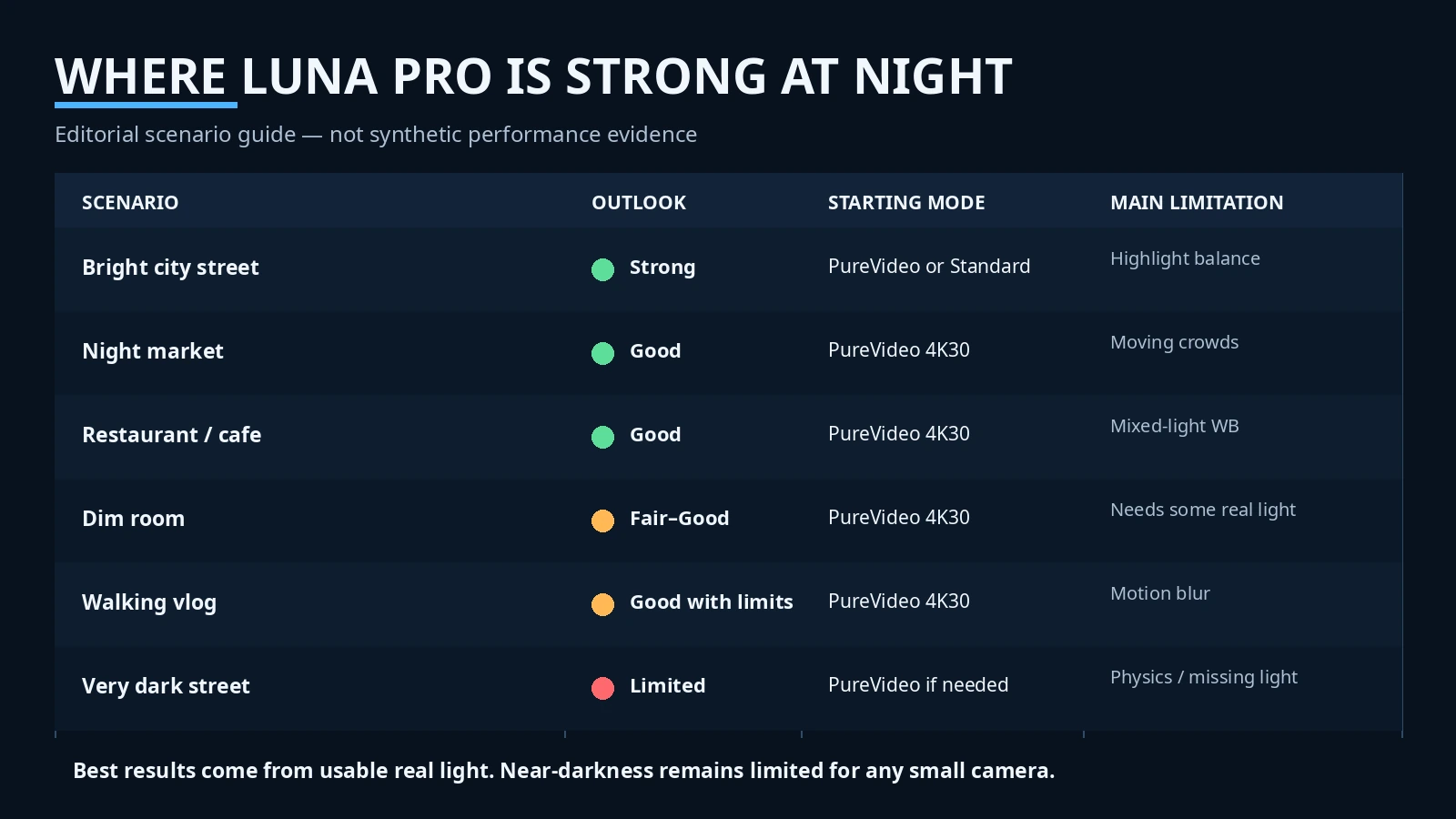
सबसे जरूरी बात: Luna Pro की low-light quality खरीदने का real reason बन सकती है, लेकिन अकेली नहीं। अगर आपका मुख्य काम रात में travel, food, streets, events या walking vlog है, इसका hardware और PureVideo meaningful advantage हैं। अगर आपका काम fast sports, dance, running subjects या लगभग अंधेरे environment में बिना lighting के professional output है, तो physics अभी भी आपके खिलाफ है।
1-Inch Sensor और F1.8 Lens रात में कितनी मदद करते हैं?
Sensor camera का वह हिस्सा है जो lens से आने वाली light को image में बदलता है। आम तौर पर बड़ा sensor ज्यादा usable light collect करने की बेहतर foundation देता है, इसलिए shadows cleaner रह सकती हैं और high ISO पर noise कम रखने की संभावना बढ़ती है। Luna Pro का main camera 1-inch-type sensor और 20mm-equivalent F1.8 Leica Summicron lens इस्तेमाल करता है। “1-inch” industry sensor-format का नाम है; इसे literal एक-inch चौड़ा sensor समझना सही नहीं होगा। [1][5]
F1.8 aperture lens का opening size बताती है। आसान भाषा में, relatively wide F1.8 opening कम रोशनी में sensor तक ज्यादा light पहुँचाने में मदद करती है। यह compact pocket camera के लिए useful है, लेकिन F1.8 रात को दिन नहीं बनाती। Final result पर shutter speed, ISO, frame rate, processing और scene की actual illumination उतने ही महत्वपूर्ण हैं।
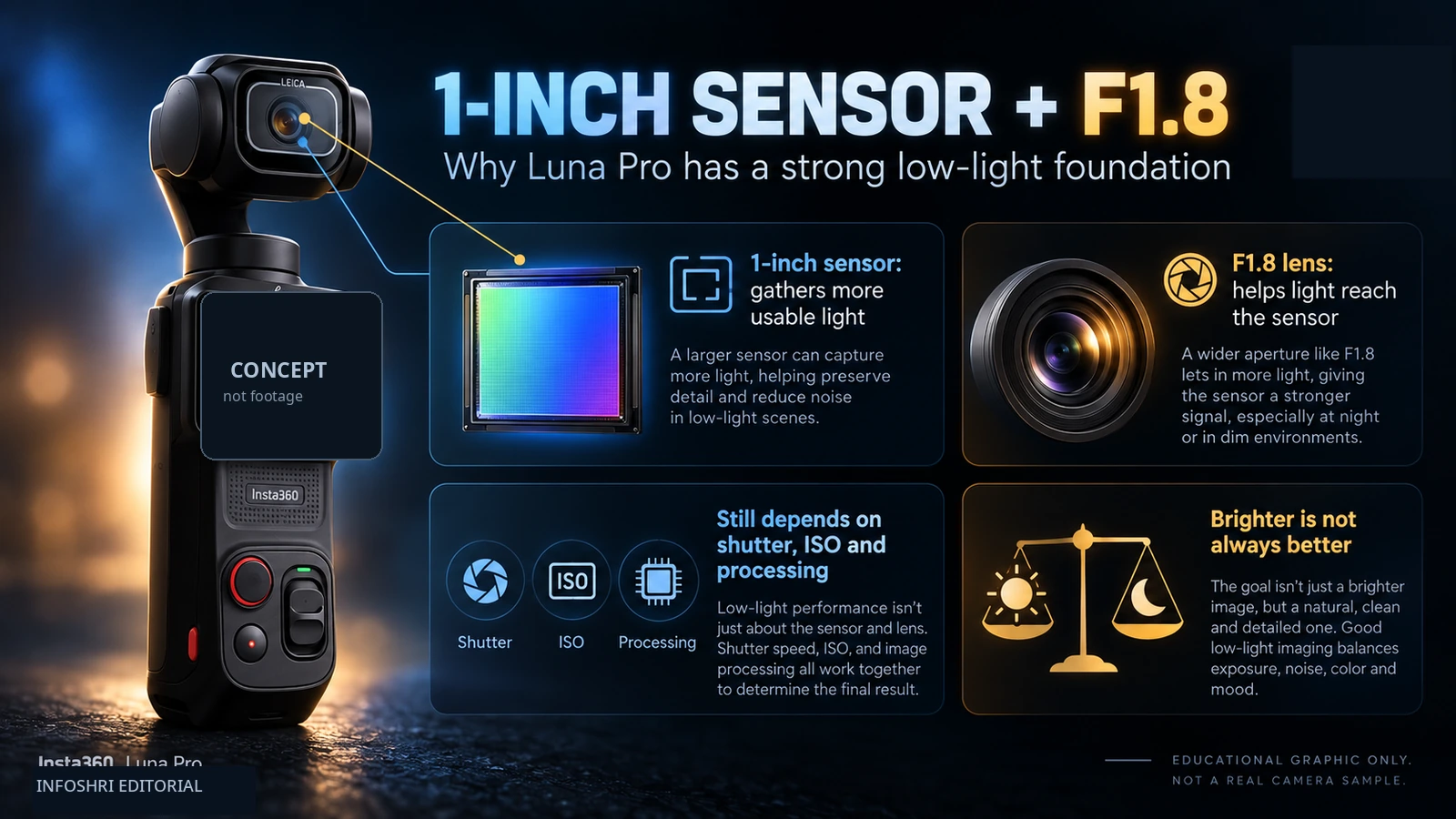
Luna Pro का 20mm-equivalent lens काफी wide है। Night vlog में यह फायदा देता है क्योंकि arm’s-length selfie में चेहरा और आसपास का environment दोनों frame में आ सकते हैं, और wide view में walking motion visually कम aggressive लग सकती है। नुकसान यह है कि दूर के subjects छोटे दिखते हैं; low light में digital zoom ज्यादा इस्तेमाल करना detail को जल्दी कमजोर कर सकता है। Official Luna Pro table 2x Clarity Zoom और आगे 4x तक zoom options देती है, लेकिन independent review में 2x के बाद softness बढ़ने की बात सामने आई। [4][6]
अब ISO समझिए। ISO camera signal को brighter दिखाने के लिए gain बढ़ाती है। Luna Pro की current official range ISO 100–6400 है। ISO बढ़ाने से dark scene bright हो सकती है, लेकिन weak signal को amplify करने के साथ noise भी बढ़ सकती है। इसलिए ISO 3200 या 6400 देखकर automatically “bad” या “good” नहीं कहा जा सकता; result scene और processing पर निर्भर है। हमारे पास अभी Luna Pro का controlled ISO 400/800/1600/3200/6400 laboratory staircase test नहीं है, इसलिए किसी specific ISO को “unusable” कहना गलत होगा। [7]
Shutter speed हर frame को expose करने का समय है। Official Luna Pro documentation video में 1/8000s से 1/2 second तक shutter range दिखाती है—यह Ultra से अलग Luna Pro-specific capability है। 1/2 second जैसी extreme slow shutter static creative shots या light-trail style effects में बहुत light collect कर सकती है, लेकिन normal walking vlog के लिए यह practically बहुत धीमी है; चलता हुआ subject smear हो जाएगा। [7][8]
यहीं पर 1-inch sensor का असली फायदा समझ आता है: बड़ा sensor और bright lens camera को वही brightness पाने के लिए कम desperate ISO/shutter compromises की संभावना देते हैं। लेकिन यह advantage तभी meaningful है जब actual footage में detail और motion भी बचें। सिर्फ bright frame देखकर sensor को winner घोषित करना low-light analysis नहीं है।
एक और important term है dynamic range—एक frame में बहुत bright और बहुत dark हिस्सों को एक साथ usable रखने की क्षमता। Night street में यह कठिन होता है: black sky और dark jacket एक तरफ, LED sign और headlight दूसरी तरफ। Insta360 ने Luna family के लिए high dynamic-range claims किए हैं, लेकिन manufacturer “stops” number को independent lab measurement नहीं मानना चाहिए जब test methodology public न हो। Luna Pro को practical night scene में sign text, face और shadows एक साथ कितनी अच्छी तरह बचते हैं—यही ज्यादा useful test है।
PureVideo क्या करती है—and Normal Video से कब Better है?
PureVideo Luna Pro का dedicated low-light recording mode है। इसका उद्देश्य dark conditions में AI-assisted processing से noise कम करना, brightness/detail को usable बनाना और night footage को camera-ready बनाना है। इसे “night vision” समझना गलत होगा। यह existing light और sensor data पर काम करती है; zero light से real detail पैदा नहीं कर सकती। Official Luna Pro shooting table के अनुसार PureVideo horizontal 4K 16:9 पर 60/50/48/30/25/24fps तक जाती है। Portrait PureVideo 3K 9:16 पर 60fps तक है; PureVideo 4K vertical नहीं है। Normal Video अलग mode है और 4K 9:16 को 30fps तक support करता है। [3]
| Mode | Horizontal night option | Vertical option | Practical meaning |
|---|---|---|---|
| Normal Video | 8K30 तक; 4K में high frame rates | 4K 9:16 up to 30fps | maximum format flexibility; low-light enhancement may still engage |
| PureVideo | 4K 16:9 up to 60fps | 3K 9:16 up to 60fps | dedicated low-light processing |
| PureVideo 4K30 | Yes | No 4K vertical | night quality/battery का sensible balance |
| PureVideo 4K60 | Yes | No 4K vertical | smoother motion; darker scene में exposure tougher |
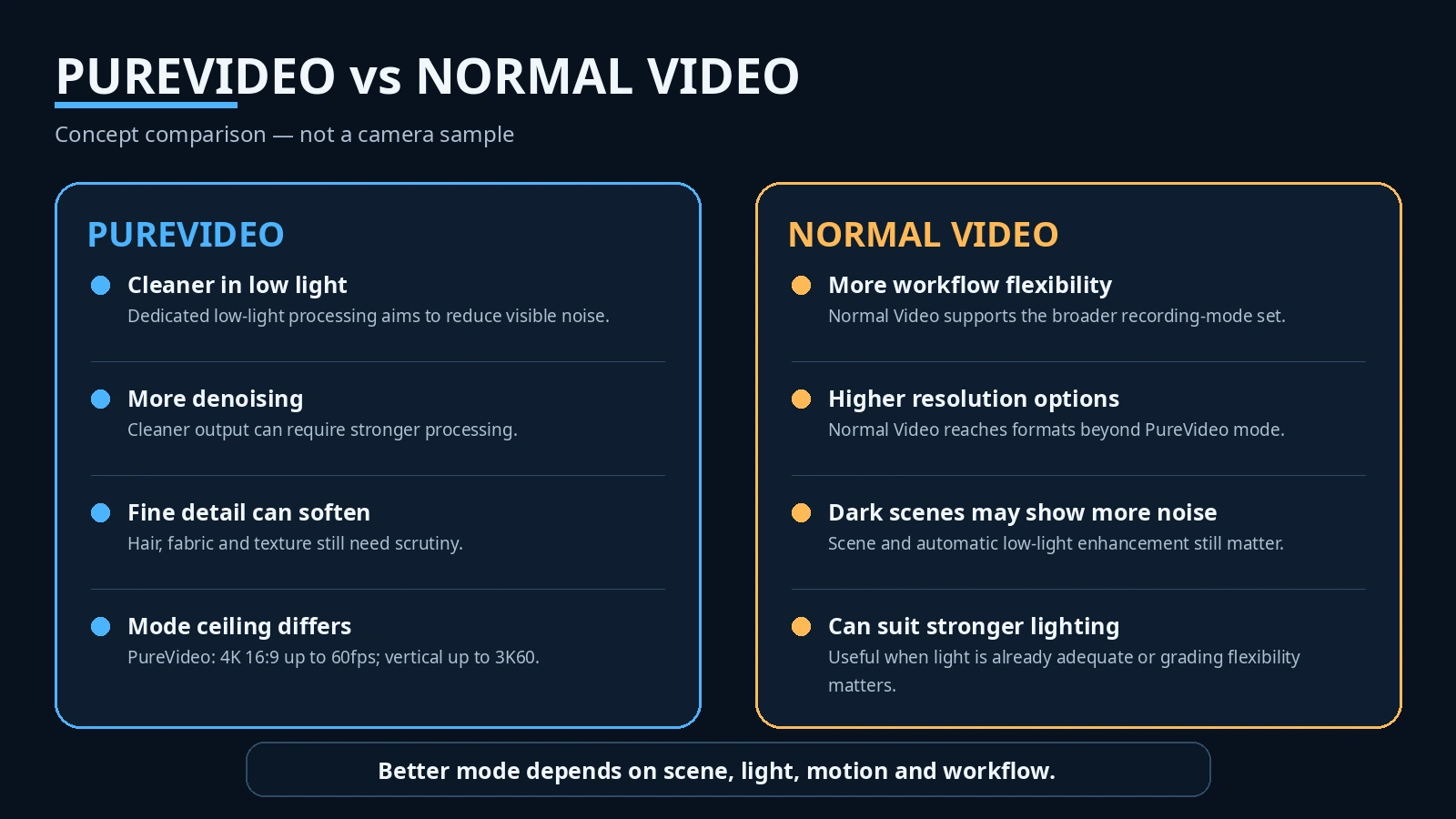
यह vertical distinction Reels/Shorts creators के लिए बड़ा है। “Luna Pro 4K vertical shoot करती है” सही है, लेकिन उससे “PureVideo भी 4K vertical है” निकालना गलत है। रात में अगर आपको PureVideo चाहिए और vertical 60fps चाहिए, current table के हिसाब से 3K 9:16 practical ceiling है। [3]
PureVideo vs Standard: comparison उतना simple नहीं जितना लगता है
Independent Luna Pro review में PureVideo को after-dark Standard/other modes की तुलना में noticeably cleaner और better-controlled बताया गया। यह current evidence का strongest Pro-specific positive signal है। साथ ही उस review ने PureVideo active होने पर Dolby Vision और I-Log खोने की बात कही। [4]
लेकिन यहाँ एक important nuance है। Insta360 की support documentation Luna family के normal Video mode में low-light image-quality enhancement का behaviour भी बताती है: recording शुरू होते समय low light detect होने पर processing engage हो सकती है। इसका मतलब है कि कुछ “Standard vs PureVideo” comparisons में Standard side भी पूरी तरह unprocessed baseline नहीं हो सकती। इसलिए matched comparison में सिर्फ mode का नाम नहीं, lighting, frame rate, shutter, ISO और camera behaviour भी देखना चाहिए।
यही कारण है कि दो अलग reviewers के दो अलग शहरों के clips देखकर “PureVideo 30% better” जैसा conclusion देना वैज्ञानिक नहीं होगा। Valid comparison ideally same place, same moment, same framing, same fps और जितना possible हो same exposure/export pipeline पर होना चाहिए।
Denoising: cleaner image की कीमत क्या है?
Noise dark footage में grain या coloured speckles की तरह दिख सकती है। Denoising software उन random variations को पहचानकर smooth करती है। अच्छी denoising noise घटाती है और real edges बचाती है। Aggressive denoising hair strands, beard texture, skin pores, fabric weave, brick, leaves और small text को भी “noise” समझकर मिटा सकती है। Result दूर से clean लगता है, zoom करने पर plastic या watercolor जैसा हो सकता है।
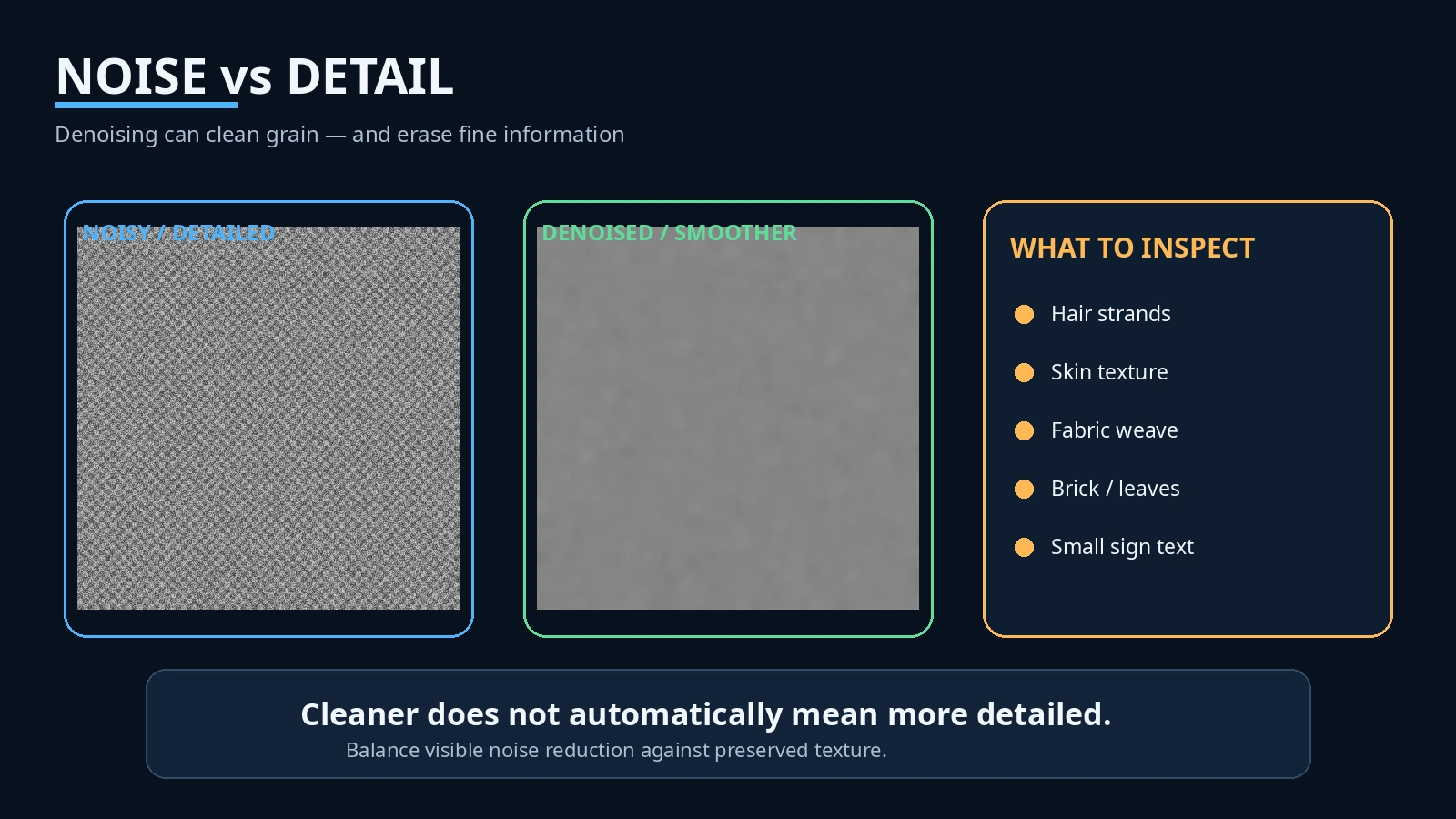
Current Luna Pro evidence PureVideo को effective बताता है, पर अभी enough controlled Pro samples नहीं हैं कि हम waxy skin, ghosting, edge halos या temporal smearing की frequency quantify कर सकें। इसलिए article का verdict यह नहीं है कि “PureVideo soft है,” बल्कि यह है कि fine-detail retention अभी independent matched testing का सबसे महत्वपूर्ण open question है।
30fps vs 60fps: रात में कौन sensible है?
Frame rate एक second में कितने frames record होते हैं। 30fps में camera के पास theoretical रूप से हर frame के लिए 60fps की तुलना में ज्यादा exposure time available हो सकती है। इसलिए समान dark scene में 30fps अक्सर lower ISO या less aggressive processing का मौका देता है। 60fps movement को smoother दिखाती है, लेकिन हर frame के लिए light budget कम होता है—जब तक scene खुद अच्छी तरह lit न हो।
| Night priority | 30fps | 60fps |
|---|---|---|
| Maximum light per frame | Better starting point | More demanding |
| Smooth walking/panning | Good | Better |
| Fast subject | Can blur if shutter slows | Can help if shutter is kept faster and light is enough |
| Noise risk in deep dark | Usually easier to manage | Often higher exposure/processing demand |
| PureVideo support | 4K30 available | 4K60 available |
| Best practical use | dark streets, restaurants, talking head | brighter streets, motion-heavy shots |
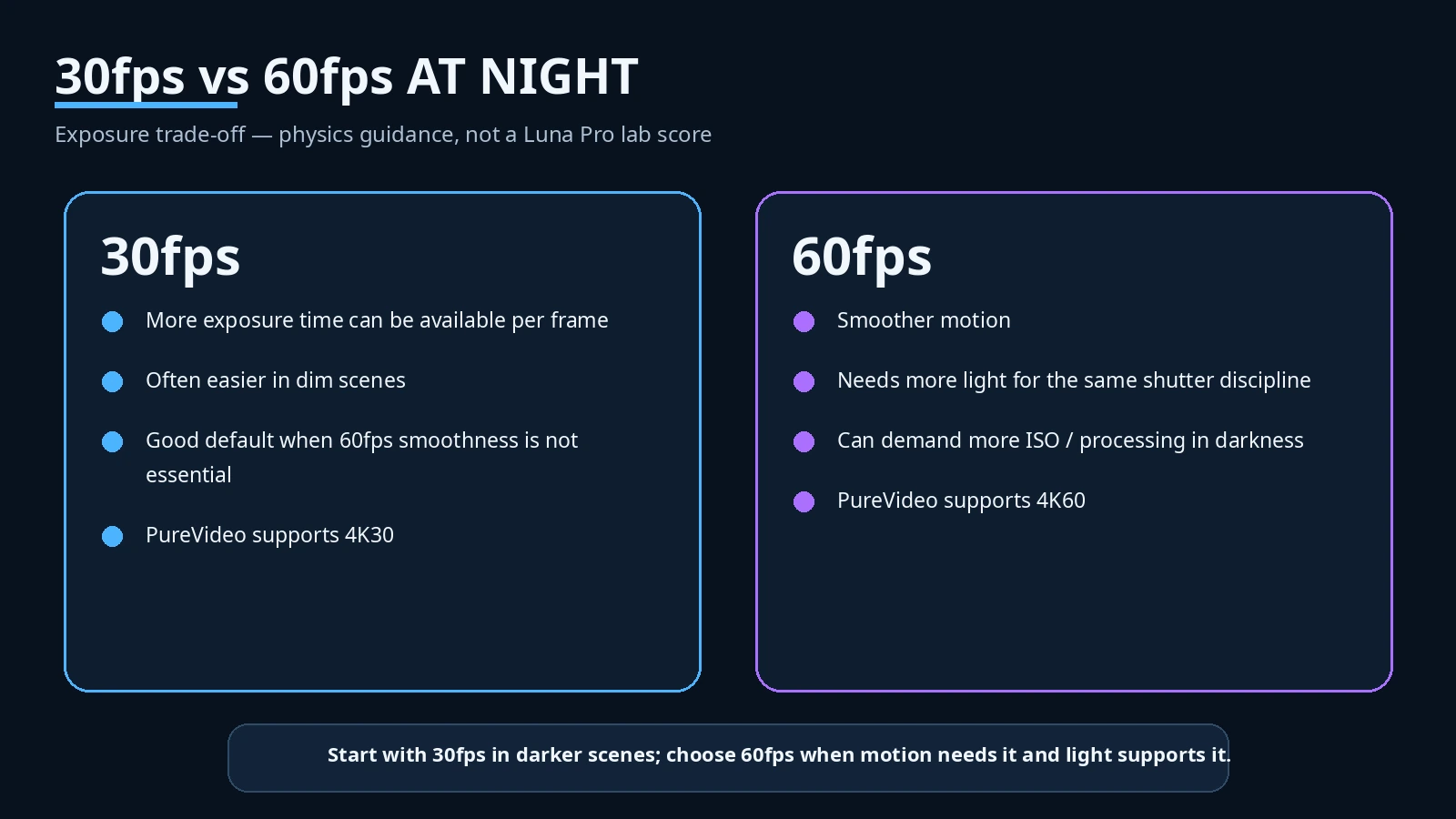
यह table physics-based guidance है, Luna Pro की laboratory 30-vs-60 score नहीं। हमें ऐसा robust matched Luna Pro sample set नहीं मिला जिसमें same scene और manual exposure के साथ 4K30 PureVideo और 4K60 PureVideo को frame-by-frame publish किया गया हो। इसलिए “4K30 हमेशा cleaner” या “4K60 रात में बेकार” जैसी rigid line evidence से justified नहीं है।
PureVideo कब use न करना बेहतर हो सकता है?
अगर city street already bright है, shop lights strong हैं या stage/indoor lighting पर्याप्त है, Standard Video आपको more flexible colour workflow दे सकती है। PureVideo का extra processing हर post-production workflow के लिए जरूरी नहीं। Advanced creator noise को थोड़ा natural रखना, I-Log में record करना और बाद में controlled denoise करना पसंद कर सकता है। Beginner को camera-ready output चाहिए तो PureVideo ज्यादा practical हो सकती है। कोई एक mode universal winner नहीं है।
Night Footage में Noise, Detail, Highlights और Skin Tones कैसे दिखते हैं?
Available evidence का strongest conclusion यह है कि Luna Pro का night output usable light वाले scenes में pocket-camera standard से मजबूत दिखता है, लेकिन evidence maturity अभी launch-week level की है। Independent Pro hands-on reports PureVideo को after dark cleaner और better controlled बताती हैं। एक direct Pro-vs-Ultra main-camera evening comparison में reviewer ने same place, same evening, same light में naked-eye image difference नहीं देखा; क्योंकि दोनों का main imaging foundation बहुत similar है। इसे Pro की telephoto capability का proof नहीं समझना चाहिए—Pro में telephoto है ही नहीं। [4][9]
City street और night market जैसे scenes में camera के लिए दो opposite काम होते हैं: dark shadows उठानी हैं और साथ में signs/headlights को blow नहीं करना। Available reviewer evidence promising है, लेकिन standardized highlight test नहीं मिला। इसलिए “highlights never clip” कहना गलत होगा। Practical reading यह है: bright signs against dark surroundings के साथ PureVideo useful दिखती है, पर exposure और metering अभी भी matter करते हैं।
Highlights image के बहुत bright areas हैं—street lamps, car headlights, LED boards. अगर वे pure white patches बन जाएँ और उनमें text/shape खो जाए, इसे highlight clipping कहते हैं। Shadows dark areas हैं—black jacket, building corner, sky के नीचे shadow side. Shadows बहुत lift करने पर noise या muddy texture दिख सकती है। Good low-light image दोनों को balance करती है; सिर्फ shadow bright करना quality नहीं है।
Skin tone सबसे मुश्किल night tests में से एक है क्योंकि real streets में orange sodium lights, blue LED, green fluorescent और magenta neon एक साथ मिलते हैं। White balance camera को बताती है कि अलग light colour के बीच neutral white कैसा दिखना चाहिए। Auto WB गलत अनुमान लगाए तो skin ज्यादा orange, green या magenta हो सकती है। Luna Pro Pro mode में WB control देती है, और official controls Matrix तथा Face Priority metering देते हैं। Face Priority का मतलब camera exposure decision में face को अधिक महत्व देती है; Matrix पूरे frame को evaluate करती है। [8]
अगर आपका चेहरा dark है और पीछे bright sign है, Face Priority face को बचा सकती है—लेकिन trade-off में background highlights ज्यादा bright हो सकती हैं। Matrix sign को बेहतर बचा सकती है पर face dark छोड़ सकती है। इसलिए “best metering” scene-dependent है। उपलब्ध Luna Pro-specific low-light skin-tone footage अभी इतनी systematic नहीं है कि हम Auto WB को class-leading कह सकें। यह PROMISING BUT NOT RELIABLY VERIFIED क्षेत्र है।
Fine detail पर भी यही discipline जरूरी है। PureVideo में smooth dark sky impressive लग सकती है, लेकिन quality judge करने के लिए hair, eyelashes, jacket texture, brick, tree leaves और sign text देखें। अगर noise कम है लेकिन micro-detail भी गायब है, footage cleaner है—necessarily more detailed नहीं।
Blue hour यानी sunset के बाद का वह समय जब environment dark हो रहा है लेकिन sky में अभी substantial light होती है। यह Luna Pro जैसे 1-inch F1.8 camera का easy win होने की संभावना वाला scene है, क्योंकि sensor को total darkness से लड़ना नहीं पड़ता। इसके विपरीत nearly dark alley में camera को high ISO, slow shutter और stronger processing का combination चाहिए। यहीं image quality तेजी से गिर सकती है। “Good low-light camera” और “camera that sees in darkness” अलग चीजें हैं।
Low-light photos को video से अलग समझना चाहिए। Luna Pro JPG + RAW photo capture और longer photo exposures support करती है। Static tripod scene में long exposure video/vlog rules से अलग result दे सकती है, क्योंकि subject motion नहीं है और camera लंबे समय तक light collect कर सकती है। लेकिन यह article video-focused है; still-photo quality पर current independent review mixed/weak रही है, इसलिए Luna Pro को सिर्फ night photography के लिए खरीदने की सलाह नहीं दी जा सकती। [3][6]
Walking at Night: Motion Blur, Gimbal और Autofocus की असली परीक्षा
Night camera test का सबसे misleading तरीका है camera को tripod पर रखकर static building shoot करना और फिर उसी result से vlog quality decide करना। Static building slow shutter tolerate कर सकती है; चलता हुआ इंसान नहीं। Motion blur तब होता है जब subject frame expose होने के दौरान move कर जाए। यह noise नहीं है। Noise grain है; motion blur smear है। एक image low-noise लेकिन blurred हो सकती है, और दूसरी sharp लेकिन noisy।
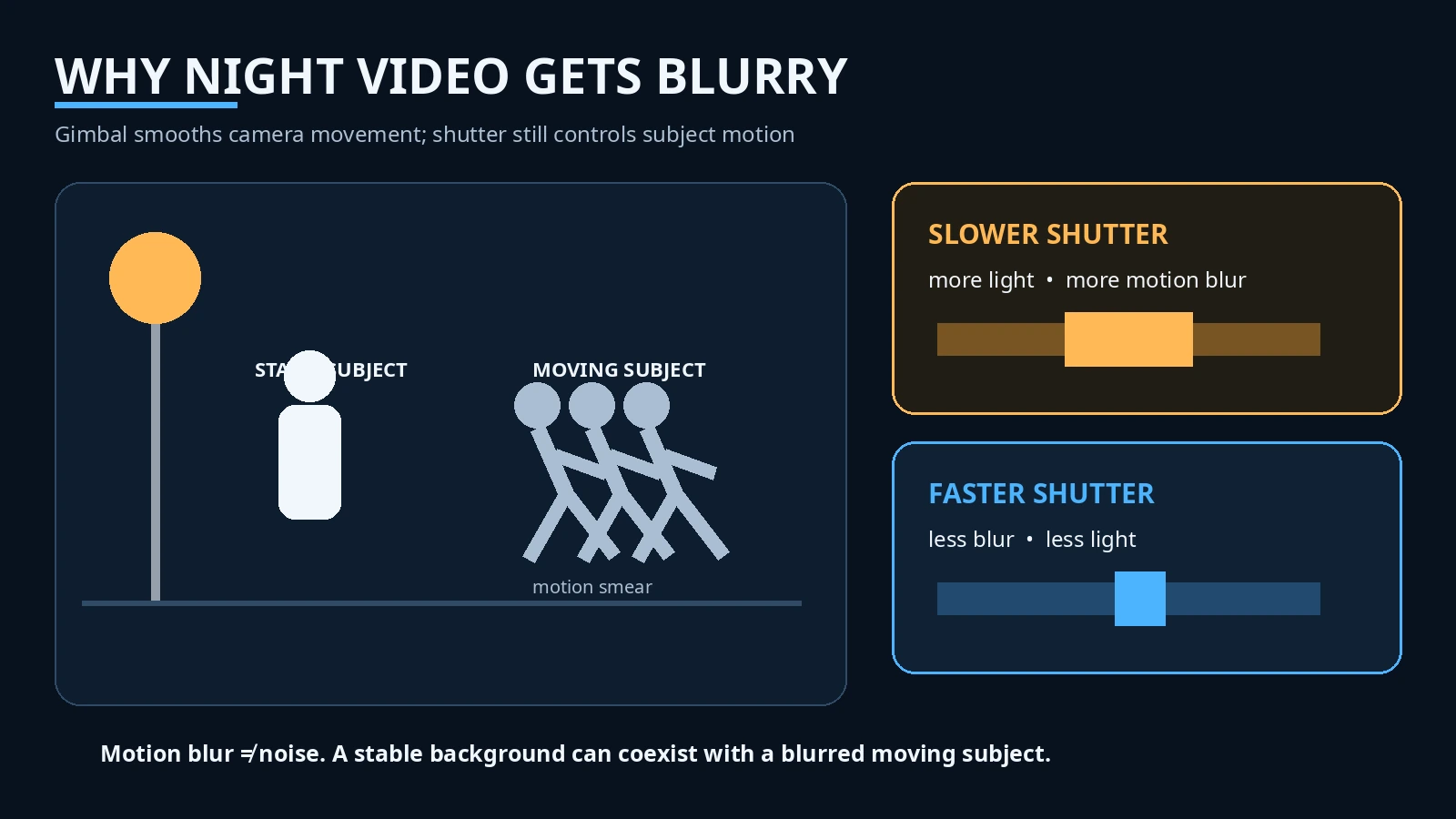
Luna Pro में 3-axis mechanical gimbal है। Gimbal physical motors से camera orientation को smooth रखता है, इसलिए footsteps और hand movement की rotational shake कम होती है। यह बहुत valuable है—especially walking shots में। लेकिन gimbal सामने चल रहे बच्चे, dancer, car या आपके waving hand को freeze नहीं कर सकता। Subject sharpness shutter speed तय करती है। [1][10]
Night walking vlog में इसलिए दो systems साथ काम करते हैं: gimbal camera movement smooth करती है; exposure system sensor को पर्याप्त light दिलाती है। अगर camera dark scene में shutter बहुत slow कर दे, background remarkably stable दिख सकता है जबकि face या हाथ smear हो सकते हैं। इसे “stabilization failure” कहना भी गलत होगा; यह exposure-motion trade-off है।
Autofocus यानी camera किस distance पर subject को sharp रखती है। Official Luna controls AF-C (continuous focus), AF-S (focus-and-lock) और Product Showcase mode देती हैं। Vlogging और चलते subject के लिए AF-C अधिक relevant है; static product/face के लिए अलग modes useful हो सकते हैं। [8]
Tracking और autofocus भी अलग हैं। Tracking = subject frame में कहाँ है। Autofocus = subject sharp है या नहीं। Camera किसी व्यक्ति को perfectly center में track कर सकती है, फिर भी insufficient light या wrong focus के कारण face soft हो सकता है। Insta360 खुद tracking documentation में कहता है कि rapid movement, obstruction और extremely low light में tracking performance limited हो सकती है। इसलिए “AI tracking है, तो रात में focus perfect रहेगा” unsupported claim होगा। [10]
Current general Luna Pro reviews tracking और stabilization को strong बताते हैं, लेकिन dedicated night AF-C stress test—face approaching, walking away, neon background, product near lens—का sufficient standardized evidence अभी नहीं मिला। इसलिए night autofocus verdict: capable system, but extreme-low-light reliability not yet fully verified।
अगर आप running, dance, kids या traffic shoot कर रहे हैं, scene में real light बढ़ाना अक्सर camera setting से ज्यादा effective है। थोड़ा fill light face पर पड़ने से camera faster shutter रख सकती है, ISO घटा सकती है और colour भी बेहतर कर सकती है। यह कोई Luna Pro weakness नहीं; photography की basic physics है।
ISO, Shutter, Frame Rate और White Balance: रात में Settings क्यों Matter करती हैं?
Beginner के लिए सबसे आसान rule है: रात में हर setting manually control करना जरूरी नहीं। PureVideo/Auto exposure काफी situations में useful हो सकती है। लेकिन अगर आप समझते हैं कि camera क्या कर रही है, तो bad result का कारण पहचानना आसान होता है।
Exposure image की total brightness है। Camera इसे मुख्य रूप से aperture, shutter और ISO से control करती है। Luna Pro की aperture fixed F1.8 है, इसलिए video में camera के पास मुख्य practical levers shutter और ISO हैं। Pro mode में manual shutter, ISO और EV control officially supported हैं। EV exposure compensation है—Auto mode को कहने का तरीका कि result थोड़ा brighter या darker चाहिए। [8]
ISO range 100–6400 है। Low ISO generally cleaner signal देती है, लेकिन dark scene में पर्याप्त brightness नहीं मिल सकती। High ISO scene को usable बनाती है, पर noise/colour quality पर pressure बढ़ता है। PureVideo बाद में noise reduce कर सकती है, मगर processing detail trade-off ला सकती है। इसलिए “ISO low रखो at any cost” भी सही advice नहीं; अगर उसके लिए shutter इतना slow करना पड़े कि face blur हो जाए, clean grain-free frame से ज्यादा खराब result मिलेगा।
24/25/30fps night में practical starting point इसलिए हैं क्योंकि camera को per-frame exposure के लिए ज्यादा समय मिल सकता है। 50/60fps तब meaningful है जब आपको smoother movement या slow-down flexibility चाहिए और environment enough light दे रहा हो। Luna Pro PureVideo 4K60 का support strong feature है, लेकिन support होना और हर रात इसे use करना दो अलग बातें हैं।
Shutter के लिए internet पर 180-degree rule से जुड़े 1/50 या 1/60 जैसे numbers अक्सर rigid कानून की तरह दिए जाते हैं। वे motion look के useful starting conventions हैं, लेकिन night scene में creative/technical compromise बदल सकता है। Luna Pro manual control देती है, और extreme slow shutter 1/2s तक जा सकती है। Static light trails के लिए मजेदार, walking vlog के लिए destructive—दोनों statements एक साथ true हैं।
White balance में Auto से शुरू करना beginner के लिए sensible है। लेकिन अगर restaurant में skin shot-to-shot orange से green बदल रही है, fixed WB consistency दे सकती है। Mixed lighting में perfect single WB संभव भी नहीं हो सकती, क्योंकि frame के अलग हिस्से सच में अलग colour temperature के हैं।
Metering में Face Priority selfie/talking head के लिए useful starting point है; Matrix landscape/street scene में whole-frame balance के लिए। अगर आपके पीछे giant LED sign है, दोनों को test करें। Face Priority आपका चेहरा बचा सकती है लेकिन sign clip करा सकती है; Matrix sign बचाकर face underexpose कर सकती है।
Beginner night principles को पाँच lines में रखें: 30fps से start करें जब 60 जरूरी न हो; unnecessary digital zoom avoid करें; face पर कुछ real light रखें; genuinely dark scene में PureVideo try करें; fast-moving subject के लिए shutter को बहुत slow होने न दें। ये rigid “best settings” नहीं, safe starting principles हैं।
I-Log, Dolby Vision और Colour: रात में कौन-सा Mode किसके लिए है?
यहाँ तीन अलग goals को mix नहीं करना चाहिए। PureVideo का primary goal low-light cleanup है। I-Log का goal grading flexibility है। Dolby Vision HDR-oriented capture/display workflow है। तीनों “better quality” के नाम नहीं; अलग workflows हैं।
I-Log flat-looking 10-bit profile है, यानी camera ज्यादा colour/tone information रखती है ताकि editing में contrast और colour को बाद में shape किया जा सके। 10-bit का सरल मतलब: 8-bit की तुलना में प्रति colour channel ज्यादा tonal steps, इसलिए heavy grading में banding/colour breakup से बचने की बेहतर गुंजाइश। I-Log RAW नहीं है और night mode भी नहीं है। Luna Pro I-Log और ACES-oriented workflow support करती है। [2][5]
Dolby Vision HDR ecosystem का हिस्सा है। इसका लक्ष्य compatible displays/workflows में highlights और colour को richer तरीके से present करना है। यह PureVideo नहीं है। Current independent Luna Pro hands-on evidence बताती है कि PureVideo active होने पर Dolby Vision और I-Log उपलब्ध नहीं रहते। Insta360 की public Basic/Pro table PureVideo में “Color Mode” control दिखाती है, लेकिन public support pages अभी पूरा combination matrix उतनी साफ़ तरह publish नहीं करतीं जितना हमें चाहिए। इसलिए safest rule है: PureVideo + I-Log/Dolby Vision simultaneous workflow को current firmware पर assume न करें; shoot से पहले exact camera menu verify करें। [4][8]
Filters अलग चीज हैं। Insta360 के official support page के अनुसार Leica Natural, Vivid और Chrome तथा cinematic filters available हैं। Luna Pro में PureVideo के साथ filters 4K30 और नीचे support होते हैं; PureVideo 4K60 के साथ filter support table नहीं देती। Dolby Vision के साथ filters unsupported हैं, जबकि I-Log के साथ filter support listed है। Filter colour look बदलता है; sensor की actual low-light information magically नहीं बढ़ाता। [11]
Advanced creator के लिए choice simple हो सकती है: अगर scene में enough light है और post-production करनी है, I-Log/manual WB/exposure ज्यादा control दे सकते हैं। अगर scene genuinely dark है और quick turnaround चाहिए, PureVideo का baked-in cleanup practical हो सकता है। लेकिन aggressive external denoise के ऊपर already-denoised PureVideo को और smooth करने से texture खो सकती है—इसके लिए Luna Pro-specific DaVinci/Premiere/Final Cut controlled test अभी पर्याप्त नहीं मिला। इसलिए “double-denoise” workflow blindly prescribe नहीं करना चाहिए।
Night Vlogging, Travel, Food और Real Creator Use में Luna Pro कहाँ Strong है?
Night walking vlogger के लिए Luna Pro का सबसे attractive combination wide 20mm view, mechanical gimbal, face-oriented controls और PureVideo है। City में जहाँ street lights, shop fronts और traffic illumination मौजूद है, यह setup मजबूत दिखता है। लेकिन चलते समय face sharpness को सिर्फ gimbal पर मत छोड़िए—motion blur exposure का issue है। यदि face बहुत dark है, small fill light image को किसी भी AI processing से ज्यादा predictable तरीके से improve कर सकती है।
Night market/travel में Luna Pro का wide view environment को अच्छी तरह capture कर सकता है। Colourful signs और food stalls camera को enough light देते हैं, लेकिन crowds लगातार move करते हैं। PureVideo noise साफ़ कर सकती है; वह motion history को वापस नहीं ला सकती जो slow shutter से smear हो गई। इसलिए 30fps dark market में cleaner हो सकती है, जबकि bright market में 60fps movement बेहतर दिखा सकती है।
Restaurant/food creator के लिए challenge noise से ज्यादा colour हो सकता है। Warm lamps food को attractive बना सकती हैं लेकिन mixed LED/tungsten skin tone को shift कर सकती है। Fixed WB और थोड़ा controlled fill light यहाँ sensor upgrade से बड़ा फर्क ला सकते हैं। Product/food close-up में Luna Pro की minimum-focus capability useful है, लेकिन dark close-up में shadow और highlight placement स्वयं lighting से बेहतर control होती है।
Indoor talking head में अगर room dim है, PureVideo face को usable बना सकती है। फिर भी एक छोटी soft key/fill light तीन फायदे साथ देती है: ISO कम, shutter faster, colour more stable. “Low-light camera खरीदकर light की जरूरत खत्म” marketing-friendly idea है, practical filmmaking नहीं।
Family/casual night video में Luna Pro का strength automation है। Beginner को exposure triangle याद नहीं रखना चाहिए। Auto/PureVideo और tracking का combination usable clips पाने का chance बढ़ाता है। लेकिन extreme dark room में बच्चों की fast movement अभी भी blur/noise problem बना सकती है। ऐसे scene में light on करना सबसे सरल fix हो सकता है।
Reels/Shorts creator के लिए specific trade-off याद रखें: Normal Video = native 4K vertical up to 30fps; PureVideo vertical = 3K up to 60fps. अगर आपका priority 4K vertical resolution है और scene adequately lit है, Normal mode logical है। अगर scene darker है और 60fps vertical चाहिए, PureVideo 3K60 option ज्यादा practical हो सकती है। Platform delivery अक्सर 1080p में होती है, लेकिन capture resolution editing/cropping flexibility को प्रभावित करती है। [3]
Professional creator के लिए Luna Pro को “mini cinema camera” कहना overstatement होगा, लेकिन timecode, I-Log, manual exposure, WB और compact stabilized form factor इसे B-cam/gimbal shot tool बना सकते हैं। Night footage larger cameras के साथ mix हो सकती है या नहीं, यह scene, grading और noise structure पर निर्भर है। अभी standardized intercut test evidence सीमित है, इसलिए “matches full-frame” जैसी line नहीं लिखनी चाहिए।
Competitor context में Luna Pro का direct rival DJI Pocket family है, लेकिन launch-week evidence में fair same-scene, same-fps, equivalent-low-light-mode Luna Pro vs Pocket 4 comparison पर्याप्त नहीं मिला। इसलिए हम low-light winner घोषित नहीं कर रहे। Luna Pro का current advantage यह है कि PureVideo 4K60, 1-inch F1.8 hardware और strong stabilization package एक compact body में मिलता है; competitor winner का फैसला matched footage के बिना नहीं होना चाहिए।
Battery, Heat और Editing: PureVideo की Hidden Cost क्या है?
Low-light processing free नहीं होती। Official Insta360 battery table के अनुसार 25°C indoor, wind-free condition में Luna Pro main unit की rated runtime PureVideo 4K60 पर लगभग 1 घंटा 43 मिनट और PureVideo 4K30 पर लगभग 2 घंटे 5 मिनट है। Compare करने के लिए same table normal 4K60 को लगभग 2 घंटे और normal 4K30 को 2.5 घंटे बताती है। इन official figures पर PureVideo 4K60 runtime करीब 17 मिनट (लगभग 14%) और PureVideo 4K30 करीब 25 मिनट (लगभग 17%) कम बैठती है। यह controlled-condition calculation है, real-world guarantee नहीं। [12]
ये laboratory-style conditions हैं। Real night vlog में screen use, tracking, wireless mic, Wi‑Fi, repeated start/stop, ambient temperature और battery age runtime बदलेंगे। इसलिए “2h05 guaranteed” नहीं, official reference point है।
Heat पर सबसे important finding actually lack of evidence है। Current Pro reviews high-load modes में warmth की बात करते हैं, लेकिन हमने Luna Pro-specific, controlled PureVideo 4K60 continuous thermal-stop test नहीं पाया जिसमें ambient temperature, firmware और exact stop time documented हो। Ultra-specific thermal observation को Pro पर copy करना इस article में prohibited है। इसलिए PureVideo thermal verdict: NOT RELIABLY VERIFIED. अगर India की warm outdoor night में long continuous 4K60 PureVideo recording आपकी priority है, independent long-run test या अपना pre-shoot stress test करना sensible होगा।
Storage भी context मांगती है। Current official Luna Pro shooting table maximum video bitrate 150 Mbps दिखाती है। Early reviews में 120 Mbps भी reported हुआ, इसलिए यह launch-era/current-doc conflict है; publication के लिए latest official Luna Pro table को authority देना ज्यादा उचित है। Maximum bitrate हर clip में constant नहीं होती, इसलिए 150 Mbps से exact file size guarantee नहीं निकाली जानी चाहिए। [7]
Editing pipeline में एक और trap है: camera preview, straight camera file, Insta360 App export और desktop software output को mix करके compare करना। अगर एक clip app से filter/sharpen/export हुआ और दूसरा straight file है, mode comparison invalid हो सकता है। Current public documentation से हमें ऐसा robust evidence नहीं मिला कि Luna Pro files पर App या Studio automatically additional low-light denoise हमेशा apply करता है। इसलिए safest workflow है: Standard vs PureVideo compare करते समय same source stage और same export settings रखें। Extra denoise का claim तभी करें जब specific software/version behaviour verified हो।
Currentness भी जरूरी है। 12 September 2026 को India App Store पर Insta360 app v2.33.0 Luna Pro support के साथ visible थी; कुछ other storefronts में 2.33.1 bug-fix rollout भी दिखा, यानी app version distribution staggered हो सकती है। Insta360 की official firmware page update/check method बताती है लेकिन crawl में latest Luna Pro firmware number directly expose नहीं करती। एक third-party firmware catalog 1.0.27 को official package के रूप में list करता है; इसे direct official latest-version confirmation नहीं मानना चाहिए। Shoot से पहले camera/app में current firmware check करना बेहतर है। [13][14]
Final Verdict: 1-Inch Sensor रात में कितना अच्छा है—and किसे Luna Pro खरीदनी चाहिए?
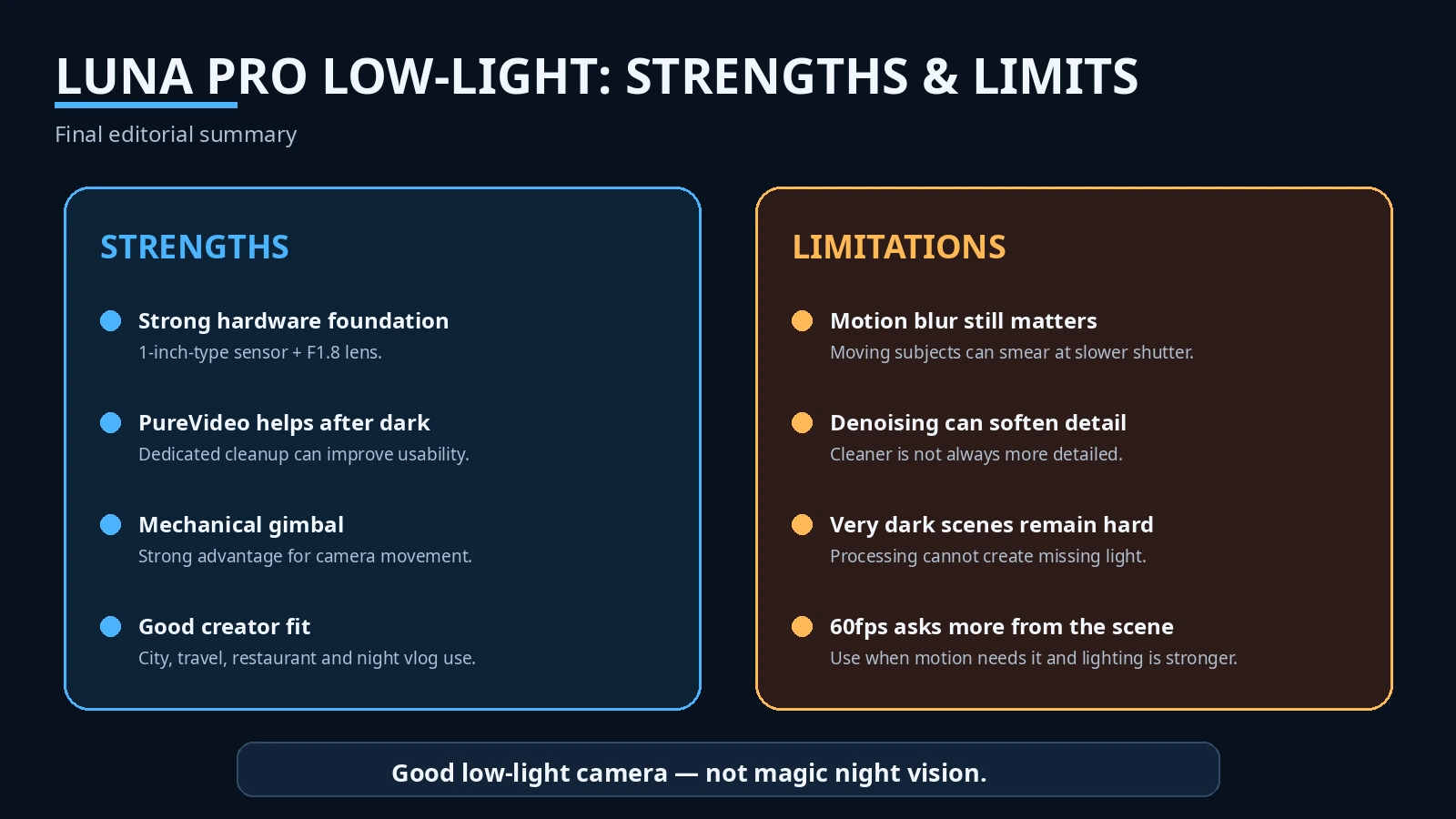
Low-light image quality: Strong for a pocket gimbal when the scene has real usable light. City, market, restaurant और indoor creator scenes में hardware + processing meaningful benefit देते हैं.
PureVideo: Luna Pro की headline low-light strength. Current Pro hands-on evidence इसे noticeably cleaner और better-controlled after dark बताती है, और 4K60 support official है. लेकिन fine-detail preservation और motion artefacts पर broader matched evidence अभी चाहिए.
Night vlogging: Strong use case. Wide lens, gimbal, tracking और PureVideo useful combination हैं. Face पर थोड़ी real light रखने से result dramatically more reliable होगा.
Moving subjects: Static scenes से कमजोर. Slow shutter brightness बचा सकती है लेकिन motion smear बढ़ा सकती है. Fast subject + very dark scene Luna Pro की सबसे difficult conditions में से है.
Static night scenes: Stronger. Camera slow shutter/processing का फायदा ज्यादा safely उठा सकती है, और gimbal orientation smooth रखती है.
Skin tones: Mixed-light handling promising but not yet enough controlled Pro-specific evidence for a class-leading verdict. Auto WB और Face Priority useful tools हैं; fixed WB/lighting pro workflow में बेहतर consistency दे सकते हैं.
Highlight control: Available night evidence promising है, especially bright signs against dark streets, but standardized Pro highlight-recovery test absent है. Manufacturer dynamic-range claims को lab result न समझें.
Noise: PureVideo noise को meaningful रूप से reduce करने के लिए designed है और current hands-on review इसे effective कहती है. “All noise removed” गलत होगा.
Detail retention: सबसे बड़ा open question. Clean-looking footage को hair, fabric, sign text और skin texture पर inspect करना चाहिए. Launch-week evidence से aggressive-processing frequency quantify नहीं की जा सकती.
Autofocus at night: System में AF-C/AF-S/Product Showcase हैं और general tracking strong reviewed है, लेकिन official docs खुद extreme low light में tracking limitation मानती हैं. Dedicated night AF stress evidence अभी incomplete है.
Stabilization at night: Mechanical gimbal camera shake के लिए strong advantage है. Subject motion blur को नहीं हटाती.
Best night frame rate: बहुत dark scenes के लिए 24/25/30fps sensible starting point; 50/60fps तब जब light पर्याप्त हो या smooth motion priority हो. यह practical exposure logic है, universal law नहीं.
Best for: night travel creators, city vloggers, food/restaurant creators, family/travel users, solo creators और social shooters जो compact stabilized camera चाहते हैं.
Not ideal for: almost-zero-light work, fast action in deep darkness, users expecting full-frame night quality, या ऐसे professionals जिन्हें every night shot पर maximum grading latitude चाहिए without baked processing.
Biggest low-light strength: 1-inch sensor + F1.8 lens + dedicated PureVideo + mechanical gimbal का integrated package.
Biggest low-light weakness: darkness बढ़ते ही camera को noise, detail और motion के बीच compromise करना पड़ता है; AI इस physics को समाप्त नहीं करती.
क्या 1-inch sensor सच में रात में अच्छा है? हाँ—यह Luna Pro को strong hardware foundation देता है. लेकिन “1-inch” अकेले verdict नहीं है. Lens, shutter, ISO, fps और processing final image तय करते हैं.
क्या low-light performance Luna Pro खरीदने का reason है? अगर आपकी shooting का बड़ा हिस्सा evening travel, market, restaurants, street vlog और indoor creator work है, हाँ, यह meaningful buying reason है. अगर आपका use daylight-heavy है, PureVideo alone purchase justify नहीं करती. अगर काम fast action in darkness है, larger controlled-light setup या larger-camera system ज्यादा appropriate हो सकता है.
Final one-line verdict: Insta360 Luna Pro रात में genuinely capable pocket gimbal है—PureVideo dark footage को useful बनाने में मदद करती है, लेकिन इसका best result तब मिलता है जब scene में कुछ real light हो और आप noise से ज्यादा motion, detail और highlights को भी judge करें।
FAQ
1. क्या Insta360 Luna Pro low light में अच्छी है?
हाँ, available current evidence के आधार पर यह pocket-gimbal category में strong low-light camera है, खासकर city/restaurant/night-market जैसी usable-light situations में. Extreme darkness में limitations तेजी से बढ़ती हैं.
2. क्या Luna Pro में वास्तव में 1-inch sensor है?
हाँ. Official/launch documentation इसे 1-inch-type main sensor के रूप में list करती है. “1-inch” industry format name है, literal sensor width नहीं.
3. PureVideo क्या है?
Dedicated low-light video mode जो processing से noise कम और dark footage को cleaner/usable बनाने की कोशिश करता है.
4. PureVideo normal Video से हमेशा बेहतर है?
नहीं. Dark scenes में useful हो सकती है; अच्छी रोशनी में Standard/I-Log workflow अधिक flexible हो सकता है. Normal Video में भी low-light enhancement engage हो सकती है.
5. क्या PureVideo 4K60 support करती है?
हाँ, current official Luna Pro table 4K 16:9 में 60fps तक PureVideo list करती है.
6. क्या PureVideo 4K vertical shoot करती है?
नहीं, current official table में PureVideo portrait maximum 3K 9:16 है. Normal Video 4K vertical up to 30fps देती है.
7. Night में 30fps या 60fps?
Dark scene में 30fps safer starting point है क्योंकि per-frame exposure budget अधिक हो सकता है. 60fps smoother है लेकिन ज्यादा light मांगती है.
8. F1.8 low light में क्या करती है?
Wide aperture sensor तक ज्यादा light पहुँचाने में मदद करती है, लेकिन अकेली clean night footage guarantee नहीं करती.
9. Luna Pro की ISO range क्या है?
Current official Luna Pro table ISO 100–6400 list करती है.
10. क्या manual ISO और shutter मिलते हैं?
हाँ. Pro mode में ISO, shutter और EV manually adjust किए जा सकते हैं.
11. Night video blur क्यों हो सकती है?
Camera ज्यादा light लेने के लिए shutter slow करती है; subject shutter खुला रहने के दौरान move करे तो motion blur बनती है.
12. क्या gimbal motion blur हटाती है?
नहीं. Gimbal camera movement smooth करती है; moving subject को freeze नहीं करती.
13. क्या PureVideo सारा noise हटा देती है?
नहीं. Processing noise कम कर सकती है, लेकिन extreme low light में noise/detail trade-off रहेगा.
14. क्या I-Log night mode है?
नहीं. I-Log 10-bit grading profile है. PureVideo low-light processing mode है. दोनों का purpose अलग है.
15. क्या Luna Pro night vlogging के लिए अच्छी है?
हाँ, यह इसके strongest use cases में से एक है—खासकर lit city streets, markets और travel environments में. Very dark scene या fast movement में fill light/shutter awareness मदद करेगी.
16. क्या Luna Pro Pocket 3/4 से रात में बेहतर है?
Launch-week matched, same-scene, equivalent-mode evidence अभी इतना मजबूत नहीं है कि responsible universal winner घोषित किया जाए. Direct comparison में same fps, FOV, scene और optimized low-light modes match करना जरूरी है.
Research transparency / sources
HANDS_ON_TESTED = FALSE. यह article InfoShri का physical Luna Pro test होने का दावा नहीं करता.
[1] Insta360 / PR Newswire — “Insta360 Launches Luna Pro: Leica Co-Engineered Gimbal Camera for Everyday Vlogging,” 10 Sep 2026. https://www.prnewswire.com/news-releases/insta360-launches-luna-pro-leica-co-engineered-gimbal-camera-for-everyday-vlogging-302875179.html
[2] DPReview — “Insta360 Luna Pro brings 8K Dolby Vision to a cheaper, single-lens vlogging camera,” 10 Sep 2026. https://www.dpreview.com/news/insta360-luna-pro-gimbal-camera-announcement/
[3] Insta360 Support — “Luna Series: Photo & Video Specifications,” checked 12 Sep 2026. https://onlinemanual.insta360.com/lunaultra/en-us/specs/shooting
[4] Brokenmount / Trusted Reviews syndicated review — “Insta360 Luna Pro Review,” 11 Sep 2026. https://www.brokenmount.com/bm/2026/09/11/insta360-luna-pro-review/
[5] Newsshooter — “Insta360 Luna Pro,” 10 Sep 2026. https://www.newsshooter.com/2026/09/10/insta360-luna-pro/
[6] TechRadar — “Insta360 Luna Pro review,” 10 Sep 2026. https://www.techradar.com/cameras/video-cameras/insta360-luna-pro-review
[7] Insta360 Support — current Luna Series shooting/specification table, checked 12 Sep 2026; Luna Pro row: ISO 100–6400, video shutter to 1/2s, maximum bitrate 150 Mbps. https://onlinemanual.insta360.com/lunaultra/en-us/specs/shooting
[8] Insta360 Support — “Luna Series: Basic Mode and Pro Mode,” checked 12 Sep 2026. https://onlinemanual.insta360.com/lunaultra/en-us/operation-tutorials/shooting-preview/shooting-specs/normal-professional-mode
[9] Vantour — “Insta360 Luna Pro: our review after the first shoot,” 10 Sep 2026. https://www.vantour.net/insta360-luna-pro-review/
[10] Insta360 Support — “Luna Series: Auto Tracking and Smart Framing,” checked 12 Sep 2026. https://onlinemanual.insta360.com/lunaultra/en-us/operation-tutorials/shooting-preview/shooting-function/smart-tracking
[11] Insta360 Support — “Luna Series: Filter Settings,” checked 12 Sep 2026. https://onlinemanual.insta360.com/lunaultra/en-us/operation-tutorials/shooting-preview/shooting-specs/filters
[12] Insta360 Support — “Luna Series: Charging and Battery Life,” checked 12 Sep 2026. https://onlinemanual.insta360.com/lunaultra/en-us/operation-tutorials/charging/battery-charging
[13] Apple App Store India — Insta360 app version history, checked 12 Sep 2026. https://apps.apple.com/in/app/insta360/id1491299654
[14] Insta360 Support — firmware check/update instructions; TousLesDrivers firmware catalog used only as a secondary signal for v1.0.27, not as direct official latest-version proof. https://onlinemanual.insta360.com/lunaultra/en-us/operation-tutorials/system-operation/firmware
Sources
- Insta360 / PR Newswire Luna Pro launch
- Insta360 Luna Series Photo & Video Specifications
- Insta360 Basic Mode and Pro Mode
- Insta360 Filter Settings
- Insta360 Charging and Battery Life
- Insta360 Auto Tracking and Smart Framing
- DPReview Luna Pro announcement
- TechRadar Luna Pro review
- Brokenmount/Trusted Reviews Luna Pro review
- Vantour Luna Pro field review
- Apple App Store India Insta360
- Insta360 firmware support

Keep exploring