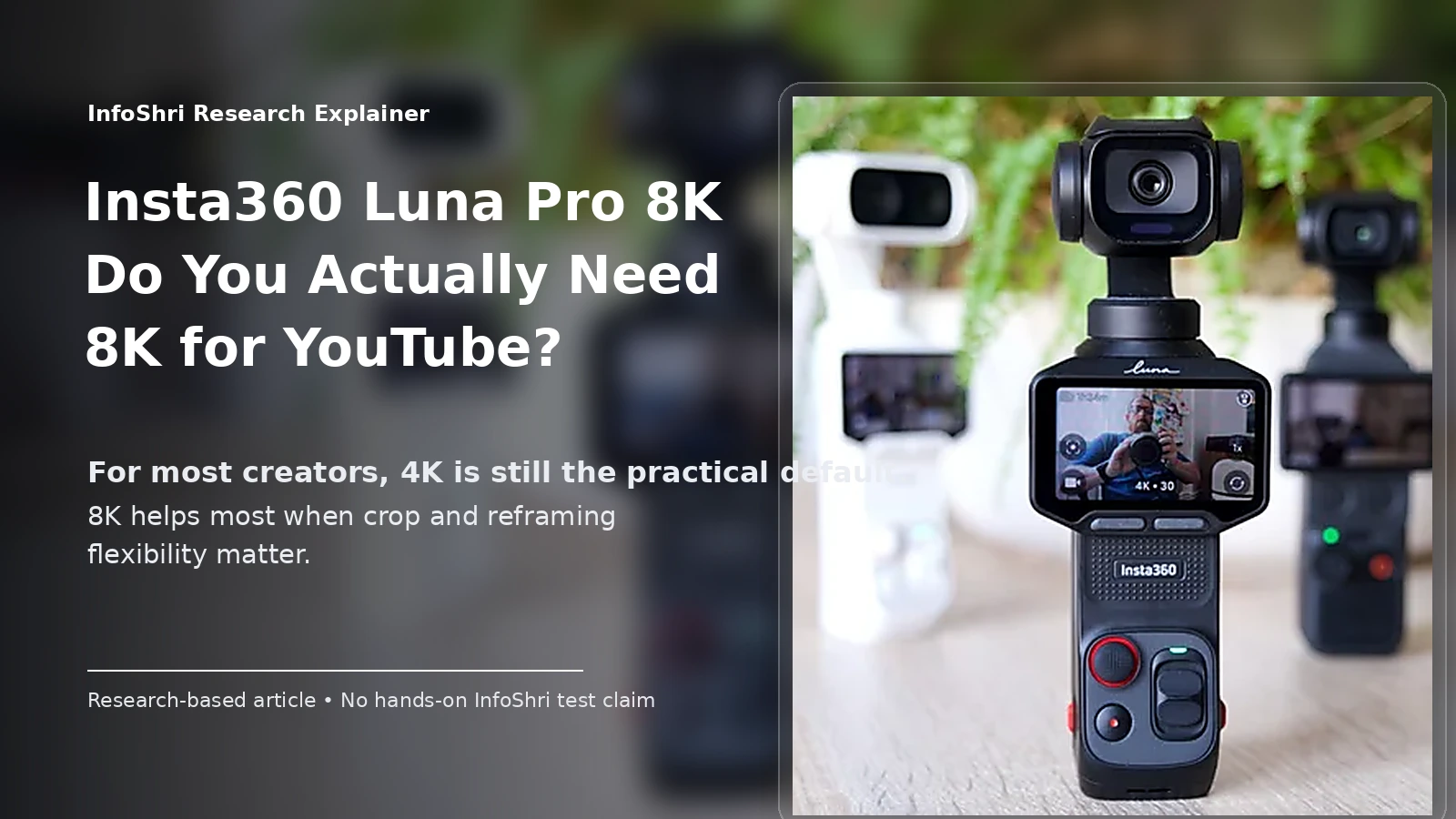
Research-based explainer | India | Last verified: 12 September 2026 | Hands-on status: InfoShri ने Luna Pro को स्वयं physically test नहीं किया है
Insta360 Luna Pro की spec sheet में 8K30 सबसे बड़ा attention-grabbing number है। लेकिन YouTube creator के लिए असली सवाल यह नहीं है कि “8K, 4K से बड़ा है या नहीं?” वह तो है। असली सवाल है: क्या 8K आपके किसी real workflow problem को solve करती है—या सिर्फ storage, battery और editing load बढ़ाती है?
सीधी बात: ज़्यादातर YouTubers के लिए 4K अभी भी बेहतर everyday default है। Luna Pro का 8K तब genuinely useful बनता है जब आपको बाद में frame crop करना हो, एक wide shot से 4K close-up निकालना हो, composition सुधारनी हो, product detail पर digital punch-in करना हो, या high-resolution master रखना हो। इसके लिए आपको final video को 8K में upload करना जरूरी नहीं है। आप 8K में shoot → edit → 4K export → YouTube पर 4K upload कर सकते हैं और फिर भी 8K source की crop/reframe flexibility का फायदा ले सकते हैं।
यही इस पूरे article की सबसे important distinction है। चार अलग workflows को एक चीज़ मत समझिए:
- 8K में shoot करना — camera 7680×4320 जैसी high-resolution source file बनाती है।
- 8K source को edit करना — timeline में वही बड़ी source file इस्तेमाल होती है।
- 8K source से 4K final बनाना — final file 3840×2160 रहती है, लेकिन edit में extra crop room मिलती है।
- True 8K YouTube upload करना — final exported file भी 7680×4320 रहती है और YouTube को 8K master दिया जाता है।
इन चारों के फायदे, लागत और hardware requirements अलग हैं।
Quick Answer: क्या YouTube के लिए आपको Luna Pro का 8K चाहिए?
अगर आपका channel talking-head, product review, interview, travel landscape, documentary या ऐसा content बनाता है जहाँ एक shot से कई framings निकालना useful है, तो Luna Pro का 8K meaningful tool हो सकता है। खासकर 4K final delivery के लिए 8K का सबसे practical फायदा यही है कि आपके पास frame के अंदर “move” करने के लिए ज्यादा pixels होते हैं।
अगर आप daily vlog बनाते हैं, लंबी recordings करते हैं, phone पर edit करते हैं, storage सीमित है, movement ज्यादा है, या आपका workflow fast turnaround वाला है, तो हर shot को 8K में record करना अक्सर unnecessary friction पैदा करेगा। ऐसे creators के लिए 4K30 या 4K60 practical default हो सकता है; fast motion या slow motion के लिए 4K60/4K120 ज्यादा useful हो सकते हैं, और low light में Luna Pro का PureVideo 4K mode 8K से ज्यादा relevant हो सकता है।
| Creator / workflow | 8K की जरूरत? | Practical reason |
|---|---|---|
| Talking-head YouTuber | कभी-कभी | एक wide shot से 4K medium/close crop निकाल सकते हैं |
| Product reviewer | अक्सर useful | buttons, ports, labels या product detail पर punch-in |
| Travel creator | selective use | landscape detail और बाद में reframing, लेकिन storage भारी |
| Daily vlogger | आम तौर पर नहीं | लंबी footage, fast workflow और storage के कारण 4K ज्यादा practical |
| Sports / fast action | अक्सर 4K बेहतर | 4K60/120 में ज्यादा motion flexibility मिलती है |
| Shorts / Reels creator | अक्सर native vertical बेहतर | horizontal 8K crop संभव है, लेकिन dedicated vertical capture सरल है |
| Phone-only creator | सावधानी | Luna Pro-specific full 8K mobile edit/export matrix अभी public docs में साफ़ verify नहीं हुई |
| Professional editor | use-case dependent | crop, VFX, archive, stabilization margin और client masters में फायदा |
| 1080p channel | niche | बहुत crop headroom मिल सकती है, लेकिन 8K workflow की कीमत भी चुकानी होगी |
| 4K channel | सबसे logical use case | 8K source से लगभग 2× linear crop तक 4K pixel dimensions बच सकती हैं |
8K का सबसे बड़ा real benefit: crop और reframe flexibility। 8K badge दिखाना नहीं।
8K की सबसे बड़ी cost: सिर्फ memory card नहीं—camera originals, backup, proxy, cache, archive, transfer time, battery और editing load सब बढ़ सकते हैं।
Most YouTubers के लिए best default: 4K।
Cropping/reframing वाले important shots के लिए: 8K30।
True 8K YouTube upload: supported है, लेकिन अधिकांश creators के लिए optional/niche है; 8K में shoot करने का फायदा लेने के लिए 8K में upload करना जरूरी नहीं।
यहाँ एक और बात साफ़ रखें: Luna Pro single-lens pocket gimbal camera है, 360-degree camera नहीं। इसका 8K normal flat frame है। इसे Insta360 X-series की 8K spherical 360 footage के बराबर pixel usage समझना गलत होगा। Flat 8K और 360-style workflows के practical फर्क के लिए हमारा Insta360 X6 review भी helpful रहेगा। 360 camera में वही total pixels पूरे sphere पर फैले होते हैं, जबकि Luna Pro का 8K एक normal rectangular frame में है।
8K असल में क्या है—and 4K से कितना ज्यादा मिलता है?
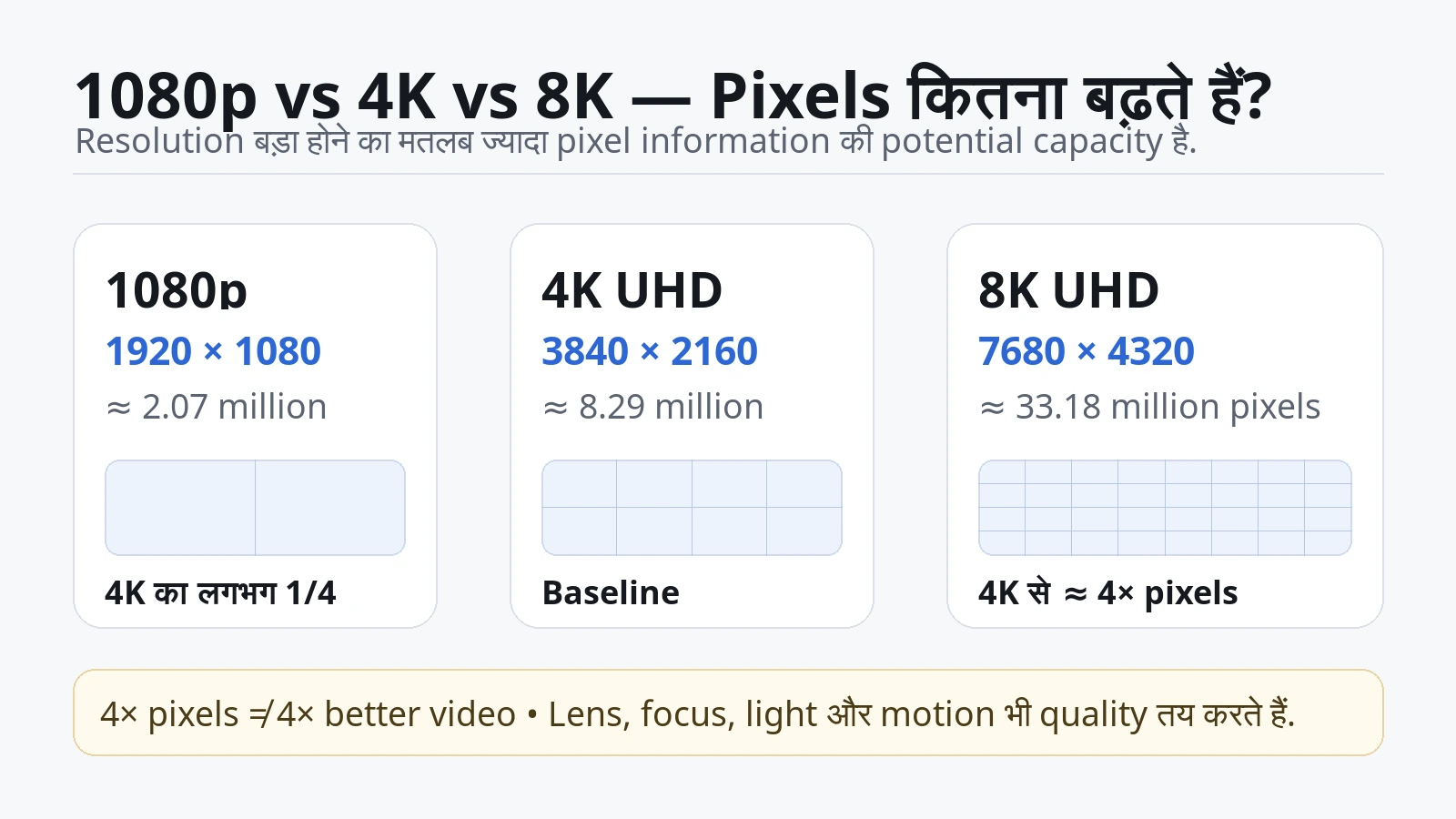
सबसे पहले “resolution” समझिए। Video picture बहुत छोटे picture points से बनी होती है जिन्हें pixels कहते हैं। आसान उदाहरण: मान लीजिए किसी फोटो को बहुत छोटी-छोटी tiles से बनाया गया है। जितनी ज्यादा tiles, उतनी ज्यादा छोटी visual information record करने की potential capacity।
Luna Pro का standard 16:9 8K mode 7680×4320 pixels record करता है। इसका मतलब एक frame में लगभग 33.18 million pixels। 4K UHD 3840×2160, यानी लगभग 8.29 million pixels। 1080p 1920×1080, यानी लगभग 2.07 million pixels।
| Format | Pixel dimensions | Approx. pixels per frame | 4K से तुलना |
|---|---|---|---|
| 1080p | 1920×1080 | 2.07 million | 4K का लगभग 1/4 |
| 4K UHD | 3840×2160 | 8.29 million | baseline |
| 8K UHD | 7680×4320 | 33.18 million | लगभग 4× pixel count |
8K में 4K से चार गुना pixel count क्यों है? Width 3840 से 7680 यानी 2× होती है, और height 2160 से 4320 यानी 2×। 2×2 = 4। इसलिए “8K में 4K से सिर्फ twice pixels हैं” कहना गलत है। लेकिन यही math दूसरी गलती भी रोकती है: चार गुना pixels का मतलब चार गुना better-looking video नहीं है।
Camera की real detail सिर्फ resolution number तय नहीं करता। Lens soft हो सकती है, focus miss हो सकता है, low light में noise बढ़ सकती है, shutter की वजह से motion blur हो सकता है, compression fine texture खा सकती है, या image processing oversharpening कर सकती है। यानी 33 million pixels में खराब information भी record हो सकती है। Resolution एक container की capacity जैसी है; content की quality बाकी imaging chain पर निर्भर करती है।
Luna Pro में 8K 16:9 वर्तमान official shooting table के अनुसार 30, 25 और 24fps तक उपलब्ध है। यहाँ fps (frames per second) का मतलब एक second में कितनी अलग तस्वीरें video में आती हैं। 30fps का मतलब 30 frames per second। इसलिए “8K30” में 8K resolution है और 30fps frame rate है। यह “8K slow है” नहीं बताता; यह सिर्फ बताता है कि इस resolution पर maximum normal frame rate 30fps है।
24fps को creators cinematic cadence के लिए पसंद कर सकते हैं, 25fps PAL-region workflows में काम आता है, और 30fps YouTube/general creator work में common है। लेकिन motion ज्यादा हो तो 60fps या 120fps अलग फायदा देते हैं—जिसे हम आगे समझेंगे।
अब screen reality समझिए। 8K और 4K के बीच difference lab crop या editing monitor पर आसानी से दिख सकता है, लेकिन viewer को कितना फर्क दिखेगा, यह screen size, playback resolution, viewing distance, eyesight, source quality और scene detail पर निर्भर करता है। 6-inch phone पर normal distance से 8K और high-quality 4K का direct viewing difference अक्सर उस level का नहीं होगा जो spec sheet देखकर लगता है। बड़े display, close viewing, fine landscape/detail या crop-heavy work में difference ज्यादा meaningful हो सकता है। हम यहाँ कोई fake “X feet से 8K बेकार” threshold नहीं दे रहे, क्योंकि ऐसा universal number context के बिना misleading होगा।
Detail और sharpness भी एक ही चीज़ नहीं हैं। 8K अधिक spatial information capture कर सकती है, लेकिन अगर focus subject पर नहीं है या shutter motion blur दे रही है, तो frame technically 8K होने के बावजूद crisp नहीं लगेगा। इसी तरह 4K frame अच्छी lens, clean light और सही focus के साथ ज्यादा pleasing लग सकता है।
इसलिए beginner के लिए सही mental model है: 8K = ज्यादा pixel information की संभावना। 8K ≠ automatically ज्यादा सुंदर video।
8K का सबसे बड़ा फायदा: Crop, Reframe और 2× “Lossless” Flexibility
अगर आप इस article से केवल एक technical idea याद रखें, तो यह रखें: 8K का strongest creator benefit editing room है।
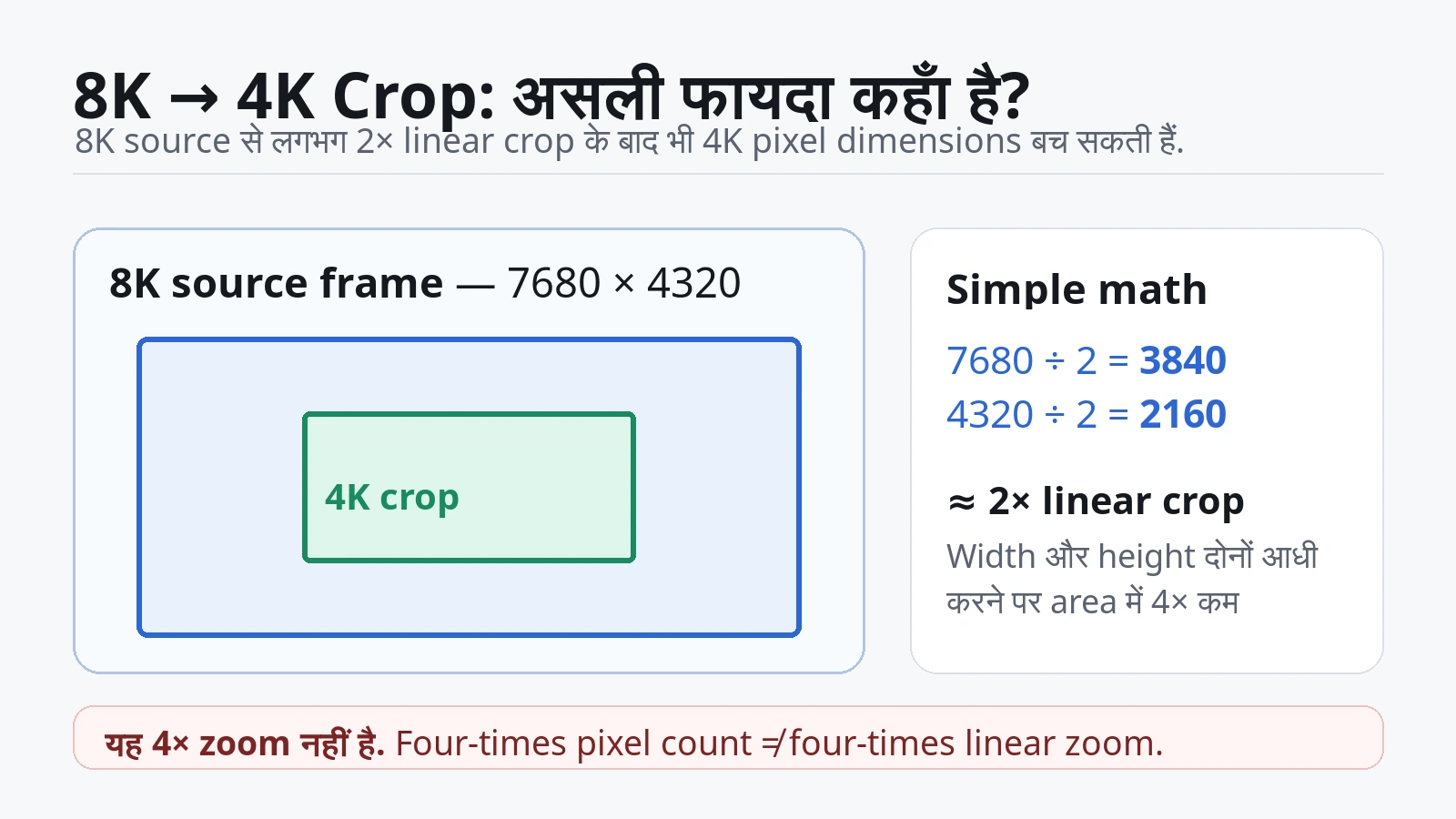
एक full 8K frame 7680×4320 है। एक 4K frame 3840×2160 है। अब 8K frame की width आधी और height आधी कर दीजिए:
- 7680 ÷ 2 = 3840
- 4320 ÷ 2 = 2160
यानी 8K source के centre से half-width और half-height वाला हिस्सा लेने पर भी आपके पास 3840×2160, यानी full 4K pixel dimensions बचती हैं। इसी वजह से 8K source 4K final workflow में लगभग 2× linear crop की गुंजाइश दे सकती है।
यहाँ “2× linear crop” शब्द जानबूझकर इस्तेमाल किया गया है। यह 4× zoom नहीं है। चार गुना pixel count का मतलब चार गुना linear zoom नहीं होता। Width और height दोनों में 2× resolution होने की वजह से area में 4× pixels आते हैं।
Luna Pro का 2× Clarity Zoom क्या है?
Current Insta360 Luna Series documentation Luna Pro के 2× position को Clarity Zoom बताती है। Official description के अनुसार यह sensor के central 4K-resolution area का इस्तेमाल करती है और interpolation के बिना 4K-size image area ले सकती है। आसान भाषा में: camera के पास इतने native pixels हैं कि वह centre portion चुनकर भी 4K-sized pixel grid रख सकती है।
यह optical zoom नहीं है। Luna Pro में 2× के लिए कोई दूसरी optical telephoto lens magically activate नहीं होती। Perspective भी वही single main lens position से आती है। इसलिए 2× crop आपको genuine second-camera perspective नहीं देता। यह उसी camera position से tighter framing है।
Official 8K landscape shooting table अभी लगभग 1× से 3× zoom range दिखाती है, जिसमें 2× Clarity Zoom position शामिल है। लेकिन 3× को lossless मत मानिए। Current zoom documentation 2× को clarity/lossless position कहती है; 2× के आगे digital crop/processing quality पर ज्यादा निर्भरता आती है। “3× optical” कहना गलत होगा।
Product-review creator के लिए इसका practical फायदा बहुत साफ़ है। मान लीजिए आप table पर camera, microphone या phone review shoot कर रहे हैं। आपने Luna Pro को एक wide framing पर लगाया। बाद में edit में आप उसी shot से:
- full product दिखा सकते हैं;
- button या port पर digital punch-in कर सकते हैं;
- hand movement को tighter frame में दिखा सकते हैं;
- label/text पर focus shift जैसा edit बना सकते हैं;
- jump cut छुपाने के लिए alternate crop बना सकते हैं।
Talking-head video में आप एक 8K wide shot को 4K timeline में use करके wide और tighter crop के बीच cut कर सकते हैं। Viewer को यह simple two-framing edit जैसा लग सकता है। लेकिन ध्यान रखें: दोनों framings का camera angle और perspective एक ही है। यह असली second camera angle नहीं है।
Travel में wide landscape shoot करके बाद में subject को centre कर सकते हैं, horizon ठीक कर सकते हैं, या composition थोड़ा बदल सकते हैं। Solo creator के लिए यह safety margin है—अगर framing perfect नहीं रही, तो edit में थोड़ी correction बची रहती है। Static 8K shot में slow digital pan/zoom भी बनाया जा सकता है क्योंकि timeline में extra pixels हैं।
Horizontal 8K से vertical Shorts बन सकती हैं?
Pixel math के हिसाब से हाँ। 7680×4320 horizontal 8K frame के अंदर से 9:16 vertical window निकाली जा सकती है। Full 4320-pixel height को रखते हुए 9:16 frame की width लगभग 2430 pixels बनती है, जो 2160×3840 vertical 4K delivery के लिए पर्याप्त pixel dimensions दे सकती है।
लेकिन इसका मतलब यह नहीं कि horizontal 8K हमेशा Shorts के लिए best है। Vertical crop बहुत narrow centre slice लेता है, इसलिए field of view काफी कम हो सकती है और capture के समय subject को safe centre में रखना पड़ता है। Luna Pro dedicated native vertical 4K mode भी देती है, जो vertical composition को शुरू से सही रखने का ज्यादा direct तरीका है। इसलिए Reels/Shorts creator के लिए “8K बड़ा number है” के बजाय सवाल होना चाहिए: क्या मुझे बाद में framing freedom चाहिए, या मुझे अभी ही vertical composition सही capture करनी है?
Extra resolution software stabilization में crop margin दे सकती है, लेकिन Luna Pro पहले से 3-axis mechanical gimbal camera है। इसलिए “8K stabilization के लिए जरूरी है” कहना overstatement होगा। अगर आपका shot पहले से mechanically stable है, extra crop margin का value कम हो सकता है।
क्या 8K Footage सच में 4K YouTube Video को Better बना सकती है?
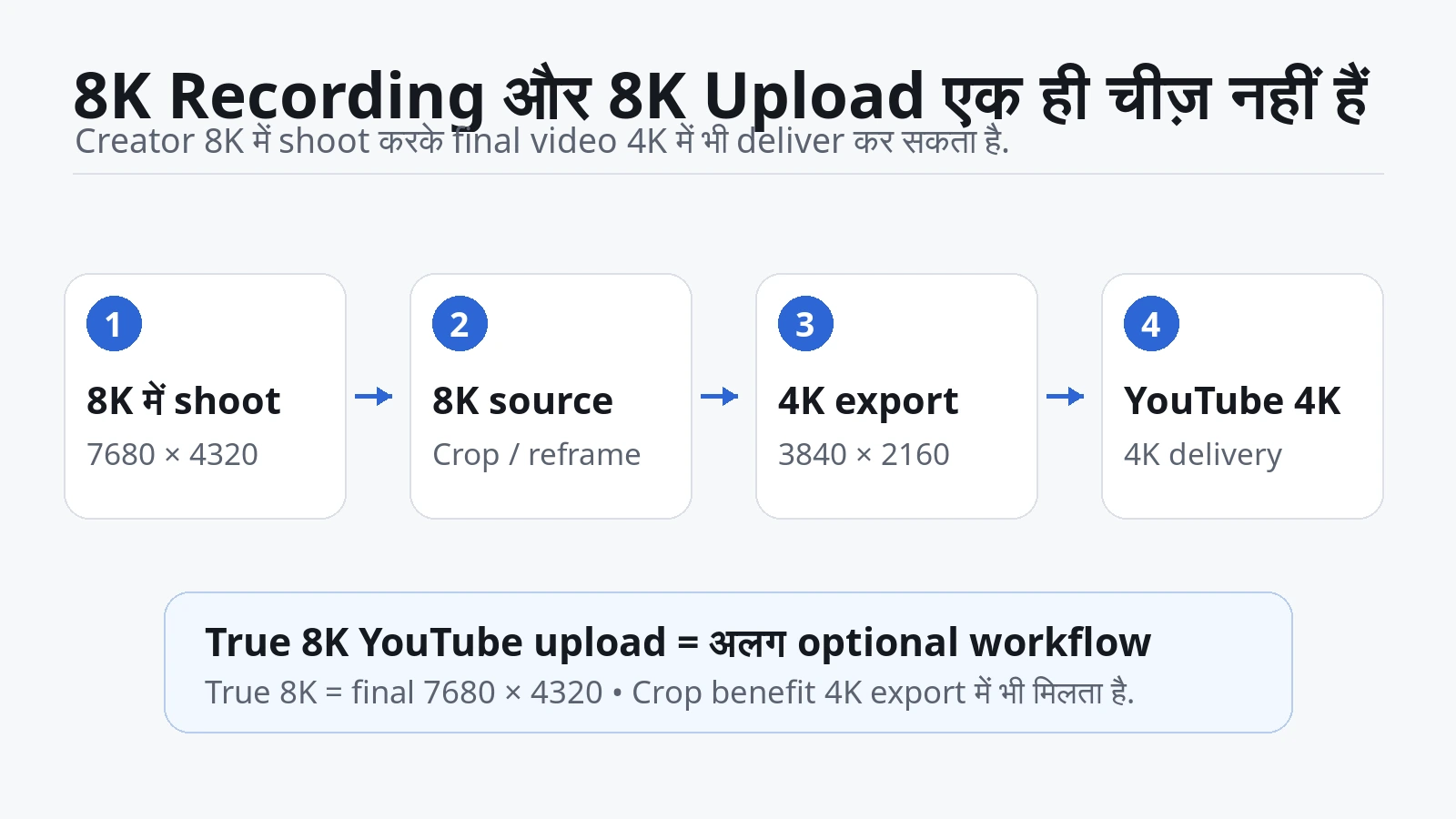
यहाँ सबसे common misunderstanding आती है: “अगर final video 4K है, तो 8K में shoot क्यों करें?” जवाब है—क्योंकि source resolution और delivery resolution अलग decisions हैं।
8K source से 4K final बनाने पर तीन संभावित फायदे हो सकते हैं: crop/reframe room, downsampling, और detail preservation। लेकिन इन तीनों को guaranteed image-quality upgrade मत समझिए। Crop benefit mathematical और clear है; downsampling का visual फायदा camera implementation और scene पर निर्भर करता है।
Downsampling का आसान मतलब है: बड़ी image को छोटी resolution में reduce करना। 8K source में 4K output से ज्यादा source samples होते हैं। अच्छी processing में कई source pixels की information को एक final output pixel में combine किया जा सकता है। कुछ परिस्थितियों में इससे fine detail साफ़ लग सकती है, aliasing/moire कम हो सकती है या textures ज्यादा natural दिख सकते हैं। लेकिन यह कोई universal magic नहीं है।
मान लीजिए Luna Pro का native 4K mode sensor से बहुत efficient readout और processing करता है, जबकि 8K mode per-pixel compression या noise reduction में अलग trade-off लेता है। तब downsampled 8K जरूरी नहीं कि native 4K से बेहतर लगे। यही कारण है कि spec-sheet math से winner घोषित करना गलत है।
Available independent matched footage में एक detailed reviewer ने Luna Pro के 8K30 और 4K30 samples compare किए और सामान्य 4K final के लिए कई scenes में native 4K30 को cleaner/preferable पाया, जबकि 8K को heavy crop और reframing के लिए ज्यादा useful माना। यह useful real-world signal है, लेकिन इसे universal law नहीं बनाना चाहिए: वह test launch-window firmware और specific scenes पर हुआ था, और current official bitrate documentation अब 150 Mbps तक दिखाती है। इसलिए सही conclusion है: Luna Pro का 8K मुख्य रूप से flexibility देता है; pure 4K image quality में हर scene पर automatic win साबित नहीं है।
Fair test कैसे होगा? Same scene, same camera position, same lighting, same focal position, practical रूप से same exposure, 8K30 और 4K30 दोनों record किए जाएँ। फिर 8K source को 4K timeline/export में downsample किया जाए और native 4K30 source को भी same export settings से 4K बनाया जाए। उसके बाद fine text, hair, foliage, brick, fabric, skin, noise, moire, aliasing और edge sharpening compare करें।
लेकिन सिर्फ 400% zoom पर pixel-peeping मत कीजिए। Normal YouTube playback size पर भी देखें। अगर difference केवल extreme crop में दिखता है और viewer normal screen पर नहीं देख पाएगा, तो उस difference का workflow value हर creator के लिए समान नहीं होगा।
यहाँ एक simple decision rule useful है:
- आप crop नहीं करेंगे, framing controlled है, final 4K है: native 4K बहुत logical choice है।
- आप 4K final में 1.2×–2× reframing चाहते हैं: 8K source का value तेजी से बढ़ता है।
- आप एक camera से multiple virtual framings चाहते हैं: 8K बहुत useful हो सकती है।
- आप सिर्फ इसलिए 8K shoot कर रहे हैं क्योंकि “higher number = better”: पहले storage/editing cost देखें।
8K का value editor की timeline में अक्सर viewer के TV से पहले शुरू हो जाता है। यही वजह है कि “मेरे viewers के पास 8K TV नहीं है” अपने-आप में 8K recording को useless साबित नहीं करता। Viewer 4K video देख सकता है जबकि creator ने 8K source की crop room इस्तेमाल की हो।
8K की असली कीमत: Storage, Battery, Heat और Recording Time
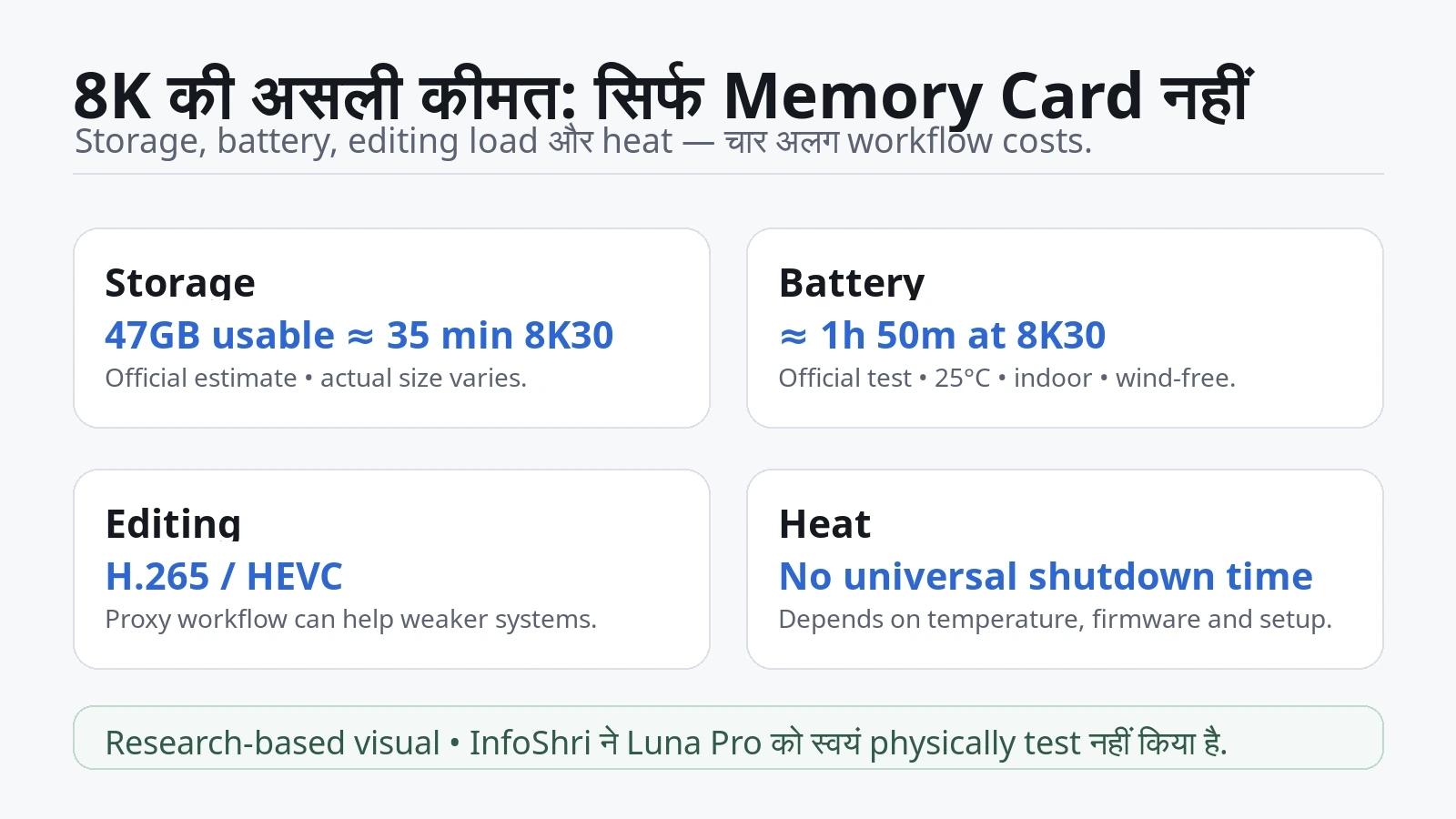
8K flexibility free नहीं आती। Camera में extra detail record करने का मतलब आम तौर पर ज्यादा data और processing है। लेकिन Luna Pro के case में exact file-size planning थोड़ा nuanced है, इसलिए हम एक fake single-number formula नहीं देंगे।
Current official Luna Series storage guidance के अनुसार Luna Pro में लगभग 47GB usable internal storage है और यह लगभग 35 minutes of 8K30 recording के लिए quoted है। Current shooting specs maximum video bitrate up to 150 Mbps दिखाती हैं। “Up to” का मतलब हर clip हर second 150 Mbps पर record नहीं करती; variable bitrate scene complexity और mode के हिसाब से बदल सकती है।
अगर केवल 150 Mbps को theoretical ceiling मानकर math करें, तो one hour video data लगभग 67.5GB बनती है। वहीं 47GB/35-minute official planning figure को सीधे extrapolate करें तो लगभग 80GB/hour के आसपास आता है। दोनों references exact same measurement method नहीं बताते, इसलिए किसी एक को “exact file size” कहना सही नहीं होगा। Practical planning के लिए बेहतर है कि 8K30 camera originals को roughly tens of gigabytes per hour—लगभग 70–85GB/hour range समझें, और actual clip metadata को final authority मानें। यह planning inference है, guaranteed constant नहीं।
यानी 47GB internal storage से long interview पूरी नहीं चलेगी। Current official guidance Luna Pro के लिए UHS-I V30 or higher, exFAT microSD recommend करती है और current Luna Series page up to 2TB cards support करती है। UHS-II/UHS-III या 2TB से बड़े cards के बारे में official page caution देती है।
| Shoot type | 8K storage सोच | Practical advice |
|---|---|---|
| 10-minute hero/B-roll | manageable | internal storage भी चल सकती है, लेकिन backup रखें |
| 30-minute talking head | significant | internal storage का बड़ा हिस्सा use होगा |
| 1-hour interview | internal alone पर्याप्त नहीं | V30 card + offload/backup planning जरूरी |
| Half-day travel | जल्दी बढ़ेगी | selective 8K + 4K mixed workflow बेहतर हो सकता है |
| Full-day creator shoot | बहुत भारी | originals + backup + edit cache + archive पहले plan करें |
याद रखें: memory card ही पूरा storage cost नहीं है। Editing computer पर original files रहेंगी, फिर proxy files बन सकती हैं, software cache/render files बनेंगे, final exports बनेंगे और ideally backup copy भी होगी। इसलिए 80GB camera originals वाला project आसानी से working storage में उससे कई गुना footprint ले सकता है। 8K एक “card capacity” decision नहीं; एक archive strategy है।
Battery: official number को condition के साथ पढ़ें
Current official battery table Luna Pro के 8K30 के लिए लगभग 1 hour 50 minutes runtime quote करती है, test conditions 25°C, indoor और wind-free बताई गई हैं। इसे “हर situation में 110 minutes” मत समझिए। Screen state, Wi‑Fi, tracking, external microphone, temperature, battery age और recording pattern real runtime बदल सकते हैं। Official page 8K figure के साथ हर accessory/screen-state variable explicitly नहीं बताती, इसलिए हम assumptions नहीं जोड़ेंगे।
एक launch-window independent test में screen active रखते हुए लगभग 90 minutes 8K recording के आसपास battery life report हुई। यह official controlled figure से lower है और यही याद दिलाती है कि field use controlled lab condition नहीं है। इसे भी universal result नहीं मानना चाहिए; यह एक reviewer setup का observation है।
Heat: “X minute में overheat” जैसी blanket claim मत मानिए
8K processing camera पर load बढ़ाती है। Independent sustained test में body काफी warm हुई और बहुत लंबी continuous 8K recording के बाद shutdown behavior report हुआ; accessible report में roughly 75 minutes से अधिक continuous run का संदर्भ है। लेकिन ambient temperature, exact firmware और stop cause हर report में पूरी तरह documented नहीं हैं। इसलिए “Luna Pro 75 minutes में overheat करती है” कहना unsupported होगा।
Thermal result evaluate करते समय चार अलग causes अलग रखिए: battery खत्म हुई, storage भर गई, user ने manually stop किया, या genuine thermal shutdown हुआ। ये चारों एक जैसे नहीं हैं। Indian summer में 35–40°C ambient condition और 25°C indoor test comparable नहीं हैं। Current operating-temperature spec 0–40°C है, पर यह continuous 8K thermal guarantee नहीं है।
Long recording के लिए एक useful detail: official Luna documentation कहती है कि 30 minutes से longer recording files automatically segments में save हो सकती हैं, और camera/app/Studio उन्हें virtually seamless तरीके से merge दिखा सकते हैं। File split का मतलब जरूरी नहीं कि recording stop हुई। Computer पर raw storage देखते समय दो अलग files दिखाई दे सकती हैं।
इसलिए long 8K shoot से पहले तीन चीजें test करें: card capacity, actual battery behavior और आपकी actual room/outdoor temperature में continuous recording। यही real workflow validation है।
8K Editing कितनी Heavy है? Phone, Laptop और PC पर Reality क्या है?
Luna Pro video files H.265 / HEVC codec में record करती है। Codec को आसान भाषा में video को compress और store करने का तरीका समझिए। H.265 बहुत efficient है—यह high-quality video को comparatively कम data में रखने में मदद करता है—लेकिन decode करना पुराने या कमजोर hardware के लिए heavy हो सकता है। इसलिए दो computers जिनमें बराबर RAM हो, 8K HEVC को बिल्कुल अलग तरह से handle कर सकते हैं अगर एक में modern hardware decoding है और दूसरे में नहीं।
यही वजह है कि “8K edit करने के लिए minimum RTX 5070 और 64GB RAM चाहिए” जैसी random requirement बनाना गलत है। Editing performance CPU, GPU, hardware HEVC decoder, RAM, SSD speed, software version, timeline effects, color grade और proxy use पर निर्भर करती है।
एक practical classification ज्यादा useful है:
Older / entry-level laptop: 8K HEVC direct playback में stutter हो सकती है। Scrubbing slow हो सकती है, effects के बाद playback और खराब हो सकती है। इसका मतलब project impossible नहीं; proxy workflow मदद कर सकता है।
Modern hardware-accelerated laptop/desktop: HEVC hardware decoding होने पर 8K handling काफी बेहतर हो सकती है, लेकिन heavy color grading, noise reduction, multicam या effects फिर भी demanding होंगे।
Professional workstation: frequent 8K projects, long timelines, multiple streams और complex effects के लिए naturally बेहतर suited है। फिर भी “professional” होने का मतलब हर clip 8K में shoot करना जरूरी नहीं।
Proxy क्या है—and beginner के लिए इतना useful क्यों है?
Proxy original 8K file की छोटी temporary copy है। मान लीजिए original file 7680×4320 HEVC है और आपका laptop उसे smoothly नहीं चला पा रहा। Editing software lower-resolution, easier-to-decode proxy बनाता है। आप उसी proxy पर cut, trim, music, titles और timing करते हैं। Final export के समय software फिर original high-resolution media से render करता है।
इसलिए proxy का मतलब quality permanently कम करना नहीं है। यह editing को हल्का बनाने का तरीका है। Weak-to-mid-range system पर 8K workflow possible बनाने के लिए proxy सबसे practical tools में से एक है। लेकिन proxy के साथ storage cost और बढ़ती है क्योंकि originals के अलावा temporary media भी रखनी पड़ती है।
Phone-only creator के लिए सबसे important warning
Current Luna Series connection documentation Luna Pro के लिए Insta360 App version 2.26.2 or later की जरूरत बताती है, और current Quick Editing / Auto Edit support pages Luna Pro को supported model list में शामिल करती हैं। लेकिन public high-resolution processing support table में, जिसे हमने 12 September 2026 को check किया, Luna Pro-specific complete 8K preview + edit + export + HDR export compatibility matrix साफ़ नहीं दी गई। उस table में older/other models की detail है, लेकिन Luna Pro की exact row reliably available नहीं मिली।
इसलिए हम Luna Ultra की limitation copy करके Luna Pro पर नहीं चिपकाएँगे। Sibling-model context के लिए आप हमारा Insta360 Luna Ultra review भी देख सकते हैं। सही status है: Luna Pro का complete 8K mobile workflow public documentation से अभी NOT RELIABLY VERIFIED है।
Phone-only creator क्या करे? खरीदने या important shoot से पहले अपने exact phone पर एक short 8K clip का end-to-end test करें:
- camera से phone transfer;
- app में preview;
- trim/edit;
- crop/reframe;
- color/HDR handling;
- desired resolution में export;
- final file का playback और YouTube upload।
अगर इनमें से किसी stage पर app 8K source को downscale, restrict या unsupported बताती है, तो आपका practical 8K benefit बदल जाएगा। यही कारण है कि app compatibility एक spec-sheet footnote नहीं, workflow decision है।
Desktop पर Insta360 Studio, Premiere Pro, Resolve और Final Cut
Insta360 Studio की public computer-requirement page modern Windows/macOS hardware recommendations देती है, लेकिन current page की model applicability list में Luna Pro-specific labeling अभी स्पष्ट नहीं मिली। इसलिए उन recommendations को Luna Pro का official “minimum PC” कहना गलत होगा। Premiere Pro, DaVinci Resolve और Final Cut Pro modern HEVC/8K media handle कर सकते हैं, लेकिन real smoothness hardware decoding, timeline settings और effects पर depend करेगी।
यहाँ best practice simple है: 8K source को capability test से गुजराइए, assumption से नहीं। अगर direct playback smooth है, native edit करें। अगर नहीं, proxies बनाइए। अगर project का 80% material 4K में ही ठीक है, केवल crop-critical shots 8K में रखें।
Mixed-resolution workflow अक्सर सबसे समझदार होता है:
- hero shots, landscape, product detail, one-camera reframing: 8K30;
- walking, sports, fast movement: 4K60;
- slow-motion shot: 4K120 जहाँ exact mode support करे;
- night/low-light: PureVideo 4K;
- Shorts/Reels: native vertical mode जहाँ practical हो।
यह कोई rigid preset नहीं है। Idea सिर्फ इतना है कि resolution को shot के purpose से match करें, पूरे दिन camera को highest number पर lock न करें।
YouTube पर 8K Upload करने से वास्तव में क्या होता है?
YouTube 8K को support करता है। Current YouTube Help resolution table 4320p/8K को 7680×4320 बताती है। इसलिए Luna Pro का standard 16:9 8K frame true 8K UHD dimensions के साथ align करता है। लेकिन इससे यह निष्कर्ष नहीं निकलता कि हर Luna Pro creator को final export 8K ही करना चाहिए।
सबसे पहले YouTube re-encoding समझिए। आप YouTube को एक master file upload करते हैं। YouTube उसे process करके अलग resolutions और playback conditions के लिए versions बनाता है। Viewer आम तौर पर आपके camera का original file byte-for-byte stream नहीं कर रहा होता। Source recording, editing/export master और YouTube playback—ये तीन अलग stages हैं।
Current official YouTube upload guidance के अनुसार 8K SDR, 24/25/30fps के लिए recommended upload bitrate लगभग 80–160 Mbps range में है। HDR 8K के लिए official recommendations इससे higher range देती हैं। ध्यान दें: यह YouTube upload/export bitrate है, Luna Pro का camera recording bitrate नहीं।
Luna Pro current official shooting specs maximum recording bitrate up to 150 Mbps दिखाती हैं। यह देखकर “camera 150 Mbps है और YouTube 80–160 कहता है, इसलिए direct perfect match” कहना गलत होगा। Editing के दौरान footage crop, grade, titles, transitions और effects से बदलती है, फिर export software नया encoded file बनाता है। Camera source bitrate और final upload bitrate अलग jobs करते हैं।
8K processing में कितना समय लगेगा?
कोई honest universal number नहीं है। YouTube खुद कहता है कि higher-quality versions को process होने में ज्यादा समय लग सकता है और processing time video length, format, frame rate, quality और platform load जैसे factors पर depend करता है। इसलिए “8K exactly 12 hours में ready होती है” जैसी statement unreliable है।
अगर 8K version publish time पर जरूरी है, practical तरीका है video को पहले private/unlisted upload करना और high-resolution processing complete होने के बाद public करना। लेकिन processing time project-by-project बदल सकता है।
क्या 8K upload करने से YouTube की 4K quality automatically better हो जाती है?
Internet पर एक popular claim मिलता है: “8K upload करो, YouTube better codec देगा और 4K playback भी automatically बेहतर हो जाएगी।” Current research में हमें ऐसा official YouTube rule नहीं मिला जिसे Luna Pro creator के लिए guaranteed fact की तरह publish किया जा सके। Codec assignment और platform transcoding behavior समय के साथ बदल सकते हैं। Controlled matched evidence के बिना इसे recommendation बनाना सही नहीं है।
इसलिए status: NOT VERIFIED AS A GUARANTEED BENEFIT.
अगर कोई creator इस claim को खुद test करना चाहता है, fair test में same master को 4K और 8K दो versions में export/upload करना होगा, दोनों के processing complete होने का इंतजार करना होगा, फिर same browser/device पर delivered 4K streams के codec, bitrate और visual quality compare करनी होगी। सिर्फ player में “8K” option दिखना proof नहीं है कि 4K rendition बेहतर हो गई।
8K Dolby Vision / HDR का क्या?
Insta360 launch material Luna Pro के लिए 8K Dolby Vision और 10-bit I‑Log capability market करता है, और independent launch coverage भी 8K30 Dolby Vision का उल्लेख करती है। लेकिन end-to-end YouTube HDR workflow में सिर्फ camera capture mode काफी नहीं है। Export file को सही HDR metadata, color handling और compatible encoding चाहिए; फिर viewer के device/display को भी HDR support करना होगा। YouTube compatible devices के लिए HDR transcodes और अन्य viewers के लिए SDR versions बना सकता है।
एक documentation nuance भी है: current YouTube HDR help text overall HDR support बताती है और encoding guidance 8K HDR bitrate ranges देती है, लेकिन एक HDR requirements table में listed resolutions lower ceiling तक दिखाई देती हैं। इसलिए “Luna Pro 8K Dolby Vision → YouTube पर guaranteed perfect 8K Dolby Vision playback” जैसा shortcut हम publish नहीं करेंगे। यह end-to-end chain current software/export/device combination पर verify करनी चाहिए।
Luna Pro general specs 10-bit I‑Log support दिखाती हैं, लेकिन current public mode table से हमें 8K24/25/30 के लिए complete I‑Log compatibility matrix reliably confirm नहीं हुई। इसलिए “8K I‑Log हर 8K frame rate पर supported है” को fact की तरह नहीं लिखा जा सकता। Status: 8K I‑Log exact mode compatibility — NOT RELIABLY VERIFIED.
Shoot 8K और Upload 8K—दो अलग decisions
| Workflow | क्या मिलता है? | किसके लिए sensible? |
|---|---|---|
| Shoot 4K → Export 4K → Upload 4K | simplest workflow | अधिकांश creators |
| Shoot 8K → Export 4K → Upload 4K | crop/reframe + possible downsampling flexibility | product, talking-head, travel, documentary |
| Shoot 8K → Export 8K → Upload 8K | true 8K delivery | niche/client/archive/large-display use |
| Shoot mixed 8K + 4K → Export 4K | flexibility + manageable storage | सबसे balanced creator workflow |
अगर आपके viewers 4K या 1080p देख रहे हैं, तब भी second workflow useful हो सकता है। इसलिए audience के पास 8K TV न होना recording-8K के खिलाफ complete argument नहीं है। लेकिन audience 8K नहीं देखती तो true 8K delivery का direct payoff naturally कम हो सकता है।
8K30 vs 4K60/4K120: Bigger Resolution या Smoother Motion?
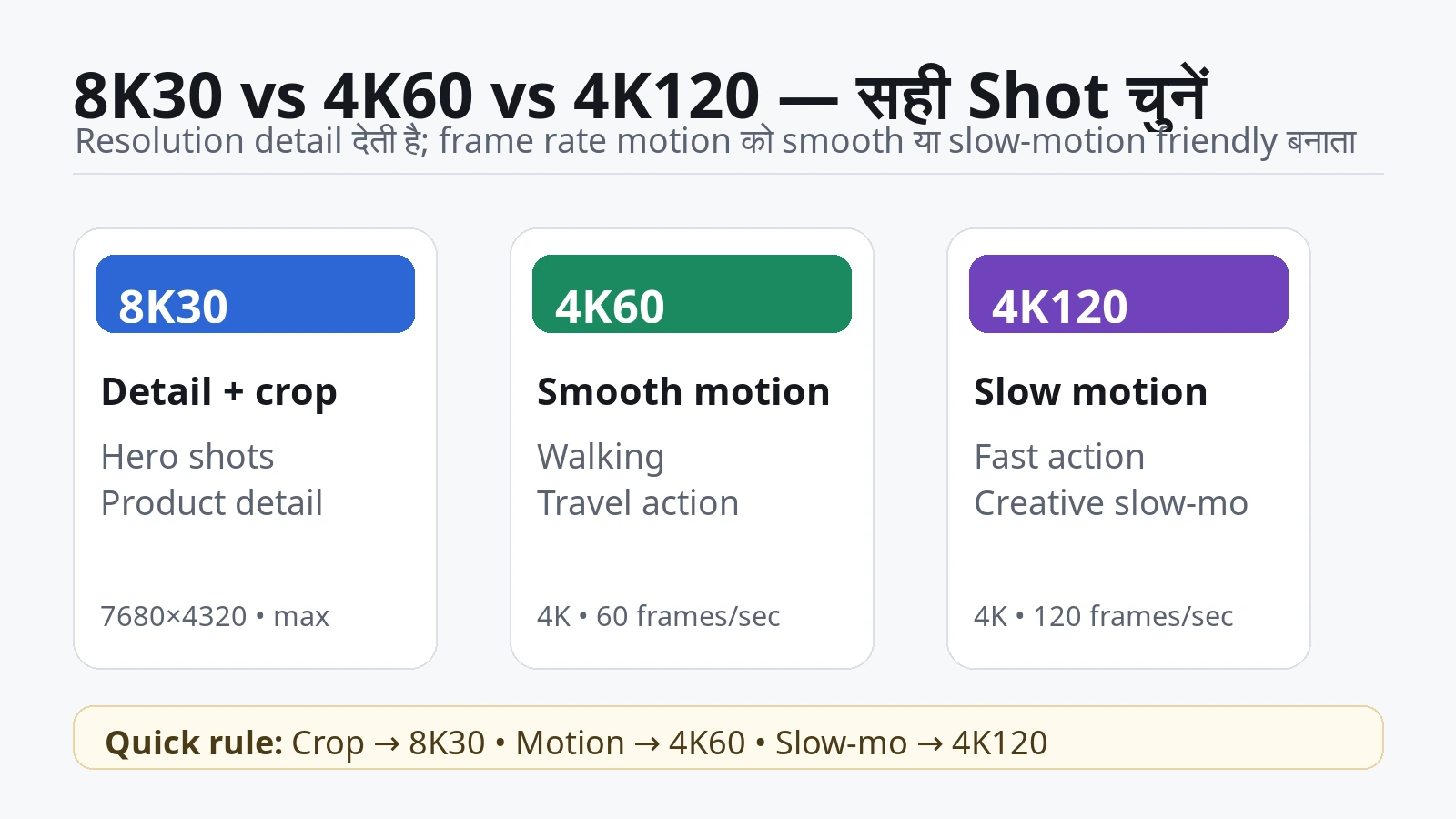
Resolution और frame rate अलग problems solve करते हैं। 8K30 ज्यादा spatial detail देता है; 4K60/120 ज्यादा temporal samples देता है। आसान भाषा में: 8K में हर frame बड़ा और detailed हो सकता है, जबकि 60/120fps में movement ज्यादा छोटे time steps में capture होती है।
Luna Pro current official shooting table 8K को 30/25/24fps तक रखती है, जबकि 4K16:9 higher frame rates—up to 120fps—support करती है। इसलिए “8K highest quality mode है, हमेशा वही use करो” गलत होगा।
| Shot | ज्यादा logical mode | क्यों? |
|---|---|---|
| Static talking head जिसे बाद में crop करना है | 8K30 | ज्यादा reframing room |
| Product demo / labels / ports | 8K30 | detail + punch-in flexibility |
| Walking vlog | 4K60 अक्सर practical | smoother motion, smaller workflow burden |
| Sports / fast action | 4K60 या 4K120 | motion capture priority |
| Slow motion | 4K120 | 8K30 slow-motion substitute नहीं है |
| Cinematic controlled 24fps shot | 8K24 हो सकती है | high-resolution master + deliberate motion |
| Night / low light | PureVideo 4K | Luna Pro का low-light optimized mode 8K नहीं है |
4K60 का फायदा सिर्फ “smooth दिखना” नहीं है। अगर final timeline 30fps है, 60fps material को slow down करने की creative flexibility भी मिल सकती है। 4K120 और अलग है—यह high-frame-rate slow motion use cases के लिए है। 8K30 और 4K120 को सिर्फ numbers से compare करना ऐसा है जैसे पूछना “बड़ा lens बेहतर या तेज shutter?”—दोनों अलग jobs के लिए हैं।
Low light में 8K हमेशा best क्यों नहीं है?
Current Luna Pro specs में PureVideo low-light optimized video mode 4K तक जाती है, 8K तक नहीं। Current table 4K60 तक PureVideo options दिखाती है। इसका practical lesson बहुत important है: maximum resolution ≠ maximum low-light quality.
Night scene में noise, dynamic range, exposure और motion handling raw pixel count से ज्यादा important हो सकते हैं। अगर camera का dedicated low-light processing 4K में available है, तो सिर्फ “8K” badge के लिए standard 8K mode चुनना उल्टा result दे सकता है। इसलिए night creator को matched real footage देखनी चाहिए, न कि resolution number।
8K में convenience features कम भी हो सकती हैं
Current Luna Series filter documentation कहती है कि in-camera filters 8K और high-frame-rate video में supported नहीं हैं। यानी highest resolution चुनने पर कुछ convenience features sacrifice हो सकते हैं। Dolby Vision में भी filter restrictions हैं।
Beautify के लिए हमें current public Luna Pro-specific 8K compatibility statement reliably नहीं मिली, इसलिए इसे assumed restriction के रूप में publish नहीं करेंगे। इसी तरह current tracking documentation Luna Pro और general Video mode tracking support करती है, लेकिन हर tracking variant—group tracking, smart framing, subject tracking—8K30 के हर combination में available है या नहीं, इसका complete public matrix clear नहीं मिला। इसलिए “8K30 पर सभी tracking features guaranteed” कहना भी सही नहीं होगा।
यही pattern creator को याद रखना चाहिए: highest-resolution mode camera के हर feature का superset जरूरी नहीं। Mode चुनते समय resolution के साथ frame rate, tracking, filters, HDR/Log, low-light processing और workflow compatibility भी check करें।
किस YouTube Creator को 8K Use करनी चाहिए—and किसे 4K पर रहना चाहिए?
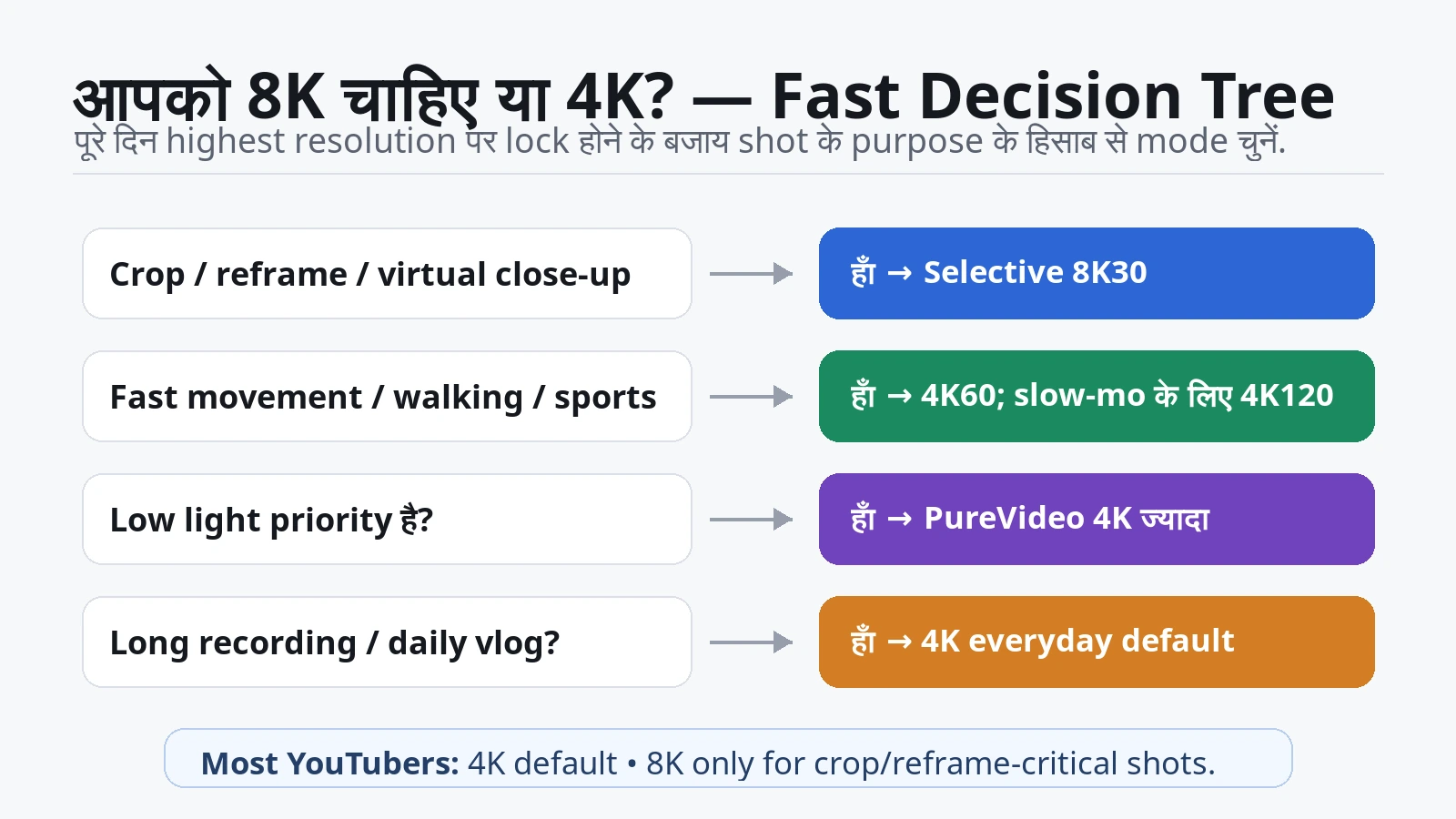
अब सारी technical बातें creator scenarios में बदलते हैं। यही section असली buying/usage decision है।
Talking-head creator: अगर camera fixed है और framing पहले से perfect है, तो 4K काफी हो सकती है। लेकिन solo creator एक wide 8K frame record करके 4K timeline में medium और close crop बना सकता है। इससे edit visually dynamic लग सकती है। याद रखें, perspective वही रहेगा—यह true second angle नहीं है।
Product reviewer: Luna Pro 8K का सबसे convincing use cases में से एक। Wide table shot से screen, button, port, label या hand movement पर crop करना useful है। यह extra B-roll की जरूरत कुछ मामलों में कम कर सकता है। फिर भी optical close-up, correct focus और lighting raw resolution से ज्यादा important हो सकते हैं।
Travel creator: Scenic landscapes, architecture, wildlife-at-distance crop या future reuse के लिए 8K useful है। लेकिन full travel day 8K में shoot करने से card, backup drive, transfer और battery pressure तेजी से बढ़ेगा। Smart workflow: hero landscapes/important moments 8K, सामान्य walking footage 4K60, low light PureVideo 4K।
Daily vlogger: हर दिन hours of footage collect करते हैं तो 8K quickly burden बन सकती है। अगर footage mostly straight cuts, talking, walking और fast turnaround है, तो 4K30/60 ज्यादा sensible है। 8K को सिर्फ उन shots पर रखें जहाँ crop value साफ़ दिख रही है।
Sports / action creator: 8K30 का static detail advantage useful हो सकता है, लेकिन fast movement में 4K60/120 का temporal advantage अक्सर ज्यादा important होगा। अगर subject जल्दी move कर रहा है, smoothness और shutter choice resolution से बड़ा factor बन सकते हैं।
Reels / Shorts creator: Horizontal 8K से vertical 4K crop mathematically possible है, लेकिन field of view narrow हो सकती है और framing centre-dependent होगी। Luna Pro का native vertical 4K workflow तेज़ और straightforward है। Horizontal 8K तब useful है जब same capture से landscape और portrait दोनों outputs चाहिए और आप extra edit/storage स्वीकार करते हैं।
Interview / event creator: One wide 8K camera से 4K timeline में virtual wide + close crop मिल सकता है। यह single-camera safety tool है। लेकिन long continuous recording में storage, battery और heat ज्यादा relevant हो जाते हैं। Critical event में बिना अपने exact setup का long-record test किए 8K पर निर्भर न रहें।
Phone-only creator: अभी सबसे cautious persona यही है। Luna Pro app support मौजूद है, लेकिन complete model-specific 8K mobile processing matrix public documentation से साफ़ verify नहीं हुई। अगर आपका पूरा workflow phone पर है, तो 8K capability तब तक practical feature नहीं मानी जानी चाहिए जब तक आपके exact phone पर preview/edit/export test pass न हो।
Professional editor / commercial creator: 8K client master, archival footage, VFX plates, reframing, stabilization margin और future reuse के लिए defensible है। लेकिन professional workflow का मतलब “हर shot 8K” नहीं। Professionals अक्सर data और turnaround बचाने के लिए mode intentionally choose करते हैं।
1080p creator: 8K से huge crop headroom theoretically मिल सकती है, लेकिन अगर channel final 1080p है तो 4K source itself already substantial crop room देता है। 8K का extra cost justify तभी होगा जब aggressive reframing, archive या future 4K delivery plan हो।
4K creator: Luna Pro 8K का sweet spot यही है। 4K final रहते हुए 8K source से 2× linear crop तक native 4K pixel dimensions retain करने का clear mathematical benefit है। यही सबसे easy-to-explain practical reason है।
Final Verdict
8K IS WORTH USING IF: आपको crop/reframe चाहिए; एक camera से multiple framings चाहिए; important landscape/product detail preserve करनी है; या high-resolution master archive करना है।
STAY WITH 4K IF: framing controlled है, long recording है, storage limited है, fast turnaround चाहिए, phone-only workflow है, या 8K का कोई specific editing benefit नहीं है।
BEST EVERYDAY MODE FOR MOST CREATORS: 4K, exact frame rate shot पर depend करेगी।
BEST FOR CROPPING / REFRAMING: 8K30।
BEST FOR FAST MOVEMENT: अक्सर 4K60; slow-motion need में 4K120 जहाँ mode suitable हो।
BEST FOR LOW LIGHT: PureVideo 4K, subject और motion के हिसाब से exact settings चुनें।
BEST FOR SHORTS: अक्सर native vertical 4K; horizontal 8K तभी जब later reframing/cross-platform extraction चाहिए।
BEST FOR LONG RECORDING: 4K अक्सर ज्यादा manageable; exact mode storage/battery/heat test करें।
BIGGEST 8K ADVANTAGE: 4K final में crop/reframe freedom।
BIGGEST 8K DISADVANTAGE: data और workflow burden—storage, transfer, backup, editing, battery और potentially heat।
DO YOU NEED TO UPLOAD IN 8K? नहीं। 8K source का फायदा 4K final में भी लिया जा सकता है।
CAN 8K HELP A 4K YOUTUBE VIDEO? हाँ, खासकर crop/reframing में; downsampling से quality advantage हो सकता है, लेकिन वह हर scene में guaranteed नहीं।
IS 8K A REAL FEATURE OR MARKETING? Luna Pro में 8K real और technically useful feature है। Marketing तब बनती है जब इसे हर creator और हर shot के लिए automatically better बताया जाए।
FINAL ONE-LINE ANSWER: Luna Pro का 8K genuinely useful tool है, लेकिन most YouTubers को इसे हर shot में use करने या final video को 8K में upload करने की जरूरत नहीं है।
अगर आप broader creator journey पर भी काम कर रहे हैं, तो हमारी YouTube channel start और grow guide भी useful रहेगी।
Quick FAQ: Luna Pro 8K के सबसे जरूरी सवाल
1. क्या Insta360 Luna Pro true 8K shoot करती है?
हाँ। Current official shooting specs standard 16:9 में 7680×4320 तक 8K video दिखाती हैं। यह flat video है, 360-degree spherical 8K नहीं।
2. क्या Luna Pro 8K60 shoot करती है?
नहीं। Current official 8K modes 30/25/24fps तक हैं। Higher frame rates के लिए 4K modes देखें।
3. 8K में कितने pixels होते हैं?
7680×4320 = लगभग 33.18 million pixels per frame। 4K 3840×2160 = लगभग 8.29 million। इसलिए 8K में 4K से लगभग चार गुना pixel count है।
4. क्या 8K चार गुना बेहतर quality है?
नहीं। Pixel count चार गुना है, लेकिन final quality lens, focus, light, noise, bitrate, processing और motion पर भी depend करती है।
5. क्या 8K को 2× crop करके 4K बचती है?
Pixel dimensions के हिसाब से हाँ। 7680×4320 का half-width/half-height centre region 3840×2160 होता है। इसलिए लगभग 2× linear crop पर 4K-sized pixel grid बच सकती है।
6. Luna Pro का 2× Clarity Zoom optical zoom है?
नहीं। Official documentation इसे sensor के central 4K-resolution area से interpolation-free crop के रूप में describe करती है। Perspective main lens का ही रहता है।
7. क्या 3× zoom भी lossless है?
Current 8K shooting table 3× तक zoom allow करती है, लेकिन official clarity/lossless position 2× है। 3× को lossless या optical कहना सही नहीं होगा।
8. क्या YouTube 8K support करता है?
हाँ। Current YouTube help table 4320p/8K को 7680×4320 के रूप में support करती है। High-quality processing complete होने में समय लग सकता है।
9. क्या YouTube के लिए final video 8K upload करना जरूरी है?
नहीं। आप 8K में shoot करके 4K final export/upload कर सकते हैं और crop/reframe benefits रख सकते हैं।
10. क्या 8K upload करने से YouTube 4K quality automatically better हो जाती है?
Guaranteed rule के रूप में current official evidence नहीं मिला। इसे codec folklore की तरह repeat न करें। Controlled test के बिना इसे benefit assume करना ठीक नहीं।
11. 47GB internal storage में कितना 8K आता है?
Current official Luna Series storage guidance लगभग 35 minutes 8K30 quote करती है। Actual file size scene और bitrate behavior के कारण vary कर सकती है।
12. 8K के लिए कौन-सा microSD card चाहिए?
Current official guidance UHS-I V30 or higher, exFAT card recommend करती है; Luna Pro current page up to 2TB support बताती है।
13. Luna Pro 8K battery कितनी चलती है?
Official controlled table लगभग 1h50 8K30 quote करती है at 25°C indoor wind-free conditions। Real runtime screen, wireless functions, temperature और use pattern से बदल सकती है।
14. क्या 8K में camera overheat करती है?
8K heavy workload है और independent long-run tests में substantial warmth/long-run shutdown behavior report हुआ है, लेकिन एक universal “X minute thermal limit” establish नहीं हुई। Ambient temperature, firmware और stop cause देखना जरूरी है।
15. क्या Luna Pro 8K phone पर edit की जा सकती है?
Luna Pro current app ecosystem में supported है, लेकिन public Luna Pro-specific complete 8K mobile preview/edit/export compatibility matrix reliably verified नहीं हुई। अपने exact phone पर end-to-end test करें।
16. क्या 4K most YouTubers के लिए enough है?
हाँ, सामान्य YouTube production के लिए 4K बहुत capable default है। 8K तब use करें जब extra pixels कोई specific problem solve करें—मुख्य रूप से crop, reframe, archive या high-resolution mastering।
Research note: यह article research-based analysis है, hands-on InfoShri test नहीं। Product capabilities के लिए current Insta360 Luna Series product/support documentation, current YouTube Help guidance और launch-window independent review/testing को cross-check किया गया। जहाँ current Luna Pro-specific public documentation incomplete या conflicting मिली—विशेषकर exact 8K mobile processing, exact 8K I‑Log mode matrix, some tracking/Beautify combinations और universal thermal limit—वहाँ claim को अनुमान से पूरा नहीं किया गया।
Source-conflict note: कुछ older cached Luna manual/support copies Luna Ultra-era values जैसे 120 Mbps या 1TB card limit दिखाती हैं। 11–12 September 2026 को crawled current Luna Series pages Luna Pro को explicitly include करके maximum video bitrate up to 150 Mbps और microSD up to 2TB दिखाती हैं। इसलिए publication में current Luna Pro-inclusive pages को प्राथमिकता दी गई है, जबकि stale-cache mismatch को backend conflict record में रखा गया है।
Sources
- PRIMARY_INPUT — User-supplied Insta360 Luna Pro product URL
- OFFICIAL_SUPPORT — Insta360 Luna Series: Photo & Video Specifications
- OFFICIAL_SUPPORT — Insta360 Luna Series: Hardware Specifications
- OFFICIAL_SUPPORT — Insta360 Luna Series: Zoom Feature
- OFFICIAL_SUPPORT — Insta360 Luna Series: Internal Storage and Memory Card FAQ
- OFFICIAL_SUPPORT — Insta360 Luna Series: Charging and Battery Life
- OFFICIAL_SUPPORT — Insta360 Luna Series: Filter Settings
- OFFICIAL_SUPPORT — Insta360 Luna Series: Connecting Camera to Phone
- OFFICIAL_APP_SUPPORT — Insta360 App: Unable to Process 6K, 8K, or 11K Media
- OFFICIAL_PLATFORM — YouTube: Video resolution & aspect ratios
- OFFICIAL_PLATFORM — YouTube recommended upload encoding settings
- OFFICIAL_PLATFORM — YouTube: Low video quality after upload
- INDEPENDENT_REVIEW — TechRadar: Insta360 Luna Pro review
- INDEPENDENT_REVIEW — Reisezoom: Insta360 Luna Ultra und Luna Pro test
- INDEPENDENT_TECH_PUBLICATION — DPReview: Insta360 Luna Pro announcement
- TARGET_SITE — InfoShri homepage / public taxonomy
- INDEPENDENT_OR_DERIVATIVE_REVIEW — Brokenmount Luna Pro long-run test report (secondary/derivative review signal)

Keep exploring