Insta360 Luna Pro की spec sheet देखकर बहुत जल्दी यह impression बन सकता है कि “best quality” का मतलब है: 8K चुनो, I-Log on करो, manual exposure लगाओ, maximum bitrate पर shoot करो और हर project को HDR या Dolby Vision में deliver करो। लेकिन creator workflow में यह सोच कई बार उल्टा नुकसान कर सकती है।
असल rule ज्यादा simple है: best setting वह नहीं है जो camera का सबसे बड़ा number दिखाए; best setting वह है जो आपकी final video के लिए जरूरी quality और flexibility बचाए, लेकिन बेवजह shooting, editing, storage और delivery workflow को complicated न बनाए।
अगर आप normal YouTube video, vlog, talking-head, travel clip या fast social content बना रहे हैं और heavy color grading नहीं करते, तो Standard mode कई बार सबसे sensible choice है। Luna Pro का normal video भी 10-bit है, इसलिए 10-bit पाने के लिए I-Log enable करना जरूरी नहीं। अगर आप commercial project, multi-camera production, serious color grading या difficult high-contrast scenes के लिए ज्यादा post-production control चाहते हैं, तब I-Log useful बनता है। अगर आपका final project वास्तव में HDR delivery के लिए है, तभी Dolby Vision और HDR monitoring/export workflow को seriously लेना चाहिए। Low light में कहानी फिर बदल जाती है, क्योंकि PureVideo और I-Log को एक साथ use नहीं किया जा सकता।
यह article research-based guide है। InfoShri ने Luna Pro को physically test नहीं किया है, इसलिए “हमारे test में” या “हमने grade करके देखा” जैसे hands-on claims यहाँ नहीं किए गए हैं। Official Insta360 documentation, current platform guidance और available independent evidence को cross-check किया गया है। जहाँ current official pages आपस में conflict करती हैं या exact mode combination public documentation से साफ नहीं होता, वहाँ उस uncertainty को छिपाया नहीं गया है।
इस guide का main सवाल यही है: Standard, 10-bit, I-Log, Active HDR और Dolby Vision में असली फर्क क्या है, और creator को कौन-सा mode कब use करना चाहिए?
Quick Answer: Standard, I-Log या Dolby Vision—Creator को कौन-सा Use करना चाहिए?
अगर आपको पूरा article पढ़ने से पहले practical answer चाहिए, तो most creators के लिए Standard mode सबसे safe default है। Current Luna Pro documentation video color depth को 10-bit बताती है और Standard Video को Rec.709 workflow से जोड़ती है। इसका मतलब यह है कि सामान्य creator को सिर्फ 10-bit पाने के लिए I-Log पर जाने की जरूरत नहीं है।
Beginner / no grading: Standard से शुरू करें। 4K25 या 4K30 practical default है। अगर fast motion या smoother movement चाहिए, 4K50/60 useful हो सकता है। Auto exposure और Auto WB भी गलत नहीं हैं अगर आपका priority speed है और lighting लगातार बदल रही है।
Normal YouTube: Standard 4K25/30 बहुत sensible है। अगर आपका पूरा channel Rec.709 SDR workflow में है, तो I-Log सिर्फ इसलिए जरूरी नहीं कि वह “professional” option है।
Fast vlogging / travel: Standard अक्सर बेहतर workflow देता है क्योंकि exposure, WB और scene लगातार बदलते रहते हैं। I-Log तभी चुनें जब आप बाद में footage को सच में grade करेंगे।
Professional grading: I-Log useful है। Official Luna-series documentation इसे 10-bit, Rec.2020-based grading workflow के रूप में document करती है और 14 stops dynamic range का manufacturer claim करती है। Native ISO 400 भी official I-Log guidance में दिया गया है।
HDR delivery: Dolby Vision तभी meaningful है जब आपका editing और display chain HDR-aware हो। सिर्फ camera में Dolby Vision option मौजूद होना यह guarantee नहीं देता कि आपका editor, export और final platform उसी Dolby Vision metadata को end-to-end preserve करेगा।
Low light: PureVideo को पहले evaluate करें। I-Log + PureVideo supported combination नहीं है। इसलिए “night = I-Log because Log is professional” गलत shortcut है।
Reels / Shorts: Native vertical modes Luna Pro की बड़ी strength हैं, लेकिन exact I-Log/Dolby Vision support हर vertical resolution और frame rate पर public documentation से पूरी तरह verified नहीं है। इसलिए fast social workflow में Standard सबसे low-risk default है, और advanced color mode चुनते समय camera UI में actual available combination verify करना चाहिए।
Product video: Controlled light, fixed WB और Product Showcase focus mode कई बार I-Log enable करने से ज्यादा बड़ा practical difference बना सकते हैं। अगर product colors और multi-camera matching critical हैं, तब I-Log useful हो सकता है।
8K: Crop, reframing, archive या high-detail master के लिए useful है। लेकिन final delivery 4K है और crop नहीं करना है, तो 8K हर shot पर जरूरी नहीं।
| Mode | Best for | Editing needed? | Main advantage | Main limitation |
|---|---|---|---|---|
| Standard | YouTube, vlog, fast turnaround, beginner | Low | 10-bit video + simple Rec.709-oriented workflow | I-Log जितनी grading flexibility नहीं |
| I-Log | Serious grading, commercial work, multi-camera matching | High | Flat 10-bit Rec.2020-oriented capture for post | PureVideo, Dolby Vision, Beauty और Adjust साथ नहीं |
| Dolby Vision | Genuine HDR-oriented project | Medium to High | HDR presentation workflow | Monitoring, editing और platform compatibility ज्यादा complex |
| PureVideo | Low-light convenience | Low to Medium | Computational low-light processing | I-Log के साथ unavailable |
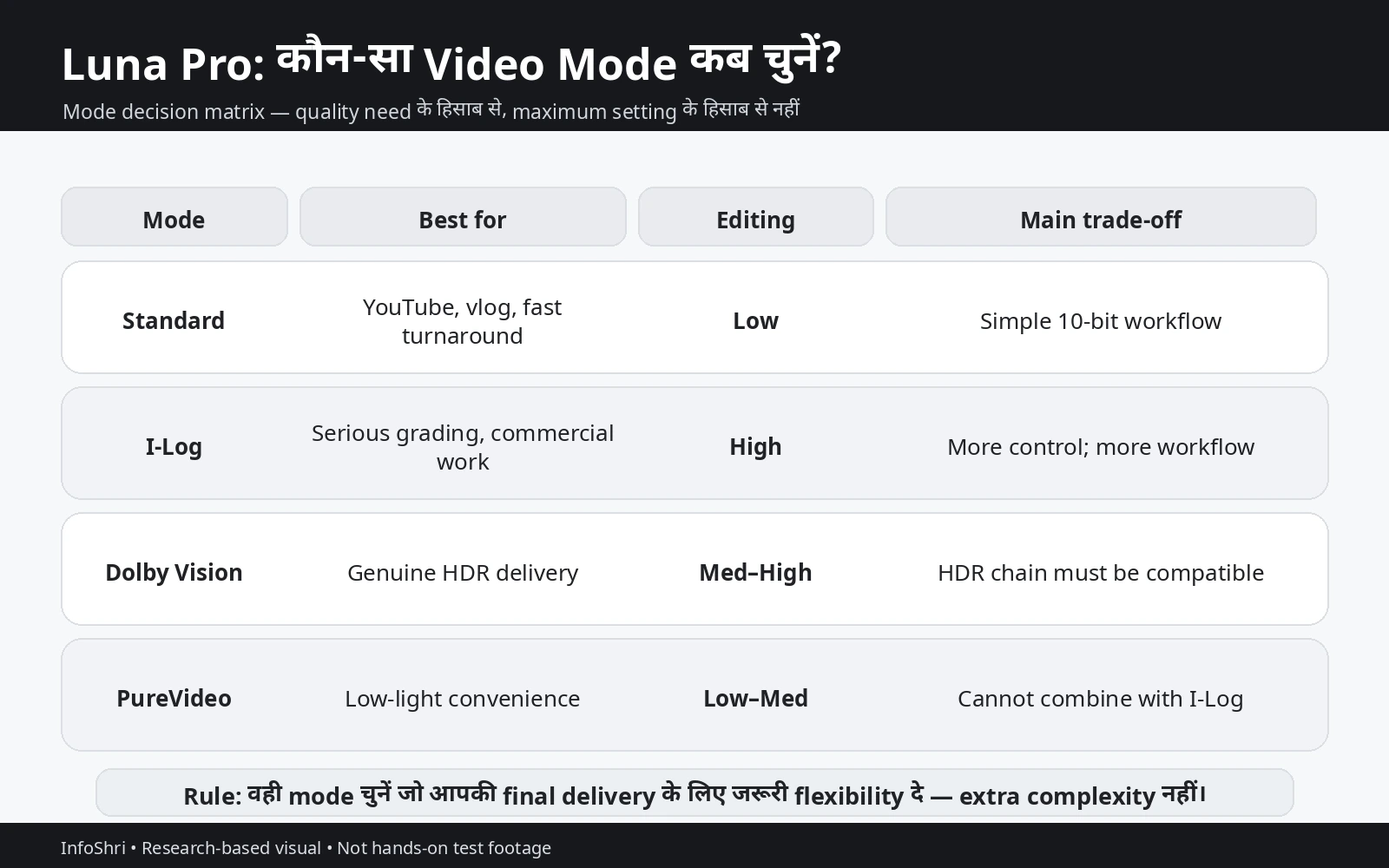
इस table को “quality ranking” मत समझिए। ये modes अलग problems solve करते हैं। Standard आसान delivery के लिए, I-Log grading control के लिए, Dolby Vision HDR-oriented output के लिए और PureVideo low-light processing के लिए है।
सबसे महत्वपूर्ण line: 10-bit ≠ I-Log, I-Log ≠ RAW, HDR ≠ Dolby Vision, और maximum setting ≠ best setting।
10-Bit, Active HDR, I-Log और Dolby Vision में असली फर्क क्या है?
यह section समझ लेना बाकी article को आसान बना देता है, क्योंकि Luna Pro के color workflow में सबसे ज्यादा confusion terminology से पैदा होता है।
10-bit क्या है? Video में bit depth broadly यह बताती है कि color और tone को represent करने के लिए कितनी discrete values available हैं। 8-bit में हर color channel के लिए 256 possible tonal values होती हैं। 10-bit में 1024 values per channel होती हैं। Ideal RGB-style mathematical combination में 8-bit लगभग 16.7 million combinations और 10-bit लगभग 1.07 billion combinations represent कर सकता है।
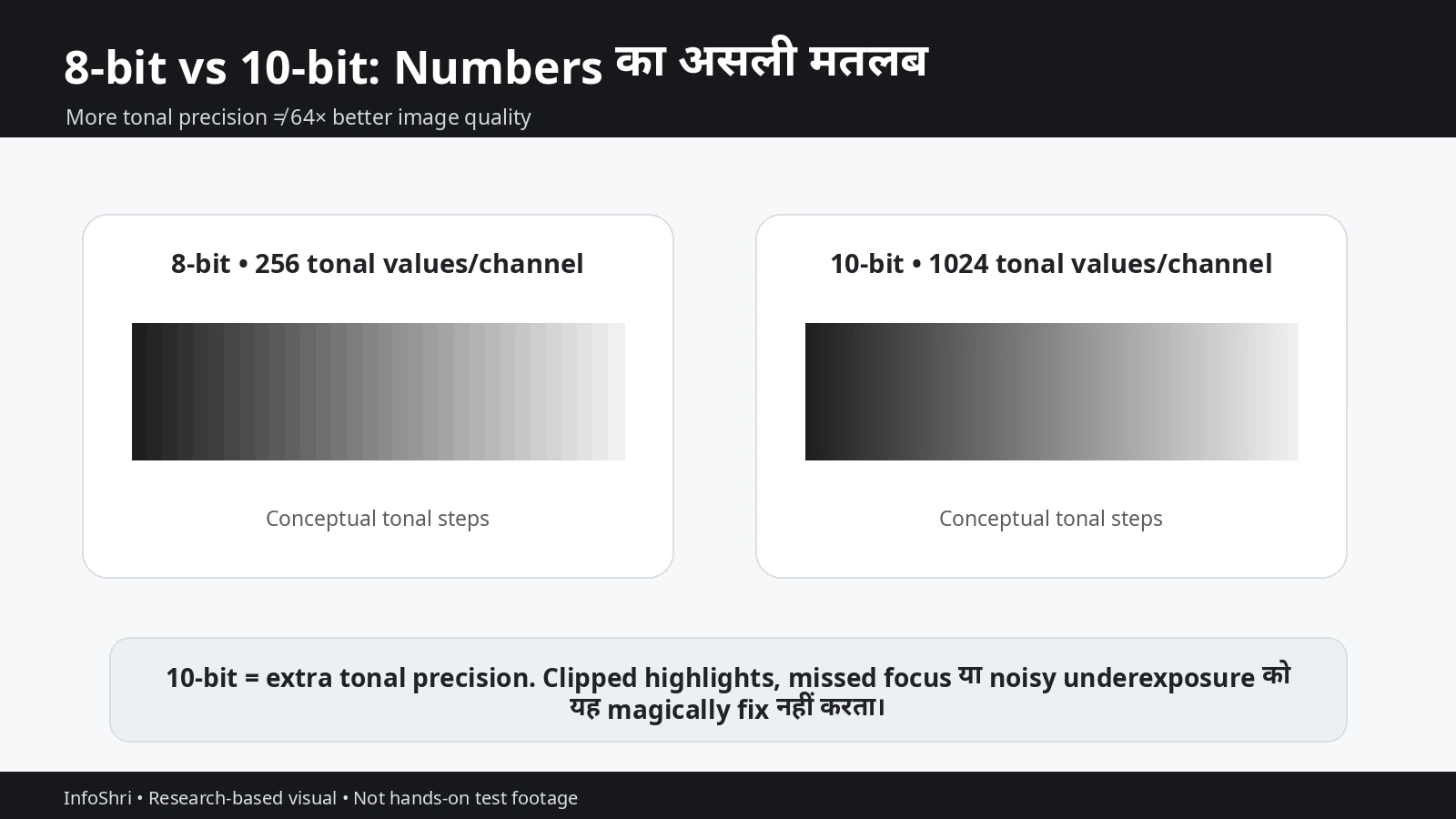
लेकिन “1.07 billion” सुनकर यह conclusion नहीं निकालना चाहिए कि 10-bit image quality 64 गुना better है। Visual quality linear तरीके से multiply नहीं होती। Real result sensor signal, noise, exposure, codec, compression, bitrate, processing, sharpening और final display पर depend करता है।
10-bit का practical फायदा कहाँ दिख सकता है? Smooth sky gradients, skin-tone transitions, subtle shadows, heavy color grading और HDR workflows में extra tonal precision useful हो सकती है। Strong color adjustments करते समय 8-bit footage में banding या color breakup जल्दी दिखाई दे सकता है; 10-bit processing उसे avoid करने की बेहतर गुंजाइश देती है। लेकिन badly clipped highlights, missed focus या severely noisy underexposed shot को 10-bit magically repair नहीं करता।
Luna Pro की current official specifications video color depth को 10-bit बताती हैं। इसलिए यह myth गलत है कि “10-bit केवल I-Log में मिलता है।” I-Log bit depth का नाम नहीं है। यह grading-oriented color/tone response और workflow है।
Standard mode क्या करता है? Current Luna-series specification Luna Pro Standard Video gamut को Rec.709 बताती है। Rec.709 सामान्य SDR video ecosystem का familiar reference है। YouTube SDR, ordinary monitors, televisions और सामान्य editing pipelines में इसकी compatibility broad है। Creator जो fast turnaround चाहता है, उसके लिए यह बहुत practical है।
यहीं एक important terminology issue आता है। Insta360 की Basic/Pro documentation normal Video mode को “10-bit HDR (Active HDR)” by default बताती है और कहती है कि इसे disable नहीं किया जा सकता। उसी documentation में Standard और Dolby Vision को अलग options की तरह treat किया गया है। इसलिए “Standard = Dolby Vision” कहना गलत होगा। “Active HDR = Dolby Vision” भी गलत होगा।
Safe interpretation यह है कि Insta360 normal Video capture/processing में अपने “Active HDR” wording का उपयोग करती है, जबकि Standard और Dolby Vision अलग color/output choices हैं। Public documentation Standard file की पूरी transfer-function और metadata pipeline को इतनी detail में नहीं बताती कि उसे बिना evidence HDR10, PQ, HLG या Dolby Vision master declare कर दिया जाए। इसलिए terminology को जितना source support करता है, उतना ही आगे ले जाना चाहिए।
I-Log क्या है? Log profile का main उद्देश्य straight-out-of-camera punchy look देना नहीं है। यह footage को flatter रखता है ताकि post-production में contrast, highlights, shadows और color को shape करने के लिए ज्यादा room मिले। Official Luna-series I-Log documentation इसे 10-bit profile बताती है, Rec.2020 input/working context देती है और manufacturer-claimed 14 stops dynamic range बताती है। Native ISO 400 भी उसी documentation का हिस्सा है।
“14 stops” को independent lab measurement की तरह नहीं लिखना चाहिए। यह manufacturer claim है। अलग brands 14, 15 या 17 stops कह सकते हैं, लेकिन जब तक measurement methodology समान नहीं हो, headline numbers को direct scoreboard की तरह compare करना misleading हो सकता है।
Dolby Vision क्या है? Dolby Vision एक HDR-oriented ecosystem है। इसका goal richer highlight/brightness presentation, wide color and compatible HDR delivery है। Luna Pro launch material 8K Dolby Vision को promote करता है और current Luna specifications Dolby Video को Rec.2020 से जोड़ती हैं। लेकिन Dolby Vision और I-Log simple “which is higher quality?” rivals नहीं हैं। I-Log maximum post-production flexibility की तरफ जाता है; Dolby Vision HDR-oriented capture/delivery की तरफ।
अगर आपका final output normal Rec.709 YouTube video है, तो I-Log shoot करके properly transform और grade करके Rec.709 deliver करना sensible हो सकता है। अगर genuine HDR master चाहिए, तो HLG/PQ/Dolby-compatible monitoring और export की जरूरत अलग होगी।
HDR और Dolby Vision एक ही शब्द नहीं हैं। HDR broad category है। Dolby Vision एक specific HDR system/workflow है। HLG और PQ/ST2084 भी HDR delivery approaches हैं। इसलिए article या editor में “HDR” और “Dolby Vision” को interchangeable शब्दों की तरह use करना technical confusion पैदा करता है।
I-Log RAW नहीं है। Luna Pro I-Log अभी भी processed/encoded video है। Current file-format documentation H.265 MP4 और 10-bit video document करती है। RAW video sensor-data workflow अलग category है। “RAW-like” analogy भी तभी use करनी चाहिए जब साफ लिखा हो कि यह actual RAW नहीं है।
यहाँ एक official-source conflict भी important है। Current Luna-series Photo & Video Specifications page maximum video bitrate 150 Mbps list करती है, जबकि Luna Pro File Format FAQ maximum bitrate 120 Mbps लिखती है। दोनों official Insta360 sources हैं और public documentation से conflict का exact reason साफ नहीं है। इसलिए इस guide में किसी एक bitrate को universally settled value मानकर “यही exact maximum है” नहीं कहा गया है। Creator के लिए ज्यादा important बात यह है कि footage H.265 10-bit workflow है और storage/editing load resolution तथा mode के साथ बदल सकता है। Exact mode-specific bitrate पर critical project हो तो current camera firmware/UI या freshly updated official documentation recheck करें।
एक और source inconsistency color gamut documentation में है: current Luna-series table Luna Pro के Standard को Rec.709 और Dolby को Rec.2020 दिखाती है; dedicated I-Log page I-Log media/workflow को Rec.2020 बताती है। Dedicated feature documentation I-Log के लिए ज्यादा direct evidence है, इसलिए grading workflow में Rec.2020 input guidance follow की जाती है, लेकिन main table omission को ignore नहीं किया जाना चाहिए।
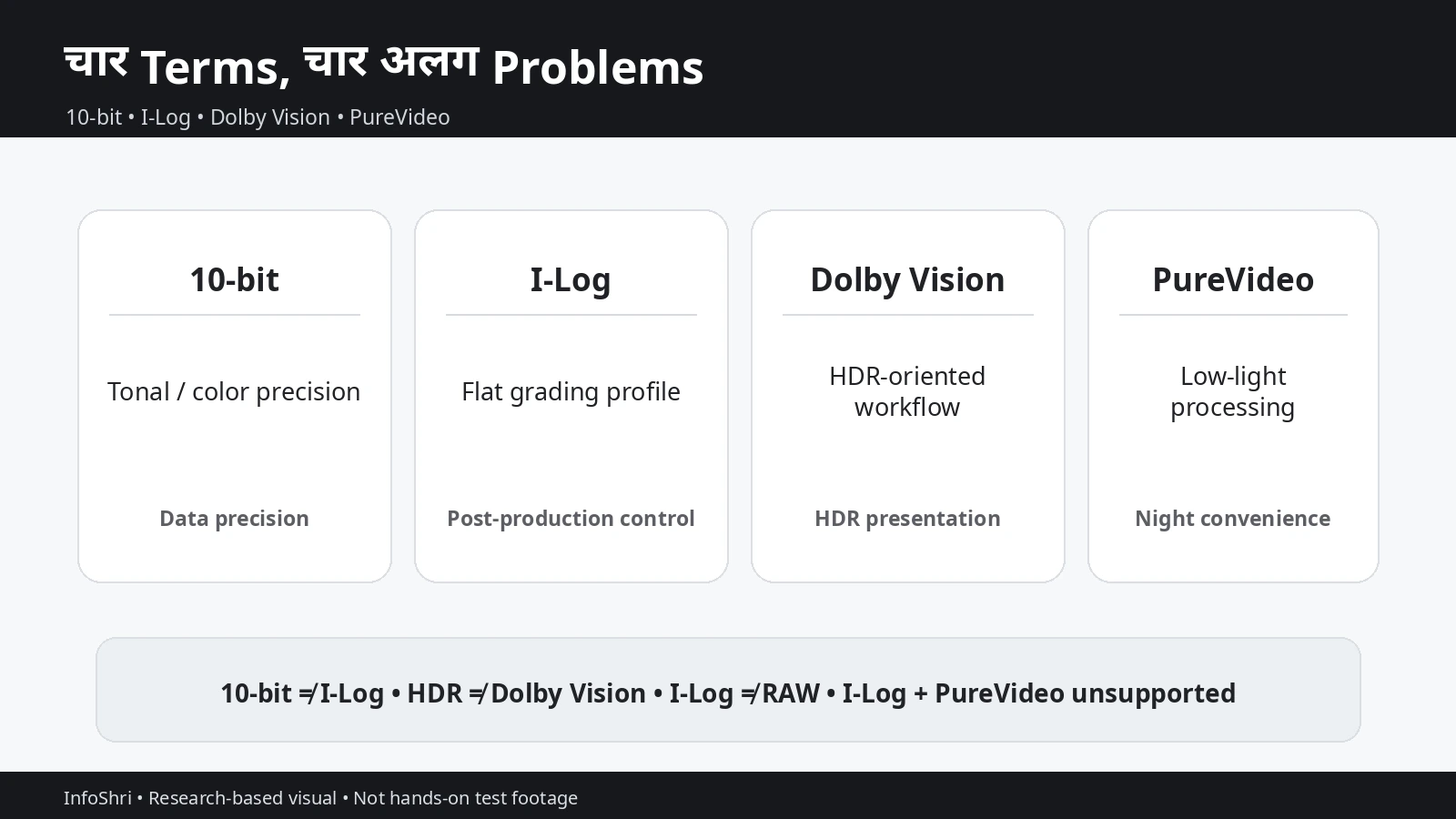
सीधी बात: 10-bit data precision है; I-Log grading profile/workflow है; Dolby Vision HDR-oriented system है; PureVideo low-light processing mode है। इन्हें एक-दूसरे के synonyms मत बनाइए।
I-Log कितना Powerful है—and इसकी Limitations क्या हैं?
I-Log का value तभी समझ आता है जब हम सिर्फ “flat image” या “14 stops” नहीं, बल्कि इसके फायदे और compromises दोनों देखें।
सबसे पहले dynamic range। एक “stop” exposure context में roughly light doubling या halving को represent करता है। अगर manufacturer कहता है कि I-Log 14 stops capture करता है, तो उसका intended meaning bright और dark detail के बीच wide range retain करने की capability है। लेकिन usable dynamic range test methodology पर depend करता है—noise threshold, processing, exposure point और acceptable shadow quality सब result बदल सकते हैं। इसलिए professional comparison में “14 vs 15” अकेले decisive नहीं है।
I-Log का दूसरा important point native ISO 400 है। Native ISO को camera pipeline का intended operating reference समझिए, “हमेशा यही ISO लगाओ” command नहीं। अगर scene dark है और ISO 400 पर subject badly underexposed है, तो सिर्फ native number बचाने के लिए shadow detail sacrifice करना समझदारी नहीं। Correct exposure अभी भी priority है।
Official documentation यह भी बताती है कि I-Log in-camera sharpening disable करता है। इसका मतलब footage straight out of camera softer लग सकती है। यह automatically कम optical detail या खराब image quality का proof नहीं है। Standard mode में sharpening/processing edges को ज्यादा crisp दिखा सकती है; I-Log professional को post में sharpening amount decide करने देता है।
लेकिन यहाँ overcorrection का खतरा है। अगर editor softness देखकर बहुत ज्यादा sharpening लगा देता है, तो halos, harsh skin texture, false micro-detail और crunchy edges बन सकते हैं। इसलिए universal “Sharpness +20” या “-2/-1” type recipe देना sensible नहीं है। Scene, output resolution और final display देखकर sharpening करनी चाहिए।
I-Log की बड़ी practical limitation monitoring है। Current official documentation restored-color/LUT-style preview को camera shooting screen पर supported feature के रूप में establish नहीं करती। Creator flat-looking image देखकर exposure और final contrast judge करता है। Experienced colorist को यह manageable लगेगा; beginner के लिए confusing हो सकता है।
Histogram का मामला भी अलग है। Luna camera itself current documentation के अनुसार in-camera histogram नहीं दिखाती, जबकि connected Insta360 App में histogram enable किया जा सकता है। Histogram कोई “perfect exposure meter” नहीं है; यह tonal distribution का overview देता है। Left side dark information और right side bright information represent करती है। अगर graph extreme right wall पर pile up हो रहा है, highlight clipping risk हो सकता है; extreme left पर heavy concentration deep shadows signal कर सकती है। लेकिन scene में intentionally black background या bright light source हो तो histogram shape अलग होगी। इसलिए rigid graph-shape target नहीं होना चाहिए।
Waveform, false color, zebras और vectorscope powerful professional tools हैं, लेकिन जब तक Luna Pro के current camera/app support में verify न हों, उन्हें available feature मानना गलत है। दूसरे camera brand के tutorials देखकर Luna Pro पर वही toolset assume नहीं करना चाहिए।
I-Log के feature restrictions practical हैं। Current official documentation के अनुसार I-Log के साथ Adjust/Color Grading, Beauty, Dolby Vision और PureVideo simultaneously use नहीं किए जा सकते। इसका मतलब creator को priority choose करनी पड़ती है।
अगर night scene में cleaner computational low-light output चाहिए, PureVideo useful हो सकता है—but तब I-Log unavailable है। अगर maximum grading flexibility चाहिए, I-Log चुन सकते हैं—but PureVideo processing छोड़नी पड़ेगी। “I-Log + PureVideo = best night quality” current system में unsupported recommendation है।
Beauty creators के लिए भी यही logic है। Beauty और I-Log साथ नहीं। Quick beauty/social content में Standard + Beauty जहाँ supported है, ज्यादा practical हो सकता है; professional skin-tone grading workflow में clean I-Log अलग approach है।
Filters और Adjust को mix न करें। Official Luna filter documentation I-Log के साथ filters support करती है। Dedicated I-Log guidance यह warning देती है कि filter effect media में embedded हो सकती है। इसका मतलब अगर आप Leica/Cinematic look चुनकर record करते हैं, तो वह creative decision footage में bake हो जाता है। Maximum flexibility चाहिए तो clean I-Log without artistic filter safer है।
एक current documentation conflict Insta360 App LUT support में भी है। English LUT support page, research date पर, applicable models में X6, Luna Ultra, X5, Ace Pro 2 और GO Ultra list करती है और Luna Pro को omit करती है। लेकिन Insta360 की Chinese LUT page Luna Pro को applicable model list में explicitly include करती है। इसका मतलब official locale pages synchronised नहीं हैं। इसलिए यह कहना भी गलत होगा कि “App LUT Luna Pro पर definitely unsupported है,” और यह कहना भी risky होगा कि “हर region/app version में definitely supported है।” Practical recommendation: अपने current Insta360 App version में Luna Pro I-Log clip open करके LUT option availability verify करें; batch LUT export current documentation में supported नहीं बताया गया है।
Desktop workflow ज्यादा reliable documented है। Current Luna I-Log documentation DaVinci Resolve 21 or later के CST workflow में Input Color Space = Rec.2020 और Input Gamma = Insta360 I-Log specify करती है। यही advanced user के लिए strong path है क्योंकि manual conversion logic clear है।
कौन I-Log सच में use करे? Commercial creator, colorist, multi-camera production, controlled interviews, product films, high-contrast daylight, branded content और वह creator जो final look को post में intentionally build करना चाहता है।
किसे शायद जरूरत नहीं? Same-day Shorts, family clips, quick travel posts, basic talking-head YouTube और वह beginner जो LUT/grade नहीं करना चाहता। Flat footage record करके उसे बिना conversion upload करना “professional workflow” नहीं, unfinished workflow बन सकता है।
I-Log का एक hidden benefit consistency है। अगर आप कई locations या कई cameras के footage को एक final look में लाना चाहते हैं, flatter capture source grade को ज्यादा controlled बना सकता है। लेकिन इसका मतलब यह नहीं कि अलग brands के Log profiles identical होते हैं। Apple Log, D-Log, S-Log, C-Log और Insta360 I-Log अलग transforms मांग सकते हैं। एक camera का LUT दूसरे camera पर लगा देना technically clean color-management नहीं है।
एक hidden cost भी है: grading time। Standard footage जहाँ छोटे exposure/contrast tweaks के बाद publish हो सकती है, I-Log source को technical transform, balancing और creative pass चाहिए हो सकता है। Solo creator जो रोज़ content publish करता है, उसके लिए यह extra 15–30 minutes per video भी meaningful operational cost बन सकता है। इसलिए post-production flexibility तभी फायदा है जब आप उसे use करने के लिए time और skill रखते हों।
Exposure, ISO, Shutter और White Balance: I-Log को सही तरह Record कैसे करें?
I-Log की सबसे बड़ी technical mistake profile choice नहीं, exposure mistake हो सकती है। Log flexibility देता है, लेकिन physics cancel नहीं करता।
Exposure: Goal यह नहीं कि histogram को किसी magical position पर धकेलना है। Goal है usable highlights बचाना, subject को unnecessarily dark न करना और post-production को enough clean signal देना। Completely clipped sky या specular area में detail वापस नहीं आएगी। दूसरी तरफ very dark shadows को post में कई stops push करने से noise, chroma blotches और color instability बढ़ सकती है।
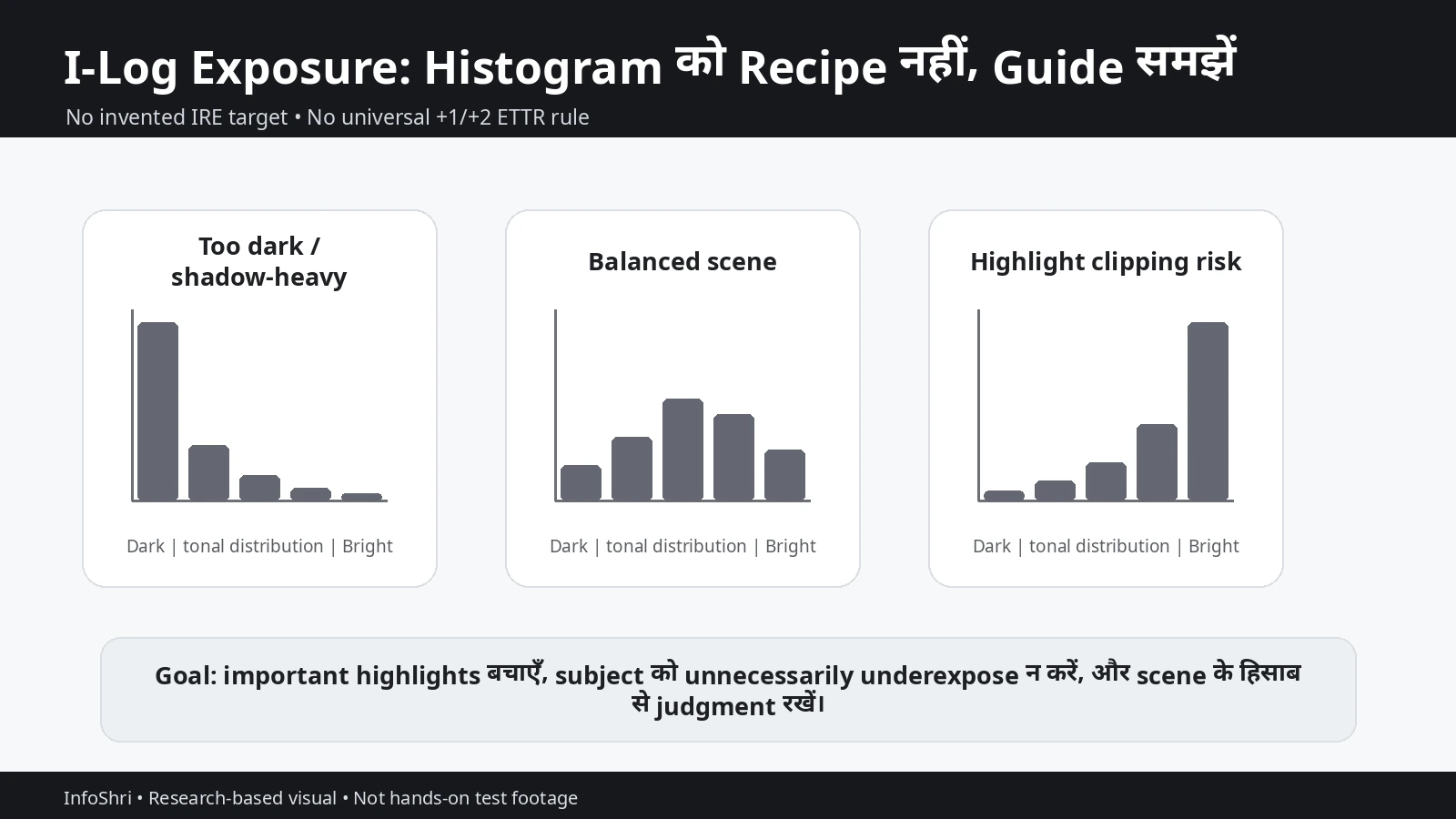
Internet पर Sony S-Log, Canon C-Log या DJI D-Log M के लिए “+1”, “+1.7”, “+2 stops” जैसे exposure recipes बहुत मिलते हैं। उन्हें Luna Pro I-Log पर copy करना सही नहीं। Current public Insta360 I-Log documentation universal ETTR offset या middle-gray IRE target publish नहीं करती। इसलिए brand-specific folklore को Luna पर transplant न करें।
अगर camera/app histogram available है, highlights और overall tonal distribution को guide की तरह use करें। Important face या product exposure को visual judgment से भी check करें। Bright window, neon sign या sun reflection scene में tiny highlight clipping acceptable हो सकती है; face clipping नहीं।
ISO: I-Log native ISO 400 documented है। इसे starting reference मानें, prison नहीं। Daylight या controlled studio में ISO 400 practical हो सकता है। Low light में अगर correct exposure के लिए higher ISO चाहिए, तो subject को heavily underexpose करके बाद में lift करने से higher ISO directly use करना कई cases में cleaner result दे सकता है—but exact Luna Pro high-ISO quality mode-by-mode independent testing पर depend करती है।
Current general Luna Pro specs ISO 100–6400 range list करती हैं। यह full camera range है; इसे यह proof मत समझिए कि हर I-Log mode और हर frame rate में exact same ISO limits या image quality होगी। Camera UI selected mode के लिए authoritative practical reference है।
Shutter speed: Shutter video में motion blur को control करती है। Familiar “180-degree shutter” convention कहती है कि shutter time लगभग frame interval का half रखा जाए—25fps पर लगभग 1/50, 30fps पर लगभग 1/60, 50fps पर 1/100 और 60fps पर 1/120। इससे motion natural cinematic blur जैसा दिख सकता है।
लेकिन यह law नहीं है। Sports में crisp action चाहिए तो faster shutter useful हो सकता है। Intentional dreamy blur के लिए slower shutter creative choice हो सकती है। Low light में light gather करने के लिए shutter slow करनी पड़ सकती है, लेकिन moving subject blur बढ़ेगा। Gimbal camera shake smooth कर सकती है; वह moving person को freeze नहीं करती।
India में electrical supply nominal 50Hz है, इसलिए artificial lighting environments में 25/50fps और compatible shutter values flicker reduction के useful starting points हो सकते हैं। लेकिन LED drivers, dimmers, signage और PWM frequencies अलग हो सकती हैं। “1/50 = हर LED flicker खत्म” guaranteed rule नहीं है। Real location पर short test clip करना best practice है।
White Balance: Luna Pro current specs 2000K–10000K range document करती हैं। Auto WB fast-moving travel और vlogging में बहुत useful है क्योंकि आप indoor, outdoor, shade और mixed light के बीच जल्दी move करते हैं। Fixed WB controlled interviews, product video और multi-camera shoots में consistency देता है।
Professional का मतलब “Auto WB कभी नहीं” नहीं है। अगर lighting constant है, fixed WB grade को आसान बनाता है। अगर lighting हर 10 seconds बदल रही है, fixed value practical headache बन सकती है। उसी तरह 5600K को “daylight truth” और 3200K को “indoor truth” मत मानिए। Cloudy sky, shade, LEDs, tungsten, window light और mixed environments अलग हैं।
Metering: Current Luna controls Matrix और Face Priority modes document करती हैं। Vlog/talking-head में Face Priority useful हो सकता है क्योंकि face exposure important है। Landscape/product scene में Matrix पूरे frame के distribution पर आधारित decision दे सकता है। Manual exposure में metering सिर्फ guide है; final creative exposure creator तय करता है।
Focus: AF-C moving vlog और walking content में logical default है। AF-S static subject में useful है। Product Showcase foreground item को camera के पास लाकर product demonstrations में helpful हो सकता है। Product reviewer के लिए यह setting I-Log से independent practical benefit है।
Auto vs Manual: Full manual हर समय “more professional” नहीं। Event, travel, street vlog या fast-changing light में Auto/partial-auto shot बचा सकता है। Controlled studio में manual exposure, fixed WB और consistent lighting shot-to-shot matching improve कर सकते हैं। Best approach अक्सर hybrid है: जिस parameter को creative consistency चाहिए उसे lock करें, बाकी camera को handle करने दें।
एक practical example: indoor talking-head, fixed lighting, 25fps. आप 1/50 के आसपास shutter से start कर सकते हैं, fixed WB set कर सकते हैं, ISO को correct exposure के हिसाब से choose कर सकते हैं और I-Log तभी use करें जब grade करेंगे। अगर same shoot quick corporate upload है, Standard mode ज्यादा efficient हो सकता है।
Walking travel vlog example: 4K30 Standard, AF-C, Auto WB और auto exposure अक्सर better real-world result देंगे क्योंकि light rapidly बदलती है। सिर्फ cinematic rule maintain करने के लिए shot miss करना ज्यादा खराब outcome है।
Product example: white gadget को black background पर shoot करते समय camera meter scene को average करने की कोशिश कर सकती है। Auto exposure product को too bright या background को too lifted कर सकती है। Controlled light में manual exposure और fixed WB repeatability improve करेंगे। Product Showcase focus foreground object presentation में useful हो सकता है।
Interview example: window-side face में highlights और shadows का contrast high है। अगर quick delivery चाहिए, Standard workable है। अगर post में skin, window और room balance करना है, I-Log flexibility useful हो सकती है—but exposure carefully set करना होगा।
ND Filters कब चाहिए—and “Cinematic Settings” का सही मतलब क्या है?
ND filter camera के लिए sunglasses जैसा है। यह incoming light कम करता है ताकि bright environment में भी आप desired shutter speed maintain कर सकें।
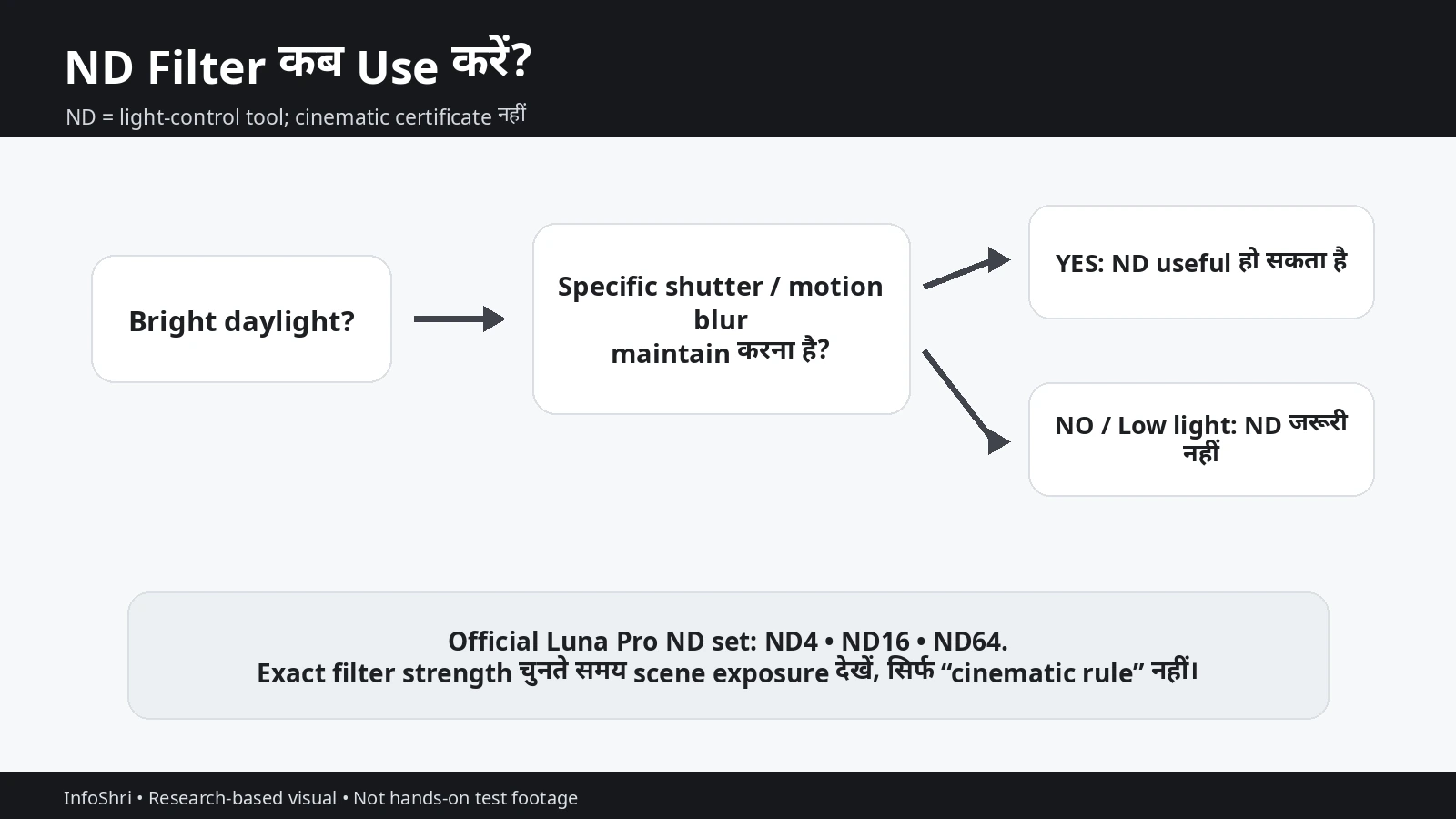
मान लीजिए आप 25fps पर 1/50 shutter रखना चाहते हैं और sunlight बहुत bright है। Lens aperture fixed है और ISO का lower limit भी reach हो गया, तब image overexpose हो सकती है। ND filter light कम करके exposure को usable range में लाता है, जिससे familiar motion blur maintain किया जा सकता है।
Official Luna Pro ND Filter Set specifically Luna Pro compatible है और ND4, ND16 तथा ND64 options देता है। Magnetic attachment भी official store documentation में listed है।
इन numbers का simple meaning: stronger ND ज्यादा light block करता है। Conventional notation में ND4 लगभग 2 stops, ND16 लगभग 4 stops और ND64 लगभग 6 stops light reduction से जुड़ा है। लेकिन real filter transmission/color cast manufacturing tolerance पर depend कर सकती है, इसलिए critical color work में quick test useful है।
ND filter कब useful है? Bright outdoor interview, commercial B-roll, daylight product shoot, controlled I-Log scene या ऐसा shot जहाँ आप intentionally slower cinematic shutter maintain करना चाहते हैं।
ND कब unnecessary है? Low light, indoor dark scene, fast sports जहाँ faster shutter desirable है, casual Auto shooting, या ऐसा creator जिसे exact motion-blur convention से फर्क नहीं पड़ता।
एक common mistake है: “24/25/30fps है तो ND mandatory है।” नहीं। ND तभी tool है जब available light आपकी desired exposure/shutter combination से ज्यादा हो। अगर light already low है, ND लगाने से ISO बढ़ेगा या image underexpose होगी।
दूसरी myth: “1/50 या 1/60 = cinematic।” Cinematic look lighting, composition, camera movement, production design, lens perspective, subject distance, color, sound और story से बनता है। Shutter सिर्फ motion rendering का एक हिस्सा है।
Travel creator के लिए variable lighting सबसे बड़ा practical issue है। आप bright road से café में enter करते हैं, cloud cover बदलता है, फिर indoor market में जाते हैं। Fixed ND और fixed shutter workflow हर transition पर adjustment मांग सकता है। ऐसे shoot में moment capture करना technical purity से ज्यादा important हो सकता है।
I-Log + manual exposure + ND controlled work में strong combination हो सकता है, लेकिन current Luna Pro exposure tools की limitation याद रखें: in-camera histogram नहीं, restored LUT preview नहीं। Connected App histogram मदद कर सकता है, लेकिन phone connection extra setup, wireless dependency और battery complexity जोड़ता है।
इसलिए beginner को पहले Standard/Auto में consistent usable footage बनाना सीखना चाहिए। जब उसे motion blur, exposure consistency और grading की real जरूरत समझ आ जाए, तब ND और manual workflow meaningful upgrade बनते हैं।
Dolby Vision कब Better है—and HDR Workflow कहाँ Complicated हो जाती है?
Dolby Vision को समझने का सबसे आसान तरीका है: इसे “I-Log से ऊपर वाला quality mode” मत समझिए। दोनों का goal अलग है।
Luna Pro launch material 8K Dolby Vision को highlight करता है। Current Luna specifications Dolby Video को Rec.2020 color gamut से जोड़ती हैं। HDR-compatible display पर correctly mastered footage brighter highlights, richer color और wider perceived contrast दिखा सकती है।
लेकिन HDR chain end-to-end होती है। Capture HDR-capable होना पर्याप्त नहीं। Editing software को footage सही interpret करना चाहिए, monitoring HDR-aware होनी चाहिए, export में correct transfer function/metadata होना चाहिए, platform उसे सही process करे और viewer के पास HDR-capable display/player हो।
YouTube की current HDR upload guidance इस difference को साफ करती है। YouTube HDR video के लिए 10 या 12-bit color depth, Rec.2020 primaries, Rec.2020 non-constant-luminance matrix, PQ या HLG transfer function और correct HDR metadata require करता है। YouTube HDR devices के लिए HDR transcodes और non-HDR devices के लिए SDR downconversion बनाता है।
इसका practical meaning: “Dolby Vision file upload कर दिया = YouTube Dolby Vision dynamic metadata exactly preserve करेगा” assume नहीं करें। YouTube documented delivery framework PQ/HLG signals पर आधारित है। Source Dolby Vision हो सकती है, लेकिन final master/export और platform processing को correctly configure करना होगा।
HDR creator को monitoring भी समझनी चाहिए। Ordinary SDR laptop पर HDR grade देखकर “यह सही है” assume नहीं कर सकते। Display peak brightness, HDR mode, OS color management और editor configuration result बदल सकते हैं। Reference HDR mastering महंगा हो सकता है; हर YouTuber को यह setup खरीदना जरूरी नहीं। लेकिन limitation समझना जरूरी है।
SDR delivery के लिए workflow बहुत simpler है। Standard shoot → normal edit → Rec.709 export. या I-Log shoot → technical transform/LUT → grade → Rec.709 export. YouTube HDR support करता है, इसलिए हर video को HDR बनाना जरूरी नहीं।
Dolby Vision कहाँ useful हो सकता है? Premium travel film, sunset/city-light montage, HDR demo content, high-contrast landscapes, brand project जहाँ HDR deliverable specifically requested हो, या creator जिसकी existing pipeline HDR-ready है।
कहाँ avoid करना practical है? Fast social turnaround, basic editor, older SDR monitor, client जिसे Rec.709 file चाहिए, mixed platform delivery जहाँ compatibility priority है, या beginner जिसे HDR color management समझ नहीं है।
Instagram/Reels जैसी platforms के HDR behavior समय के साथ बदल सकते हैं। “HDR accepted” और “Dolby Vision preserved” same statement नहीं हैं। हर viewer को same HDR presentation मिलेगी यह भी guarantee नहीं। और HDR का algorithmic reach advantage claim करने का reliable evidence नहीं है। इसलिए “Dolby Vision = ज्यादा views” marketing myth है।
Luna Pro में Beauty Dolby Vision के साथ supported नहीं है—current official support इसे restriction के रूप में document करता है। इसी तरह I-Log और Dolby Vision mutually exclusive color choices हैं।
Exact resolution × fps × aspect ratio × Dolby Vision support matrix public Luna Pro documentation में पूरी तरह स्पष्ट नहीं है। “8K Dolby Vision” headline कम से कम 8K Dolby workflow existence establish करती है, लेकिन इससे 4K120 Dolby Vision, 3K60 vertical Dolby Vision या PureVideo Dolby Vision automatically prove नहीं होते। अगर camera UI selected mode में option नहीं देता, उसे supported assume न करें।
HDR delivery के लिए एक practical planning question पूछें: क्या viewer को HDR benefit सच में मिलेगा? अगर client television commercial के लिए SDR master मांगता है, Dolby capture additional complexity दे सकती है। अगर content specifically HDR showcase है, तब investment worthwhile है।
दूसरा सवाल: क्या आपका editor और monitor HDR-aware हैं? Software में HDR option मौजूद होना और सही mastering करना अलग चीजें हैं। Timeline color space, display mode, scopes और export metadata गलत हुए तो washed-out या oversaturated result आ सकता है।
तीसरा सवाल: क्या multiple deliverables चाहिए? Commercial production में अक्सर SDR और HDR दोनों versions चाहिए। ऐसे case में flexible master strategy ज्यादा important है। I-Log capture से अलग delivery transforms बनाना एक possible approach है, लेकिन workflow को pre-production में test करना चाहिए।
चौथा सवाल: क्या social platform आपके output को re-encode करेगा? लगभग हर major platform re-encoding करता है। इसलिए local file में perfect HDR master होने का मतलब platform playback identical होगा, यह guarantee नहीं।
और पाँचवाँ: क्या HDR color सिर्फ “ज्यादा saturation” है? नहीं। Good HDR grading highlight range, display luminance और tone mapping के बारे में है। Saturation slider बढ़ाना HDR mastering नहीं है।
I-Log को Edit कैसे करें: LUT, Rec.709, HLG, PQ और DaVinci Workflow
I-Log shoot करने के बाद footage flat और कम contrast वाली दिखेगी। यह expected behavior है। Log का purpose final look camera में bake करना नहीं, post-production में decision postpone करना है।
Beginner के लिए सबसे आसान तरीका technical conversion LUT है। LUT यानी Look-Up Table—यह input color/tone values को predefined mapping के अनुसार output values में transform करती है। लेकिन technical LUT और creative LUT अलग हैं।
Technical/conversion LUT: Log footage को display/output space की तरफ convert करती है। Creative LUT: Artistic color look जोड़ती है।
इन दोनों को बिना समझे stack करना wrong contrast, oversaturation या double transform create कर सकता है।
Official Luna I-Log documentation Rec709, HLG और ST2084/PQ-oriented LUT families provide करती है। Rec709 सामान्य SDR delivery के लिए logical है। HLG HDR workflow के लिए है। ST2084/PQ HDR mastering path के लिए है। Official documentation s33 और s65 variants का भी mention करती है; s65 color accuracy पर थोड़ा अधिक focus करता है, जबकि general grading में s33 lower processing load के लिए recommended बताया गया है।
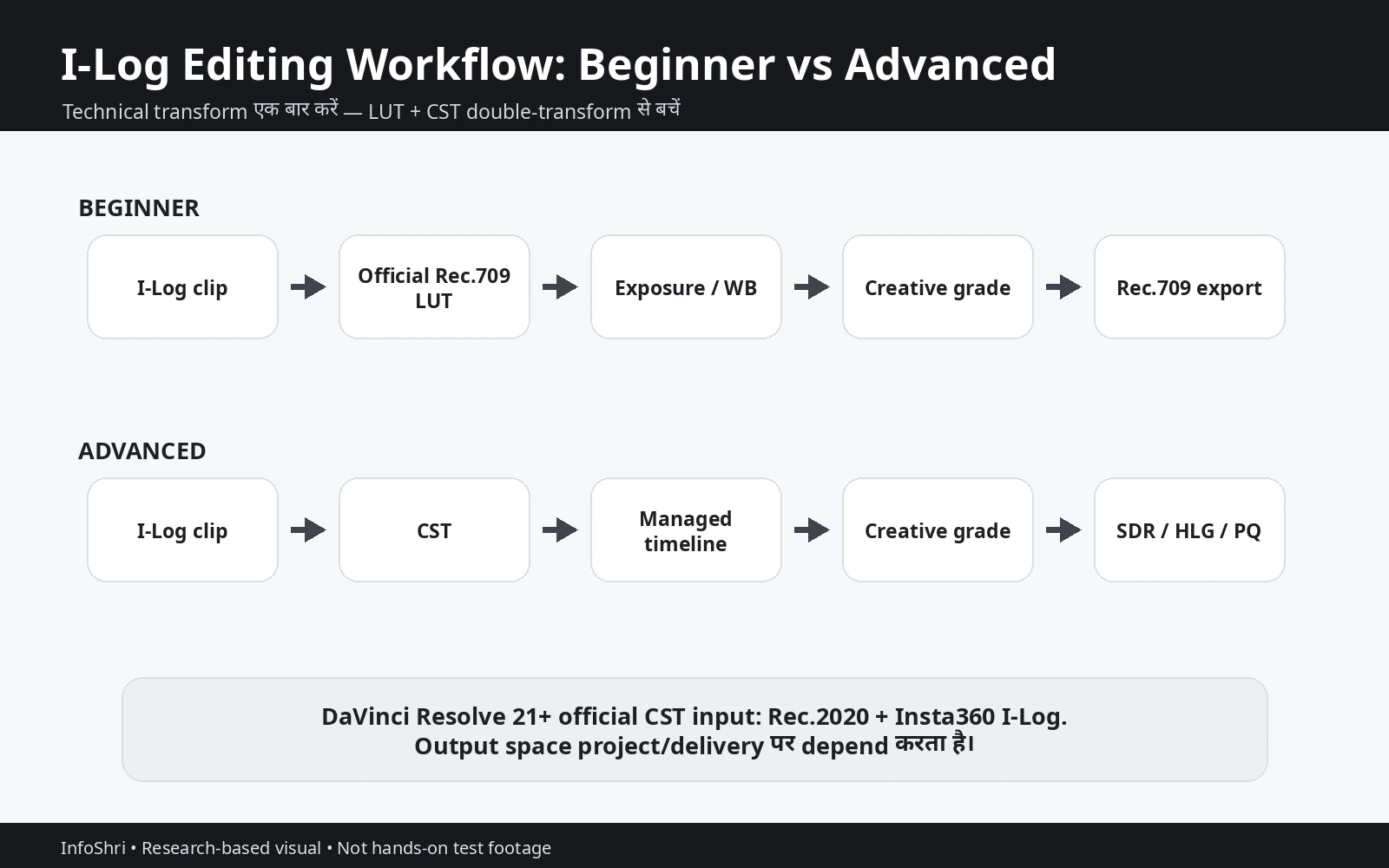
Beginner SDR workflow:
I-Log clip → official Rec709 conversion LUT → exposure/WB correction → contrast/saturation refinement → Rec.709 export
ध्यान रखें LUT “fix everything” button नहीं। अगर source underexposed है, WB गलत है या highlights clip हैं, LUT सिर्फ transform करेगी; scene correction फिर भी करनी पड़ेगी।
Advanced workflow में DaVinci Resolve 21+ current official I-Log documentation के अनुसार native CST route देता है:
Input Color Space: Rec.2020 Input Gamma: Insta360 I-Log
इसके बाद working timeline और output space project के delivery goal पर depend करते हैं। SDR के लिए Rec.709 output logical हो सकता है; HDR project में HLG/PQ configuration अलग होगी।
Double-transform warning: अगर आपका color-managed pipeline पहले ही I-Log को transform कर रहा है और उसके ऊपर technical Rec709 LUT लगा देते हैं, तो image दो बार transform हो सकती है। Symptoms: overly crushed contrast, wrong saturation, strange highlight roll-off. Technical transform एक ही place पर होना चाहिए—LUT या CST/color management—blindly दोनों नहीं।
Official I-Log documentation का metadata note expert users के लिए important है। MediaInfo कुछ clips को BT.709 metadata के रूप में report कर सकता है, लेकिन Insta360 guidance कहती है कि I-Log restoration/input workflow Rec.2020 के रूप में treat किया जाए। इसलिए सिर्फ metadata label देखकर I-Log clip को Rec.709 input मान लेना गलत grade शुरू कर सकता है।
Premiere Pro और Final Cut Pro modern wide-gamut/HDR workflows support करते हैं, लेकिन generic HDR support और camera-specific I-Log transform same चीज नहीं हैं। अगर current editor version Luna I-Log को native input gamma के रूप में नहीं पहचानता, official LUT route safer starting point हो सकता है। Sony/Canon/DJI Log transform को Luna I-Log पर substitute मत करें।
ACES का भी यही rule है। Luna Pro launch material ACES workflow compatibility claim करता है, लेकिन public documentation में हर software के लिए exact Luna Pro-specific ACES IDT/transform procedure uniformly detailed नहीं है। “ACES automatically grade कर देगा” गलत है। ACES color-management framework है, creative grade replacement नहीं।
App LUT workflow में official locale conflict है: English Insta360 App LUT page research date पर Luna Pro को applicable list में omit करती है, Chinese page Luna Pro को include करती है। इसलिए app-level support region/version synchronized नहीं है। अपने current app version में actual LUT control verify करें। Current LUT documentation batch export with LUT को supported नहीं बताती।
Sharpening पर भी ध्यान दें। I-Log in-camera sharpening disable करता है, इसलिए post sharpening useful हो सकती है। लेकिन universal number नहीं है। 8K source को 4K deliver कर रहे हैं तो resize itself perceived sharpness बदल सकता है। Skin, hair, text और product edges अलग amounts tolerate करते हैं।
HDR edit करते समय capture mode और final delivery को अलग decisions रखें। I-Log capture से Rec.709 SDR master बन सकता है। वही source properly managed pipeline में HLG/PQ HDR output में भी जा सकता है। Camera में Dolby Vision shoot किया है तो भी final YouTube HDR master platform requirements के अनुसार configure करना होगा।
Simple rule: पहले delivery तय करें, फिर color-management path तय करें। “Professional” दिखने वाले सभी options simultaneously enable करने की कोशिश न करें।
एक beginner के लिए practical edit sequence यह हो सकता है: clip import करें, exposure और WB gross error check करें, official technical LUT लगाएँ, फिर contrast/saturation/skin को fine-tune करें, scopes से clipping check करें और Rec.709 export करें। इससे वह color-management basics सीख सकता है बिना ACES या complex node trees में फँसे।
Intermediate user पहले technical transform को node/adjustment layer में isolate कर सकता है, फिर pre-transform exposure/WB और post-transform creative look अलग रख सकता है। इससे troubleshooting आसान होती है।
Advanced user managed timeline, proper input transform, calibrated monitoring और separate SDR/HDR outputs बना सकता है। लेकिन article का उद्देश्य software course बनना नहीं है; मुख्य lesson यही है कि camera profile और delivery space को अलग समझें।
Best Settings for Different Creators: कौन-सा Mode कब Use करें?
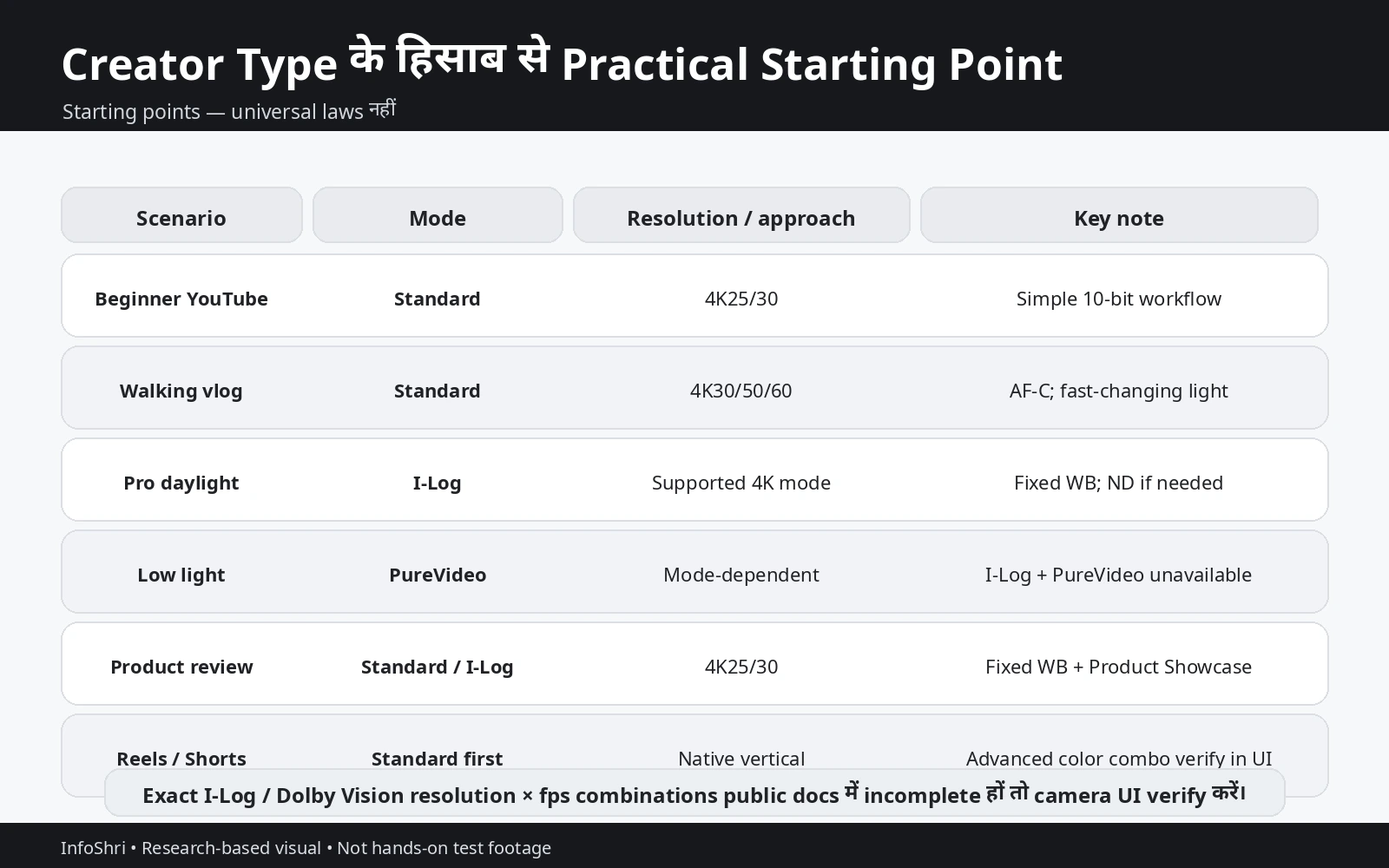
कोई single “Luna Pro best settings” preset हर creator पर लागू नहीं हो सकता। नीचे starting points हैं—laws नहीं। Lighting, motion, editing skill, final platform और creative intent के अनुसार इन्हें बदलें।
| Situation | Practical starting point | Why |
|---|---|---|
| Beginner YouTube | Standard, 4K25/30, Auto/partial Auto | Simple 10-bit workflow |
| Talking Head | Standard या I-Log, 4K25/30, fixed WB | Controlled consistency |
| Walking Vlog | Standard, 4K30/50/60, AF-C | Fast-changing scene friendly |
| Professional Daylight | I-Log, supported 4K mode, fixed WB, controlled exposure, ND if needed | Grading flexibility |
| Product Review | Standard/I-Log, 4K25/30, fixed WB, Product Showcase | Product color + focus consistency |
| Travel Landscape | Standard for fast delivery; I-Log for planned grade | Workflow-dependent |
| Low Light | PureVideo first consideration | I-Log + PureVideo unsupported |
| Reels/Shorts | Native vertical Standard unless advanced color combo is verified in-camera | Low-risk social workflow |
| Slow Motion | 4K100/120 where supported; color mode verify in camera | High fps ≠ automatic I-Log/Dolby support |
| 8K Master | 8K24/25/30 where crop/archive matters | Extra detail/reframing |
Beginner YouTube / zero grading: Standard 4K25 या 4K30. अगर India indoor lighting में shoot करते हैं, 25fps practical हो सकता है; global 30fps workflow भी perfectly valid है। Auto exposure और Auto WB से शुरू करने में कोई शर्म नहीं। Focus पर AF-C moving/self-vlog में useful है।
Talking-head studio: Controlled lighting में 4K25/30 enough है। Quick delivery है तो Standard. Professional branded grade है तो I-Log. Fixed WB shot-to-shot consistency improve करेगा। Manual shutter useful हो सकता है। Face Priority metering helpful हो सकती है, लेकिन skin clipping monitor करें।
Professional daylight: I-Log strong choice हो सकता है, especially sky + subject contrast high हो। Native ISO 400 practical baseline है, but correct exposure first. Desired shutter maintain करने के लिए ND filter use करें अगर light ज्यादा है। Exact I-Log resolution/fps selected camera UI से verify करें।
Walking vlog: Standard कई creators के लिए I-Log से better है, क्योंकि fast changes में Auto exposure/WB friction कम करते हैं। 4K30 general; 50/60fps movement smoother दिखा सकता है और slow-down flexibility देता है। लेकिन higher fps usually more light और storage/processing मांगता है।
Travel landscape: Planned cinematic film है और grade करेंगे तो I-Log. Same-day upload है तो Standard. Genuine HDR travel film है तो Dolby Vision/HDR pipeline—but monitor/export capability पहले confirm करें। 8K सिर्फ जब crop/detail/archive benefit real हो।
Low light: PureVideo का purpose computational low-light cleanup है। I-Log grading flexibility देता है, low-light noise magic नहीं। Current system में दोनों साथ unavailable हैं। इसलिए priorities choose करें। Static cityscape और controlled exposure में I-Log workable हो सकता है; moving night vlog में PureVideo convenience ज्यादा useful हो सकती है। Matched Luna Pro-specific independent tests scene-dependent हैं, इसलिए universal winner claim नहीं।
Product review: Fixed WB, controlled lighting, Product Showcase focus और consistent exposure बहुत important हैं। White product, black gadget, glossy screen—metering अलग behave कर सकती है। I-Log useful है अगर brand color matching या multi-camera grade चाहिए। Fast review channel के लिए Standard workflow faster है।
Reels/Shorts: Current Luna Pro specs native 4K 9:16 up to 30fps और 3K 9:16 up to 60fps document करती हैं। 4K30 detail-priority vertical और 3K60 motion-priority vertical के रूप में practical choice हो सकती है। लेकिन vertical I-Log और vertical Dolby Vision का complete current public matrix clear नहीं है। Camera UI में option verify करें।
Slow motion: Base camera 4K100/120 और 1080p high frame rates support करती है, लेकिन “camera supports 4K120” + “camera supports I-Log” से automatically “4K120 I-Log” prove नहीं होता। यही fail-closed rule Dolby Vision पर भी लागू है।
8K master: Luna Pro 8K24/25/30 video modes document करती है। 8K crop/reframe, archive और detail-heavy product shot में useful है। लेकिन 4K delivery में 8K का editing load ज्यादा हो सकता है। High-resolution source हमेशा better final story नहीं बनाता।
No-edit workflow: Standard. Camera filter/look तभी use करें जब baked-in aesthetic intentionally चाहिए। I-Log capture करके grade न करना extra work with worse immediate appearance हो सकता है।
Multi-camera matching: I-Log सबसे logical Luna option है क्योंकि controlled transform/grade किया जा सकता है। लेकिन दूसरे camera का Log profile अलग होगा। एक LUT सब cameras पर apply न करें; हर camera को उसके सही input transform से normalize करें।
India 50Hz indoor shooting: 25/50fps + compatible shutter starting point useful है, लेकिन actual LED flicker test करें। किसी “universal anti-flicker” claim पर blind भरोसा न करें।
ND daylight setup: 25fps/1-50 or 30fps/1-60 convention maintain करना चाहते हैं और exposure too bright है तो ND4/ND16/ND64 scene brightness के हिसाब से useful हो सकते हैं। Histogram/app exposure check करें, सिर्फ filter number नहीं।
और सबसे important: exact color-mode compatibility public docs में incomplete होने पर camera UI source of truth है। अगर I-Log select करने के बाद particular resolution/fps गायब हो जाता है, combination supported नहीं मानें।
Common Mistakes: 10-Bit और I-Log होने के बाद भी Footage खराब क्यों हो सकती है?
Luna Pro में 10-bit, I-Log, Dolby Vision, 8K और high-frame-rate options होना useful है, लेकिन इन features में से कोई भी खराब capture decision को automatically ठीक नहीं करता। कई बार footage इसलिए खराब होती है क्योंकि creator किसी technical feature को उसकी actual purpose से ज्यादा powerful मान लेता है।
Mistake 1: “14 stops हैं, इसलिए highlights recover हो जाएँगी।” Dynamic range unlimited नहीं होती। I-Log के लिए 14 stops Insta360 का manufacturer claim है; यह guarantee नहीं कि पूरी तरह clipped sky, lamp या skin highlight post में वापस आ जाएगी। अगर RGB channel में information record ही नहीं हुई, grading उसे invent नहीं कर सकती। Practical goal highlight protection और usable subject exposure के बीच balance बनाना है।
Mistake 2: Log को बहुत underexpose करना। कुछ creators सोचते हैं कि flat profile का मतलब shadows को बाद में कितनी भी lift कर सकते हैं। Reality में dark signal को aggressively push करने से luminance noise, chroma noise और color instability बढ़ सकती है। 10-bit grading latitude देता है, infinite signal-to-noise ratio नहीं।
Mistake 3: Native ISO 400 को commandment समझना। I-Log का documented native ISO 400 useful reference है, लेकिन “ISO 400 से कभी ऊपर मत जाओ” universal rule नहीं। अगर ISO 400 पर subject severely underexposed है, तो सिर्फ native value बचाने के लिए exposure खराब करना sensible नहीं। Scene और available light के हिसाब से correct exposure ज्यादा important है।
Mistake 4: I-Log record करना लेकिन transform/grade न करना। Flat I-Log image final delivery look नहीं है। अगर creator footage को direct export करता है, result washed-out और low-contrast लग सकता है। Zero-grading workflow में Standard ज्यादा logical choice है।
Mistake 5: Artistic filter लगाकर untouched Log master expect करना। Current Luna documentation filters और Adjust को अलग features मानती है। I-Log के साथ filters apply हो सकते हैं, लेकिन filter effect recorded media में embed हो सकती है। Maximum grading flexibility चाहिए तो clean I-Log बिना artistic filter record करें।
Mistake 6: Filter और Adjust को same समझना। I-Log के साथ Adjust/Color Grading currently unavailable है, जबकि filters का behavior अलग documented है। UI में दोनों पास-पास दिखें तो भी technical role एक नहीं है।
Mistake 7: I-Log + PureVideo recommend करना। यह current official documentation के अनुसार unsupported combination है। Low-light creator को दो priorities में choose करना पड़ता है: PureVideo का computational low-light processing या I-Log की grading flexibility। दोनों को एक साथ “best night preset” बताना गलत है।
Mistake 8: I-Log + Dolby Vision simultaneously use करना। I-Log और Dolby Vision अलग color-mode/workflow choices हैं। I-Log maximum post control की तरफ जाता है; Dolby Vision HDR-oriented capture/delivery की तरफ। Current documentation इन्हें simultaneous mode के रूप में support नहीं करती।
Mistake 9: I-Log + Beauty recommend करना। Beauty I-Log के साथ available नहीं है। Quick beauty/social workflow में Standard + Beauty जहाँ supported हो, ज्यादा practical हो सकता है; professional skin-tone grading अलग workflow है।
Mistake 10: 10-bit को RAW कहना। 10-bit tonal precision बताता है। I-Log H.265 encoded video workflow है, RAW sensor recording नहीं। “10-bit = RAW” और “Log = RAW” दोनों गलत shortcuts हैं।
Mistake 11: 10-bit को “64× बेहतर image quality” कहना। 8-bit में 256 values/channel और 10-bit में 1024 values/channel होने से mathematical combinations बहुत बढ़ते हैं, लेकिन perceived quality linearly 64× नहीं होती। Sensor quality, exposure, noise, compression और final encode उतने ही important हैं।
Mistake 12: HDR और Dolby Vision को same शब्द समझना। HDR broad category है। Dolby Vision specific HDR system/workflow है। HLG और PQ/ST2084 भी HDR delivery approaches हैं। इसलिए “HDR on” और “Dolby Vision on” को interchangeable मत मानिए।
Mistake 13: Rec.2020 देखकर automatically HDR assume करना। Wide color gamut और HDR related हो सकते हैं, लेकिन Rec.2020 primaries अकेले HDR delivery define नहीं करतीं। Transfer function, metadata, mastering और display behavior भी matter करते हैं।
Mistake 14: MediaInfo में BT.709 metadata देखकर I-Log को Rec.709 input treat करना। Insta360 की dedicated I-Log guidance restoration/color-management workflow में Rec.2020 input बताती है। File metadata label को बिना context final grading instruction मानना गलत transform पैदा कर सकता है।
Mistake 15: हर scene में 1/50 या 1/60 shutter force करना। 180-degree-style shutter convention familiar motion blur देता है, लेकिन sports, low light, flicker और creative motion अलग requirements रखते हैं। “Cinematic” rule shot की usability से ऊपर नहीं होना चाहिए।
Mistake 16: ND filter को cinematic certificate समझना। ND exposure-control tool है। Bright light में desired shutter बनाए रखने में मदद करता है। Lighting, framing, camera movement, sound और story खराब हैं तो ND filter video को cinematic नहीं बना देगा।
Mistake 17: हर beginner को full manual exposure देना। Fast-changing travel या vlog scene में Auto या partial-Auto setting shot बचा सकती है। Controlled studio में manual consistency useful है। Professional decision scene के अनुसार होता है, ideology के अनुसार नहीं।
Mistake 18: Auto WB को “unprofessional” कहना। Controlled interview और product shoot में fixed WB grading consistency देता है। लेकिन fast travel vlog में Auto WB practical advantage हो सकता है। Wrong fixed WB पूरे shoot को consistently wrong भी बना सकता है।
Mistake 19: Dolby Vision upload = YouTube Dolby Vision end-to-end मान लेना। YouTube की current HDR guidance Rec.2020, 10/12-bit और PQ/HLG signals plus HDR metadata पर आधारित है। इसलिए source Dolby Vision होने का मतलब यह नहीं कि platform उसी Dolby Vision metadata को exactly preserve करेगा। Final export और platform processing अलग stage हैं।
Mistake 20: HDR से automatically ज्यादा views मिलेंगे। HDR picture-format decision है, recommendation algorithm hack नहीं। अगर audience SDR devices पर है या workflow गलत है, HDR complexity practical benefit से ज्यादा हो सकती है।
Mistake 21: 8K को हर video का default बनाना। 8K crop, reframe, archive और detail-heavy work में useful है। लेकिन storage, decode load और edit time बढ़ते हैं। अगर final 4K है और crop जरूरत नहीं, 4K ज्यादा efficient हो सकती है।
Mistake 22: “Camera 4K120 भी करता है और I-Log भी, इसलिए 4K120 I-Log जरूर होगा।” Capability A और capability B का होना combination AB prove नहीं करता। यही rule 8K I-Log, vertical I-Log, 4K120 Dolby Vision और vertical Dolby Vision पर लागू है। Public matrix incomplete हो तो camera UI में actual available setting verify करें।
Mistake 23: App LUT support को single universal fact मानना। Research date पर official English LUT page Luna Pro को applicable list में omit करती है, जबकि official Chinese page Luna Pro को include करती है। इससे locale/version documentation conflict दिखता है। अपने current app version में actual LUT option verify करें।
Mistake 24: Official bitrate conflict को silently resolve करना। Current Luna shooting table 150 Mbps maximum list करती है, जबकि Luna Pro File Format FAQ 120 Mbps लिखती है। दोनों official sources होने पर सिर्फ larger number चुन लेना verification नहीं है। Storage planning करते समय exact mode/firmware behavior recheck करें।
Mistake 25: I-Log softness को automatically कम detail समझना। I-Log में in-camera sharpening disabled होने से edges Standard से softer दिख सकती हैं। Sharpening perception और captured detail same चीज नहीं हैं। Independent matched testing के बिना “I-Log कम resolution देता है” conclusion नहीं निकालना चाहिए।
Mistake 26: Soft footage देखकर post में oversharpen करना। Excessive sharpening halos, harsh skin, ringing और fake detail बना सकती है। Output resolution, subject और final display देखकर sharpening करें; universal slider number avoid करें।
Mistake 27: LUT को full color grade समझना। Conversion LUT technical starting point है। Exposure, WB, contrast, saturation और creative look अभी भी scene-dependent हैं। LUT लगते ही हर clip finished नहीं हो जाती।
Mistake 28: CST और conversion LUT दोनों blindly apply करना। अगर CST पहले ही I-Log को target space में transform कर रहा है और फिर technical conversion LUT भी लगा दी, double transform हो सकता है। Result overly contrasty या oversaturated दिख सकता है। एक clear color-management path चुनें।
Mistake 29: HDR grade को ordinary SDR display पर reference-accurate मान लेना। HDR monitoring में display capability, OS settings, editor color management और transfer function matter करते हैं। SDR screen पर preview useful हो सकती है, लेकिन उसे reference HDR mastering monitor मानना गलत है।
Mistake 30: “Maximum settings” को professional decision समझना। 8K + I-Log + manual + HDR-type workflow technically impressive लग सकता है, लेकिन अगर final deliverable quick SDR Reel है तो यह unnecessary complexity है। Professional workflow वह है जो requirement को reliably पूरा करे।
इन mistakes में common pattern एक ही है: feature का नाम देखकर उसका purpose assume करना। Luna Pro का फायदा तभी मिलता है जब creator capture setting, post-production और final delivery को एक connected chain की तरह देखे।
Final Decision: Standard, I-Log या Dolby Vision—आपको कौन-सा Choose करना चाहिए?
अगर पूरे article को एक decision framework में compress करें, तो Luna Pro के लिए कोई universal “best mode” नहीं है। सही mode उस creator के लिए best है जिसकी final delivery और editing workflow उससे match करती है।
Best for beginners: Standard. Luna Pro का video 10-bit है, इसलिए beginner को सिर्फ bit depth पाने के लिए I-Log सीखने की जरूरत नहीं। Standard में exposure और color workflow सरल रहता है और normal SDR delivery आसान होती है। पहले framing, lighting, audio, focus और consistent exposure सीखना ज्यादा बड़ा quality jump देगा।
Best for fast YouTube: Standard 4K25/30. Talking-head, tutorials, news-style creator videos और normal reviews में 4K25/30 enough है। India में artificial-light environments के लिए 25fps useful starting point हो सकता है; 30fps global/online workflows में equally valid है। अगर fast motion है, 50/60fps consider करें।
Best for professional grading: I-Log. अगर आप footage को LUT/CST से normalize करके properly grade करेंगे, I-Log meaningful है। Multi-camera matching, commercial work, controlled product films और high-contrast scenes में यह ज्यादा post control दे सकता है। लेकिन “I-Log selected” होना professional grade की guarantee नहीं—exposure और color management फिर भी सही चाहिए।
Best for HDR delivery: Dolby Vision या properly managed I-Log-to-HDR workflow. यह तभी चुनें जब आप HDR monitoring, export और platform requirements समझते हों। अगर final client/YouTube deliverable SDR Rec.709 है, Dolby Vision mandatory नहीं।
Best for low light: PureVideo first consideration. क्योंकि PureVideo और I-Log together unavailable हैं, creator को choose करना पड़ता है। Handheld night vlog, moving subjects और fast turnaround में PureVideo convenient हो सकता है। Controlled night scene और deliberate grade में I-Log भी use हो सकता है, लेकिन इसे automatically cleaner option न मानें।
Best for Reels/Shorts: Native vertical Standard as safe default. Luna Pro native 4K9:16 up to 30fps और 3K9:16 up to 60fps document करती है। अगर advanced color workflow चाहिए तो selected vertical mode में I-Log/Dolby option camera UI से verify करें; public documentation हर combination confirm नहीं करती।
Best for product video: Controlled light + fixed WB + Product Showcase. Product का exact color और consistent exposure कई बार Log profile से ज्यादा important है। Fast product-review channel Standard use कर सकता है; branded commercial grade या multi-camera matching के लिए I-Log useful है।
Best for travel: workflow decide करेगा. Same-day upload, changing light और minimal edit = Standard. Planned cinematic travel film = I-Log. Genuine HDR showcase project = Dolby/HDR workflow. 8K only when crop/archive/detail का real reason हो।
Best for multi-camera matching: I-Log. लेकिन हर camera का Log curve/space अलग होता है। Luna I-Log footage को सही Luna transform से normalize करें; दूसरे brand का LUT copy न करें।
Best for no-edit workflow: Standard. अगर आप color correction भी नहीं करने वाले, I-Log capture unnecessary burden है। Camera filters/look तभी use करें जब baked aesthetic intentionally चाहिए।
Best for maximum post flexibility: clean I-Log. No artistic filter, controlled exposure, consistent WB where practical, and proper transform in post. यही वह case है जहाँ I-Log का extra effort justify होता है।
I-Log का biggest advantage क्या है? Post-production control. Flat capture आपको final contrast/color decision बाद में लेने देता है।
I-Log की biggest limitation क्या है? Extra workflow और incompatible features. PureVideo, Dolby Vision, Beauty और Adjust साथ नहीं मिलते; LUT/grade जरूरी हो सकता है; monitoring भी beginner-friendly नहीं है।
Dolby Vision का biggest advantage क्या है? Correct HDR chain में richer HDR-oriented presentation potential। Bright highlights और wide-gamut content compatible displays पर ज्यादा impactful दिख सकते हैं।
Dolby Vision की biggest limitation क्या है? Workflow complexity. Capture से viewer screen तक हर stage HDR-aware होना चाहिए। Editor, metadata, export और platform behavior गलत हुआ तो expected result नहीं मिलेगा।
क्या most creators को I-Log चाहिए? नहीं। जिन creators को footage grade करनी है और extra flexibility का use करना है, उन्हीं के लिए यह meaningful है। “Professional” शब्द के कारण इसे default बनाने की जरूरत नहीं।
क्या most creators को Dolby Vision चाहिए? नहीं। Genuine HDR project में useful है; सामान्य SDR YouTube और social workflow में optional है।
क्या Standard mode में 10-bit useful है? हाँ। यही Luna Pro के बारे में सबसे important misconceptions में से एक को clear करता है: 10-bit सिर्फ I-Log में नहीं मिलता। Bit depth और Log profile अलग concepts हैं।
क्या 10-bit से banding पूरी तरह खत्म हो जाती है? नहीं। 10-bit tonal steps बढ़ाता है और heavy grading/gradients में मदद कर सकता है, लेकिन compression और platform re-encoding अभी भी banding पैदा कर सकते हैं।
क्या Log रात में automatically बेहतर है? नहीं। Flat image कम noise का proof नहीं। PureVideo specifically low-light processing के लिए है और I-Log के साथ unavailable है। Scene-specific testing matters।
क्या 8K best default है? नहीं। 8K तभी जब crop, archive, reframing या detail का clear use case हो। 4K कई creators के लिए storage/edit efficiency और final quality का better balance है।
क्या manual exposure हमेशा better है? नहीं। Controlled lighting में manual consistency strong advantage है। Fast-changing vlog में Auto या partial Auto ज्यादा reliable professional choice हो सकता है क्योंकि moment miss नहीं होता।
क्या fixed WB हमेशा better है? Controlled scene में consistency के लिए अक्सर हाँ; rapidly changing travel scene में Auto WB practical हो सकता है। Rule context-dependent है।
क्या ND filter हर outdoor video में चाहिए? नहीं। सिर्फ तब जब bright light में desired shutter/exposure maintain करना हो। Fast shutter intentionally use कर रहे हैं या light कम है तो ND unnecessary है।
क्या YouTube HDR बनाने के लिए Dolby Vision जरूरी है? नहीं। YouTube current HDR guidance Rec.2020 + PQ/HLG + correct HDR metadata पर focus करती है। Source Dolby Vision हो सकती है, लेकिन Dolby Vision mandatory YouTube requirement नहीं।
क्या I-Log को official Rec709 LUT लगाने के बाद exactly Standard मिल जाता है? जरूरी नहीं। Standard camera processing में sharpening, tone processing और other decisions अलग हो सकते हैं। LUT technical conversion है; camera Standard pipeline की exact clone होने की guarantee नहीं।
क्या ACES beginner को use करना चाहिए? जरूरी नहीं। Official Rec709 LUT workflow काफी सरल है। ACES बड़े multi-camera/VFX/color-managed projects में useful हो सकता है, लेकिन complexity तभी worth है जब project को जरूरत हो।
क्या app LUT support guaranteed है? Current official English और Chinese Insta360 App support pages Luna Pro applicability पर consistent नहीं हैं। इसलिए current app/region/version में actual option verify करें। Desktop official LUT/CST workflow इस uncertainty से अलग है।
क्या exact maximum bitrate 120 Mbps है या 150 Mbps? Current official documents conflict करते हैं: shooting specification 150 Mbps बताती है और Luna Pro File Format FAQ 120 Mbps। इसलिए इस guide में इसे unresolved official-source conflict माना गया है। Storage calculation के लिए current firmware/mode-specific data verify करना बेहतर है।
क्या 8K I-Log, 4K120 I-Log या vertical Dolby Vision use कर सकते हैं? Public documentation की incomplete matrix के कारण हर combination को article से blindly confirm नहीं किया जा सकता। Practical fail-closed rule: desired color mode select करें और camera UI में जो resolution/frame-rate options actually available रहें, उन्हीं को supported मानें।
अगर मुझे एक simple preset चाहिए तो क्या रखूँ? Normal creator के लिए starting point: Standard 4K25/30, AF-C if movement/self-vlog, Auto exposure/WB when environment changes quickly. Controlled studio में fixed WB और manual/controlled exposure add करें. I-Log तभी switch करें जब grade करेंगे। यह universal preset नहीं—safe starting framework है।
अगर professional preset चाहिए? Controlled scene: I-Log, supported resolution/frame rate, correct exposure, fixed WB where stable, ND only when needed, clean capture without baked artistic filter, then official LUT or properly configured CST. Again, exact fps/mode combination camera UI से verify करें।
अगर रात में simple preset चाहिए? PureVideo को first test करें, especially handheld/moving scenes. अगर grading flexibility priority है और PureVideo छोड़ सकते हैं, I-Log/Standard comparison अपने actual scene में short test clip से करें।
अगर HDR project बनाना है? पहले delivery तय करें: YouTube HDR, client HDR master या local Dolby Vision playback? फिर timeline/output color management configure करें। HDR monitor capability confirm करें। उसके बाद capture mode choose करें। उल्टा—पहले Dolby Vision shoot करके बाद में delivery सोचने—से workflow surprises बढ़ते हैं।
यही पूरी guide का practical निष्कर्ष है: camera menu को feature checklist की तरह नहीं, decision tree की तरह use करें। पहले पूछें final video कहाँ जाएगी, कितनी grading करनी है, lighting कैसी है और turnaround कितना fast है। फिर उस जरूरत के लिए सबसे simple mode चुनें जो required quality preserve करता हो।
Final one-line rule:
वही setting वास्तव में “best” है जो आपकी final delivery के लिए जरूरी quality और flexibility बचाए—बिना ऐसे 8K, Log, manual, ND या HDR complexity को जोड़ने के जिसका आप इस्तेमाल ही नहीं करेंगे।
Research note: यह guide 17 September 2026 तक उपलब्ध current official documentation, current platform guidance और verified InfoShri cluster context पर आधारित है। Luna Pro firmware, Insta360 App और editing software updates mode compatibility, LUT support, bitrate documentation और HDR behavior बदल सकते हैं। Exact resolution × frame-rate × color-mode combination public documentation में पूरी तरह स्पष्ट न होने पर current camera UI और latest official support documentation को final operational check मानें।
Sources
- Insta360 — Luna Series: I-Log Mode
- Insta360 — Luna Series: Photo & Video Specifications
- Insta360 — Luna Pro: File Format Related FAQ
- Insta360 — Luna Series: Basic Mode and Pro Mode
- Insta360 — Luna Series: Filter Settings
- Insta360 — Insta360 App: LUT (English)
- Insta360 — Insta360 App: LUT (Chinese)
- Insta360 Store — ND Filter Set for Insta360 Luna Pro
- YouTube Help — Upload High Dynamic Range (HDR) videos
- InfoShri — Insta360 Luna Pro Review
- InfoShri — Insta360 Luna Pro Full Specifications Explained
- InfoShri — Insta360 Luna Pro Low-Light Test Explained
- InfoShri — Insta360 Luna Pro 8K Explained
- InfoShri — Insta360 Luna Pro Vertical Video
- InfoShri — Insta360 Luna Pro Battery Life Guide
- InfoShri — Insta360 Luna Pro Storage Guide
- InfoShri — Insta360 Luna Pro vs Luna Ultra

Keep exploring