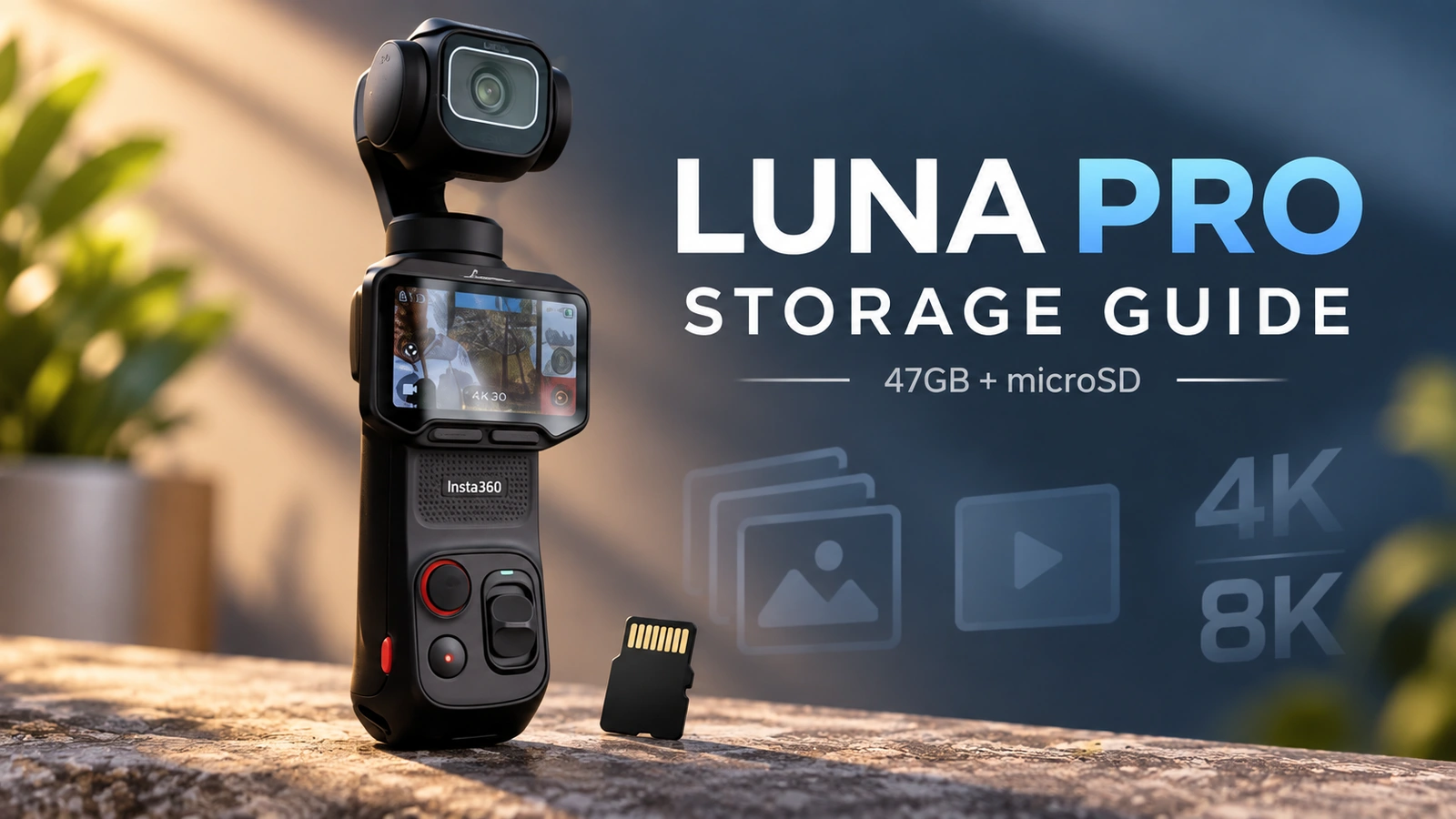
Research-based guide | India | Last verified: 15 September 2026 | Hands-on status: InfoShri ने Luna Pro को स्वयं physically test नहीं किया है
Insta360 Luna Pro में storage का सवाल पहली नज़र में बहुत simple लगता है: camera में 47GB internal storage है, microSD card लगाया जा सकता है, और current Luna Series documentation supported cards के लिए 2TB तक की capacity बताती है। लेकिन creator के लिए असली सवाल “सबसे बड़ा card कौन-सा लग सकता है?” नहीं है। असली सवाल है: आप जिस resolution, frame rate और workflow में shoot करते हैं, उसके लिए कितनी reliable storage चाहिए—और shoot खत्म होने के बाद footage की second copy कहाँ होगी?
यही फर्क इस guide को सिर्फ specification list से अलग बनाता है।
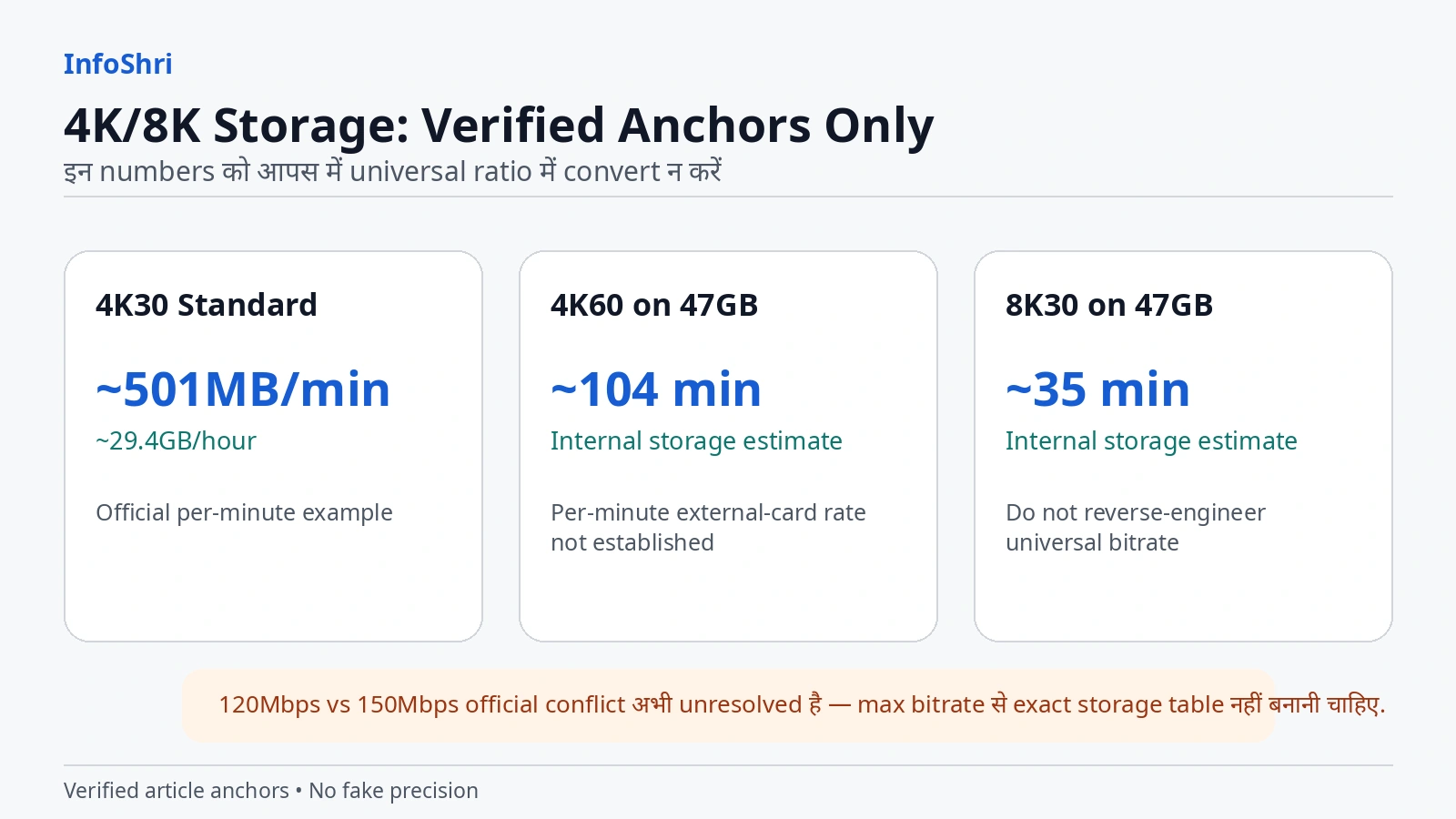
Luna Pro 8K30, 4K120, native 4K vertical, H.265, 10-bit video और अलग-अलग shooting modes देती है। इसका मतलब यह नहीं कि हर mode एक जैसा storage खाता है। Insta360 की current official documentation 4K30 Standard Bitrate के लिए लगभग 501MB per minute का example देती है, लेकिन 4K60 और 8K30 के लिए उसी तरह का per-minute number नहीं देती। दूसरी तरफ 47GB internal storage पर manufacturer लगभग 104 minutes 4K60 और लगभग 35 minutes 8K30 estimate करता है। इन figures को जोड़कर किसी “perfect universal bitrate formula” में बदल देना सही नहीं होगा, क्योंकि current official pages maximum bitrate पर भी एक-दूसरे से agree नहीं करतीं: एक current Luna Series specification table 150Mbps लिखती है, जबकि File Format FAQ 120Mbps लिखती है।
इसलिए इस article में जहाँ exact mode-specific data verified है, वहीं calculation की गई है। जहाँ नहीं है, वहाँ “unknown” को unknown ही रखा गया है।
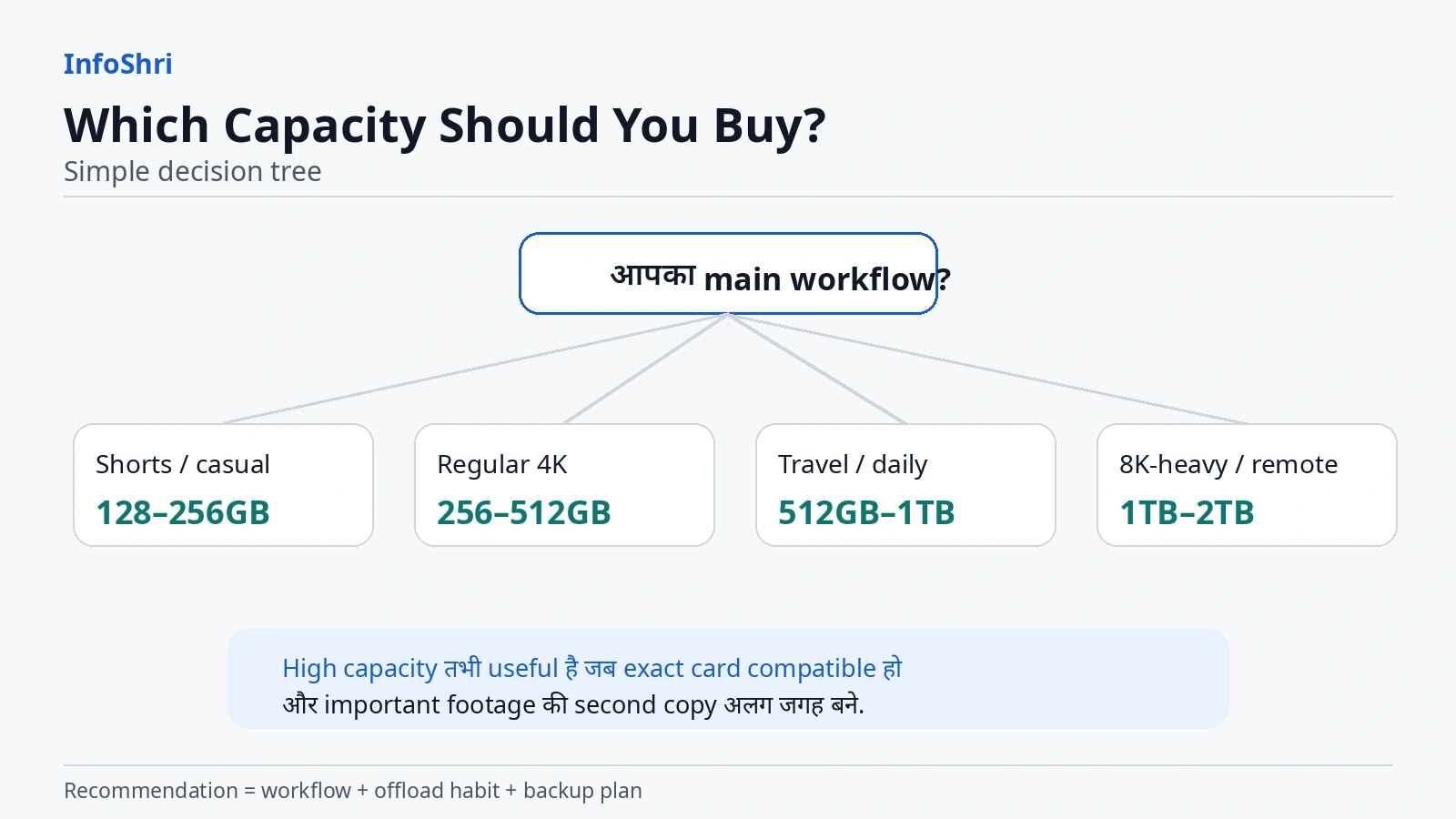
सीधी बात: 47GB internal storage emergency और short-session shooting के लिए genuinely useful है, लेकिन serious creator workflow के लिए microSD अभी भी practical requirement है। Most regular creators के लिए 256GB–512GB range sensible starting point बनती है; high-volume travel, mixed 4K/8K या long shoot में 512GB–1TB ज्यादा comfortable हो सकती है। 2TB support useful है, लेकिन 2TB हर buyer के लिए automatically best choice नहीं है—और एक 2TB card भी backup नहीं होता।
Quick Answer: Luna Pro में कितना Storage है और कौन-सा microSD लेना चाहिए?
Current Luna Series support documentation, जिसमें Luna Pro applicability दिखाई गई है, 47GB internal storage और external microSD/TF storage दोनों बताती है। Current support guidance UHS-I, V30 speed class or higher और exFAT format recommend करती है, और supported capacity 2TB तक बताती है। उसी guidance में UHS-II और UHS-III cards avoid करने को कहा गया है क्योंकि compatibility issue recording को रोक सकता है।
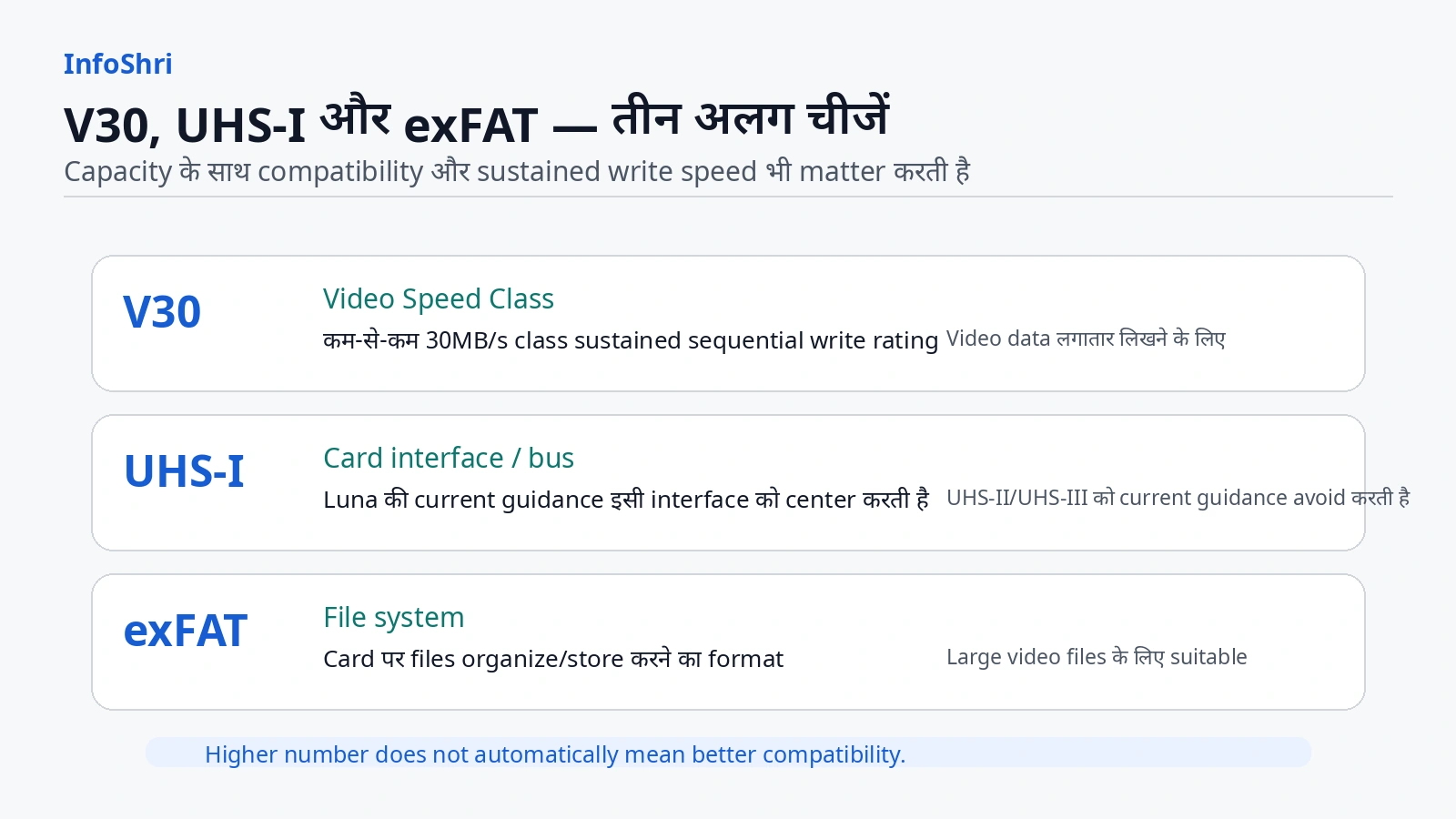
यहाँ तीन अलग चीजें समझना जरूरी है:
Capacity बताती है card में कितना data आ सकता है—128GB, 256GB, 512GB, 1TB या 2TB।
Speed class बताती है card लगातार video data कितनी reliably लिख सकता है। V30 का मतलब SD Association standard के अनुसार Video Speed Class 30 है, यानी defined test conditions में कम-से-कम 30MB/s sequential write performance का class।
Interface बताता है card और camera किस bus standard पर communicate करते हैं। Luna Pro के current guidance में UHS-I central requirement है। कोई card V60/V90 होने से automatically बेहतर choice नहीं बन जाता अगर उसका interface camera की compatibility guidance से बाहर हो।
और exFAT file system है—यानी card पर files organize/store करने का format। यह speed class नहीं है।
Quick storage buying table
| Creator type | Practical starting capacity | क्यों | Main caution |
|---|---|---|---|
| Casual / family / occasional clips | 128GB | 47GB internal के साथ अच्छा fallback और extra headroom | Regular offload जरूरी |
| Reels / Shorts creator | 128–256GB | छोटे clips, frequent phone/computer transfer | Vertical mode का exact file rate verified नहीं है |
| Normal 4K YouTuber | 256–512GB | multiple takes, B-roll और longer sessions के लिए practical | Final video duration को raw footage duration मत मानें |
| Daily vlogger | 512GB | कम card swapping, daily volume के लिए comfortable | Card पर कई दिन की only copy न रखें |
| Travel creator | 512GB–1TB | offload हर दिन possible न हो तो useful | एक बड़ी card failure/loss exposure बढ़ा सकती है |
| Product reviewer / mixed 4K + 8K + 120fps | 512GB–1TB | multiple takes और high-data modes | 4K120/8K का exact card-hour table अभी reliably established नहीं |
| 8K-heavy creator | 1TB–2TB | high storage demand और fewer swaps | exact tested card model compatibility verify करें |
| Professional / irreplaceable shoots | multiple cards + backup | capacity के साथ risk distribution | एक 2TB card को backup मत समझें |
Best capacity for most serious creators: 512GB एक practical sweet spot बन सकती है, क्योंकि यह frequent swapping कम करती है लेकिन आपको पूरे project को एक single 2TB card पर रखने के लिए मजबूर नहीं करती। यह price-per-GB claim नहीं है; current India card pricing seller और model के हिसाब से बदलती है।
Best value for lighter workflows: 256GB अक्सर ज्यादा sensible starting point है, खासकर अगर आप shoot के बाद नियमित offload करते हैं।
Best for 8K-heavy work: 1TB या 2TB useful हो सकती है, लेकिन केवल तब जब exact card model current compatible list या manufacturer guidance से match करे और आपके पास backup plan हो।
एक और important point: current official Luna support “up to 2TB” कहती है, लेकिन इसका मतलब यह नहीं कि market में मिलने वाला हर 2TB microSD guaranteed compatible है। Capacity, interface, speed class, controller, authenticity और firmware—सब matter कर सकते हैं।
47GB Internal Storage वास्तव में कितनी Useful है?
47GB सुनने में कभी बहुत कम और कभी काफी लग सकती है। सही answer इस पर निर्भर है कि आप क्या shoot कर रहे हैं।
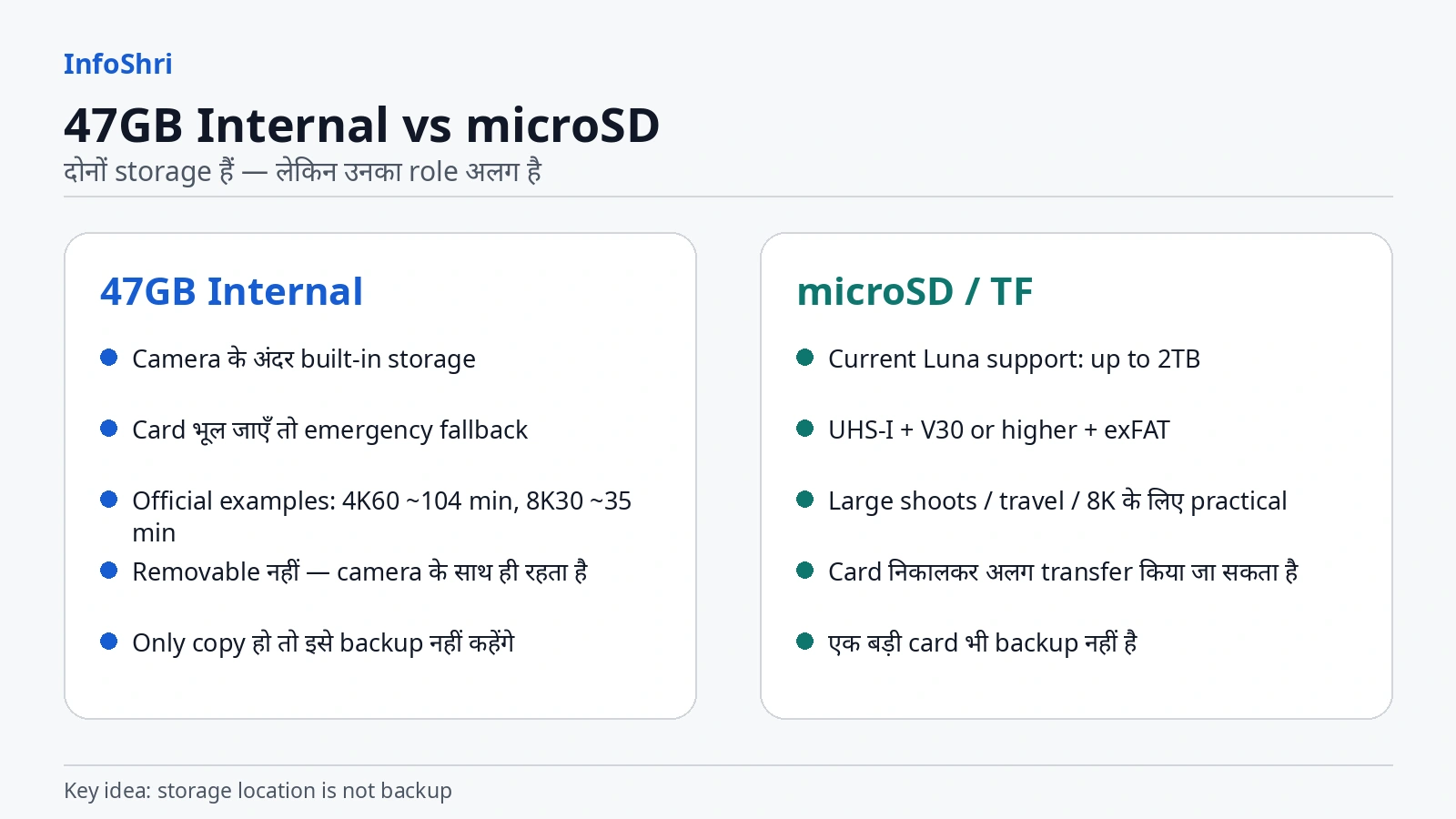
Current official Luna Series storage FAQ 47GB internal storage पर दो useful examples देती है:
- 4K60: लगभग 104 minutes
- 8K30: लगभग 35 minutes
Manufacturer खुद कहता है कि actual time shooting conditions के कारण थोड़ा बदल सकता है।
यहीं 8K का storage impact तुरंत समझ आता है। 47GB में 8K30 का official estimate करीब 35 minutes है। यानी अगर आप किसी trip पर सिर्फ internal storage के भरोसे 8K-heavy शूट करने निकलते हैं, तो battery खत्म होने से बहुत पहले storage limit आ सकती है।
लेकिन यही 47GB बेकार भी नहीं है। इसकी सबसे बड़ी practical value emergency fallback है।
मान लीजिए आप shoot location पर पहुँचे और microSD card घर पर रह गया। Luna Pro पूरी तरह unusable नहीं हो जाती। आप internal storage चुनकर shoot कर सकते हैं। Card भर जाए, remove हो या troubleshooting के लिए अलग करनी पड़े—internal storage आपको दूसरा recording location देता है।
लेकिन एक terminology trap है: internal storage “backup” तभी बनेगी जब वही footage दूसरी जगह भी मौजूद हो। अगर एक important clip सिर्फ internal storage पर है, तो वह backup नहीं, आपकी only copy है।
Camera खो गया, damage हो गया या service में चला गया, तो internal-only footage भी camera के साथ unavailable हो सकती है। microSD removable होने का फायदा यह है कि card अलग किया जा सकता है, लेकिन microSD भी खो सकती है या fail हो सकती है। इसलिए storage location और backup strategy अलग concepts हैं।
4K30 का एक अलग official example
Insta360 current Luna storage FAQ 4K30 Standard Bitrate का एक example देती है: लगभग 501MB per minute, और लगभग 29.4GB per hour।
इन दोनों figures को engineering laboratory constants न समझें। ये manufacturer के approximate planning figures हैं, और displayed units/rounding के कारण simple arithmetic perfectly match न भी करे तो उस difference को “correct” करने की जरूरत नहीं है। असली lesson यह है कि same “4K” label के अंदर भी fps और bitrate setting बदलने से storage demand बदल सकती है।
और यहाँ एक surprising बात है: official 47GB estimate 4K60 के लिए लगभग 104 minutes है, जबकि 4K30 Standard का separate file-size example उससे intuitive तरीके से scale नहीं करता। इसका मतलब यह नहीं कि manufacturer का कोई figure automatically wrong है। इसका मतलब सिर्फ इतना है कि इन examples की test conditions, bitrate settings या documentation context sufficiently comparable नहीं हैं कि हम उनसे एक universal formula बना दें।
इस guide में इसलिए 4K60 को 4K30 का “double” और 8K को 4K का “four times” नहीं माना गया।
Photos कितनी space लेती हैं?
Current storage FAQ Standard photo को लगभग 2.5MB और Ultra HD/high-resolution photo को लगभग 9.5MB per photo का example देती है।
लेकिन JPG+RAW के लिए यही number use नहीं किया जा सकता। Current Luna file-format documentation JPG और JPG+RAW दोनों support दिखाती है, लेकिन Luna Pro-specific RAW file size का reliable current figure इस research pass में establish नहीं हुआ। इसलिए “RAW photo = X MB” बनाना fake precision होगा।
क्या 47GB पर बिना card camera चल सकती है?
हाँ—official documentation internal storage को standalone storage path के रूप में support करती है। लेकिन यह full-day high-volume creator storage नहीं है।
47GB सबसे useful है:
- short family/casual session में;
- card भूल जाने पर;
- card troubleshoot करते समय;
- emergency shots के लिए;
- brief 4K session में;
- selected 8K hero shots में।
Less suitable है:
- full-day travel archive;
- long 8K session;
- multiple-camera event;
- long interview + B-roll;
- product review जिसमें 4K120 और repeated takes हों;
- ऐसा shoot जहाँ offload का मौका नहीं मिलेगा।
Internal storage को “free 47GB bonus” मानना सही है। “MicroSD की जरूरत नहीं” मानना serious creator के लिए सही conclusion नहीं है।
microSD Card में V30, UHS-I और exFAT का क्या मतलब है—and Wrong Card से क्या हो सकता है?
Card खरीदते समय सबसे common mistake है: “512GB है, इसलिए ठीक होगा” या “V90 है, इसलिए best होगा।”
Capacity और speed अलग चीजें हैं।
UHS-I: camera-card communication interface
UHS-I SD card bus interface का एक generation है। SD Association के अनुसार UHS-I first-row contacts पर higher bus speed support करता है; UHS-II और UHS-III second row contacts और अलग signalling architecture use करते हैं।
Normally technology में newer/faster generation attractive लगती है। लेकिन camera compatibility में host device की requirement manufacturer तय करता है। Current Luna Series support specifically UHS-I recommend करती है और UHS-II/UHS-III cards use न करने को कहती है।
इसलिए “UHS-II theoretically faster है, तो Luna Pro में automatically better होगा” गलत buying logic है।
V30: sustained video writing के लिए speed class
Video recording continuous write workload है। Camera एक बार में file copy नहीं कर रही; वह हर second नए video data को card पर लिख रही है। अगर card बीच-बीच में advertised burst speed तो दे दे लेकिन sustained writing maintain न कर पाए, recording interrupt हो सकती है।
SD Association Video Speed Class system में V30 का class 30MB/s minimum sequential write performance को represent करता है under defined conditions।
Current Insta360 guidance Luna Series के लिए V30 or higher कहती है। इसका practical मतलब: ऐसा card लें जिसे continuous video writing के लिए properly rated किया गया हो, सिर्फ “up to 200MB/s read” जैसी front-pack marketing देखकर निर्णय न करें।
U3 और V30 same चीज हैं?
पूरी तरह same standard नहीं, लेकिन दोनों labels में 30MB/s minimum-class concept आता है। U3 UHS Speed Class है, V30 Video Speed Class है। Protocol/testing context अलग हो सकता है।
Luna Pro के लिए buying rule को simple रखें: current Insta360 recommendation को follow करें—UHS-I + V30 or higher + exFAT—and preferably current tested/recommended family चुनें।
A1 और A2 क्या हैं?
A1/A2 “Application Performance Class” हैं। SD Association ने इन्हें apps और random read/write workloads के लिए define किया है। A2 higher random-performance target देता है और compatible host features का फायदा ले सकता है।
लेकिन camera video recording में A2 label core requirement नहीं है। A2 card automatically A1 card से “better video” record नहीं करती। अगर दो cards दोनों current Luna compatibility और V30/UHS-I requirement पूरा करते हैं, तो A2 logo को primary video-quality deciding factor मत बनाइए।
exFAT क्यों important है?
exFAT file system removable storage और large files के लिए designed है। Microsoft documentation के अनुसार exFAT very large files support कर सकता है और FAT32 की 4GB single-file limit से बंधा नहीं है।
Luna support exFAT explicitly मांगती है। इसलिए card speed सही होने के साथ उसका format भी सही होना चाहिए।
Current recommended card families
Current Luna Series storage FAQ में tested/recommended families के रूप में ये names दिखाई देते हैं:
- Insta360 microSD V30 A1
- SanDisk Extreme V30 A1
- SanDisk Extreme Pro V30 A1
- SanDisk Extreme V30 A2
- SanDisk Extreme Pro V30 A2
- Lexar Professional 1066x microSD UHS-I SILVER
- Kingston Canvas Go! Plus
- Samsung PRO Plus
इसे “इन brands का हर card compatible है” न समझें। Family, capacity, exact SKU और regional revision matter कर सकते हैं। खासकर 1TB/2TB खरीदते समय exact model-level compatibility current list से recheck करना बेहतर है।
UHS-II / V60 / V90: बड़ा number देखकर क्यों नहीं खरीदना चाहिए?
बहुत-से V60/V90 cards UHS-II ecosystem में आते हैं। Luna की current guidance UHS-II/UHS-III avoid करने को कहती है। इसलिए V90 का बड़ा number आपको गलत product की तरफ ले जा सकता है।
Goal “highest number” नहीं, camera के साथ verified sustained compatibility है।
Wrong या fake card से क्या हो सकता है?
Current Insta360 documentation कहती है कि insufficient read/write performance वाला unsuitable card recording interruption या file corruption का कारण बन सकता है।
Counterfeit card अलग risk है। Fake “512GB” card packaging पर 512GB लिख सकती है लेकिन actual capacity कम हो सकती है, sustained speed गलत हो सकती है या data overwrite/corrupt हो सकता है। SanDisk की current anti-counterfeit guidance genuine packaging/markings verify करने, suspiciously cheap deals से सावधान रहने और reputable/authorized channels से खरीदने पर जोर देती है।
लेकिन packaging देखकर अकेले definitive authenticity verdict देना भी गलत है। किसी specific marketplace seller को evidence के बिना “fake seller” कहना इस guide का हिस्सा नहीं है।
microSD requirement snapshot
| चीज | Luna Pro के लिए practical rule | इसका मतलब |
|---|---|---|
| Capacity | current support up to 2TB | हर 2TB model automatically verified नहीं |
| Bus/interface | UHS-I | UHS-II/UHS-III को current Insta360 guidance avoid करती है |
| Video class | V30 or higher | continuous video write capability |
| File system | exFAT | large media-file friendly format |
| A1/A2 | secondary label | app/random performance class; primary video rule नहीं |
| Brand | exact compatible model देखें | brand name alone guarantee नहीं |
| Authenticity | reputable/authorized supply | fake capacity/speed से recording/data risk |
128GB, 256GB, 512GB, 1TB या 2TB—आपको वास्तव में कितनी Capacity चाहिए?
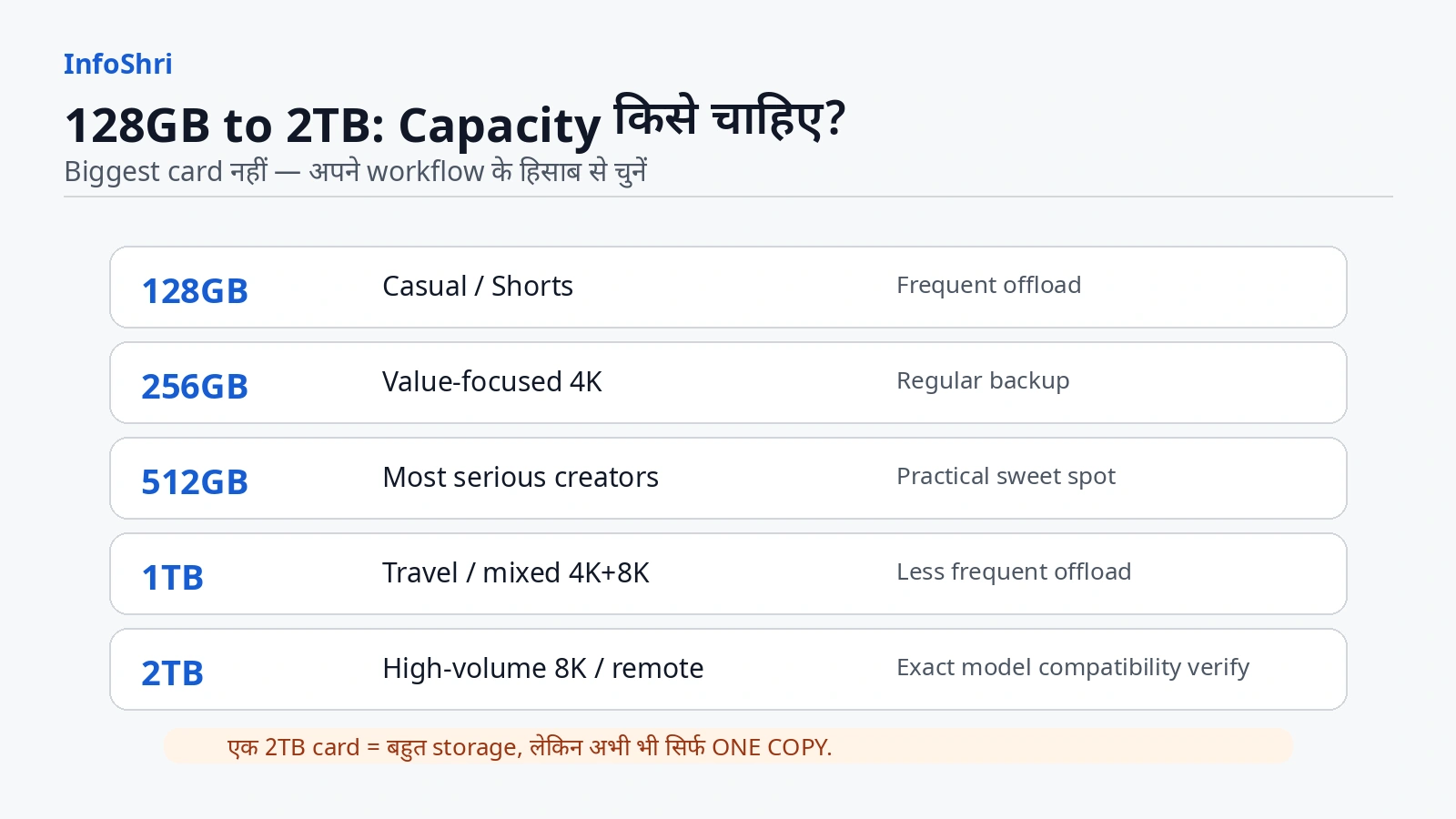
Card capacity का सही answer creator type से निकलता है, camera spec sheet से नहीं।
एक 30-minute final YouTube video बनाने वाला creator अक्सर 30 minutes raw footage नहीं shoot करता। वह retakes, alternate angles, B-roll, product close-ups और safety takes जोड़कर final duration का 2×, 3× या 5× footage shoot कर सकता है।
इसी तरह Shorts creator 30-second clips shoot करता है, लेकिन एक दिन में 80 clips ले तो total data तेजी से बढ़ सकता है।
128GB: casual और disciplined offload workflow
128GB उन users के लिए workable है जो:
- mostly short clips shoot करते हैं;
- 4K30/normal use करते हैं;
- हर shoot या हर दिन files transfer कर देते हैं;
- 8K को occasional hero shots तक रखते हैं;
- card को long-term archive नहीं बनाते।
4K30 Standard के verified manufacturer example पर 128GB nominal capacity theoretical तौर पर कई घंटे की recording space देती है। लेकिन 8K, 4K120, higher bitrate और other modes इसे बहुत तेजी से fill कर सकते हैं। इसलिए “128GB = X hours in every mode” बिल्कुल नहीं।
128GB का advantage: सस्ता entry point, files जल्दी offload, एक card में बहुत ज्यादा दिनों का material जमा नहीं।
Limitation: travel या high-volume professional day में बार-बार offload/card swap की जरूरत पड़ सकती है।
256GB: many creators का sensible value range
256GB अक्सर Shorts, normal 4K YouTube, family/travel day और moderate vlog workload के बीच अच्छा balance बनती है।
अगर आपका discipline अच्छा है—shoot → copy → verify → reuse—तो 256GB बहुत capable है।
Product reviewer के लिए भी 256GB काम कर सकती है अगर 8K और 4K120 selective हों। लेकिन repeated takes और long B-roll session में 512GB ज्यादा आराम देती है।
512GB: practical sweet spot
512GB का सबसे बड़ा फायदा “luxury” नहीं, friction कम करना है।
आप:
- ज्यादा takes shoot कर सकते हैं;
- travel day में कम card swap करते हैं;
- 4K-heavy workflow को आराम से handle कर सकते हैं;
- कुछ 8K/120fps shots के लिए extra headroom रखते हैं;
- full day के बाद offload कर सकते हैं।
इसी वजह से 512GB most serious creators के लिए practical sweet spot हो सकती है।
लेकिन risk उल्टा भी है: card जितनी बड़ी होगी, उतना ज्यादा footage एक physical object पर जमा हो सकता है। अगर वही card खो गई या fail हुई और backup नहीं है, तो high capacity loss को बड़ा बना देती है।
1TB: travel, mixed high-resolution और fewer-offload days
1TB तब sense बनती है जब:
- कई दिन travel हो;
- laptop/SSD offload हर रात possible न हो;
- 8K regularly use हो;
- long interview/event के साथ B-roll भी हो;
- multiple projects same day shoot हों;
- card swap कम रखना हो।
लेकिन 1TB खरीदना “professional” होने की पहचान नहीं है। अगर आप daily 30–60 minutes 4K shoot करके रात में backup कर देते हैं, 1TB का बड़ा हिस्सा हमेशा unused रह सकता है।
2TB: maximum support, not default recommendation
Current fresh Luna support 2TB तक cards support करती है। यह genuinely useful capability है, खासकर 8K-heavy या remote travel workflow में।
लेकिन 2TB तभी sensible है जब:
- exact 2TB card model compatibility verify हो;
- high capacity की real workflow need हो;
- card पर only copy लंबे समय न रहे;
- offload/backup plan हो;
- purchase authenticity reliable हो।
Shorts creator जो हर दिन transfer करता है, उसके लिए 2TB overkill हो सकती है।
Professional भी हमेशा one huge card नहीं चुनते। कई 512GB/1TB cards use करने से failure exposure अलग तरह से distribute हो सकता है, लेकिन card handling और loss risk बढ़ता है। इसलिए “multiple small cards हमेशा safer” या “one huge card हमेशा safer”—दोनों blanket statements गलत हैं।
Capacity recommendation by workflow
| Workflow | Practical range | Why |
|---|---|---|
| 15–60 sec Shorts, frequent offload | 128–256GB | volume manageable, low carrying cost |
| Weekly 4K YouTube videos | 256–512GB | retakes + B-roll के लिए headroom |
| Daily vlogging | 512GB | less swapping, comfortable daily buffer |
| Travel with nightly backup | 512GB | enough headroom without extreme single-card exposure |
| Travel without regular offload | 1TB | fewer swaps and more days between transfers |
| Mixed 4K/8K product review | 512GB–1TB | high-res B-roll + repeated takes |
| 8K-heavy / remote shoot | 1TB–2TB | high storage pressure |
| Long interview/event | 256GB+ plus spare | duration + power/thermal planning equally important |
| Professional irreplaceable job | multiple compatible cards + second copy | redundancy matters more than one giant card |
4K और 8K Recording Time कैसे Calculate करें—without Fake Precision
Recording-time tables internet पर बहुत misleading हो सकती हैं। कोई author maximum bitrate उठाता है, उसे आठ से divide करता है, फिर हर capacity के लिए exact hours बना देता है। Luna Pro के लिए यह खास तौर पर unsafe है क्योंकि current official documentation स्वयं maximum bitrate पर conflict करती है।
इसलिए calculation का सही order है:
पहले verified mode-specific data rate खोजिए → फिर capacity से approximate planning time निकालिए → फिर usable-space, format overhead और variable bitrate के लिए margin रखिए।
Verified 4K30 Standard anchor
Current Luna Series storage FAQ:
- 4K30
- Standard Bitrate
- लगभग 501MB per minute
- लगभग 29.4GB per hour
यही एक current Pro-applicable official per-minute storage anchor इस research pass में reliably मिला।
इस rate को सिर्फ इसी mode के लिए use करना चाहिए।
4K30 Standard के लिए nominal-capacity planning estimate
नीचे numbers advertised card capacity पर rough planning estimate हैं। Real camera-available space कम हो सकती है; file-system overhead, card formatting और scene-dependent bitrate actual time बदल सकते हैं।
| Card capacity | 4K30 Standard planning estimate | Confidence |
|---|---|---|
| 128GB | लगभग 4.2 घंटे class | official 501MB/min anchor से derived estimate |
| 256GB | लगभग 8.5 घंटे class | same |
| 512GB | लगभग 17 घंटे class | same |
| 1TB | लगभग 33 घंटे class | same |
| 2TB | लगभग 66 घंटे class | same |
इन numbers को guarantee नहीं मानें। Practical shoot plan में हमेशा headroom रखें।
अगर आपको exact remaining time चाहिए तो camera का current remaining-recording-time display उस moment के selected mode/storage के लिए ज्यादा useful operational indicator हो सकता है।
4K60 का exact card-time table क्यों नहीं दिया?
Official FAQ 47GB internal storage पर 4K60 के लिए लगभग 104 minutes देती है। लेकिन current documentation इस mode का reliable per-minute card data rate नहीं देती। Internal storage duration को सीधे 128GB/256GB/1TB तक linear scale करना tempting है, लेकिन source context पर्याप्त नहीं है।
इसलिए इस guide का verdict:
4K60: 47GB internal ≈ 104 minutes official estimate; card-capacity exact extrapolation = NOT RELIABLY ESTABLISHED.
8K30 का exact card-time table क्यों नहीं दिया?
Official 47GB internal estimate लगभग 35 minutes है। यह clearly बताता है कि 8K internal storage तेजी से consume कर सकती है।
लेकिन 47GB/35min से universal bitrate reverse-engineer करके “1TB = exactly X hours 8K” लिखना नहीं किया गया।
8K30: 47GB internal ≈ 35 minutes official estimate; external-card exact duration = NOT RELIABLY ESTABLISHED from current official per-minute data.
4K120, PureVideo और vertical 4K?
Current shooting spec modes establish करती है कि Luna Pro 4K120, PureVideo up to 4K60 और native vertical 4K30 support करती है। लेकिन इन modes के trustworthy Pro-specific per-minute storage figures current official sources में नहीं मिले।
इसलिए:
- 4K120 file-size table: not reliably established
- PureVideo 4K30/60 file-size table: not reliably established
- Vertical 4K30 file-size table: not reliably established
- I-Log vs Standard matched-mode file-size difference: not reliably established
- Dolby Vision matched-mode file-size difference: not reliably established
यह data missing होना weakness नहीं; invented answer देना weakness होता।
“8K four times 4K है, तो file भी four times होगी”—क्यों गलत?
8K frame में 4K से roughly four times pixels होते हैं, लेकिन compressed video file size pixels का simple multiplication नहीं है।
Codec, bitrate ceiling, fps, motion, detail, noise, color mode और encoding strategy decide करते हैं कि actual data कितना लिखा जाएगा।
इसलिए 4K30 × 4 = 8K30 file size लिखना गलत है।
इसी तरह 4K30 × 4 = 4K120 भी गलत है। Higher fps पर encoder हर frame को independent full image की तरह store नहीं करता।
Bitrate, H.265 और File Size: क्यों Same “4K” Videos भी Different Size हो सकती हैं?
Storage समझने के लिए चार terms अलग रखिए:
Resolution = frame में कितने pixels हैं।
FPS = हर second कितने frames record हो रहे हैं।
Bitrate = encoded video data कितनी rate से लिखा जा रहा है, आम तौर पर Mbps में।
Codec = video को compress/store करने की method।
Luna Series current file-format documentation MP4 container और H.265 encoding बताती है।
MP4 और H.265 same चीज नहीं हैं। MP4 container है—एक box जैसा जिसमें video/audio streams और metadata रहते हैं। H.265/HEVC compression codec है—वह तरीका जिससे video data efficiently encode किया जाता है।
Mbps और MB/s में confusion
Bitrate अक्सर Mbps यानी megabits per second में लिखा जाता है। Storage MB यानी megabytes में देखी जाती है।
Basic conversion:
8 bits = 1 byte
लेकिन अगर spec page 150Mbps लिखती है, तो 150 ÷ 8 = 18.75MB/s निकालकर हर Luna Pro clip को exactly 18.75MB/s कहना गलत है।
क्यों?
क्योंकि:
- maximum bitrate actual average bitrate नहीं;
- variable bitrate scene के साथ बदल सकती है;
- audio और container overhead अलग होते हैं;
- resolution/fps mode अलग ceiling use कर सकते हैं;
- Standard और High bitrate settings अलग हो सकती हैं;
- firmware behavior बदल सकती है।
Official 120Mbps vs 150Mbps conflict
यह इस article का सबसे important documentation conflict है।
Current fresh Luna Series Photo & Video Specifications table Luna Pro row में Maximum Video Bitrate = 150Mbps दिखाती है।
Current fresh Luna Series File Format FAQ Maximum video bitrate = 120Mbps दिखाती है।
दोनों official Insta360 support ecosystem में हैं और current search crawl में Luna Pro applicability दिखाते हैं।
Older cached versions से और context मिलता है: उसी support ecosystem की previous Luna Ultra-only pages 120Mbps और older 1TB memory-card limit दिखाती थीं। इससे यह possibility बनती है कि documentation transition चल रही है। लेकिन exact page revision timestamps और firmware mapping public surface से sufficiently establish नहीं हुए, इसलिए 150 को “new truth” और 120 को “wrong old page” declare करना अभी evidence से आगे जाना होगा।
Final status:
OFFICIAL DOCUMENTATION CURRENTLY CONFLICTS: 120Mbps vs 150Mbps.
इसका practical effect क्या है?
- Maximum bitrate से universal storage table मत बनाइए।
- Camera में selected bitrate option और remaining-time indicator देखें।
- Important shoot से पहले अपने exact firmware/mode पर short test recording करें।
- File properties/MediaInfo जैसे tools से अपने real files की average bitrate देख सकते हैं—लेकिन एक sample को भी universal camera spec न मानें।
एक independent Luna-series hands-on article ने अलग modes में अलग measured bitrate values report कीं, जो यही idea reinforce करती हैं कि mode-to-mode data rate बदलती है। लेकिन उस article का measurement set Luna Pro-only controlled storage benchmark के रूप में isolate नहीं था, इसलिए उसे इस guide की exact capacity table में नहीं डाला गया।
H.265 का creator पर असर
H.265 high-resolution video को manageable file size में compress करने में मदद करता है। इसका benefit 8K/4K जैसी modes में important है।
Trade-off: older computers पर H.265 decoding/editing heavier हो सकती है। इसलिए camera card storage बचने का मतलब यह नहीं कि editing storage और computer load भी trivial होगा।
एक project में camera originals के अलावा proxies, cache, render files, exports और backup copies भी बन सकती हैं। इसलिए 100GB card footage editing drive पर 100GB से ज्यादा working space मांग सकती है।
Long Recording में 30-Minute Files क्यों बनती हैं—and क्या Recording रुकती है?
अगर computer folder में long interview के तीन अलग files दिखें, तो पहला डर यह होता है: “Camera हर 30 minutes पर रुक गई?”
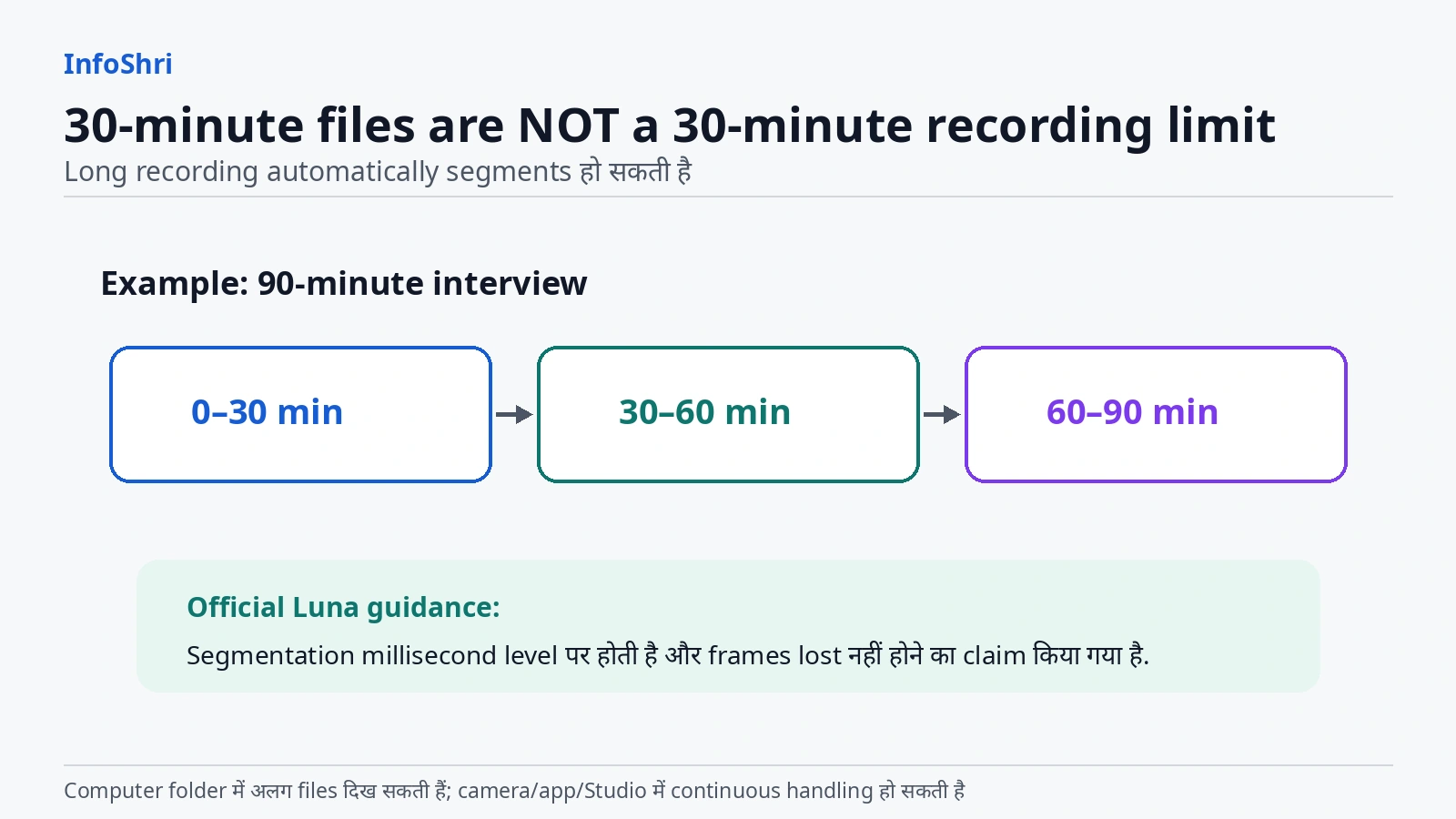
Current Luna Series storage FAQ का answer साफ है: continuous recording 30 minutes से आगे जाने पर camera compatibility और stability के लिए media को segments में save करती है। Official wording के अनुसार segmentation millisecond level पर होती है और frames lost नहीं होते।
इसलिए:
30-minute file segmentation ≠ 30-minute recording limit.
Camera/App/Insta360 Studio में segments automatically one continuous video की तरह present/merge हो सकते हैं। Computer file system में वे अलग files की तरह दिख सकती हैं।
90-minute interview example
मान लीजिए आपने 90-minute interview record किया।
Computer folder में roughly multiple segment files दिख सकती हैं। इसका मतलब यह नहीं कि camera manually तीन बार stop/start हुई।
Editor के लिए practical workflow:
- सारे related segment files copy करें।
- File names/time order verify करें।
- Editing software timeline पर consecutive clips रखें।
- Join point पर audio/video continuity check करें।
- Original files delete करने से पहले destination copy open करके verify करें।
Official FAQ no-frame-loss claim करती है, लेकिन किसी important production में copy/transfer corruption, accidental missing file या storage problem जैसी unrelated failure possibilities zero नहीं हो जातीं। इसलिए “segmentation gap नहीं” और “हर possible failure impossible है”—इन दोनों statements को अलग रखें।
FAT32 4GB story यहाँ क्यों नहीं लगानी चाहिए?
Internet पर पुराने cameras के context में 4GB file limit और FAT32 की explanation बहुत common है। Luna Pro current storage guidance exFAT मांगती है, और Insta360 segmentation का अपना reason compatibility और stability बताती है।
इसलिए Luna Pro की 30-minute segmentation को बिना evidence “FAT32 4GB limit” कहना गलत होगा।
Storage Full, Transfer और Backup: Footage को Safe कैसे रखें?
Storage capacity सिर्फ record button तक की problem नहीं है। Creator workflow में असली stress shoot के बाद शुरू होता है—hundreds of GB को safely move, verify और back up करना।
Card/full storage के दौरान active file का क्या होता है?
Current Luna storage FAQ कहती है कि memory card space खत्म होने तक continuously recorded footage automatically save हो जाती है।
यह useful protection है।
लेकिन इसका मतलब यह नहीं कि “storage full होने पर camera magically दूसरी storage पर seamless shift हो जाएगी।”
Current docs storage path को Internal Storage या SD Card Storage के रूप में select करने की बात करती हैं। This research pass में automatic internal↔SD failover का explicit official confirmation नहीं मिला।
इसलिए safe wording:
Current file save होने की protection documented है; automatic seamless failover to the other storage is NOT VERIFIED.
Important long recording से पहले selected storage और remaining time check करें।
Battery खत्म होने पर active recording save होती है?
Current official FAQ कहती है कि low battery के कारण camera automatically power off होने पर active media automatically save की जाती है to avoid data loss।
यह reassuring है, लेकिन इसे universal data-loss guarantee न समझें। Sudden physical damage, storage corruption, cable removal, firmware fault या abnormal power event अलग failure modes हो सकते हैं।
क्या direct external SSD पर record कर सकते हैं?
Current Luna storage FAQ का answer: currently not supported.
यानी Luna Pro को laptop/SSD-connected cinema recorder की तरह plan न करें।
आप footage record internal storage या supported microSD पर करेंगे, फिर transfer करेंगे।
Computer पर transfer
Current Luna Series documentation USB file transfer support करती है। Camera connect करने पर File Transfer mode select किया जाता है और DCIM/Camera01 folder access किया जा सकता है।
SD card inserted हो तो computer पर internal storage और SD card दो अलग drives की तरह दिख सकती हैं।
इसे combined storage pool या RAID मत समझें। वे अलग locations हैं।
Current official transfer-speed references
Fresh Luna Series File Export support page large-volume transfer के लिए कुछ lab/maximum references देती है:
- camera internal storage + USB 3.0 C-to-C: up to लगभग 450MB/s
- SD card + USB 3.0 C-to-C through camera: up to लगभग 80MB/s
- officially supplied USB 2.0 cable path: लगभग 35MB/s
- Wi-Fi 6 lab transfer: up to लगभग 70–80MB/s
Actual speed cable, port, computer, card, file mix और network conditions पर depend करेगी।
यहाँ एक practical trap है: “USB-C connector” देखकर automatically USB 3 speed assume मत करें। Connector shape और protocol speed अलग चीजें हैं।
Battery Handle slow क्यों हो सकती है?
Current Luna computer-transfer FAQ Battery Handle को USB 2.0 path बताती है और लगभग 40MB/s या कम transfer speed का context देती है। Camera का own port और 1/4″ Thread Handle USB 3.0 path के रूप में documented हैं।
अगर आपके पास 300–500GB footage है, slow USB2 route पर copy करना dramatically longer महसूस होगा। Large offload के लिए fastest supported direct path use करना practical है।
Phone/App transfer
Current Luna Pro-applicable support Wi-Fi, NFC quick connection और wired USB phone transfer paths document करती है।
Wired phone transfer support:
- iPhone 15 और later USB-C models
- Android phones with OTG support
Current support page app version 2.26.2 or later का reference देती है, लेकिन app versions तेजी से बदलती हैं; future reader को latest version recheck करनी चाहिए।
Phone workflow quick clips, Reels और field review के लिए convenient है। Hundreds of GB का master archive phone-only workflow पर रखना हमेशा practical नहीं होगा।
Internal storage से SD card में camera के अंदर direct copy?
इस research pass में current Luna Pro-specific official support में in-camera internal→SD direct copy feature का clear confirmation नहीं मिला।
App दोनों storage locations की media देख सकती है और computer दोनों drives expose कर सकता है, लेकिन इससे direct in-camera copy automatically prove नहीं होती।
Status: NOT VERIFIED.
अगर यह workflow आपके लिए critical है, अपने current firmware पर camera menu/support से verify करें।
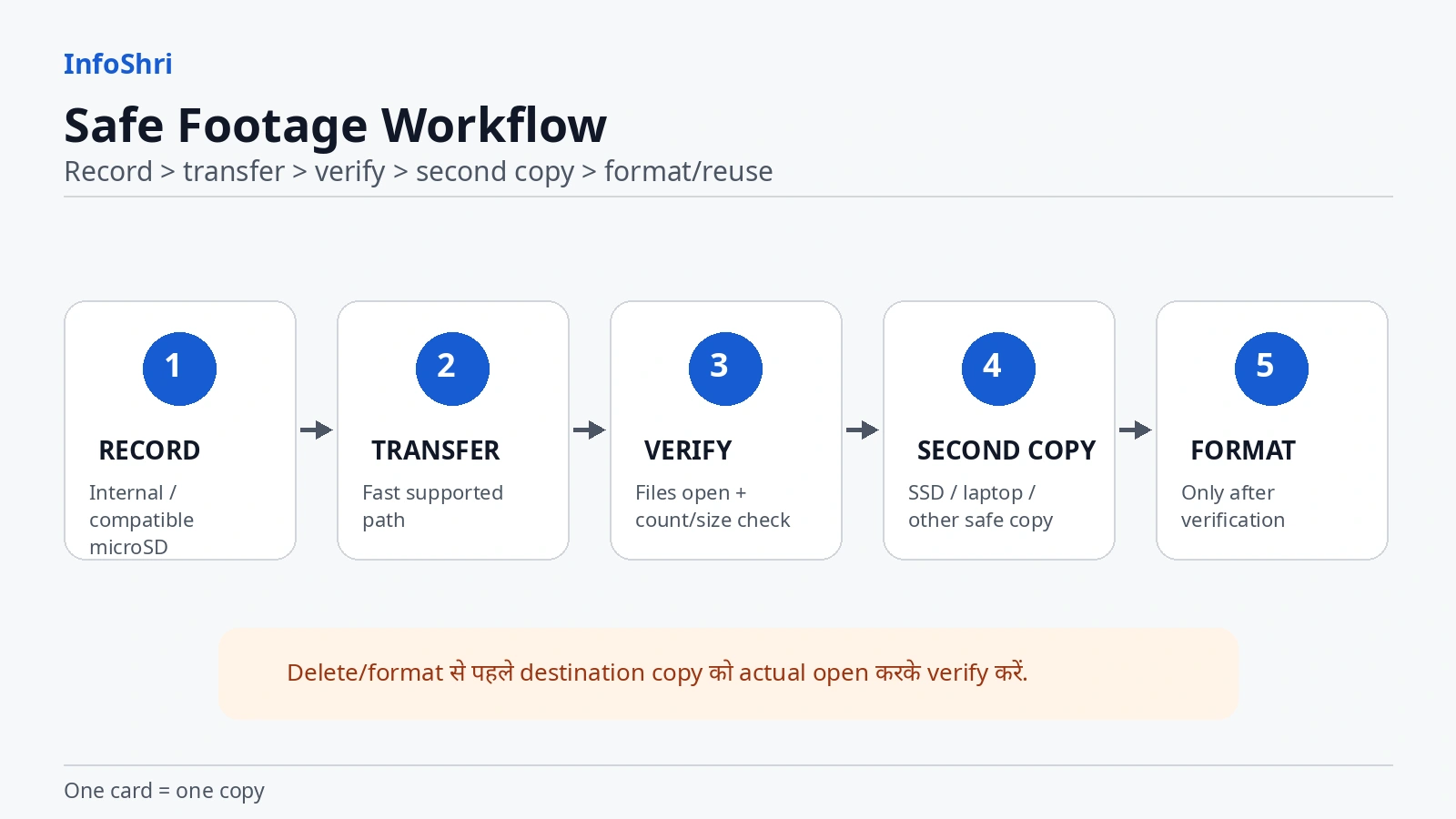
Backup का simplest rule
One card = one copy.
2TB card में पूरी trip हो सकती है, लेकिन card lost/fail हुई तो पूरी trip एक ही failure point पर थी।
Important footage के लिए minimum practical workflow:
- card/internal से laptop/SSD/phone पर copy;
- destination files open करके verify;
- irreplaceable shoot में second copy बनाएं;
- तभी original card format/reuse करें।
Professional data workflows अक्सर 3-2-1 philosophy use करते हैं, लेकिन beginner को हर trip में expensive NAS setup की जरूरत नहीं। कम-से-कम एक second verified copy enormous improvement है।
Internal Storage vs microSD vs backup
| Storage location | फायदा | limitation | Best use |
|---|---|---|---|
| 47GB internal | always in camera, emergency fallback | removable नहीं; high-res में जल्दी fill | backup shooting space / short session |
| microSD | huge capacity, removable, replaceable | lost/fake/fail हो सकती है | primary creator recording |
| laptop/SSD copy | camera से अलग copy | extra device/time | after-shoot backup |
| phone copy | fast field access/share | phone space limited | quick offload / social workflow |
| cloud | off-site copy possible | internet/time/cost | selected important files |
Formatting और Card Maintenance: Recording Errors से कैसे बचें?
Formatting का मतलब सिर्फ files delete करना नहीं है। यह storage का file-system structure reset/prepare करता है।
Current Luna Series formatting guidance Quick Format और Low-Level Format options document करती है।
Quick Format fast है और storage की files clear करती है।
Low-Level Format longer process है। Insta360 guidance इसे खास तौर पर internal storage के context में तब useful बताती है जब many read/write cycles के बाद performance degradation recording interruption जैसी problem create करे।
इसका मतलब यह नहीं कि हर shoot के बाद low-level format करना चाहिए।
Format करने से पहले
सबसे important rule:
Backup first. Verify second. Format third.
सिर्फ destination drive पर file name दिख जाना verification नहीं है। कम-से-कम representative video/photo open करके देखें। Important project में file count/size भी compare करें।
Delete और Format में difference
Delete कुछ files हटाता है।
Format storage को broadly reset/prepare करता है और current files erase कर देता है।
अगर card mixed devices में use हुई है या camera errors दे रही है, correct in-camera format workflow useful हो सकता है। लेकिन current Luna documentation से beyond कोई blanket “हर shoot के बाद format करें” rule इस article में नहीं दिया जा रहा।
New card को format करना चाहिए?
Current official Luna guidance exFAT requirement देती है और camera में formatting options देती है। Safe practical approach है card का backup/contents verify करके camera के Storage Management से correct format use करना, खासकर अगर card दूसरे device से आई है।
लेकिन factory-new compatible card को बिना किसी context “must low-level format” कहना justified नहीं है।
Card trouble के signs
Possible storage trouble:
- recording unexpectedly stop;
- write error;
- file corruption;
- unusual slow transfer;
- camera card recognize न करे;
- expected capacity weird दिखे।
Troubleshooting order:
- exact card model compatibility;
- card authenticity;
- UHS-I/V30 markings;
- capacity within current support;
- exFAT format;
- camera firmware;
- different known-good compatible card;
- storage health/format.
Camera को तुरंत दोष देना और card को तुरंत दोष देना—दोनों shortcuts हैं।
Firmware current क्यों रखना चाहिए?
Storage compatibility और device behavior support updates से बदल सकते हैं। Current Insta360 instructions firmware version camera info या Insta360 app से check करने और latest firmware available होने पर update करने का तरीका देती हैं।
लेकिन accessible official download page इस research pass में Luna Pro का exact latest build number reliably expose नहीं कर पाई। इसलिए article कोई firmware version invent नहीं करता।
Publication date पर current app/camera update check करना अच्छा practice है, खासकर 2TB compatibility, transfer या recording issue troubleshoot करते समय।
Final Guide: 128GB, 256GB, 512GB, 1TB या 2TB—आपके लिए कौन-सा सही है?
अब सारी technical detail को simple decision में बदलते हैं।
Casual user
अगर family, occasional travel या short clips shoot करते हैं और regularly phone/computer पर transfer करते हैं, 128GB enough हो सकती है। 47GB internal emergency buffer अलग मिलता है।
Reels / Shorts creator
Frequent short-form creator के लिए 128–256GB practical है। अगर dozens of takes shoot करते हैं, 256GB ज्यादा comfortable है। सिर्फ short clip duration देखकर capacity underestimate न करें—retakes और unused takes भी storage खाते हैं।
Normal 4K YouTuber
256–512GB most practical range है। 30-minute final video के लिए raw footage कई घंटे हो सकती है। B-roll, retakes, thumbnails/photos और alternate takes जोड़ें तो 512GB convenience बढ़ाती है।
Daily vlogger
512GB strong starting point है। Daily offload discipline हो तो 256GB भी चल सकती है; multi-day accumulation हो तो 512GB friction कम करती है।
Travel creator
अगर हर रात laptop/SSD backup संभव है तो 512GB अच्छा balance है।
अगर remote travel है और offload gaps लंबे हैं तो 1TB ज्यादा sense बनती है।
फिर भी पूरे trip की only copy एक card पर न रखें।
Product reviewer
Talking-head 4K, 8K crop shots, 4K120 B-roll और multiple takes वाला workflow जल्दी बड़ा हो सकता है। 512GB–1TB practical range है।
Long interview / event
अगर 4K30 Standard use हो रहा है, verified 501MB/min anchor के हिसाब से 128GB nominal card theoretical तौर पर कई घंटे की class space देती है। लेकिन event workflow में single-mode math पर निर्भर मत रहें।
256GB या उससे ऊपर + spare compatible card ज्यादा comfortable operational choice है, क्योंकि battery, heat, bitrate mode और unexpected retakes भी matter करते हैं।
8K-heavy creator
Official internal estimate 47GB पर करीब 35 minutes है—यह alone बताता है कि 8K storage hungry है।
1TB–2TB high-volume 8K workflow में sensible हो सकती है, लेकिन exact 8K hours इस article में intentionally नहीं दिए गए क्योंकि current Pro-specific per-minute figure reliably established नहीं हुआ।
Professional
Professional का best answer “2TB” नहीं है।
Best answer है:
- enough card capacity;
- tested exact card models;
- spare media;
- fast transfer path;
- verified second copy;
- clear labeling;
- no premature formatting.
कई pros के लिए multiple 512GB/1TB cards + backup, one giant card से better workflow हो सकता है। दूसरे workflows में 2TB card swaps कम करके value दे सकती है। Context decides।
Best capacity for most
अगर एक single general recommendation देनी पड़े:
Most serious Luna Pro creators के लिए 512GB practical sweet spot है।
यह absolute price/value winner नहीं है। यह workflow recommendation है—enough headroom, fewer swaps, 2TB के extreme single-card concentration से बचाव, और 47GB internal fallback के साथ अच्छा balance।
Best value
अगर budget और disciplined offload priority है:
256GB को value-focused starting point मानिए।
अगर current market में 512GB price gap छोटा हो, 512GB better value बन सकती है। इसलिए खरीदते समय exact model की current ₹ price compare करें—लेकिन cheapest unknown card न लें।
1TB कब sense बनती है?
- travel;
- mixed 4K/8K;
- long shooting day;
- less frequent offload;
- multiple projects;
- high-volume B-roll.
2TB कब sense बनती है?
- 8K-heavy workflow;
- remote shoot;
- very long days;
- offload difficult;
- exact 2TB model current compatible list से verified.
2TB कब overkill है?
- casual clips;
- Shorts-only workflow;
- daily transfer habit;
- low shooting volume;
- budget better spent on second backup drive/card.
क्या Luna Pro microSD के बिना shoot कर सकती है?
हाँ। Current official documentation 47GB internal storage देती है और internal storage को selectable recording path बताती है।
क्या 47GB enough है?
Short session और emergency use के लिए—हाँ।
Full-day high-resolution creator workflow के लिए—आमतौर पर नहीं।
Final one-line recommendation
Luna Pro के लिए card “सबसे बड़ा जो support होता है” देखकर मत खरीदिए; पहले अपना shooting mode और offload habit तय करें—casual/Shorts के लिए 128–256GB, most serious 4K creators के लिए 512GB, और genuinely high-volume 8K/travel workflow के लिए verified 1TB–2TB card चुनें, लेकिन हर important shoot की second copy जरूर बनाएं।
Quick FAQs
1. Luna Pro में कितना internal storage है?
Current Luna Series documentation 47GB internal storage बताती है।
2. क्या यह 64GB total / 47GB usable है?
Luna Pro-specific current official sources checked in this research pass physical 64GB figure clearly establish नहीं करतीं। इसलिए safe wording सिर्फ 47GB documented internal storage है।
3. क्या बिना microSD camera use हो सकती है?
हाँ, internal storage पर record कर सकती है।
4. Maximum microSD capacity कितनी है?
Current fresh Luna Series support Luna Pro के लिए up to 2TB guidance देती है।
5. पुराने pages 1TB क्यों दिखाते हैं?
Older cached Luna Ultra-only support copy 1TB limit दिखाती है। Current fresh Luna Series guidance 2TB दिखाती है। इसलिए 1TB old-version documentation conflict है, current Luna Pro ceiling नहीं।
6. कौन-सा speed class चाहिए?
Current guidance UHS-I, V30 or higher, exFAT कहती है।
7. क्या V90 better है?
Automatically नहीं। Luna guidance UHS-II/UHS-III avoid करने को कहती है; कई high-end V60/V90 cards उस ecosystem में होते हैं। Exact compatibility पहले देखें।
8. A2 card video quality बेहतर करती है?
A2 app/random-access performance class है। Video recording के लिए current Luna requirement V30/UHS-I compatibility ज्यादा important है।
9. 47GB में 8K30 कितना चलेगा?
Insta360 का current estimate लगभग 35 minutes है।
10. 47GB में 4K60 कितना चलेगा?
Current official estimate लगभग 104 minutes है।
11. 4K30 का file size कितना है?
Current official Standard Bitrate example लगभग 501MB/min और 29.4GB/hour बताता है। इसे other 4K modes पर apply न करें।
12. 30-minute file का मतलब recording limit है?
नहीं। Current official docs long recording को segments में save करती हैं; no-frame-loss segmentation claim करती हैं।
13. Battery खत्म होने पर current file save होती है?
Official FAQ low-battery auto power-off पर active media auto-save कहती है। फिर भी backup जरूरी है।
14. Card full होने पर current file save होती है?
Official docs full होने तक recorded content save होने की बात करती हैं। Automatic switch to internal storage separately verified नहीं है।
15. Direct SSD पर record कर सकते हैं?
Current official answer: नहीं।
16. Internal storage से SD में camera के अंदर copy कर सकते हैं?
Current Luna Pro-specific support में यह feature reliably verified नहीं हुआ।
17. Fastest transfer कैसे करें?
Large transfer के लिए current Luna support USB3 direct path को fastest options में रखती है; Battery Handle USB2 path slow हो सकती है।
18. Card format कब करें?
Important footage copy और verify करने के बाद, जब storage clear/reuse करनी हो या manufacturer-supported troubleshooting reason हो। Low-Level Format को routine daily habit न बनाएं।
Sources checked
-
Insta360 — Luna Series: Internal Storage and Memory Card Related FAQ
https://onlinemanual.insta360.com/lunaultra/en-us/operation-tutorials/sdcard-file-storage/sdcard -
Insta360 — Luna Series: Hardware Specifications
https://onlinemanual.insta360.com/lunaultra/en-us/specs/specs -
Insta360 — Luna Series: Photo & Video Specifications
https://onlinemanual.insta360.com/lunaultra/en-us/specs/shooting -
Insta360 — Luna Series: File Format Related FAQ
https://onlinemanual.insta360.com/lunaultra/en-us/operation-tutorials/sdcard-file-storage/file-format -
Insta360 — Luna Series: File Export
https://onlinemanual.insta360.com/lunaultra/en-us/operation-tutorials/file-export/file-export -
Insta360 — Luna Series: Connecting Camera to Phone / Tablet
https://onlinemanual.insta360.com/lunaultra/en-us/operation-tutorials/connection/phones-tablets -
Insta360 — Luna Series: Transferring Files from Camera to Computer
https://onlinemanual.insta360.com/lunaultra/en-us/operation-tutorials/connection/pc -
Insta360 — Luna Series: Formatting Memory
https://onlinemanual.insta360.com/lunaultra/en-us/operation-tutorials/sdcard-file-storage/format-memory -
Insta360 — Luna Series: Check and Update Firmware Version
https://onlinemanual.insta360.com/lunaultra/en-us/operation-tutorials/system-operation/firmware -
SD Association — Speed Class Standards for Video Recording
https://www.sdcard.org/consumers/about-sd-memory-card-choices/speed-class-standards-for-video-recording/ -
SD Association — Bus Speed / UHS interfaces
https://www.sdcard.org/developers/sd-standard-overview/bus-speed-default-speed-high-speed-uhs-sd-express/ -
SD Association — Application Performance Class
https://www.sdcard.org/developers/sd-standard-overview/application-performance-class/ -
Microsoft — exFAT File System Specification
https://learn.microsoft.com/en-us/windows/win32/fileio/exfat-specification -
SanDisk — Safe Buying Guide / counterfeit-card guidance
https://support-in.sandisk.com/app/answers/detailweb/a_id/50760 -
TechRadar — Insta360 Luna Pro review (independent context)
https://www.techradar.com/cameras/video-cameras/insta360-luna-pro-review -
Reisezoom — Insta360 Luna Ultra und Luna Pro test/tips (independent combined Luna-series context; not used as a Pro-only exact storage benchmark)
https://reisezoom.com/insta360-luna-ultra-test-tipps/
Related InfoShri guides
- Luna Pro Review: https://infoshri.com/insta360-luna-pro-review/
- Luna Pro Full Specifications Explained: https://infoshri.com/insta360-luna-pro-specs/
- Luna Pro 8K Explained: https://infoshri.com/insta360-luna-pro-8k-explained/
- Luna Pro Price in India: https://infoshri.com/insta360-luna-pro-price-india/
- Luna Pro vs DJI Osmo Pocket 4: https://infoshri.com/insta360-luna-pro-vs-dji-osmo-pocket-4/
- Luna Pro Low-Light Explained: https://infoshri.com/insta360-luna-pro-low-light-test/
- Product hub: https://infoshri.com/product/insta360/luna-series/insta360-luna-pro/
Sources
- Insta360 Luna Series: Internal Storage and Memory Card Related FAQ
- Insta360 Luna Series: Hardware Specifications
- Insta360 Luna Series: Photo & Video Specifications
- Insta360 Luna Series: File Format Related FAQ
- Insta360 Luna Series: File Export
- Insta360 Luna Series: Phone/Tablet Transfer
- Insta360 Luna Series: Computer Transfer
- Insta360 Luna Series: Formatting Memory
- Insta360 Luna Series: Firmware Update Instructions
- SD Association: Video Speed Class
- SD Association: Bus Speed / UHS
- SD Association: Application Performance Class
- Microsoft exFAT specification
- SanDisk Safe Buying Guide
- TechRadar Luna Pro review
- Reisezoom Luna Ultra and Luna Pro test/tips

Keep exploring