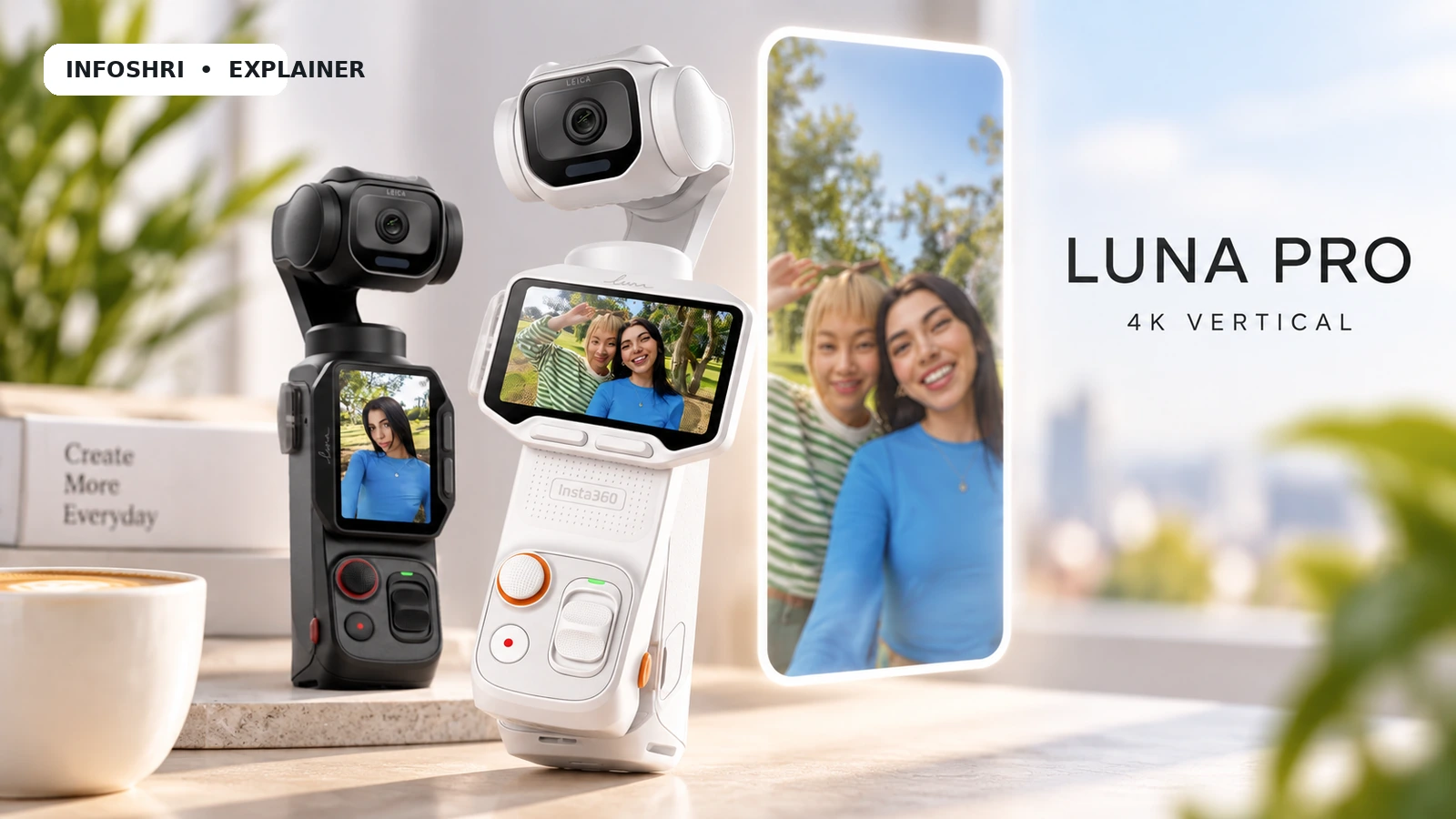
अगर आप Reels या YouTube Shorts बनाते हैं, तो Insta360 Luna Pro का “4K vertical” feature पहली नजर में बहुत simple लगता है: camera को 9:16 पर रखिए, 4K में shoot कीजिए और upload कर दीजिए। लेकिन practical decision इतना सीधा नहीं है। Luna Pro native 9:16 में 2160×3840 तक record करती है, पर इस 4K mode की maximum frame rate 30fps है। अगर आपको dance, fitness, तेज walking या ज्यादा movement चाहिए, तो 3K 9:16 का 60fps option कई बार ज्यादा useful हो सकता है। और low light में कहानी फिर बदलती है, क्योंकि PureVideo का current vertical ceiling 3K 9:16 है, 4K नहीं। [1]
इसलिए इस guide का सवाल “4K बड़ा number है या नहीं?” नहीं है। असली सवाल है: native vertical capture क्या बदलता है, 4K30 और 3K60 में किसे चुनना चाहिए, horizontal 8K crop कितना practical है, tracking और gimbal narrow vertical frame में कितने useful हैं, और Instagram/YouTube upload के बाद camera की extra quality में से viewer तक कितना पहुंचता है।
यह hands-on InfoShri test नहीं है। यह article 15 September 2026 तक उपलब्ध Insta360 की current mode-specific documentation, product/launch material, YouTube और Instagram/Meta documentation, और independent review evidence पर आधारित research-based analysis है। जहाँ current public evidence किसी exact combination—जैसे हर 9:16 mode में I-Log, हर tracking variant या Shorts-feed में guaranteed 4K playback—को साफ verify नहीं करता, वहाँ उसे assumption बनाकर publish नहीं किया गया है।
Quick Verdict: Reels और Shorts के लिए Luna Pro का Vertical Video कितना अच्छा है?
सीधी बात: short-form creator के लिए Luna Pro का native vertical workflow genuinely useful है, लेकिन उसका सबसे बड़ा फायदा सिर्फ 4K resolution नहीं है। असली फायदा यह है कि camera 9:16 composition को shoot के समय ही दिखाती है, mechanical 3-axis gimbal और subject tracking उसी creator workflow का हिस्सा बनते हैं, और detachable touchscreen remote आपको tripod से दूर खड़े होकर framing और recording control करने देता है। Insta360 की current shooting table Luna Pro पर 4K 9:16 को 2160×3840 at 30/25/24fps और 3K 9:16 को 1728×3072 up to 60fps बताती है। [1]
अगर आपका Reel talking-head, beauty, food, product demo या relatively controlled travel monologue है, तो 4K30 logical starting point है: subject movement moderate है और extra spatial detail काम आ सकती है। अगर dance, fitness, fast walking, sports-style movement या 30fps timeline पर 2× slow-down चाहिए, तो 3K60 अक्सर ज्यादा practical starting point बनती है। 60fps का मतलब हर second 60 frames capture होना है; motion smoother दिख सकता है, लेकिन ज्यादा frame rate light और data दोनों पर दबाव बढ़ा सकती है।
Night/indoor creator के लिए “4K ही best है” कहना गलत होगा। Current PureVideo table vertical में 3K 9:16 up to 60fps देती है, जबकि 4K PureVideo केवल 16:9 में listed है। इसका मतलब dark scene में standard 4K30 vertical बनाम PureVideo 3K vertical का trade-off resolution से ज्यादा important हो सकता है। [1]
और Instagram के लिए 4K खरीदने से पहले एक reality check जरूरी है: Meta की public help guidance 9:16/Reels upload और “Upload at highest quality” control बताती है, लेकिन organic Reel के final viewer stream के लिए guaranteed 2160×3840 retention या exact public bitrate ceiling साफ publish नहीं करती। इसलिए “Luna Pro 4K record करती है, तो Instagram viewer को untouched 4K मिलेगा” कहना supported नहीं है। [13]
YouTube की स्थिति थोड़ी साफ है। Current YouTube Help के अनुसार square या vertical video up to three minutes Short बन सकती है, YouTube 4K uploads को support करता है और player non-16:9 aspect ratios के हिसाब से adapt होता है। लेकिन Shorts feed में हर device/app/network पर 2160×3840 playback guaranteed रहेगा—ऐसी Shorts-specific universal guarantee current public documentation में नहीं मिली। [10][11][12]
Quick vertical mode decision
| Creator scenario | Practical starting mode | क्यों | मुख्य caution |
|---|---|---|---|
| Talking Reel | 4K30 9:16 | ज्यादा detail, movement कम | final Instagram stream 4K preserve करे यह guaranteed नहीं |
| Beauty / makeup | 4K30 9:16 | skin, hair, fabric detail के लिए headroom | beautify/processing को over-smoothing के लिए check करें |
| Food / product | 4K30 9:16 | labels, texture, small text में detail useful | focus/lighting resolution से ज्यादा important हो सकते हैं |
| Dance | 3K60 9:16 | faster motion smoother | low light में 60fps tougher हो सकता है |
| Fitness | 3K60 9:16 | full-body motion और movement priority | tracking + lighting verify करें |
| Walking Short | 3K60 या 4K30 | style पर depend: smoothness vs detail | gimbal bounce zero नहीं होता |
| Night / indoor | PureVideo 3K vertical से compare करें | low-light processing ज्यादा useful हो सकती है | 4K PureVideo vertical current table में नहीं |
| Shorts-only creator | Native 9:16 | fastest social-first composition | 16:9 reuse कम flexible |
| YouTube long-form + Shorts | Hybrid workflow | 16:9 master + selected native 9:16 takes | extra takes/storage |
Luna Pro का vertical mode खरीदने का genuine reason तब बनता है जब आपका काम बार-बार short-form framing, solo shooting और fast turnaround पर निर्भर हो। अगर महीने में दो-चार casual Reels बनती हैं और आपका flagship phone already good stabilization/vertical video देता है, तो Luna Pro सिर्फ “4K vertical” badge की वजह से जरूरी नहीं हो जाती।
पूरे camera का broader buying context चाहिए तो InfoShri का research-based Luna Pro review देखें: https://infoshri.com/insta360-luna-pro-review/
Native Vertical Video असल में क्या है—and Horizontal Crop से कैसे अलग है?
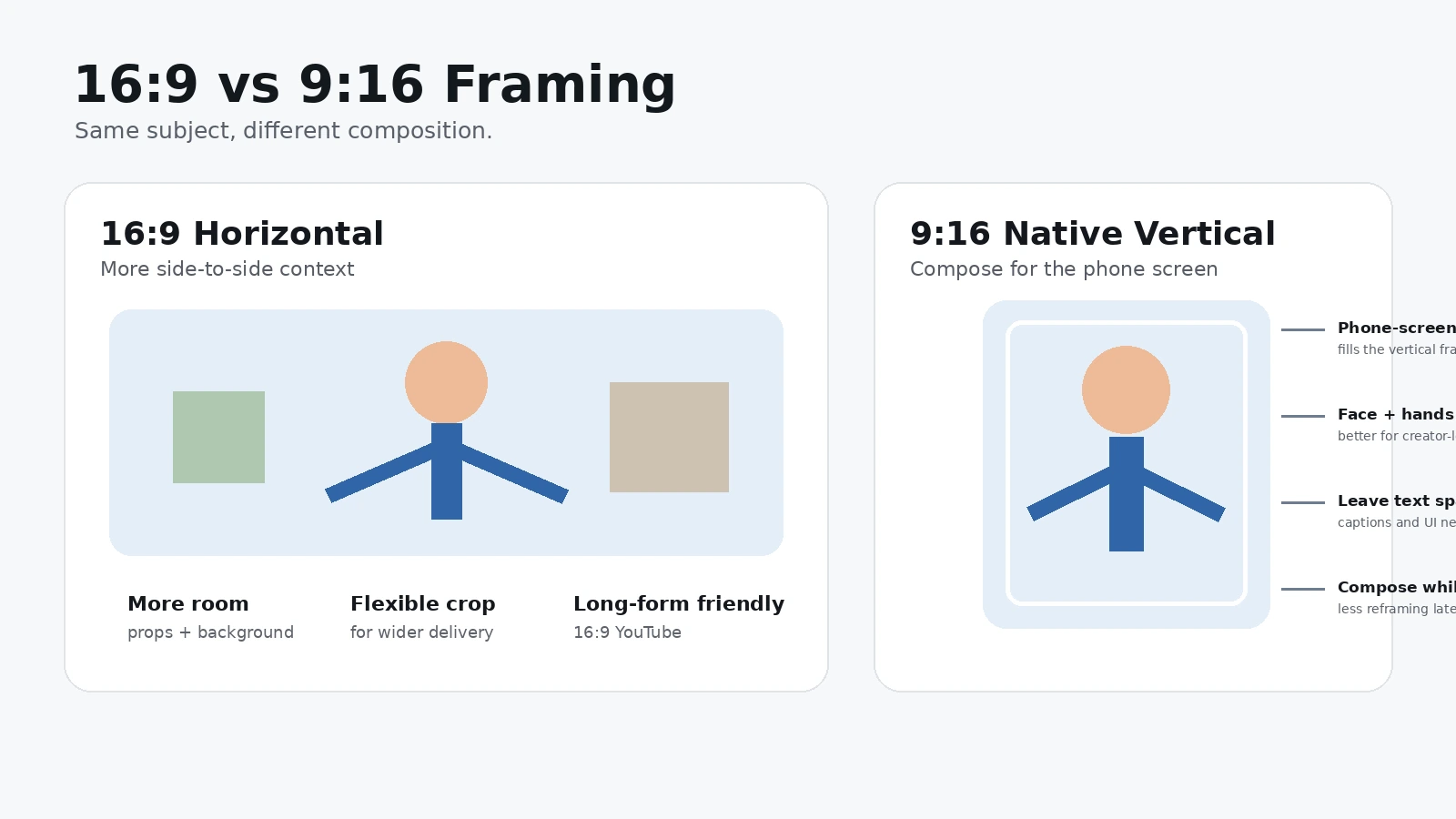
9:16 वह लंबा vertical frame है जो phone screen को naturally भरता है। “9” frame की width और “16” height का ratio बताता है। Luna Pro में native 9:16 का मतलब यह है कि आप camera के shooting mode में ही vertical aspect ratio चुनते हैं और final file vertical dimensions में record होती है—जैसे 4K mode में 2160 pixels wide और 3840 pixels high। [1]
यह सिर्फ export setting नहीं है। Shoot के समय ही आपकी composition बदल जाती है। 16:9 widescreen में किसी व्यक्ति के left-right काफी space रहती है; 9:16 में वही frame narrow हो जाता है। Face कहाँ रहेगा, headroom कितना होगा, hands frame से बाहर तो नहीं जा रहे, product कहाँ पकड़ा है, captions के लिए खाली जगह है या नहीं—ये decisions recording के पहले हो जाते हैं। यही native vertical का सबसे practical फायदा है।
मान लीजिए आप fitness Reel shoot कर रहे हैं। Horizontal 16:9 में आपका पूरा शरीर आसानी से fit हो सकता है, लेकिन बाद में center 9:16 crop करते समय हाथ या पैर बाहर जा सकते हैं। अगर subject side में move करे तो editor को keyframe से crop follow करना पड़ सकता है। Native 9:16 में आप वही narrow reality पहले देख लेते हैं, इसलिए camera position, distance और movement उसी हिसाब से set कर सकते हैं।
Traditional horizontal workflow इस तरह चलता है: 16:9 shoot → editor में timeline → 9:16 crop → subject reframe → captions/graphics reposition → export. इसका advantage भी real है: एक master clip से long-form YouTube, landscape website video और vertical social cut—तीनों बन सकते हैं। लेकिन flexibility editing time खरीदकर आती है।
Native vertical workflow: 9:16 select → vertical composition देखते हुए shoot → tracking/framing monitor → short-form oriented file → trim/color/caption → publish. अगर आपका output लगभग हमेशा Reels/Shorts है, तो यह steps घटा सकता है। लेकिन native vertical automatically “better image quality” नहीं कहला सकती, क्योंकि quality sensor readout, processing, frame rate, exposure, lens, light और platform compression पर भी depend करती है।
एक official-documentation ambiguity यहाँ बताना जरूरी है। Insta360 की current aspect-ratio help page portrait shooting के बारे में कुछ wording देती है जो पहली नजर में confusing लग सकती है—एक जगह 4K portrait के लिए 16:9 और horizontal hold की recommendation है, जबकि उसी page की FAQ Luna Pro पर 4K30 portrait support confirm करती है। Mode-specific shooting table साफ 4K 9:16 = 2160×3840 at 30/25/24fps दिखाती है। इसलिए इस article में exact native 9:16 capability के लिए mode table को primary authority माना गया है और ambiguous wording को silently “fix” नहीं किया गया। [1][2]
यह conflict इसलिए important है क्योंकि broad product/marketing copy में “4K60 Portrait” जैसी language भी दिखाई दे सकती है। उसे native Luna Pro 9:16 4K60 मानना unsafe है। Current Luna Pro mode table dedicated portrait 4K को 30fps max बताती है; जब तक mode-specific official table बदलकर 4K60 9:16 नहीं दिखाती, publication-safe claim 4K30 vertical ही है। [1]
Internal reading के लिए InfoShri का पूरा Luna Pro specs explainer भी useful है: https://infoshri.com/insta360-luna-pro-specs/
4K30 vs 3K60: Bigger Resolution या Smoother Movement?
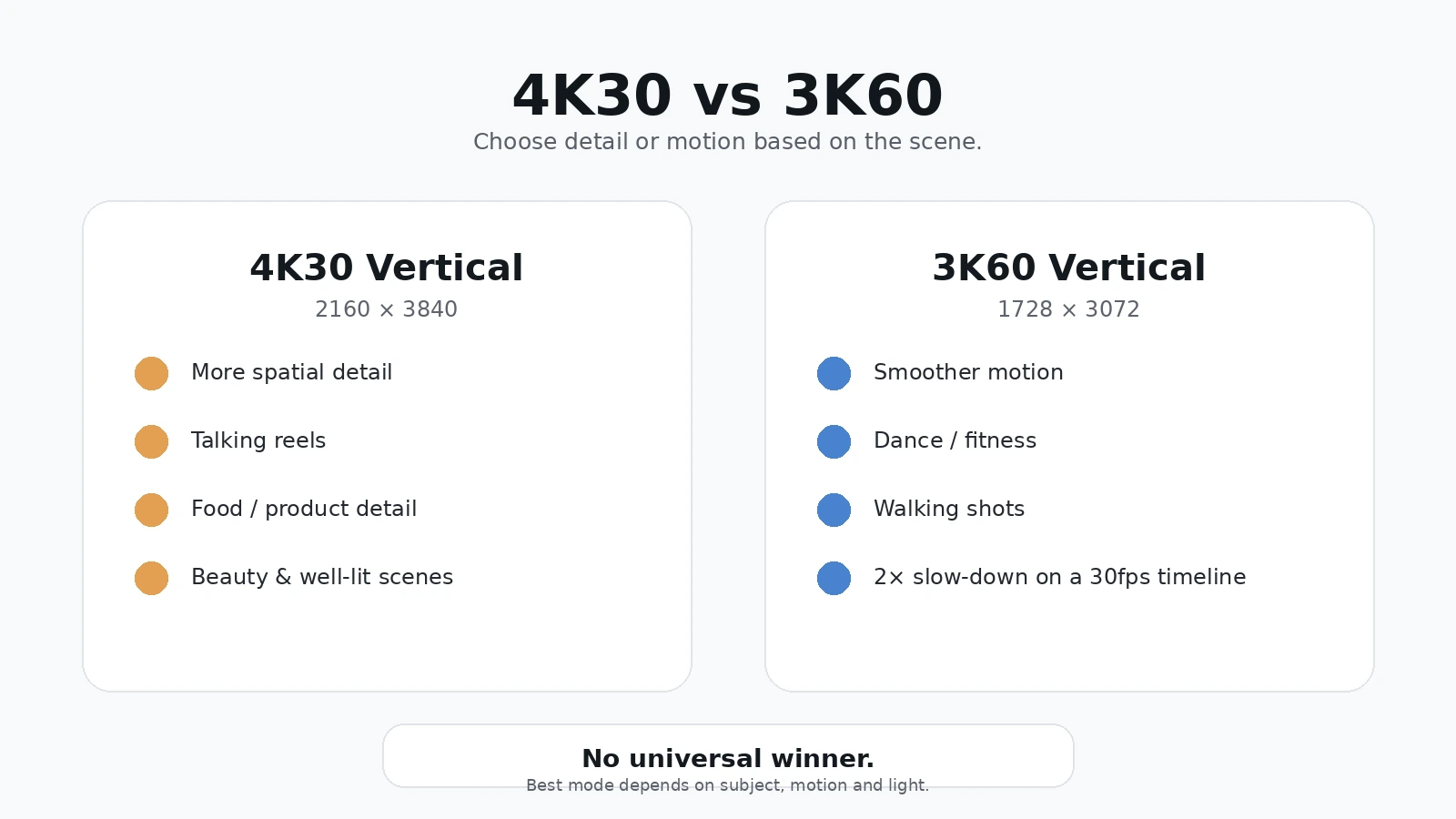
यह article का सबसे important day-to-day decision है। 4K30 में “4K” resolution बताता है और “30” frame rate. 3K60 में resolution थोड़ी कम है, लेकिन हर second दोगुने frames capture होते हैं। बड़ा number किस column में है, वही winner तय नहीं करता।
Luna Pro का 4K vertical 2160×3840 है। Total करीब 8.29 million pixels per frame होते हैं। 3K vertical 1728×3072 है—करीब 5.31 million pixels per frame. इसलिए still frame या relatively calm subject में 4K file में अधिक spatial information हो सकती है। लेकिन 60fps motion sampling दोगुनी कर देता है; fast movement में हर movement step के बीच gap छोटा होता है, इसलिए footage ज्यादा fluid लग सकती है। [1]
| Decision | 4K30 vertical | 3K60 vertical |
|---|---|---|
| Resolution | 2160×3840 | 1728×3072 |
| Max frame rate | 30fps | 60fps |
| Main strength | fine detail / crop headroom | smoother motion / 2× slow-down potential |
| Talking head | strong fit | useful but अक्सर unnecessary |
| Food/product | strong fit | movement-heavy demo में useful |
| Dance/fitness | detail अच्छा, motion less sampled | usually stronger starting point |
| Low light | 30fps exposure flexibility helpful हो सकती है | 60fps commonly अधिक light मांगता है |
| File/edit load | high-res | high-frame-rate; load भी substantial |
| Universal winner? | नहीं | नहीं |
Talking Reel में creator mostly camera की तरफ बोल रहा है। Face movement, hand gestures और body movement limited हैं। यहाँ 4K30 का extra detail hair, beard, clothes, product text या background texture में काम आ सकता है—हालाँकि final social platform re-encode difference को छोटा कर सकता है।
Beauty/makeup में 4K30 logical है, लेकिन “ज्यादा detail = बेहतर face” भी automatic rule नहीं। Camera sharpening, Beauty mode, skin smoothing, exposure और platform compression final skin texture बदल सकते हैं। Luna Pro की official Beauty documentation बताती है कि Pro पर Beauty standard Video 4K60-and-below range में supported है, लेकिन Beauty I-Log/Dolby Vision के साथ compatible नहीं है। इसका practical मतलब यह है कि creator को “beauty look” और “maximum grading flexibility” को एक ही setting समझकर नहीं चलना चाहिए। [5]
Food और product video में small label, texture, garnish, fabric, watch dial, gadget buttons जैसे details 4K30 को meaningful बनाते हैं। यहाँ lighting और focus first priority हैं—bad focus को 4K fix नहीं करेगा—लेकिन जब focus सही है, higher source resolution post crop और text readability के लिए extra room देती है।
Dance और fitness में opposite trade-off आता है। Fast arm/leg movement, turns, jumps और lateral motion में 60fps visibly smoother हो सकता है। 30fps timeline पर 60fps clip को आधी speed पर चलाकर 2× slow motion भी बनाया जा सकता है, बशर्ते आपने sound/real-time motion की जरूरत को ध्यान में रखा हो। हर 60fps clip को slow motion बनाना जरूरी नहीं; यह सिर्फ extra temporal information देता है।
Low light में 30fps को conceptual advantage इसलिए मिल सकती है क्योंकि camera हर second कम frames बनाती है। Normal motion-oriented shutter settings में 30fps frame के लिए 60fps की तुलना में ज्यादा exposure time मिल सकती है। लेकिन auto exposure, shutter choice, subject motion और Luna Pro का PureVideo processing actual result बदलते हैं। इसलिए “30fps हमेशा brighter” या “60fps हमेशा noisy” जैसी universal lines सही नहीं हैं।
Independent TechRadar review ने Luna Pro की tracking और stabilization को strong बताया और 4K30 vertical capability भी confirm की, लेकिन available independent evidence में हर creator scenario का controlled, same-scene 4K30-vs-3K60 laboratory comparison नहीं मिला। इसलिए इस guide में resolution और frame-rate trade-off को physics + verified mode specs से समझाया गया है, fake matched-test result से नहीं। [14]
4K Vertical की Image Quality कितनी Better है—and 6K Oversampling का Real फायदा क्या है?
Insta360 Luna Pro के launch material में manufacturer कहता है कि 4K30 9:16 mode 6K high-resolution oversampling से 4K output बनाता है। आसान भाषा में: camera पहले final 4K से ज्यादा image information capture/process करती है, फिर उसे 4K file में downsample करती है। Final file 6K नहीं होती। [3]
Oversampling का theoretical/practical फायदा यह हो सकता है कि fine detail ज्यादा clean दिखे, diagonal edges smoother हों और कुछ repeating patterns में aliasing या moiré कम हो। Moiré वह strange wavy/colored interference pattern है जो fine fabric, grill, screen या closely spaced lines पर कभी-कभी दिखता है। Insta360 खुद specific subjects में moiré reduction का claim करता है, इसलिए उसे manufacturer-described benefit की तरह पढ़ना चाहिए—not “Luna Pro में moiré कभी नहीं होगा।” [3]
यहाँ एक boundary बहुत important है: public documentation 6K oversampling का outcome बताती है, लेकिन हर internal sensor-readout detail—full-sensor readout, exact binning, line-skipping या pixel mapping—publicly पूरी तरह disclose नहीं करती। इसलिए उन्हें invent करना ठीक नहीं। “6K oversampling” को इतना ही समझना पर्याप्त है कि final 4K बनाने के लिए higher-resolution source information use की जाती है।
क्या 4K vertical ordinary phone screen पर 3K से clearly better दिखेगी? कभी हाँ, कभी मुश्किल से। एक close-up product label, fine hair, patterned fabric या architecture में difference दिख सकती है। Talking face with shallow detail, heavily compressed Reel या small phone viewport में difference subtle हो सकती है। Editor के 400% zoom पर difference देखकर viewer experience का verdict देना misleading होगा।
Higher-resolution source का फायदा final playback 4K न होने पर भी रह सकता है: edit में छोटा crop, stabilization margin, text/detail preservation, future reuse या platform transcode को cleaner starting file मिलना। लेकिन यह guarantee नहीं कि हर platform algorithm 4K source से visibly better stream देगा। Source quality और final delivery quality अलग stages हैं।
एक और useful reality: Luna Pro की official video encoding H.265 और current mode-specific maximum bitrate 150Mbps listed है। Bitrate का मतलब हर second video data की मात्रा है; ज्यादा bitrate हमेशा ज्यादा quality guarantee नहीं करती, लेकिन codec, scene complexity और settings के साथ detail preservation पर असर पड़ता है। Exact 4K vertical file size केवल “max bitrate × duration” से predict नहीं करना चाहिए, क्योंकि actual bitrate mode/scene/encoding के अनुसार बदल सकती है। [1]
अगर आपका main interest 8K और crop flexibility है, InfoShri का focused guide देखें: https://infoshri.com/insta360-luna-pro-8k-explained/
Tracking, Gimbal और Framing: Vertical Creator को कितना आसान बनाती है?
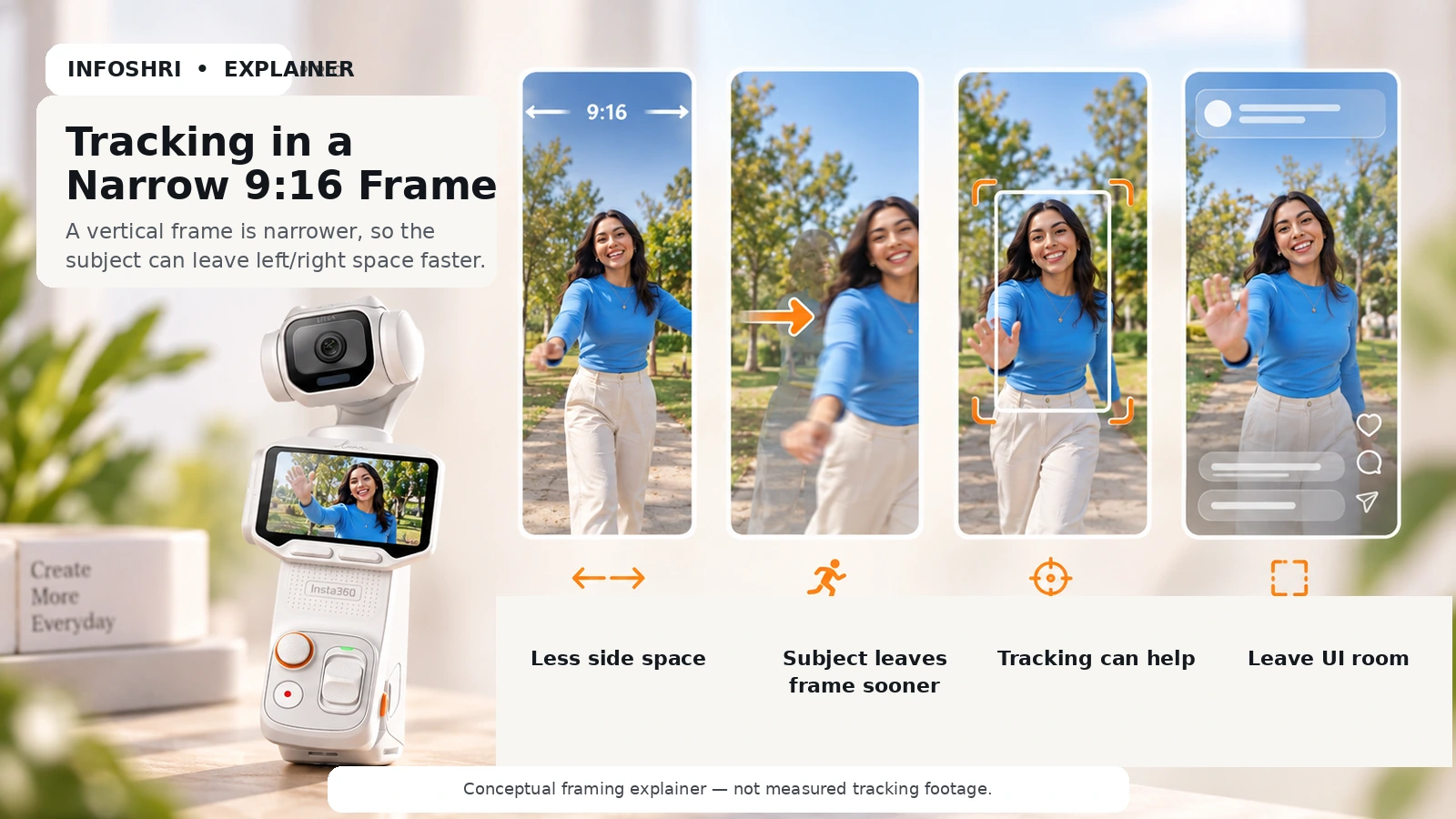
Vertical frame narrow है। यही कारण है कि tracking यहाँ सिर्फ fancy AI feature नहीं, practical framing tool बन सकती है। 16:9 में subject थोड़ा side में move करे तो उसके पास horizontal breathing room ज्यादा रहता है। 9:16 में वही movement जल्दी edge तक पहुंच सकती है। Solo dance, fitness, fashion या product demo में creator camera operator भी खुद है—तो subject को frame में रखना कठिन हो सकता है।
Luna Pro का 3-axis mechanical gimbal camera को pan, tilt और roll directions में physically stabilize करता है। Official documentation Auto Tracking को shooting interface का core control दिखाती है; product/launch material vertical capture को AI tracking और three-axis stabilization के साथ position करता है। Independent TechRadar review ने subject tracking को excellent और stabilization को effective कहा। [3][14]
लेकिन यहाँ overclaim नहीं करना चाहिए। Current public support pages हर intelligent tracking subtype—person, group, smart framing, zoom tracking—का हर resolution/aspect-ratio combination वाला complete matrix publish नहीं करतीं। इसलिए “हर tracking feature 4K9:16 30 और 3K9:16 60 पर guaranteed है” कहना unnecessary risk होगा। Safe practical advice: normal vertical tracking workflow supported evidence से strong है; किसी paid shoot में specific advanced combination चाहिए तो current firmware पर camera menu में वही mode verify करें।
Detachable touchscreen solo creator के लिए शायद 4K resolution से भी बड़ा workflow feature है। Official Luna documentation कहती है कि detached screen real-time preview, parameter adjustment, mode switching और start/stop control देती है; open unobstructed conditions में HD transmission up to 20m listed है। Remote में built-in microphone भी है। Complex wireless environment में official FAQ shorter practical range और interference caveats देती है। [6]
इसका practical setup सोचिए: camera tripod पर है, creator 3–8m दूर full-body Reel कर रहा है, screen creator के हाथ/nearby stand पर है। आप framing देख सकते हैं, recording start/stop कर सकते हैं और exposure/mode adjust कर सकते हैं। Fitness, dance, fashion, tutorials और solo travel में यह “phone को दौड़कर check करो” friction कम कर सकता है।
Current touchscreen documentation screen rotation/adaptive landscape-portrait behavior और live preview दोनों explain करती है। फिर भी InfoShri ने physical Luna Pro unit पर remote 9:16 UI orientation को hands-on verify नहीं किया, इसलिए article exact UI animation या button position invent नहीं करता। [6]
Gimbal के बारे में भी expectation सही रखें। Mechanical stabilization walking shake को काफी reduce कर सकती है, लेकिन “zero bounce” promise नहीं। Footstep bobbing, running, stairs, abrupt turns और vertical up-down body movement में operator technique अभी भी matter करती है। Narrow 9:16 frame में stabilization और tracking साथ useful हैं, लेकिन physical motion गायब नहीं होता।
Safe composition का एक simple rule है: face, hands और product को frame edge से चिपकाकर shoot न करें। Reels/Shorts interface पर username, captions, engagement buttons और description overlays आते हैं। Platform UI बदल सकती है, इसलिए permanent “250 pixels clear” जैसा invented number use करने के बजाय visual breathing room रखें और upload preview में check करें। Meta की Reels guidance 9:16 और safe-zone thinking को reinforce करती है, लेकिन exact organic UI margin app/version के साथ बदल सकती है। [13]
Night Reels और Indoor Shorts में क्या 4K Vertical ही Best Mode है?
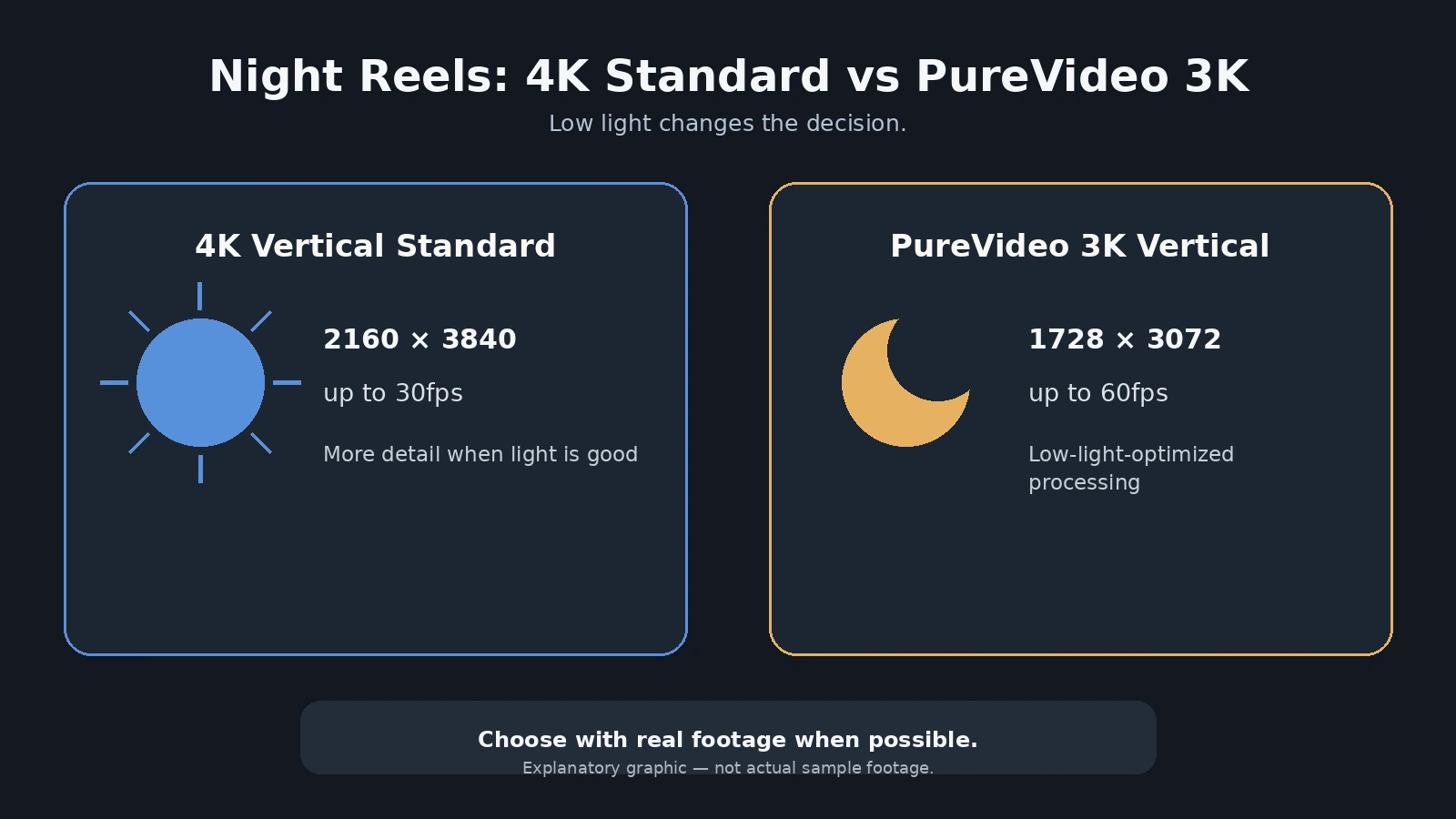
नहीं। Low light वह जगह है जहाँ Luna Pro का biggest-resolution rule सबसे जल्दी टूटता है। Current official table में standard Video mode 4K 9:16 को 30fps तक देता है, जबकि PureVideo vertical 3K 9:16 को 60/50/48/30/25/24fps तक list करता है। 4K PureVideo current table में 16:9 तक है; 4K 9:16 PureVideo listed नहीं है। [1]
PureVideo को “night vision” समझना गलत होगा। यह low-light-oriented computational processing mode है। इसका goal dark scenes में noise/detail/usable exposure को improve करना है, लेकिन subject movement, highlights, autofocus, skin tone और processing artifacts actual result तय करते हैं। इसलिए night street, restaurant, dim room, neon sign और moving face में one-number answer नहीं है।
अगर scene relatively static है और आपको highest vertical resolution चाहिए, standard 4K30 useful हो सकती है। अगर scene dark है और noise/usable exposure बड़ी समस्या है, 3K PureVideo compare करना ज्यादा sensible है—even though resolution lower है। अगर PureVideo 3K60 चुनते हैं, तो 60fps का motion advantage मिलता है, लेकिन higher frame rate की light demand भी आती है। इसलिए 3K60 PureVideo को “night mode + smoother = automatically best” मत मानिए। कई dark scenes में 3K30 PureVideo अधिक practical हो सकती है।
Luna Pro के Pro controls का एक interesting point है: official documentation Luna Pro video में shutter speed as slow as 1/2 second तक support होने की बात करती है, जबकि normal motion video में इतनी slow shutter भारी motion blur पैदा करेगी। इसका मतलब long exposure capability मौजूद होना और usable moving Reel बनना अलग बातें हैं। Creator को shutter को subject movement के हिसाब से रखना होगा। [8]
I-Log भी low-light shortcut नहीं है। Official support कहती है कि I-Log 10-bit grading-oriented mode है और PureVideo, Beauty तथा Dolby Vision के साथ simultaneously use नहीं किया जा सकता। इसलिए “PureVideo + I-Log” workflow assume नहीं करें। [4]
Dolby Vision/HDR के बारे में भी exact vertical compatibility को blanket statement बनाना ठीक नहीं। Luna Series camera documentation Dolby Vision को video color mode के रूप में list करती है, पर public mode-specific table हर 9:16 resolution/frame-rate combination के लिए अलग Dolby Vision matrix नहीं देती। Insta360 app documentation में newer app versions में Dolby Vision terminology को HDR के रूप में rename करने और mobile export behavior के platform-specific caveats भी हैं। इसलिए किसी exact paid-production workflow में 4K9:16 + specific HDR/Log combination चाहिए तो current camera/app पर verify करें।
यहाँ practical priority simple है: dark Reel में clean face, controlled highlights और stable focus “4K” badge से ज्यादा important हैं। अगर 3K PureVideo visually cleaner result देती है, तो lower resolution चुनना downgrade नहीं; वह सही mode selection है।
InfoShri का अलग low-light deep dive: https://infoshri.com/insta360-luna-pro-low-light-test/
Instagram Reels और YouTube Shorts Upload होने के बाद 4K का कितना फायदा बचता है?
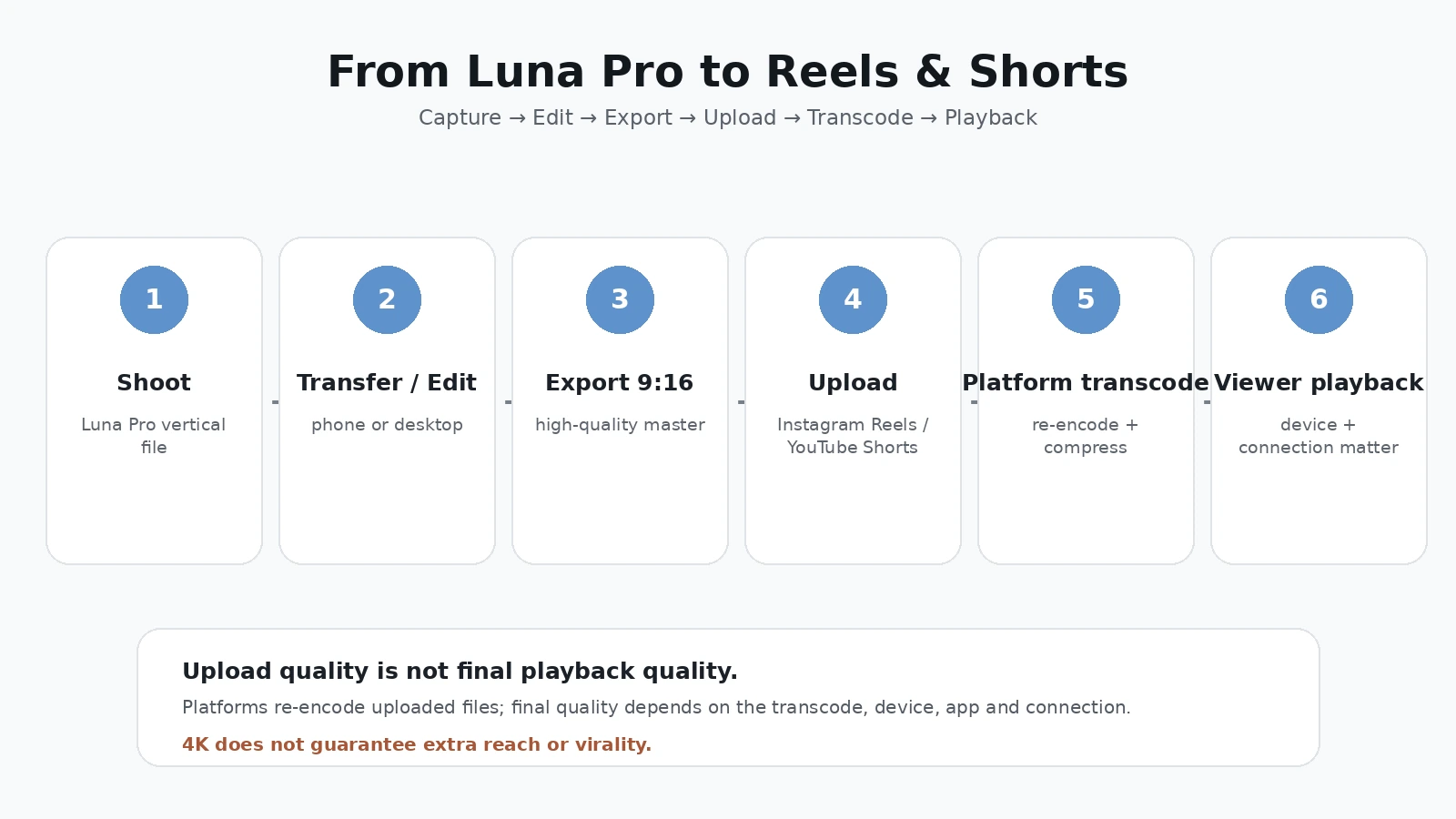
Camera file और viewer stream को एक ही चीज समझना सबसे common mistake है। Luna Pro memory card/internal storage पर जो 2160×3840 H.265 file बनाती है, वही exact file Instagram या YouTube viewer को bit-for-bit नहीं मिलती। Platforms uploads को process/transcode करते हैं, multiple playback versions बनाते हैं और viewer device, app, connection तथा selected quality के अनुसार stream serve कर सकते हैं।
Instagram Reels
Instagram Help Center current Reels guidance में portrait-friendly aspect ratios और “Upload at highest quality” setting का रास्ता दिखाती है: Settings/Your app and media → Media quality → Upload at highest quality. इसका मतलब app को higher-quality upload prioritize करने देना है; यह “final Reel untouched 4K में ही चलेगी” guarantee नहीं है। [13]
Meta की public consumer documentation exact organic-Reels retained bitrate या guaranteed 2160×3840 final playback ceiling साफ disclose नहीं करती। इसलिए इस article का answer deliberately conservative है: Luna Pro का 4K source upload workflow में useful हो सकता है, लेकिन “Instagram displays full 4K Reels” को verified fact नहीं माना गया है।
तो 4K source का फायदा कहाँ बच सकता है? Fine detail, text, hair, fabric, product labels, crop/reframe margin और platform encode से पहले cleaner master में। लेकिन viewer phone पर 3K बनाम 4K difference content के हिसाब से बहुत subtle भी हो सकती है। अगर Reel का hook weak, audio खराब, lighting poor या subject out of focus है, 4K उस problem को fix नहीं करेगी। और कोई authoritative evidence यह नहीं कहती कि Instagram algorithm 4K upload को इसलिए extra reach देता है।
Safe-zone के लिए exact permanent pixel numbers use न करें। Instagram UI controls, captions, username और engagement icons frame के हिस्से cover करते हैं। Shoot करते समय face/product/text को extreme top, bottom या right edge पर न रखें और final publish screen में overlay check करें।
YouTube Shorts
YouTube Help के current rules ज्यादा explicit हैं: square या vertical video, up to three minutes, Short के रूप में upload/classify हो सकती है। Standard channels के लिए यह current three-minute rule October 15, 2024 के बाद uploads पर लागू है; old “Shorts हमेशा सिर्फ 60 seconds” rule अब universally current नहीं है। [10]
YouTube 4K video uploads support करता है और उसकी encoding guidance 2160p के लिए upload bitrate recommendations भी देती है। YouTube player vertical/square aspect ratios के हिसाब से automatically adapt होता है। इन documents को साथ पढ़ने पर 2160×3840 vertical master upload करना technically sensible है। [11][12]
लेकिन एक nuance जरूरी है: YouTube की public documentation सामान्य 4K processing और vertical aspect ratio support को explain करती है; current Shorts Help page हर device/app/feed context में “maximum selectable quality always 2160p” जैसा universal promise नहीं करती। Processing time, device capability, app behavior, network और playback selection final experience बदल सकते हैं। इसलिए “YouTube Shorts supports 4K upload” और “हर viewer को हमेशा 4K stream मिलेगा” अलग statements हैं। पहला strong evidence से supported है; दूसरा blanket guarantee नहीं।
YouTube की upload guidance यह भी कहती है कि content उसी frame rate में upload करें जिसमें record हुआ है। 4K30 source के लिए standard frame-rate encoding और 3K60 source के लिए high-frame-rate workflow अलग हो सकता है। Final export में unnecessary frame-rate conversion motion artifacts ला सकती है। [11]
सबसे useful creator takeaway यह है: platform compression के डर से 4K shoot बंद करना जरूरी नहीं, लेकिन platform playback को camera spec sheet जैसा treat भी न करें। अच्छा source master आपको post और transcode headroom देता है; final stream platform control में रहती है।
InfoShri ने इस article के लिए same Luna Pro master को Instagram Reels और YouTube Shorts पर controlled account/device matrix में upload करके decoded stream measurement नहीं किया है। इसलिए कोई fake “Instagram ने X Mbps रखा” या “YouTube ने exact Y resolution दिया” result publish नहीं किया गया।
Shoot Once, Post Everywhere: Long YouTube + Shorts + Reels Workflow कैसे Plan करें?
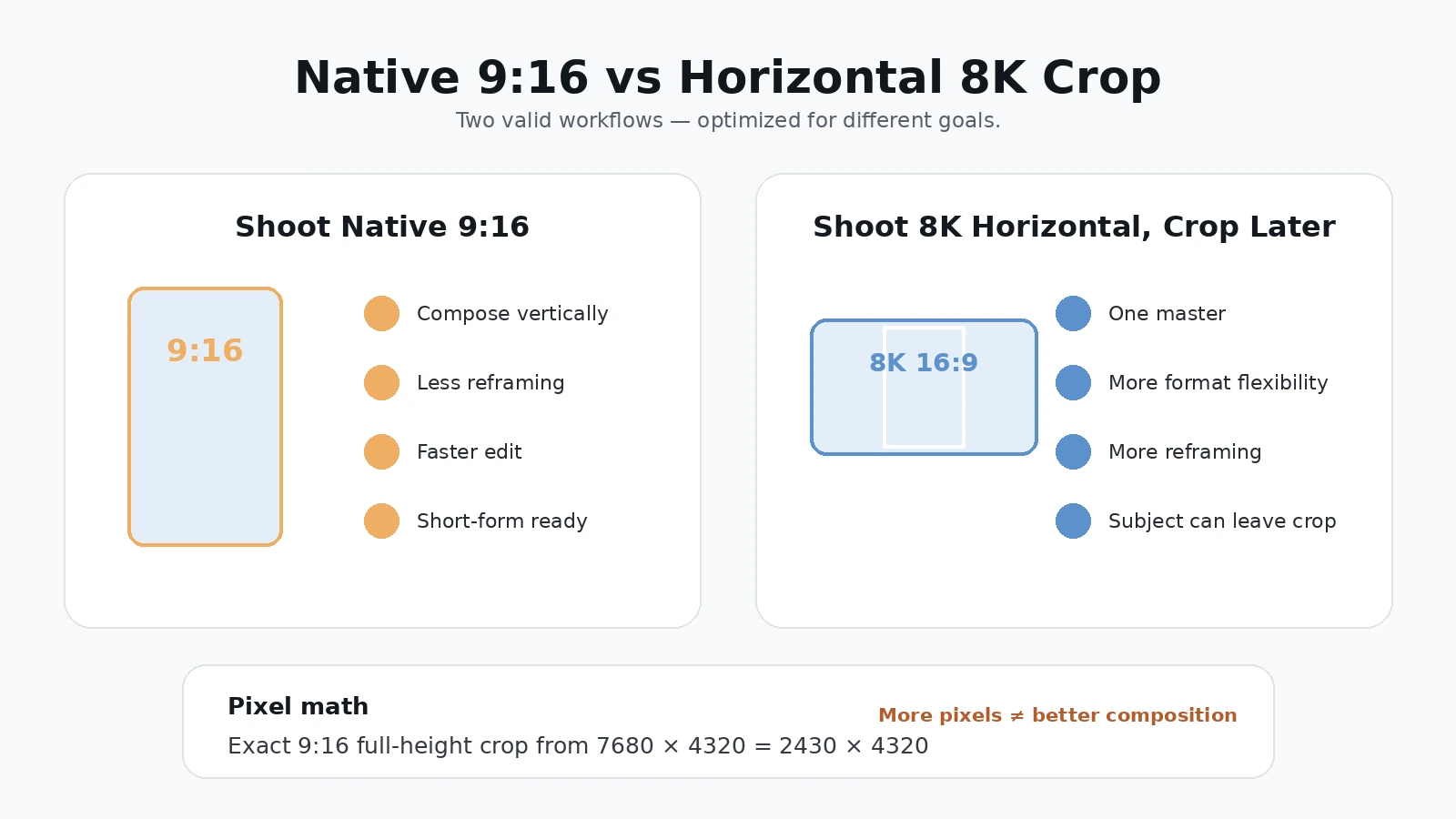
Short-form creator का real सवाल सिर्फ “क्या camera vertical shoot करती है?” नहीं, बल्कि “क्या मुझे हर scene दो बार shoot करना पड़ेगा?” है। अगर आपका content YouTube 16:9 और Reels/Shorts 9:16 दोनों में जाता है, तीन realistic workflows हैं।
| Workflow | Best when | फायदा | Limitation |
|---|---|---|---|
| A. Native 9:16 | Shorts/Reels primary हैं | fastest correct vertical composition | long-form 16:9 reuse weak |
| B. Horizontal 8K master → 9:16 crop | long-form primary है, post comfortable है | one master, crop flexibility | vertical framing/editing ज्यादा, side pixels discard |
| C. Separate 16:9 + 9:16 takes | दोनों formats important हैं | each format की best composition | extra time, retakes, storage |
Workflow A सबसे simple है। Camera को 9:16 में set कीजिए, frame short-form के हिसाब से compose कीजिए और clip सीधे vertical workflow में जाती है। Talking Reel, beauty, fitness tutorial, product Short या social-first travel creator के लिए यह efficient है।
Workflow B attractive है क्योंकि Luna Pro 16:9 8K 7680×4320 record कर सकती है। अब exact pixel math देखें। अगर 7680×4320 horizontal frame की full 4320 height रखते हुए exact 9:16 center crop बनाएं, तो crop width होगी 4320 × 9 ÷ 16 = 2430 pixels. यानी theoretical crop 2430×4320 है। यह native 2160×3840 vertical से pixel dimensions में बड़ा है और total pixels लगभग 26.6% ज्यादा हैं। लेकिन उस 8K horizontal frame की original 7680 width में से केवल 2430 pixels बचते हैं—करीब 31.6%. लगभग 68.4% horizontal width side crop में चली जाती है।
यही कारण है कि “8K gives full 4K vertical crop, इसलिए native vertical बेकार है” गलत simplification है। Pixel count पर्याप्त हो सकता है, लेकिन composition और field of view नहीं बचते। Subject अगर center से बाहर है तो editor को reframe करना पड़ेगा; हाथ/props side में हैं तो कट सकते हैं; tracking behavior shoot के समय widescreen composition पर आधारित हो सकता है। दूसरी तरफ native vertical mode manufacturer-described 6K oversampling pipeline use करती है, इसलिए सिर्फ final crop pixels से image-processing winner तय नहीं किया जा सकता। [1][3]
| तुलना | Native 4K 9:16 | 8K 16:9 से exact 9:16 crop |
|---|---|---|
| Output/crop dimensions | 2160×3840 | 2430×4320 theoretical full-height crop |
| Pixels | ~8.29 MP/frame | ~10.50 MP/frame |
| Shoot-time vertical composition | हाँ | नहीं, unless external framing discipline |
| Horizontal field retained | vertical mode-specific | original 8K width का ~31.6% |
| Post reframing | कम | अक्सर ज्यादा |
| One master for 16:9 + 9:16 | कम flexible | strong advantage |
| Processing pipeline | manufacturer says 6K oversampling → 4K | 8K landscape capture then crop |
| Automatic winner | नहीं | नहीं |
Workflow C professional hybrid creator के लिए सबसे reliable हो सकती है: main 16:9 take long-form के लिए, फिर short-form के लिए selected vertical take. इससे दोनों compositions intentional होती हैं। Cost है—talent को line/action repeat करनी पड़ती है, shoot time और storage बढ़ते हैं। हर shot duplicate करने की जरूरत नहीं; hero hooks, product close-ups, demonstrations और key reactions दो formats में shoot करना काफी हो सकता है।
Shorts-first creator के लिए native 9:16 जीतती है। Long-form-first creator के लिए horizontal 8K/4K master ज्यादा rational हो सकता है। Hybrid creator को selective dual capture अक्सर best balance देता है। यह एक universal preset नहीं; content mix से decision बदलता है।
Audio, Editing और Publishing: क्या Luna Pro Short-Form Workflow सच में Faster करती है?
Short-form में speed सिर्फ camera boot time नहीं है। पूरा chain है: shoot → transfer → trim/edit → captions/color/audio → export → upload. Luna Pro phone जितना one-device simple नहीं हो सकता, लेकिन उसका dedicated camera workflow कुछ creator types के लिए shooting friction बहुत कम कर सकता है।
Audio से शुरू करें। Official Luna documentation चार-microphone array बताती है, जिसमें detachable touchscreen remote का mic भी शामिल है। Audio modes में Original Audio, Wind Reduction और Voice Enhancement हैं। Luna Series direct Bluetooth connection के लिए Insta360 Mic Air और Mic Pro support करती है; external wireless microphone use करने के wired/receiver और Bluetooth workflows भी documented हैं। [6][9]
Talking Reel में clean voice कई बार 4K से ज्यादा noticeable improvement देती है। Street Reel में Wind Reduction मदद कर सकता है; controlled room में Voice Enhancement useful हो सकती है; music/performance scene में Original Audio ज्यादा natural हो सकता है। लेकिन built-in mic “professional wireless mic का replacement हर situation में” नहीं है। Distance, wind, room echo और clothes/body placement audio result बदलते हैं।
Detachable screen का mic solo tripod creator के लिए interesting है, क्योंकि screen आपके पास रह सकती है जबकि camera दूर है। Official remote guide इसे standalone remote controller + microphone कहती है। इसका value fitness, cooking, teaching या product demo में resolution से ज्यादा workflow-centric है: creator framing भी देखता है और voice source camera से nearer हो सकती है। [6]
Transfer step phone-native workflow से extra है। Insta360 official File Export guide के अनुसार USB 3.0 C-to-C से internal storage transfer up to 450MB/s lab/maximum class तक listed है; supplied USB 2.0 cable करीब 35MB/s और Wi‑Fi 6 lab environment में 70–80MB/s तक listed है। Actual device/network speeds vary. App connection docs Luna Series के लिए Insta360 app v2.26.2 or later recommend करती हैं। [7][8]
इसका practical अर्थ: एक-दो short clips phone पर wireless pull करना आसान हो सकता है; dozens of heavy 4K/8K clips desktop में ले जाने हों तो proper USB 3 cable ज्यादा efficient हो सकती है। Creator अगर supplied cable देखकर USB-C = automatically USB 3 speed assume करेगा तो disappointment हो सकती है—official guide supplied cable को USB 2.0 speed class बताती है। [7]
Insta360 app basic editing में trim, clip assembly, color/filter और aspect-ratio work दे सकती है, लेकिन advanced short-form creator को captions, brand graphics, sound design और batch work के लिए Premiere Pro, DaVinci Resolve या Final Cut ज्यादा control दे सकते हैं। Phone-only creator के लिए question यह है कि Luna की gimbal/tracking/image benefits extra transfer step justify करती हैं या नहीं।
I-Log grading flexibility देती है, लेकिन simple Reel creator को इसे हर समय use करने की जरूरत नहीं। Log footage intentionally flatter दिख सकती है और proper conversion/grading चाहती है। Official I-Log page इसे 10-bit workflow बताती है और PureVideo, Beauty तथा Dolby Vision के साथ incompatible बताती है। Filters I-Log के साथ supported हो सकते हैं, पर filter apply करने पर final media में look embed हो सकता है। [4][5]
Instagram publish से पहले “Upload at highest quality” on रखना sensible है, लेकिन इसे magic 4K switch न समझें। YouTube के लिए source frame rate preserve करना और vertical file में baked black bars न डालना better है; player खुद aspect ratio adapt कर सकता है। [11][13]
Battery और thermal behavior को भी short-form context में सही scale पर रखें। Official battery figures mode-dependent हैं और available public runtime table vertical-specific 4K9:16 battery number अलग से नहीं देती। इसलिए इस article में horizontal 4K runtime को vertical runtime के रूप में copy नहीं किया गया। Reels अक्सर short clips होती हैं, इसलिए one-hour continuous heat test हर creator की reality नहीं; लेकिन batch-shooting में screen, tracking, wireless transfer और repeated recording battery/heat demand बढ़ा सकते हैं। Spare power plan रखना spec-sheet runtime guess करने से बेहतर है।
Phone का convenience counterpoint real है: phone में shoot, edit, caption और upload एक ही device पर हो सकता है। Luna Pro को justify करने के लिए उसकी dedicated gimbal, tracking, remote screen, optical/imaging system और creator control से enough value मिलनी चाहिए। Casual short-form user के लिए phone simpler रह सकता है; high-frequency solo creator के लिए Luna workflow ज्यादा repeatable हो सकती है।
Final Verdict: Reels & Shorts Creator के लिए Luna Pro Vertical Video Worth It है?
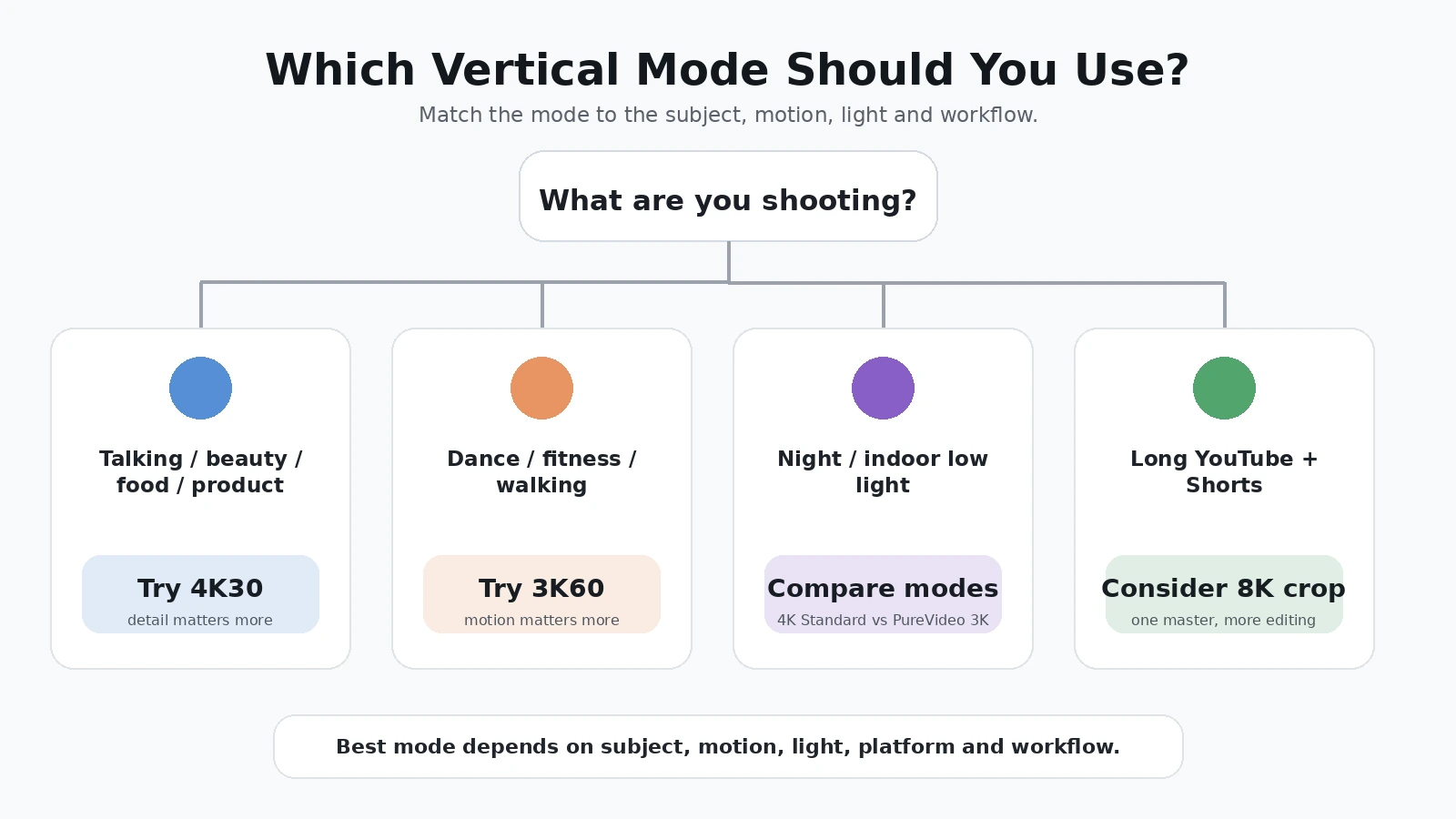
हाँ—अगर आपका काम genuinely short-form-first है, तो Luna Pro का native vertical system उसके सबसे meaningful features में से एक है। लेकिन इसे “4K इसलिए best” की तरह नहीं खरीदना चाहिए। Luna Pro की real vertical advantage intentional 9:16 framing + 4K30 detail option + 3K60 motion option + gimbal + tracking + detachable remote workflow का combination है।
Maximum detail के लिए bright/controlled scene में 4K30 strongest starting point है। Smooth movement के लिए 3K60 ज्यादा sensible हो सकती है। Dark scene में PureVideo 3K को standard 4K से compare करना चाहिए। Long-form और Shorts दोनों चाहिए तो horizontal master, native vertical या dual-take workflow content priorities से चुनना चाहिए।
Instagram creator को यह feature इसलिए नहीं खरीदना चाहिए कि “Instagram full 4K दिखाएगा” या “4K से reach बढ़ेगी।” दोनों claims current evidence से support नहीं होते। YouTube creator के पास high-resolution vertical upload का stronger technical ecosystem है, लेकिन Shorts-feed playback हर device पर identical 4K guarantee नहीं है।
Solo creator के लिए detachable remote कई बार 4K से भी ज्यादा valuable हो सकती है। Camera tripod पर रखकर live preview/control और mic access, narrow 9:16 frame में tracking, और physical gimbal—ये features repeated solo production में time बचा सकते हैं।
Creator persona verdict
| Creator | Best starting mode/workflow | क्यों | Caution |
|---|---|---|---|
| Talking-head | 4K30 native 9:16 | detail + simple motion | platform compression |
| Beauty/fashion | 4K30 | face/fabric detail | Beauty/Log/HDR compatibility check |
| Food/product | 4K30 | labels/text/texture | focus + lighting first |
| Dance | 3K60 | motion smoothness | light requirement |
| Fitness | 3K60 | full-body movement | narrow framing/tracking |
| Travel Shorts | 4K30 or 3K60 | scene vs motion dependent | hybrid 16:9 needs planning |
| Night creator | PureVideo 3K compare first | low-light processing | 60fps not automatically best |
| YouTube long-form + Shorts | selective dual workflow | both compositions optimized | extra shoot time |
| Shorts-only creator | native 9:16 | fastest publish-oriented framing | less 16:9 reuse |
| Casual social user | phone may remain enough | one-device convenience | Luna तभी जब camera workflow value चाहिए |
Best for talking Reels: 4K30 native vertical, especially controlled lighting and moderate movement.
Best for dance/fitness: 3K60 native vertical is the more logical starting point because temporal smoothness matters more than maximum pixels.
Best for food/product: 4K30, provided focus and lighting are right.
Best for night: do not lock yourself to 4K; compare PureVideo 3K vertical, and consider 30fps when light is limited.
Best for maximum detail: 4K30 native 9:16.
Best for smooth motion: 3K60 native 9:16.
Best for fastest Shorts-only workflow: native 9:16 capture.
Biggest 4K vertical advantage: shoot-time composition plus high-resolution vertical source—not an algorithm boost.
Biggest limitation: 4K native vertical currently tops out at 30fps, and PureVideo vertical currently tops out at 3K.
Native 9:16 or crop 8K? Shorts-first → native. Long-form-first → 8K/4K horizontal master can be efficient. Both are important → selective dual takes.
Is 4K30 better than 3K60? No universal winner. Detail vs motion is the real trade-off.
Is vertical video a real reason to buy Luna Pro? For high-frequency Reels/Shorts creators—yes, especially when gimbal, tracking and remote self-shooting matter together. For occasional social clips—possibly not; a good phone can be simpler.
Final one-line verdict: Luna Pro का best vertical mode सबसे बड़ा resolution number नहीं, बल्कि वह mode है जो आपके subject, movement, light, platform और workflow से match करता है।
Quick FAQ
क्या Luna Pro true 4K vertical shoot करती है?
हाँ। Current official shooting table 4K 9:16 को 2160×3840 at 30/25/24fps list करती है। [1]
क्या Luna Pro 4K60 vertical shoot करती है?
Current mode-specific official table के अनुसार native 9:16 4K का ceiling 30fps है। Broad “4K60 Portrait” wording को native 9:16 4K60 न मानें जब तक mode table officially update न हो। [1][2]
क्या Luna Pro 4K120 vertical shoot करती है?
नहीं। 4K120 current specs में 16:9/2.35:1 modes से जुड़ा है; native 9:16 4K120 listed नहीं है। [1]
क्या Luna Pro 3K60 vertical shoot करती है?
हाँ। 1728×3072 9:16 at up to 60fps officially listed है। [1]
4K30 या 3K60—कौन बेहतर?
Static/moderate motion और fine detail → 4K30. Dance/fitness/fast movement → 3K60 अक्सर ज्यादा useful. Lighting और delivery platform decision बदल सकते हैं।
क्या PureVideo 4K vertical है?
Current official table में नहीं। PureVideo vertical maximum 3K 9:16 listed है; 4K PureVideo 16:9 में available है। [1]
क्या native vertical slow motion है?
Current Slow-Mo mode table 16:9 और 2.35:1 aspect ratios list करती है, 9:16 नहीं। Vertical slow-motion के लिए 3K60 normal vertical को timeline पर slow करना या horizontal high-fps clip को crop करना अलग workflow हो सकता है। [1]
क्या tracking vertical में काम करती है?
Official launch/product material vertical workflow को AI tracking + 3-axis stabilization के साथ promote करता है और general Auto Tracking documented है। लेकिन हर tracking subtype का हर vertical resolution/fps matrix publicly स्पष्ट नहीं; advanced combination current firmware पर verify करें। [3]
क्या I-Log vertical 4K में निश्चित रूप से available है?
I-Log Luna Pro video modes के लिए official feature है, लेकिन public page exact 4K9:16/3K60 compatibility matrix नहीं देती। इसलिए हर vertical combination को blanket guarantee न मानें। I-Log PureVideo, Beauty और Dolby Vision के साथ simultaneously supported नहीं है। [4]
क्या Instagram 4K Reel को full 4K में दिखाता है?
Current public Meta help exact guaranteed organic-Reels 2160×3840 playback/bitrate promise नहीं करती। High-quality source upload useful है, लेकिन final stream platform-controlled है। [13]
क्या YouTube Short 4K vertical हो सकती है?
YouTube vertical/square Shorts up to three minutes और 4K uploads दोनों support करता है। 2160×3840 high-res vertical master upload करना supported workflow के अनुरूप है, लेकिन हर device/feed session में 4K playback universal guarantee नहीं है। [10][11][12]
क्या 4K Reel/Short से views या reach बढ़ती है?
ऐसा authoritative platform rule नहीं मिला। Resolution viewer experience का एक हिस्सा है; hook, story, audio, lighting, editing और retention भी matter करते हैं। “4K = viral” claim गलत है।
क्या 8K horizontal master से vertical बनाना बेहतर है?
कभी-कभी। Exact full-height 9:16 crop 2430×4320 बन सकता है, इसलिए pixel headroom strong है; लेकिन लगभग 68.4% horizontal width discard होती है और vertical composition बाद में करनी पड़ती है। Shorts-first creator के लिए native vertical अक्सर faster है।
क्या phone-only creator को Luna Pro चाहिए?
जरूरी नहीं। Phone का one-device shoot-edit-upload workflow unbeatable convenience देता है। Luna Pro तब meaningful है जब dedicated gimbal, tracking, remote screen, camera image pipeline और repeatable solo shooting extra transfer step justify करें।
Sources
- Insta360 — Luna Series: Photo & Video Specifications
- Insta360 — Luna Series: Aspect Ratio Switching (Landscape/Portrait)
- Insta360 News — Luna Pro launch / 4K vertical announcement
- Insta360 — Luna Series: I-Log Mode
- Insta360 — Luna Series: In-camera Beauty Feature
- Insta360 — Luna Series: Filter Settings
- Insta360 — Luna Series: Detachable Touchscreen Remote
- Insta360 — Luna Series: File Export
- Insta360 — Luna Series: Connecting Camera to Phone / Tablet
- Insta360 — Luna Series: Connecting Bluetooth Headphones and Microphones
- YouTube Help — Upload YouTube Shorts
- YouTube Help — Understand three-minute YouTube Shorts
- YouTube Help — YouTube recommended upload encoding settings
- YouTube Help — Video resolution & aspect ratios
- YouTube Help — Create and upload YouTube videos in 4K
- Instagram Help Center / Meta — Reel size & aspect ratios on Instagram
- TechRadar — Insta360 Luna Pro review

Keep exploring